
Introduction
This manual provides essential information for the assembly, operation, maintenance, and care of your Forte 4 Door Tall Side Door TV Unit. Please read these instructions carefully before assembly and use to ensure safe and proper functionality. Keep this manual for future reference.

Image: Front view of the Forte 4 Door Tall Side Door TV Unit, showcasing its design with a television and various media devices placed on and within the unit.
Safety Information
Adhere to the following safety guidelines during assembly and use:
- Ensure all components are securely fastened during assembly. Loose parts can cause instability.
- Do not overload shelves or compartments. Refer to specifications for weight limits.
- Place the unit on a flat, stable, and level surface to prevent tipping.
- Keep small parts away from children during assembly to prevent choking hazards.
- If wall-mounting is an option (check specific model features), use appropriate hardware and consult a professional if unsure.
Package Contents
Verify that all components listed below are present before beginning assembly:
- Complete set of TV unit panels and hardware
- Wire Manager
- Assembly instructions (this manual)
If any parts are missing or damaged, contact customer support immediately.
Setup and Assembly Instructions
Assembly of this TV unit is required. It is recommended to have at least two people for assembly. Clear a spacious area and lay out all components before starting.
- Unpack Components: Carefully remove all parts from the packaging. Check against the package contents list.
- Identify Parts: Familiarize yourself with the different panels, hardware, and connectors.
- Assemble Base Unit: Begin by assembling the main base structure of the TV unit, following the numerical or alphabetical sequence provided in the included diagram (if applicable).
- Attach Side Panels: Secure the side panels to the base.
- Install Shelves: Insert adjustable shelves into the designated slots. Ensure they are level and secure.
- Mount Doors: Attach the four doors to their respective compartments using the provided hinges. Adjust hinges for proper alignment.
- Install Wire Manager: Position and secure the wire manager as indicated to help organize cables.
- Final Check: Ensure all screws and fasteners are tightened. Do not overtighten.
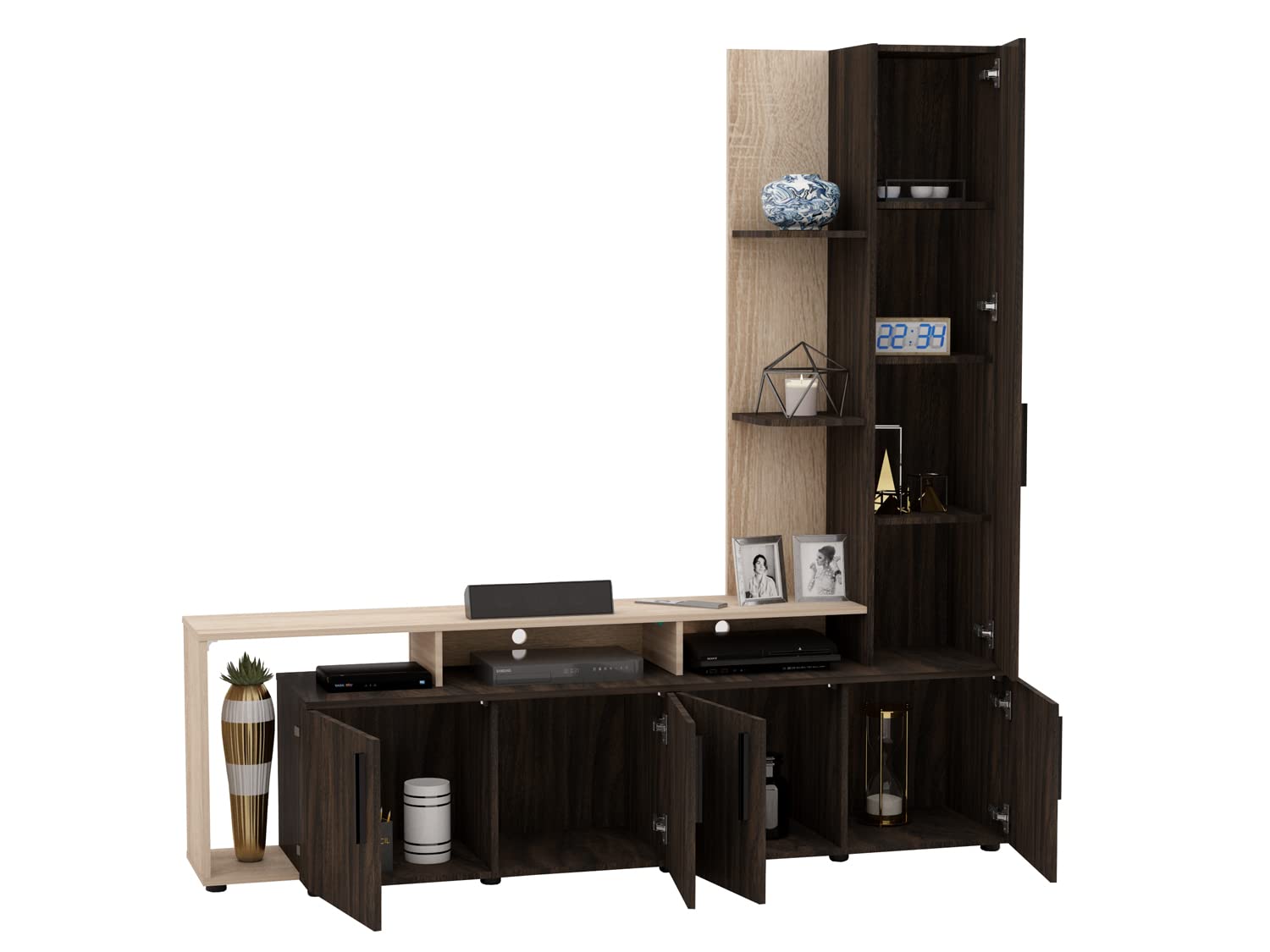
Image: The Forte TV unit with all four lower doors open, revealing the interior storage compartments and adjustable shelves, suitable for media devices and decor.
Operating Instructions
This TV unit is designed for storing and displaying media equipment and decorative items.
- TV Placement: The unit can accommodate TVs up to 50 inches. Place the television centrally on the main TV platform.
- Storage: Utilize the four door compartments and open shelves for storing set-top boxes, music systems, speakers, and other decor items.
- Adjustable Shelves: The shelves within the compartments are adjustable. To change shelf height, remove the shelf, reposition the shelf pins to the desired level, and reinsert the shelf.
- Cable Management: Use the integrated wire manager to route and conceal cables from your electronic devices, maintaining a tidy appearance.
Maintenance and Care
Proper care will extend the life and appearance of your TV unit:
- Sunlight Exposure: Keep furniture out of direct sunlight to prevent fading and material degradation.
- Heat and Air Vents: Avoid placing furniture in front of or under heating and air conditioning vents.
- Spills: Blot up spills immediately with a clean, dry cloth. Do not rub.
- Surface Protection: Use coasters, place mats, and tablecloths to protect surfaces from scratches and moisture.
- Moving Items: Lift and place items instead of sliding them across furniture surfaces to prevent scratches.
- Accessory Rotation: Rotate accessories on your furniture periodically to ensure even exposure and prevent permanent marks.
- Plastic/Rubber Items: Avoid prolonged use of plastic and rubber items directly on the furniture surface, as they can cause discoloration.
- Dusting: Dust your furniture regularly with a soft, dry cloth.
Troubleshooting
If you encounter any issues with your TV unit, refer to the following common solutions:
- Unit Wobbles: Ensure the unit is on a level surface. Check all assembly screws and tighten them if loose.
- Doors Misaligned: Adjust the hinges on the doors to correct any misalignment. Most hinges allow for minor adjustments.
- Scratches/Dents: For minor surface imperfections, touch-up pens or furniture repair kits matching the wood finish may be used.
For persistent issues or concerns not addressed here, please contact customer support.
Specifications
| Feature | Detail |
|---|---|
| Brand | Generic |
| Model | 4 Door Tall Side Door TV Unit |
| Material | High quality European standard Engineered wood |
| Color | Redica durance n Sonomo oak |
| Overall Dimensions (L x W x H) | 180 x 42 x 180 cm (70.87 x 16.54 x 70.87 inches) |
| Max TV Size Accommodated | 50 inches |
| Assembly Required | Yes |
| Included Components | TV unit panels, Wire Manager |

Image: Detailed diagram of the Forte TV unit showing various dimensions in millimeters, including shelf depths, heights, and overall unit measurements.

Image: The Forte TV unit displayed next to a human figure (5'5" or 1651mm tall) to provide a visual representation of its overall size and height.
Warranty Information
This product is covered by a standard manufacturer's warranty against defects in materials and workmanship. The specific terms and duration of the warranty may vary. Please retain your proof of purchase for warranty claims.
For detailed warranty information, please contact the manufacturer directly using the support information provided below.
Customer Support
For assistance with assembly, missing parts, or any other inquiries, please contact Forte furniture products India Private Limited:
Manufacturer: Forte furniture products India Private LimitedAddress: 40, Second main road, 1st Floor, Unipunch pride building, Ambattur Industrial estate, Chennai – 600058
Please have your product model number (4 Door Tall Side Door TV Unit) and proof of purchase ready when contacting support.