
Introduction
This manual provides detailed instructions for the safe and proper installation, operation, and maintenance of your Samsung Full Motion Slim TV Wall Mount WMN-B05FB. This wall mount is designed to provide flexibility in viewing angles for compatible televisions, allowing you to adjust your TV right, left, and even forward.
Compatibility: This mount is compatible with Samsung TV models from 2021/2022, ranging from 43 inches to 55 inches. It also supports 65-inch OLED TVs.
Important Safety Instructions
Please read all instructions carefully before installation. Incorrect installation may result in property damage, serious injury, or death. If you do not understand these instructions or have doubts about the safety of the installation, consult a qualified professional.
- Professional Installation Recommended: For optimal safety and performance, professional installation is highly recommended.
- Wall Type: Ensure the wall structure can safely support the combined weight of the mount and your television. Do not install on drywall alone without proper reinforcement.
- Weight Capacity: Do not exceed the maximum weight capacity specified for this mount. Refer to your TV's manual for its weight.
- Cable Management: Ensure all cables are routed safely and are not pinched or strained during movement of the TV.
- Children: Keep children away from the installation area. Small parts may be a choking hazard.
Package Contents
Before beginning installation, verify that all components are present and undamaged. If any parts are missing or damaged, do not proceed with installation and contact Samsung customer support.
- Wall Plate Assembly
- TV Brackets (Left and Right)
- Mounting Hardware Kit (various screws, washers, spacers for TV and wall)
- Installation Template
- User Manual
Installation Guide
Before You Begin
Tools Required: Drill, stud finder, level, Phillips head screwdriver, measuring tape, pencil.
Wall Considerations: This mount is designed for installation into wood studs or solid concrete/brick walls. Do not install into metal studs or hollow walls without appropriate anchors (not included).
Step 1: Prepare the Wall Plate
Identify the desired location for your TV. Use a stud finder to locate the center of two adjacent wood studs. Mark the drill holes using the provided template. Ensure the marks are level before drilling pilot holes.

Image: Overview of the Samsung Full Motion Slim TV Wall Mount components, showing the main wall plate and articulating arms.
Step 2: Attach TV Brackets to Television
Carefully place your TV face down on a soft, clean surface. Identify the VESA mounting holes on the back of your TV. Select the appropriate screws and spacers from the hardware kit that fit your TV's mounting holes. Attach the left and right TV brackets to the back of your TV, ensuring they are securely fastened and level.
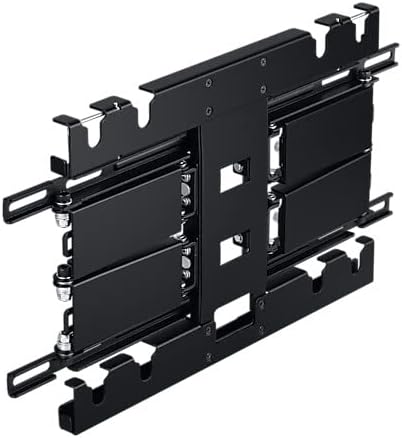
Image: Rear view of the TV mount, showing the attachment points for the television brackets.
Step 3: Mount Wall Plate to Wall
Align the wall plate with the pre-drilled pilot holes. Use the provided lag bolts and washers to securely fasten the wall plate to the wall. Use a level to ensure the wall plate is perfectly horizontal before tightening all bolts.

Image: Side view of the TV mount, illustrating its slim profile when retracted against the wall.
Step 4: Secure TV to Wall Plate
With assistance, carefully lift the TV with the attached brackets and hook them onto the wall plate. Ensure the brackets are properly seated on the wall plate's hooks. Secure the TV to the wall plate using the safety screws or locking mechanisms provided, typically located at the bottom of the TV brackets.

Image: The TV mount in an extended position, demonstrating its full motion capability.
Step 5: Final Adjustments
Once the TV is securely mounted, you can make final adjustments to the tilt and swivel. Ensure all connections are tight and the TV is stable before use.
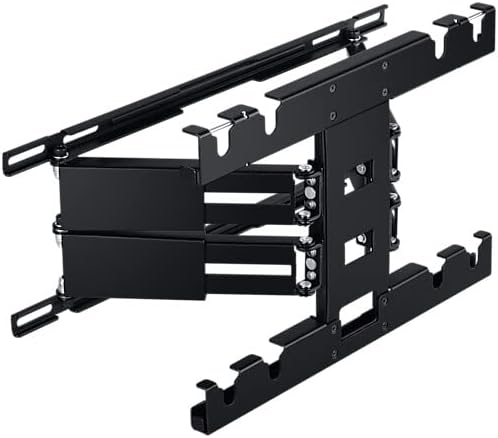
Image: Another view of the extended TV mount, highlighting the articulation points for movement.

Image: Technical drawing showing the dimensions of the wall mount: 234 mm height and 350 mm width.
Operating Your TV Wall Mount
This full motion mount allows for flexible viewing angles. To adjust your TV:
- Extension: Gently pull the TV away from the wall to extend the arms.
- Swivel: Carefully pivot the TV left or right to achieve your desired viewing angle.
- Tilt: Loosen the tilt adjustment knobs (if applicable), adjust the TV to the desired vertical angle, and then re-tighten the knobs to secure.
Always move the TV smoothly and avoid sudden jerks. Ensure no cables are snagged or stretched during adjustments.
Care and Maintenance
To ensure the longevity and safe operation of your TV wall mount, follow these maintenance guidelines:
- Cleaning: Wipe the mount with a soft, dry cloth. Do not use abrasive cleaners or solvents, as they may damage the finish.
- Periodic Checks: Periodically check all screws and bolts to ensure they remain tight. Re-tighten if necessary.
- Lubrication: The articulating joints are designed for smooth movement and generally do not require lubrication. If movement becomes stiff, consult Samsung support.
Troubleshooting
If you encounter issues with your TV wall mount, refer to the following common problems and solutions:
- TV is not level: Ensure the wall plate was installed level. If the wall plate is level, check if the TV brackets are evenly attached to the TV. Some mounts offer post-installation leveling adjustments.
- Difficulty moving the TV: Check for any obstructions or pinched cables. Ensure all adjustment knobs (for tilt/swivel) are not overtightened.
- Mount feels loose: Immediately remove the TV from the mount. Re-check all wall mounting bolts and TV bracket screws for tightness. Ensure the wall structure is sound.
- Missing parts: Do not proceed with installation. Contact Samsung customer support for replacement parts.
If the problem persists, contact Samsung customer support for further assistance.
Product Specifications
| Feature | Specification |
|---|---|
| Brand | Samsung |
| Model Number | WMN-B05FB/XC |
| Compatible Devices | Television |
| Compatible TV Size | 43" to 55" (OLED 65") |
| Color | Black |
| Material | Alloy Steel |
| Mounting Type | Wall Mount |
| Movement Type | Articulating (Full Motion) |
Warranty and Customer Support
Your Samsung Full Motion Slim TV Wall Mount is covered by a limited warranty. For specific warranty terms and conditions, please refer to the warranty card included with your product or visit the official Samsung website for your region.
For technical support, troubleshooting assistance, or to inquire about replacement parts, please contact Samsung customer support:
- Website: Visit samsung.com/support
- Phone: Refer to your product packaging or Samsung's website for local support numbers.
Please have your model number (WMN-B05FB) and purchase information ready when contacting support.