
Introduction
This manual provides essential instructions for the proper setup and operation of your PERFASCIN ZH/LT-01 series universal replacement remote control. This remote is designed to be compatible with various CHIGO, AGER, and Duval air conditioning units. Please read this manual thoroughly before use to ensure optimal performance and longevity of your device.
Setup
Battery Installation
- Locate the battery compartment on the back of the remote control.
- Slide the battery cover downwards to open it.
- Insert two (2) 1.5V AAA alkaline batteries, ensuring the positive (+) and negative (-) terminals match the diagrams inside the compartment.
- Slide the battery cover back into place until it clicks securely.
Note: Batteries are not included with the remote control. Always use new batteries for best performance. Do not mix old and new batteries, or different types of batteries.

Image: Rear view of the remote control with the battery compartment open, illustrating the correct orientation for inserting two AAA batteries.
Operating Instructions
The PERFASCIN ZH/LT-01 remote control is designed for immediate use without any programming or pairing. Once batteries are installed, it is ready to operate your compatible air conditioning unit.
Remote Control Layout and Functions
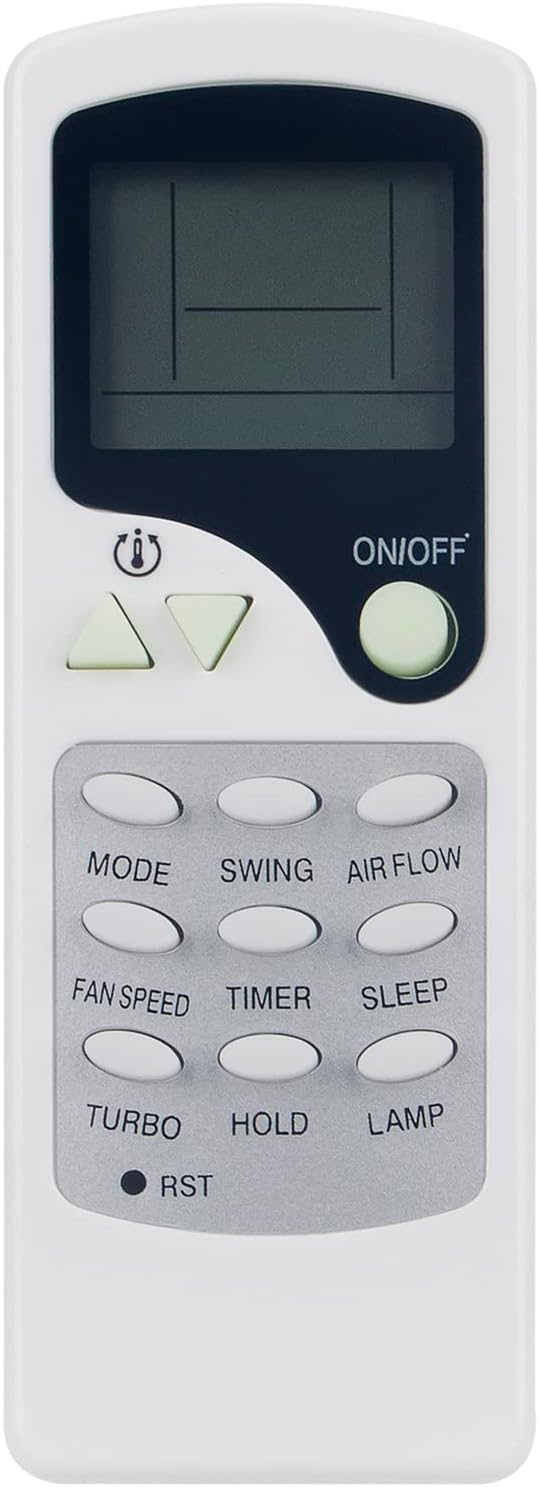
Image: Front view of the PERFASCIN ZH/LT-01 universal AC remote control, displaying its LCD screen and various function buttons.
- ON/OFF Button: Powers the air conditioning unit on or off.
- Temperature Adjustment Buttons (Up/Down Triangles): Increases or decreases the desired temperature setting.
- MODE Button: Cycles through different operating modes (e.g., Cool, Heat, Fan, Dry, Auto).
- SWING Button: Controls the vertical swing of the air conditioner's louvers.
- AIR FLOW Button: Adjusts the direction or pattern of the airflow.
- FAN SPEED Button: Changes the fan speed (e.g., Low, Medium, High, Auto).
- TIMER Button: Sets a timer for the unit to turn on or off automatically.
- SLEEP Button: Activates the sleep mode, which adjusts temperature and fan speed for comfortable sleep.
- TURBO Button: Engages maximum cooling or heating for rapid temperature change.
- HOLD Button: May pause or hold current settings (functionality can vary by AC unit).
- LAMP Button: Controls the display light on the air conditioning unit.
- RST (Reset) Button: Resets the remote control to default settings. This may require a small pointed object to press.
Specifications
- Model Number: ANG-MBE560-ZHLT-01-US (also compatible with ZH/LT-01, ZHLT-01, ZHLT01, ZHF/LT-01, ZHF-LT-01)
- Power Supply: 2 x 1.5V AAA Alkaline Batteries (not included)
- Product Dimensions: 7 x 2 x 0.65 inches
- Item Weight: 1.76 ounces
- Compatible Devices: Air Conditioner units from CHIGO, AGER, Duval, and other compatible brands.
- Special Feature: Universal IR Remote
Troubleshooting
- Remote not responding:
- Ensure batteries are inserted correctly with the correct polarity.
- Replace old batteries with new 1.5V AAA alkaline batteries.
- Ensure there are no obstructions between the remote control and the air conditioning unit's infrared receiver.
- Confirm the remote is pointed directly at the AC unit.
- Specific functions not working:
- While this is a universal remote, some advanced functions may not be supported by all compatible AC units.
- Refer to your air conditioner's original manual for specific feature compatibility.
Maintenance
- Clean the remote control regularly with a soft, dry cloth. Do not use liquid cleaners.
- Avoid dropping the remote control or exposing it to extreme temperatures or humidity.
- If the remote will not be used for an extended period, remove the batteries to prevent leakage.
Support
If you encounter issues not covered in this manual or require further assistance, please contact PERFASCIN customer service. Provide your product model number (ZH/LT-01) and a detailed description of the problem for efficient support.
For general inquiries or support, please refer to the contact information provided by your retailer or the PERFASCIN official channels.