
Isafenest LZ-1903
Isafenest Photoelectric Smoke Alarm User Manual
Model: LZ-1903 | Brand: Isafenest
Introduction
Thank you for choosing the Isafenest Photoelectric Smoke Alarm. This device is designed to provide early warning of smoke and fire, helping to protect your home and family. It features a 10-year product life and a 5-year replaceable DC 9V battery, offering reliable and long-lasting protection. Please read this manual thoroughly before installation and use to ensure proper operation and safety.

Image: Two Isafenest Photoelectric Smoke Alarms, showing their compact, white design with a central test button and LED indicator.
Important Safety Information
Please observe the following safety precautions to ensure the safe and effective operation of your smoke alarm:
- Do not paint the smoke alarm. Painting can interfere with the sensor's ability to detect smoke.
- Regularly test the smoke alarm using the test button to ensure it is functioning correctly.
- Replace the battery every 5 years or immediately when the low battery warning sounds.
- Do not install the smoke alarm in areas with high humidity, extreme temperatures, or excessive dust, as this can lead to false alarms or malfunction.
- Clean the smoke alarm regularly to prevent dust accumulation from affecting its performance.
- This smoke alarm is designed for residential use. For commercial or industrial applications, consult relevant safety standards.
- In case of a real fire, evacuate immediately and call emergency services. Do not re-enter the building until declared safe.
Package Contents
Verify that all items are present in the package:
- Isafenest Photoelectric Smoke Alarm Unit (2 Pack)
- Mounting Brackets (2)
- DC 9V Batteries (2)
- Screws and Anchor Plugs (for mounting)
- User Manual

Image: Contents of the Isafenest smoke alarm package, showing two smoke alarms, two mounting brackets, two 9V batteries, mounting hardware, and the user manual.
Setup and Installation
Follow these steps for proper installation of your smoke alarm:
- Unscrew Mounting Bracket: Gently twist the mounting bracket counter-clockwise from the smoke alarm unit to separate it.
- Install Battery: Connect the included 9V battery to the battery clip inside the smoke alarm unit. Ensure correct polarity.
- Mark Drilling Points: Hold the mounting bracket against the desired installation location on the wall or ceiling. Mark the two drilling points.
- Drill Holes: Drill two 5mm diameter holes at the marked points. Insert the anchor plugs into the drilled holes.
- Secure Mounting Bracket: Align the mounting bracket with the anchor plugs and secure it firmly using the provided screws.
- Attach Alarm Body: Align the smoke alarm unit with the mounted bracket and twist it clockwise until it clicks securely into place.
- Test the Alarm: Press the 'TEST' button on the front of the alarm. The alarm should sound loudly, and the LED indicator should flash. This confirms proper installation and battery function.
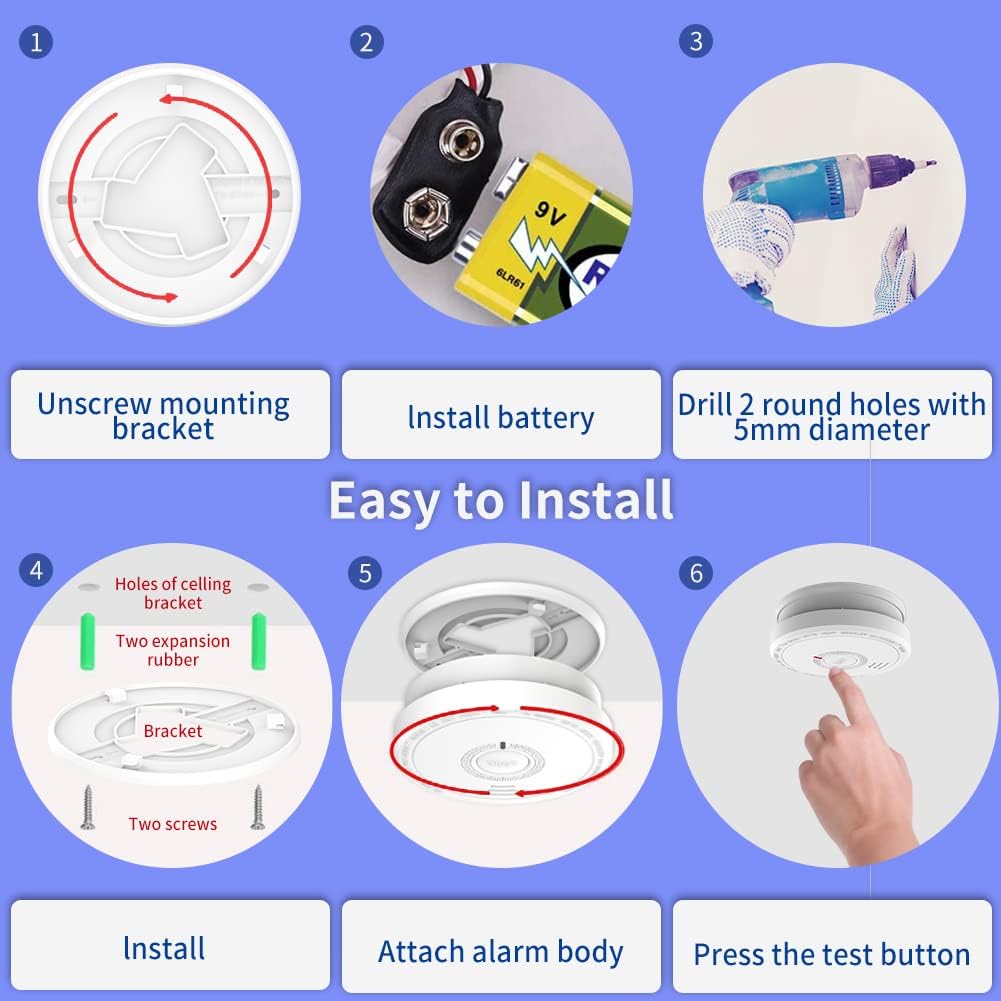
Image: A visual guide illustrating the six steps for installing the smoke alarm, from unscrewing the mounting bracket to testing the alarm.
Recommended Placement
For optimal protection, install smoke alarms in every sleeping area, outside each separate sleeping area, and on every level of your home, including the basement.
- Avoid placing alarms in "dead air" spaces, such as corners where walls and ceilings meet, or within 10 cm (4 inches) of a wall when mounted on the ceiling.
- When mounting on a wall, the top of the alarm should be between 10 cm (4 inches) and 30 cm (12 inches) from the ceiling.
- Do not install near windows, doors, or air vents where drafts could interfere with smoke detection.
- Keep away from kitchens and bathrooms to avoid false alarms from cooking fumes or steam.

Image: A diagram illustrating recommended placement of smoke alarms (green circles) throughout a multi-story home for comprehensive safety coverage.
Operation
Test Button
The 'TEST' button is used to verify the alarm's functionality. Press and hold the 'TEST' button for a few seconds. The alarm will sound a loud, pulsating siren, and the LED indicator will flash rapidly. Release the button to stop the test.
- Weekly Test: It is recommended to test your smoke alarm weekly to ensure it is working correctly.
- After Battery Replacement: Always test the alarm after replacing the battery.

Image: A close-up view of the smoke alarm's 'TEST' button, highlighting its function and the 85dB alarm sound level.
Silence/Hush Button
In case of a non-emergency alarm (e.g., from cooking fumes), you can temporarily silence the alarm by pressing the 'HUSH' button (which is the same as the 'TEST' button). The alarm will silence for approximately 10 minutes. After this period, if smoke is still present, the alarm will reactivate.
- Important: Do not use the silence feature in a real fire emergency. Evacuate immediately.
- The silence feature is designed for nuisance alarms only.

Image: A visual representation of the 'HUSH' button function, showing a hand pressing the button to temporarily silence the alarm.
Maintenance
Battery Replacement
The smoke alarm is designed with a 5-year replaceable DC 9V battery. When the battery is low, the alarm will chirp approximately once every 30-40 seconds, and the LED indicator will flash. Replace the battery immediately when this occurs.
- Twist the smoke alarm unit counter-clockwise to remove it from the mounting bracket.
- Disconnect the old 9V battery from the clip.
- Connect a new DC 9V battery, ensuring correct polarity.
- Reattach the smoke alarm unit to the mounting bracket by twisting clockwise until secure.
- Test the alarm using the 'TEST' button to confirm proper operation with the new battery.
Cleaning Your Smoke Alarm
Dust and debris can accumulate on the smoke alarm and affect its performance. Clean your smoke alarm at least once a month.
- Use a soft brush attachment on your vacuum cleaner to gently remove dust from the alarm's cover and vents.
- Do not use cleaning solvents or sprays on the alarm, as these can damage the sensor.
- Never paint the smoke alarm.
Troubleshooting
If your smoke alarm is not functioning as expected, refer to the following table for common issues and solutions:
| Problem | Possible Cause | Solution |
|---|---|---|
| Alarm chirps every 30-40 seconds. | Low battery. | Replace the 9V battery immediately. |
| Alarm sounds frequently without smoke. | Dust accumulation, high humidity, cooking fumes, steam. | Clean the alarm. Relocate if near kitchen/bathroom or high humidity areas. Use Hush button for nuisance alarms. |
| Alarm does not sound during test. | Dead or improperly installed battery, faulty unit. | Check battery connection and replace if necessary. Ensure alarm is securely attached to mounting bracket. If problem persists, the unit may be faulty and needs replacement. |
| LED indicator not flashing. | No power, faulty LED. | Check battery. If battery is new and correctly installed, contact support. |
Specifications
| Feature | Detail |
|---|---|
| Model Number | LZ-1903 |
| Sensor Type | Photoelectric |
| Power Source | DC 9V Battery (included) |
| Battery Life | 5 Years (replaceable) |
| Product Life | 10 Years |
| Alarm Loudness | 85dB at 3 meters |
| Operating Humidity | Up to 95% RH (non-condensing) |
| Product Dimensions | 10.8 x 10.8 x 5 cm |
| Item Weight | 180 g |
| Certifications | CE, British BRE Certification (EN 14604) |
Warranty and Support
Isafenest products are manufactured to high-quality standards. For specific warranty details, please refer to the warranty card included with your product or contact Isafenest customer support.
If you encounter any issues or have questions regarding your smoke alarm, please contact the seller or Isafenest customer service for assistance.
Related Documents - LZ-1903
 |
Isafenest LZ-1906 Photoelectric Smoke Detector User Manual & Installation Guide Learn how to install, operate, and maintain your Isafenest LZ-1906 photoelectric smoke detector with this comprehensive user manual. Ensure home safety with reliable smoke detection. |
 |
Invicta L(z) Series Vibrators: Installation and Maintenance Manual Official installation and maintenance manual for Invicta L(z) Series dust-protected rotary electric vibrators. Covers operational conditions, safety, technical specifications, and ATEX compliance for industrial use. |
 |
JUKI LZ-2290A Series Engineer's Manual: Adjustment and Maintenance Comprehensive engineer's manual for the JUKI LZ-2290A Series computer-controlled, direct-drive, high-speed zigzag stitching machine, covering standard adjustments, maintenance procedures, and operational details for technical personnel. |
 |
ButterflyMX Supported Smart Locks Product Reference Guide A comprehensive product reference guide detailing ButterflyMX's supported smart lock integrations, including Dormakaba EVO LZ series, Yale Assure 2 WF1 Deadbolt, Schlage Encode series, and Salto KS Lock Series, with features, requirements, and future updates. |
 |
LG Air Conditioner Owner's Manual and Operation Guide Comprehensive owner's manual for LG Air Conditioners (Ventilators), covering safety instructions, operation, maintenance, and troubleshooting. Includes details on features, remote control usage, ventilation modes, and cleaning procedures. |
Ask a question about this manual
Ask about setup, troubleshooting, compatibility, parts, safety, or missing instructions. Manuals+ will review the question and use this page’s manual context to help answer it.