
Introduction
Thank you for choosing the Sonata Digital Watch Model 87011PP02. This manual provides detailed instructions to help you understand and operate your new watch effectively. Please read this manual thoroughly before use and keep it for future reference.
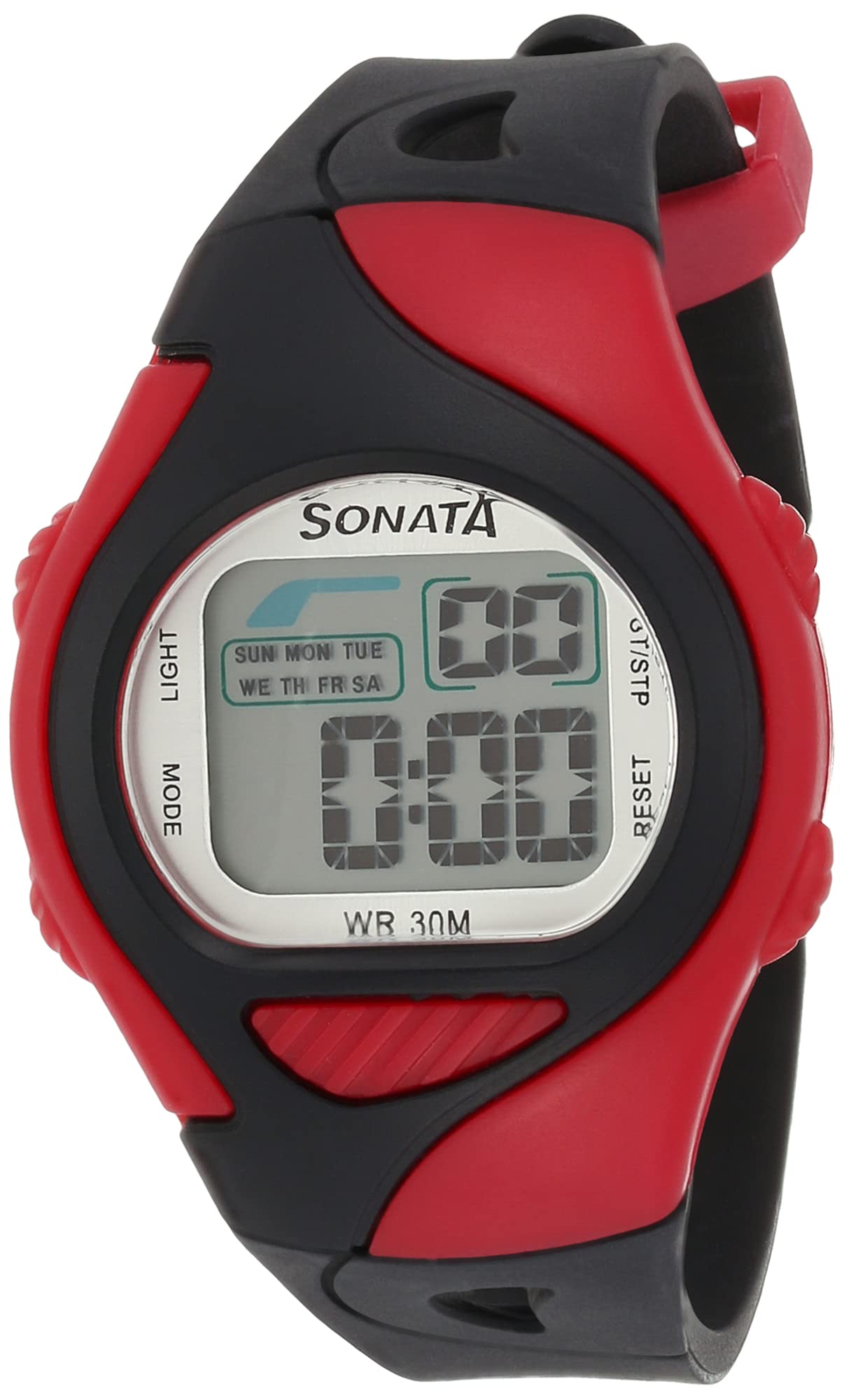
The Sonata Digital Watch Model 87011PP02 features a clear digital display, a durable plastic strap, and is designed for unisex use. It is water-resistant up to 30 meters, making it suitable for daily wear and light water activities.
This image displays the Sonata Digital Watch Model 87011PP02 worn on a wrist, highlighting its grey digital display and the two-tone black and red plastic strap.
Setup
Your Sonata Digital Watch comes with a pre-installed battery. Initial setup primarily involves setting the correct time and date.
- Activating the Watch: If the display is off, press any button to activate it.
- Entering Time Setting Mode: Locate the 'MODE' button (usually on the bottom left). Press it repeatedly until the time display starts flashing.
- Adjusting Time: Use the 'ADJUST' or 'SET' button (usually top right) to change the flashing digits (hours, minutes). Use the 'START/STOP' button (usually bottom right) to move between hours, minutes, and other settings.
- Setting Date: After setting the time, continue pressing 'START/STOP' to cycle through date settings (month, day, year) and adjust them using the 'ADJUST' button.
- Exiting Setting Mode: Once all settings are correct, press the 'MODE' button again to return to normal time display.

A close-up front view of the Sonata Digital Watch, Model 87011PP02, detailing the digital time display and the functional buttons on the side of the watch case. Refer to this image for button locations.
Operating Instructions
Your digital watch offers several functions accessible via its buttons:
- Time Display: The default screen shows the current time (hours, minutes, seconds) and often the day of the week.
- Date Display: Press the 'MODE' button once from the time display to show the date.
- Stopwatch Function:
- Press 'MODE' repeatedly until 'STW' or 'STOPWATCH' appears.
- Press 'START/STOP' to begin timing.
- Press 'START/STOP' again to pause/resume.
- Press 'RESET' (often the top left button) to clear the stopwatch.
- Alarm Function:
- Press 'MODE' repeatedly until 'ALM' or 'ALARM' appears.
- Use 'ADJUST' to set the alarm time.
- Press 'START/STOP' to toggle the alarm ON/OFF. An alarm icon will appear when active.
- Backlight: Press the 'LIGHT' button (usually top left) to illuminate the display in low-light conditions. The backlight will typically stay on for a few seconds.
Maintenance
- Cleaning: Wipe the watch case and strap with a soft, dry cloth. For stubborn dirt, use a slightly damp cloth and mild soap, then dry thoroughly. Avoid harsh chemicals.
- Water Resistance: This watch is water-resistant up to 30 meters (3 ATM). This means it can withstand splashes, rain, and brief immersion in water. It is not suitable for swimming, diving, or showering with hot water, as steam can penetrate the seals. Ensure all buttons are not pressed while the watch is wet.
- Battery Replacement: When the display dims or functions become erratic, the battery may need replacement. It is recommended to have the battery replaced by a qualified watch technician to ensure proper sealing and water resistance.
- Storage: Store your watch in a cool, dry place away from direct sunlight and extreme temperatures when not in use.
Troubleshooting
| Problem | Possible Cause | Solution |
|---|---|---|
| Display is blank or dim. | Low or dead battery. | Replace the battery. |
| Time is incorrect. | Time not set properly or accidentally reset. | Refer to the "Setup" section to reset the time. |
| Buttons are unresponsive. | Watch may be in a locked mode or battery is very low. | Try pressing all buttons firmly. If still unresponsive, replace battery. |
| Condensation inside the watch. | Exposure to extreme temperature changes or compromised water resistance. | Stop using the watch immediately and take it to a service center. |
Specifications
- Brand: Sonata
- Model Number: 87011PP02
- Display Type: Digital
- Movement: Quartz
- Case Material: Stainless Steel
- Case Diameter: 34 mm
- Case Thickness: 7.9 mm
- Glass Material: Mineral Glass
- Strap Material: Plastic
- Strap Color: Black (with red accents as seen in images)
- Band Width: 24 mm
- Dial Color: Grey
- Clasp Type: Buckle
- Water Resistance: 30 meters (3 ATM)
- Power Source: Battery Powered (1 Lithium Ion battery included)
- Item Weight: 60 grams
- Country of Origin: India
Warranty and Support
This Sonata Digital Watch Model 87011PP02 comes with a manufacturer's limited warranty for 1 year from the date of purchase.
For warranty claims, maintenance, or technical support, please contact the manufacturer or their authorized service agent. You may also contact Amazon customer service for further details regarding your purchase and warranty information.
Please retain your proof of purchase for warranty validation.