
CyberPower CP1500AVRLCD3
CyberPower CP1500AVRLCD3 Intelligent LCD UPS System User Manual
Model: CP1500AVRLCD3
Brand: CyberPower
Introduction
The CyberPower Intelligent LCD CP1500AVRLCD3 is a mini-tower Uninterruptible Power Supply (UPS) system designed with line interactive topology. It provides essential battery backup and surge protection for a variety of electronic devices, including desktop computers, workstations, networking equipment, and home entertainment systems. This model utilizes Automatic Voltage Regulation (AVR) to stabilize power fluctuations without engaging the battery, thereby extending battery life. This manual provides detailed instructions for the proper setup, operation, maintenance, and troubleshooting of your CP1500AVRLCD3 UPS system.
Important Safety Instructions
Please read and follow all instructions carefully before installing and operating the unit. Retain this manual for future reference.
- This UPS is designed for indoor use only.
- Do not install the UPS in direct sunlight, near heat sources, or in areas with excessive humidity.
- Ensure the UPS is connected to a grounded AC power outlet.
- Do not connect non-computer related items such as medical equipment, life support equipment, microwave ovens, or vacuum cleaners to the UPS.
- To reduce the risk of electric shock, do not open the unit. There are no user-serviceable parts inside. Refer servicing to qualified service personnel.
- Disconnect the UPS from the AC outlet before cleaning.
- The battery is a sealed lead-acid type. Refer to local regulations for proper disposal.
Package Contents
Verify that all items are present upon unpacking:
- CyberPower CP1500AVRLCD3 Intelligent LCD UPS System
- USB A-B Cable
- Power Cord (integrated)
- User Manual (this document)
- PowerPanel Personal Edition Management Software (Download)
Product Overview
Front Panel Features

The front panel features the multifunction color LCD display, control buttons (Display, Mute, Enter, Setup), and two USB charging ports (one Type-A, one Type-C). The LCD provides real-time information on battery status, power conditions, and load.
Rear Panel Features

The rear panel includes 12 NEMA 5-15R outlets: six battery backup and surge protected outlets, and six surge protected outlets only. It also features a circuit breaker reset button, coaxial cable protection ports (In/Out), network protection ports (In/Out), a USB communication port, and a serial communication port.
Dimensions
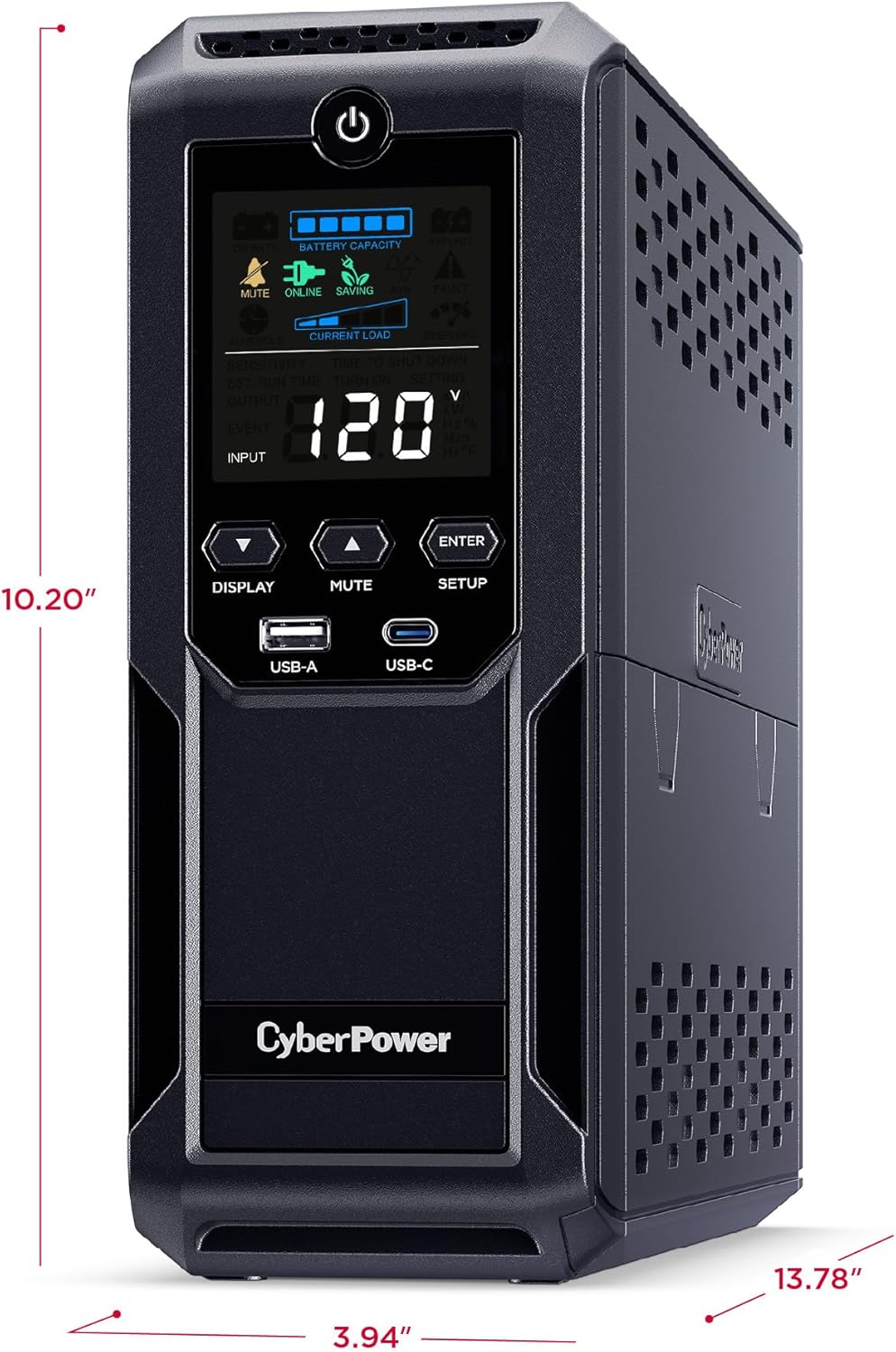
The unit measures approximately 13.8 inches (D) x 3.9 inches (W) x 10.2 inches (H) and weighs 23.8 pounds. Its compact mini-tower design allows for flexible placement.
Setup and Installation
Initial Battery Charge
- Unpack the UPS and place it on a flat, stable surface.
- Plug the UPS power cord directly into a grounded wall outlet.
- Allow the unit to charge for at least 8 hours to ensure maximum battery runtime. The unit will charge whether it is turned on or off.
Connecting Equipment
- Connect your computer, monitor, and other critical devices requiring battery backup to the 'SURGE + BATTERY' protected outlets. These outlets provide power during outages and protect against surges.
- Connect non-critical devices, such as printers or scanners, to the 'SURGE' protected outlets. These outlets provide surge protection but do not offer battery backup.
- Do not connect laser printers to the 'SURGE + BATTERY' outlets, as their high power draw can overload the UPS.
- For network and coaxial line protection, connect your modem/router and incoming lines to the respective 'NETWORK' and 'COAX' IN/OUT ports on the rear panel.
Software Installation
Download and install the PowerPanel Personal Edition Management Software from the CyberPower website. This software allows for advanced monitoring and management of your UPS, including scheduled shutdowns, power event logging, and customizable alerts. Connect the UPS to your computer using the provided USB cable to enable communication with the software.
Operation
LCD Display Functions
The multifunction color LCD panel displays real-time information about the UPS status. Use the 'DISPLAY' button to cycle through various screens, including:
- Input Voltage (V)
- Output Voltage (V)
- Battery Capacity (%)
- Estimated Runtime (minutes)
- Load Capacity (Watts/%)
- AVR Status
The color display alerts users to potential issues, such as low battery or overload, before they can affect critical equipment.
Automatic Voltage Regulation (AVR)
The CP1500AVRLCD3 features Automatic Voltage Regulation (AVR). This technology automatically corrects minor power fluctuations (sags and surges) without switching to battery power. This extends the life of the battery and ensures a stable power supply to connected devices.
USB Charging Ports
The front panel includes one USB Type-A (2.4A) and one USB Type-C (15W) charging port. These ports provide convenient charging for mobile phones, tablets, and other USB-powered devices, even during a power outage when the UPS is on battery power.
Maintenance
Battery Replacement
The CP1500AVRLCD3 uses two 12V sealed lead-acid batteries. The typical battery life is 3-5 years, depending on usage and environmental conditions. When the battery needs replacement, the UPS will indicate this on the LCD. Refer to the CyberPower website or contact customer support for information on purchasing replacement batteries and detailed replacement instructions.
Cleaning
To clean the exterior of the UPS, use a soft, dry cloth. Do not use liquid or aerosol cleaners. Ensure the unit is unplugged from the wall outlet before cleaning.
Troubleshooting
This section addresses common issues you might encounter with your UPS. If the problem persists after attempting the solutions below, please contact CyberPower technical support.
| Problem | Possible Cause | Solution |
|---|---|---|
| UPS will not turn on. | Battery is low or depleted. | Charge the UPS for at least 8 hours. |
| No power to outlets. | Circuit breaker tripped. | Press the circuit breaker reset button on the rear panel. |
| UPS beeps continuously. | Overload condition. | Remove non-essential equipment from battery backup outlets. |
| UPS is on battery power frequently. | Frequent power fluctuations. | This is normal operation for AVR. Ensure the UPS is properly sized for your load. |
Technical Specifications
| Feature | Specification |
|---|---|
| Model | CP1500AVRLCD3 |
| Capacity (VA/Watts) | 1500VA / 900W |
| Input Voltage | 120 Volts |
| Outlets | 12 NEMA 5-15R (6 Battery + Surge, 6 Surge Only) |
| USB Charging Ports | 1x USB-A (2.4A), 1x USB-C (15W) |
| Battery Type | Sealed Lead Acid (2 x 12V batteries) |
| Dimensions (D x W x H) | 13.8 x 3.9 x 10.2 inches |
| Item Weight | 23.8 pounds |
| Color | Black |
| Manufacturer | CyberPower Systems |
| Country of Origin | Philippines |
Warranty and Technical Support
The CyberPower CP1500AVRLCD3 Intelligent LCD UPS System comes with a three-year warranty, which includes coverage for the batteries. Additionally, it is backed by a $500,000 Connected Equipment Guarantee, providing peace of mind for your connected devices.
For detailed warranty information, technical assistance, or to download the latest version of the PowerPanel Personal Edition Management Software, please visit the official CyberPower website or refer to the User Manual PDF available at: https://manuals.plus/m/61c663543464ea25f56b74ac58843d3f6def7778c6fa4d63724b2ce79e1388a2
You may also contact CyberPower customer support directly for further assistance.
Related Documents - CP1500AVRLCD3
 |
CyberPower BRG1500AVRLCD2 UPS User Manual: Features, Installation, and Operation Comprehensive user manual for the CyberPower BRG1500AVRLCD2 Intelligent LCD UPS. Learn about its features, installation, basic operation, battery replacement, troubleshooting, and technical specifications. |
 |
CyberPower Intelligent UPS Series OR1000LCDRM1U/OR1500LCDRM1U User Manual | Power Protection Guide Comprehensive user manual for CyberPower Intelligent UPS Series (OR1000LCDRM1U, OR1500LCDRM1U). Learn about installation, features, operation, battery replacement, troubleshooting, technical specs, and safety for reliable power protection. |
 |
CyberPower Intelligent LCD UPS User Manual User manual for CyberPower Intelligent LCD UPS models CP825LCD and CP600LCD, covering installation, basic operation, troubleshooting, and technical specifications. |
 |
CyberPower AVR UPS Series AVRG750U/AVRG900U User Manual User manual for CyberPower AVR UPS Series models AVRG750U and AVRG900U, providing installation, operation, safety, and troubleshooting information for these uninterruptible power supply units. |
 |
CyberPower AVR UPS Series User Manual: AVRG750LCD & AVRG900LCD - Installation, Operation, and Safety This user manual provides detailed information on the installation, operation, safety precautions, and troubleshooting for the CyberPower AVR UPS Series models AVRG750LCD and AVRG900LCD, including features like Automatic Voltage Regulation (AVR) and LCD display. |
 |
CyberPower Smart App Sinewave Series UPS User's Manual User's manual for CyberPower Smart App Sinewave Series UPS models PR1000LCDRTXL2Ua, PR1500LCDRTXL2U, and PR2200LCDRTXL2U, detailing installation, operation, safety precautions, troubleshooting, technical specifications, and warranty information. |