
1. Introduction
The Saramonic Blink 100 B5 is an ultra-portable and easy-to-use 2.4GHz wireless microphone system designed to deliver broadcast-quality sound. This system is ideal for content creators using iPhone 15, Android smartphones and tablets, newer iPads, computers, and other devices equipped with a USB-C port. Its compact design and advanced features make it suitable for various applications, including video recording, streaming, and audio recording.

2. What's in the Box
- 1 x Blink 100 TX Transmitter
- 1 x Blink 100 RXUC USB-C Receiver
- 1 x Furry Windscreen for TX
- 1 x USB-C Charging Cable
- 1 x Carrying Pouch

3. Components Overview
3.1. Blink 100 TX Transmitter
- Built-in Omnidirectional Microphone: Captures clear audio.
- Furry Windscreen: Reduces wind noise for outdoor use.
- Power Button: Press and hold to power on/off.
- Mute Button: Press to mute/unmute the microphone.
- NR (Noise Reduction) Button: Press to activate/deactivate active noise cancellation.
- Gain Control (+/-) Buttons: Adjust microphone input level (12-step control).
- 3.5mm TRS Input: For connecting external lavalier microphones or line-level audio sources.
- USB-C Charging Port: For charging the transmitter's internal battery.

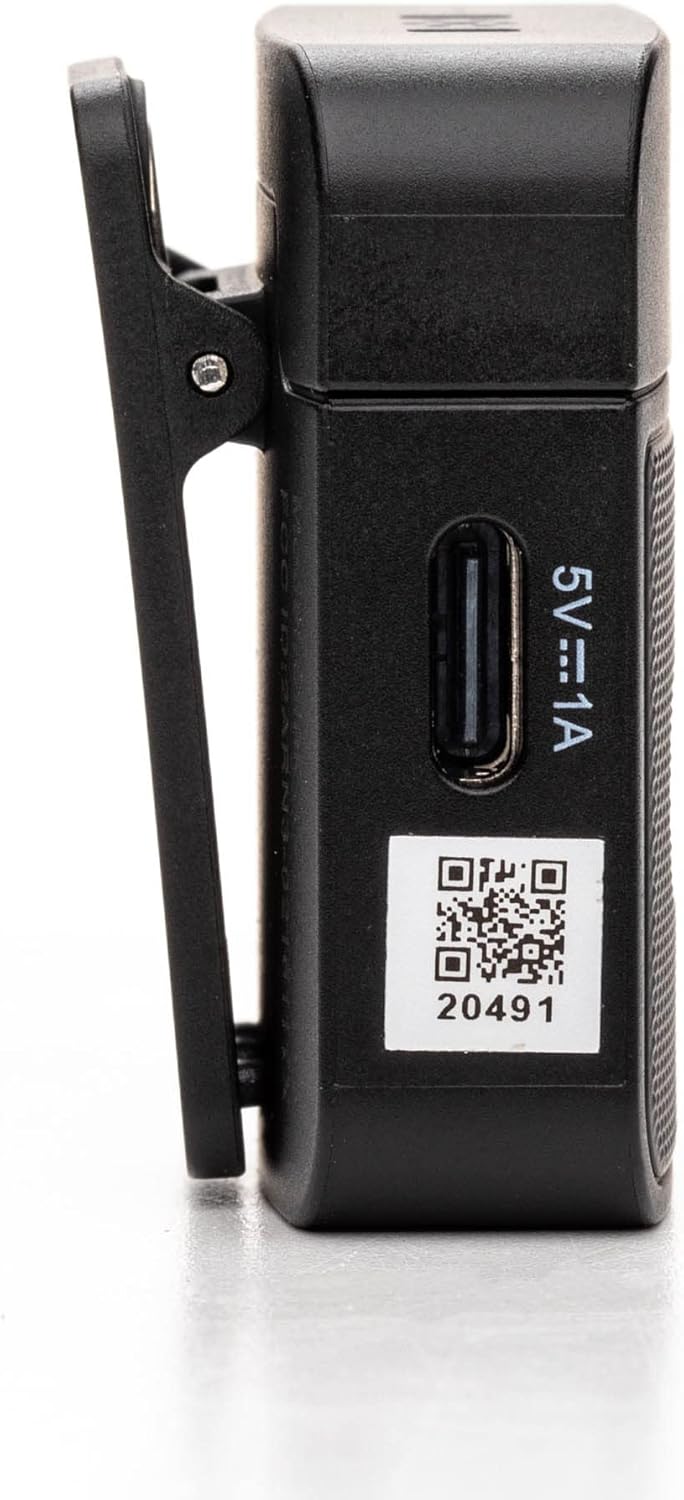
3.2. Blink 100 RXUC USB-C Receiver
- USB-C Connector: Plugs directly into your mobile device or computer.
- USB-C Pass-Through Charging Port: Allows simultaneous charging of your mobile device while the receiver is connected.
- Pairing Indicator: LED light indicates pairing status.

4. Setup
4.1. Charging the Transmitter
- Connect the supplied USB-C charging cable to the transmitter's USB-C port.
- Connect the other end of the cable to a USB power source (e.g., computer, wall adapter).
- The indicator light will show charging status. A full charge provides up to 10 hours of operation.
4.2. Connecting the Receiver
- Plug the Blink 100 RXUC receiver directly into the USB-C port of your smartphone, tablet, or computer.
- The receiver is battery-free and draws power from your device.

4.3. Automatic Pairing
The Blink 100 system features automatic pairing. Simply power on the transmitter and plug in the receiver. The units will automatically search for and connect to each other, indicated by a solid blue light on both units. The system also automatically switches channels to avoid static and dropouts.
5. Operating Instructions
5.1. Basic Operation
- Power On/Off: Press and hold the power button on the TX transmitter for 2 seconds.
- Wearing the Transmitter: Clip the TX transmitter to your shirt or clothing. For optimal sound, position the microphone approximately 6-8 inches from your mouth.

5.2. Gain Control
Use the + and - buttons on the TX transmitter to adjust the microphone's input gain. There are 12 steps of gain control to achieve optimal audio levels for different recording environments and speaker volumes.
5.3. Active Noise Cancellation (NR)
Press the NR button on the TX transmitter to activate or deactivate the active noise cancellation feature. When activated, the system will reduce ambient background noise, providing clearer audio, especially in noisy environments.
5.4. Muting
Press the MUTE button on the TX transmitter to temporarily mute the microphone. Press it again to unmute.
5.5. Connecting External Audio Sources
The 3.5mm TRS input on the TX transmitter allows you to connect external lavalier microphones, headset microphones, or even line-level audio devices (e.g., music players, mixers) for wireless transmission. Ensure the input mode is correctly set on the transmitter if using a line-level source (refer to advanced settings if available, though the Blink 100 series typically auto-detects mic input).
5.6. Powering Your Mobile Device
The RXUC receiver features a USB-C pass-through charging port. This allows you to charge your mobile device simultaneously while the receiver is connected and in use, ensuring extended recording sessions without draining your device's battery.
5.7. Official Product Video
6. Specifications
| Feature | Specification |
|---|---|
| Brand | Saramonic |
| Model Name | Wireless Audio Transmission Kit |
| Item Model Number | Saramonic BLINK100 |
| Connectivity Technology | 2.4GHz |
| Connector Type | USB Type-C |
| Compatible Devices | Personal Computer, Smartphones, Tablets |
| Microphone Form Factor | Handheld (Clip-On) |
| Polar Pattern | Omnidirectional |
| Audio Sensitivity | 39 Decibels |
| Signal-to-Noise Ratio | 76 dB |
| Frequency Response | 24 GHz |
| Number of Channels | 2 |
| Special Features | Battery Indicator Light, Clip, Mute Function, Noise Reduction |
| Power Source | Corded Electric (for charging) |
| Batteries | 1 Lithium Polymer battery required (included) |
| Item Weight | 4.8 ounces |
| Product Dimensions (L x W x H) | 3.74 x 2.32 x 4.69 inches |
| Color | Black |
| Wireless Range | Up to 164 feet (50m) line-of-sight |
| TX Battery Run Time | Up to 10 hours |
7. Troubleshooting
7.1. No Sound or Low Audio Level
- Ensure both the transmitter (TX) and receiver (RXUC) are powered on and successfully paired (solid blue indicator light).
- Check the microphone gain level on the TX transmitter using the +/- buttons. Increase the gain if the audio is too low.
- Verify that the RXUC is securely plugged into your recording device's USB-C port.
- Confirm that your recording application or device settings are configured to use the external microphone input.
- If using an external lavalier, ensure it is properly connected to the TX's 3.5mm TRS input.
7.2. Poor Sound Quality / Interference
- Activate the Noise Reduction (NR) feature on the TX transmitter if recording in a noisy environment.
- Ensure there are no obstructions between the transmitter and receiver, and try to maintain line-of-sight within the 164-foot (50m) range.
- Avoid operating near other 2.4GHz wireless devices (Wi-Fi routers, other wireless mics) that might cause interference.
- Check the furry windscreen is properly installed on the TX's built-in mic when recording outdoors to minimize wind noise.
7.3. Pairing Issues
- Power cycle both the TX transmitter and RXUC receiver.
- Ensure both units are within close proximity during initial pairing.
- The system is designed for automatic pairing. If issues persist, refer to the full Saramonic support documentation online.
7.4. Device Not Charging via RXUC Pass-Through
- Ensure the charging cable is securely connected to both the RXUC's pass-through port and a working power source.
- Verify that your mobile device supports charging via its USB-C port while an accessory is connected.
8. Maintenance
- Keep the devices clean using a soft, dry cloth.
- Avoid exposing the devices to extreme temperatures, humidity, or direct sunlight.
- Store the system in the provided carrying pouch when not in use to protect it from dust and damage.
- Do not attempt to disassemble or repair the device yourself, as this will void the warranty.
9. Warranty and Support
Saramonic products come with a manufacturer's warranty. For detailed warranty information, product registration, and technical support, please visit the official Saramonic website or contact their customer service. Keep your purchase receipt as proof of purchase for warranty claims.
For further assistance, you may visit the Saramonic Store on Amazon.


