
1. Product Overview
Thank you for purchasing the Zojirushi CP-EA20 Electric Pot. This appliance is designed for convenient hot water dispensing with a compact 2.0L capacity, making it ideal for individual use or small households. It features multiple temperature retention settings and a specialized slow drip function for coffee.

Front-angled view of the Zojirushi CP-EA20 Electric Pot in Straight Black, showing the water level indicator and control panel.
Key Features:
- Compact 2.0L Capacity: Space-saving design suitable for various kitchen setups.
- Three Temperature Retention Settings: Maintain water at 98°C, 90°C, or 70°C. The 70°C setting is particularly useful for preparing milk.
- Slow Drip Dispensing: A specialized dispensing mode that reduces splashing and allows for precise pouring, ideal for drip coffee.
- Simple Operation: User-friendly control panel with clearly marked buttons.
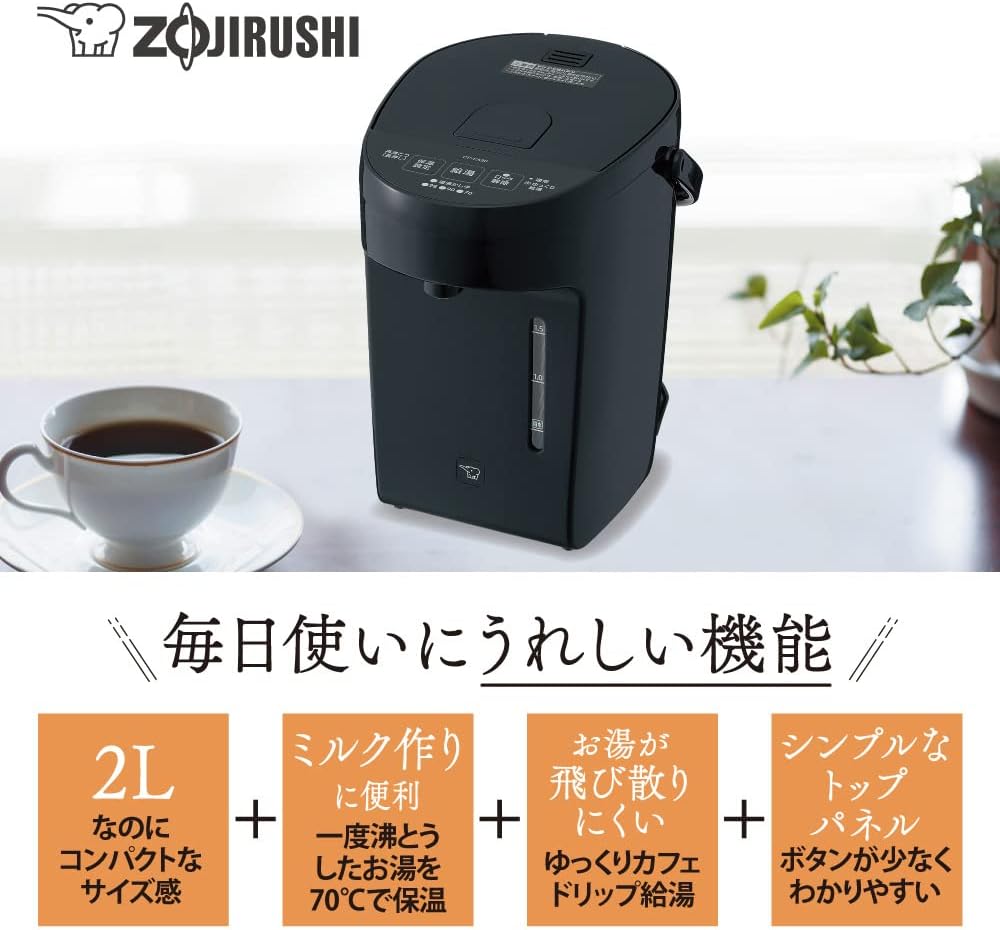
An image highlighting the key features of the Zojirushi CP-EA20 Electric Pot: 2.0L compact size, convenient for milk preparation with 70°C keep warm, slow drip dispensing, and a simple top panel with few buttons.
2. Important Safety Information
Please read all safety instructions carefully before using the appliance to prevent injury or damage. Keep this manual for future reference.
General Safety Precautions:
- Do not immerse the main unit, power cord, or plug in water or other liquids.
- Ensure the power outlet voltage matches the appliance's rating.
- Do not operate the appliance with a damaged cord or plug. Contact customer service for repairs.
- Keep the appliance out of reach of children. Hot water and steam can cause severe burns.
- Place the pot on a stable, flat, heat-resistant surface away from edges.
- Do not fill above the maximum water level indicator.
- Avoid touching hot surfaces. Use handles and knobs.
- Unplug the appliance when not in use and before cleaning.
3. Product Components
The Zojirushi CP-EA20 Electric Pot consists of the following main parts:
- Main Unit (Pot Body)
- Lid
- Power Cord
- Water Level Indicator
- Control Panel (Buttons for Reboil/Keep Warm, Dispense, Lock Release)
4. Setup
4.1 Unpacking
- Carefully remove the electric pot and all accessories from the packaging.
- Check for any damage during transit. If damaged, do not use and contact your retailer.
- Remove all packing materials, stickers, and labels from the pot.
4.2 Initial Cleaning
- Wash the interior of the pot and the lid with a soft sponge and mild dish soap.
- Rinse thoroughly with clean water.
- Wipe the exterior with a damp cloth. Do not immerse the main unit in water.
- Ensure all parts are completely dry before use.
4.3 Placement and Power Connection
- Place the electric pot on a stable, level, and heat-resistant surface. Ensure there is adequate space around the pot for ventilation and to prevent steam damage to walls or cabinets.
- Plug the power cord securely into the pot's power inlet, then into a grounded electrical outlet.

The Zojirushi CP-EA20 Electric Pot placed on a desk next to a laptop and a mug, illustrating its compact size.
5. Operating Instructions
5.1 Filling with Water
- Open the lid.
- Fill the pot with fresh water up to the desired level, ensuring it does not exceed the 'MAX' mark on the water level indicator.
- Close the lid securely.
5.2 Boiling Water
Once filled and plugged in, the pot will automatically begin heating the water to boiling temperature (100°C). The 'Boiling' indicator light will illuminate.
5.3 Temperature Retention Settings
After boiling, the pot will automatically switch to the default keep-warm temperature. You can adjust this setting:
- Press the 'Keep Warm Setting' button repeatedly to cycle through the available temperatures: 98°C, 90°C, and 70°C.
- The corresponding indicator light will illuminate for the selected temperature.

The 70°C temperature retention setting is ideal for preparing milk.
5.4 Dispensing Water
- Ensure the 'Lock Release' button is pressed to unlock the dispensing function.
- Place your cup or container under the dispensing spout.
- Press the 'Dispense' button to release hot water. Release the button to stop.
5.5 Slow Drip Dispensing (for Coffee)
For a controlled pour, suitable for drip coffee:
- Press the 'Lock Release' button twice quickly. This will activate the slow drip mode.
- Press the 'Dispense' button. Water will be dispensed at a slower, more controlled rate.
- To return to normal dispensing, press the 'Lock Release' button once.

Illustration of the 'Slow Drip Dispensing' feature for coffee.
5.6 Control Panel Overview

Detailed view of the control panel with 'Reboil/Keep Warm Setting', 'Dispense', and 'Lock Release' buttons.
6. Maintenance
Regular cleaning ensures optimal performance and extends the life of your electric pot.
6.1 Daily Cleaning
- Unplug the appliance and allow it to cool completely before cleaning.
- Exterior: Wipe the exterior with a soft, damp cloth. Do not use abrasive cleaners or solvents.
- Interior: Empty any remaining water. Wash the interior with a soft sponge and mild dish soap. Rinse thoroughly.
- Lid: Remove the lid and wash it with a soft sponge and mild dish soap. Rinse well.
- Ensure all parts are dry before reassembling and storing.
6.2 Descaling (Mineral Deposit Removal)
Over time, mineral deposits (limescale) may build up inside the pot, especially in hard water areas. This can affect performance. Descale the pot periodically (e.g., once a month or as needed).
- Use a commercially available citric acid cleaner specifically designed for electric kettles/pots, or a solution of white vinegar and water (e.g., 1 part vinegar to 2 parts water).
- Fill the pot with the descaling solution up to the MAX line.
- Boil the solution and let it sit for 30-60 minutes (or according to cleaner instructions).
- Empty the solution and rinse the interior thoroughly several times with clean water to remove any residue.
- Perform a test boil with fresh water and discard the water before using the pot for beverages.
7. Troubleshooting
If you encounter issues with your electric pot, please refer to the following common problems and solutions:
| Problem | Possible Cause | Solution |
|---|---|---|
| Pot does not heat or boil. | Not plugged in correctly; Power outage; Appliance malfunction. | Check power cord connection and outlet; Check household circuit breaker; Contact customer support if problem persists. |
| Water is not dispensing. | Dispensing lock is engaged; Insufficient water in the pot. | Press the 'Lock Release' button; Ensure there is enough water in the pot. |
| Water has an unusual taste or odor. | New appliance odor; Mineral deposits; Pot not cleaned properly. | Perform initial cleaning and several test boils; Descale the pot; Clean thoroughly. |
| Steam leakage from lid. | Lid not closed properly; Lid seal damaged. | Ensure lid is securely closed; Inspect lid seal for damage and replace if necessary. |
If the problem persists after attempting these solutions, please contact Zojirushi customer support.
8. Specifications
| Feature | Specification |
|---|---|
| Brand | Zojirushi |
| Model Number | CP-EA20 |
| Color | Straight Black |
| Capacity | 2.0 L |
| Wattage | 700 W |
| Product Dimensions (L x W x H) | 25.5 cm x 19 cm x 25.5 cm |
| Item Weight | 2.5 kg |
| Care Instructions | Hand wash |
| Battery Use | No |
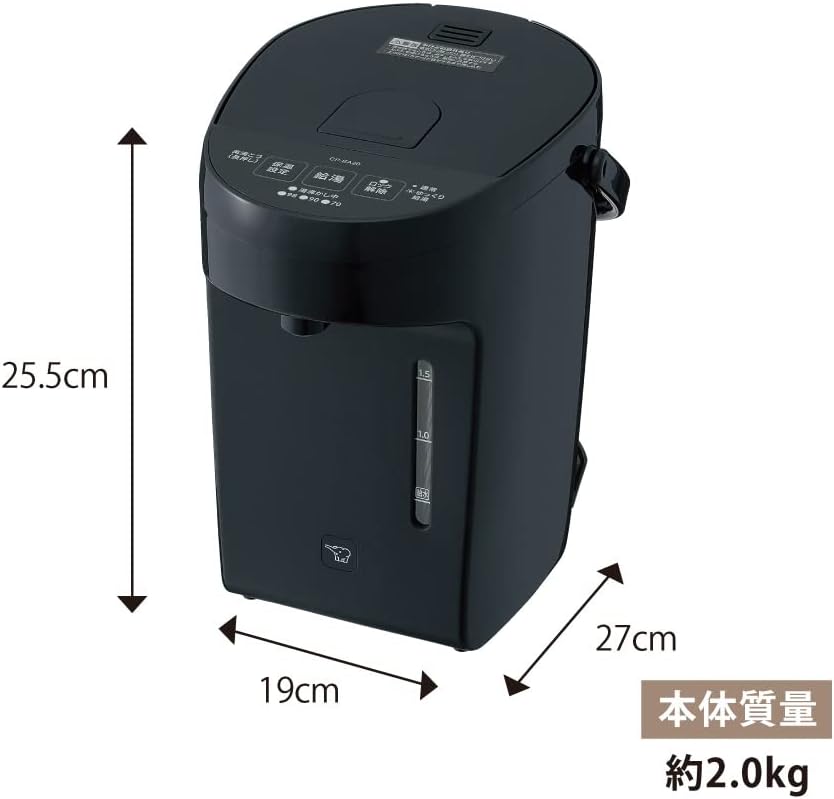
Diagram illustrating the dimensions and weight of the Zojirushi CP-EA20 Electric Pot.
9. Warranty and Support
This Zojirushi product is covered by a manufacturer's warranty. Please refer to the warranty card included with your purchase for specific terms and conditions, including the warranty period and coverage details.
Customer Support:
For technical assistance, warranty claims, or to inquire about replacement parts, please contact Zojirushi customer service. Contact information can typically be found on the Zojirushi official website or on your product packaging.
Please have your model number (CP-EA20) and proof of purchase ready when contacting support.