
1. Introduction
This manual provides essential instructions for the safe and efficient use of your FNRIDS 7.2 kW Type 2 Portable EV Charger. Please read this manual thoroughly before operating the device and retain it for future reference. This charger is designed to provide a reliable and flexible charging solution for electric vehicles equipped with a Type 2 charging port.
2. Safety Information
Your safety is paramount. The FNRIDS portable EV charger incorporates multiple safety features to ensure secure operation. Adhere to all warnings and precautions to prevent injury or damage.
- Overcurrent Protection: Automatically disconnects power if current exceeds safe limits.
- Overvoltage Protection: Safeguards against excessive voltage input.
- Leakage Protection: Detects and prevents electrical leakage.
- Over-temperature Protection: Monitors internal temperature and reduces power or shuts down if overheating occurs.
- Ground Protection: Ensures proper grounding for electrical safety.
- Short Circuit Protection: Protects against short circuits.
- Material: Constructed from high-strength ABS material for enhanced durability and safety.
- Important: Do not attempt to switch the charging current (amperage) while the device is actively charging your vehicle. Adjustments must be made before initiating a charge.

Image: Multiple Security Protection. This diagram highlights the comprehensive safety mechanisms integrated into the FNRIDS EV charger, ensuring a secure charging process.

Image: Internal Circuitry. A visual representation of the charger's internal components, demonstrating the robust engineering behind its protective features.
3. Product Overview
The FNRIDS 7.2 kW Type 2 Portable EV Charger is designed for convenient and flexible electric vehicle charging. It features a robust control box with a digital display and a 5-meter cable.
Key Features:
- Charging Power: Up to 7.2 kW.
- Adjustable Current: Switchable between 10A, 16A, 20A, 24A, and 32A.
- Connector Type: IEC 62196-2 (Type 2) for vehicle connection.
- Power Plug: CEE plug for wall outlet connection.
- Cable Length: 5 meters.
- Display: Digital screen for real-time charging status.
- Durability: IP67 (as per product title) / IP65 (as per feature bullet and image) rated for water and dust resistance.
Components:
- Charging Control Box: Houses the digital display, control button, and safety electronics.
- Type 2 Connector: Plugs into your electric vehicle's charging port.
- CEE Plug: Connects to a compatible CEE wall socket.
- Charging Cable: 5-meter cable connecting the control box to both the CEE plug and the Type 2 connector.

Image: EV Charging Control Box with LED Display. This image shows the central control unit, featuring a digital screen that displays charging information and a button for current selection.

Image: 7 Pins Female Plug (Type 2). A detailed view of the vehicle-side connector, highlighting its 7-pin configuration for compatibility with IEC 62196-2 standard electric vehicles.

Image: Type 2 Connector Icon. This graphic illustrates the standard Type 2 connector interface.

Image: Cable Construction. A cutaway view revealing the high-quality, oxygen-free pure copper wires and durable TPE insulation, designed for stable and safe charging.
4. Setup
Follow these steps to set up your FNRIDS portable EV charger for the first time.
- Inspect the Charger: Before each use, visually inspect the charging cable, control box, and connectors for any signs of damage, wear, or foreign objects. Do not use if damaged.
- Connect to Power Outlet: Insert the CEE plug securely into a compatible CEE wall socket. Ensure the socket is properly grounded and rated for the desired charging current.
- Select Charging Current (Optional): Before connecting to the vehicle, you can press the 'Power Button' on the control box to cycle through the available current settings (10A, 16A, 20A, 24A, 32A). Select the appropriate current based on your vehicle's requirements and the power outlet's capacity. Remember: Current cannot be changed during charging.
- Connect to Vehicle: Open your electric vehicle's charging port cover. Insert the Type 2 connector firmly into the vehicle's charging inlet. Ensure a secure connection.
- Verify Connection: The charger's display and indicator lights will show the connection status.

Image: Vehicle Charging Setup. This image demonstrates the complete setup, from the CEE plug in the wall to the Type 2 connector in the vehicle, illustrating the charging process.

Image: CEE Plug Detail. A magnified view of the CEE plug, emphasizing its design for secure and high-power connections to industrial-grade sockets.

Image: Connecting the Charger. This image shows a user plugging the charger into an electric vehicle, highlighting the practical application of the device.
5. Operating Instructions
Once the charger is set up, follow these steps to begin and monitor charging.
- Initiate Charging: After connecting both the CEE plug to the power source and the Type 2 connector to your vehicle, the charging process should begin automatically or after a brief handshake period with the vehicle.
- Monitor Charging Status: The digital display on the control box will show real-time charging information, including voltage, current, power (kW), charging time, and energy delivered (kWh).
- Indicator Lights: The control box also features LED indicator lights to provide a quick visual status:
- First solid green light: Waiting for connection.
- Three green lights alternating: Normal charging.
- First green light solid, second green light flashing: Charging complete.
- Stop Charging: To stop charging, first disconnect the Type 2 connector from your vehicle. Then, unplug the CEE plug from the wall socket.
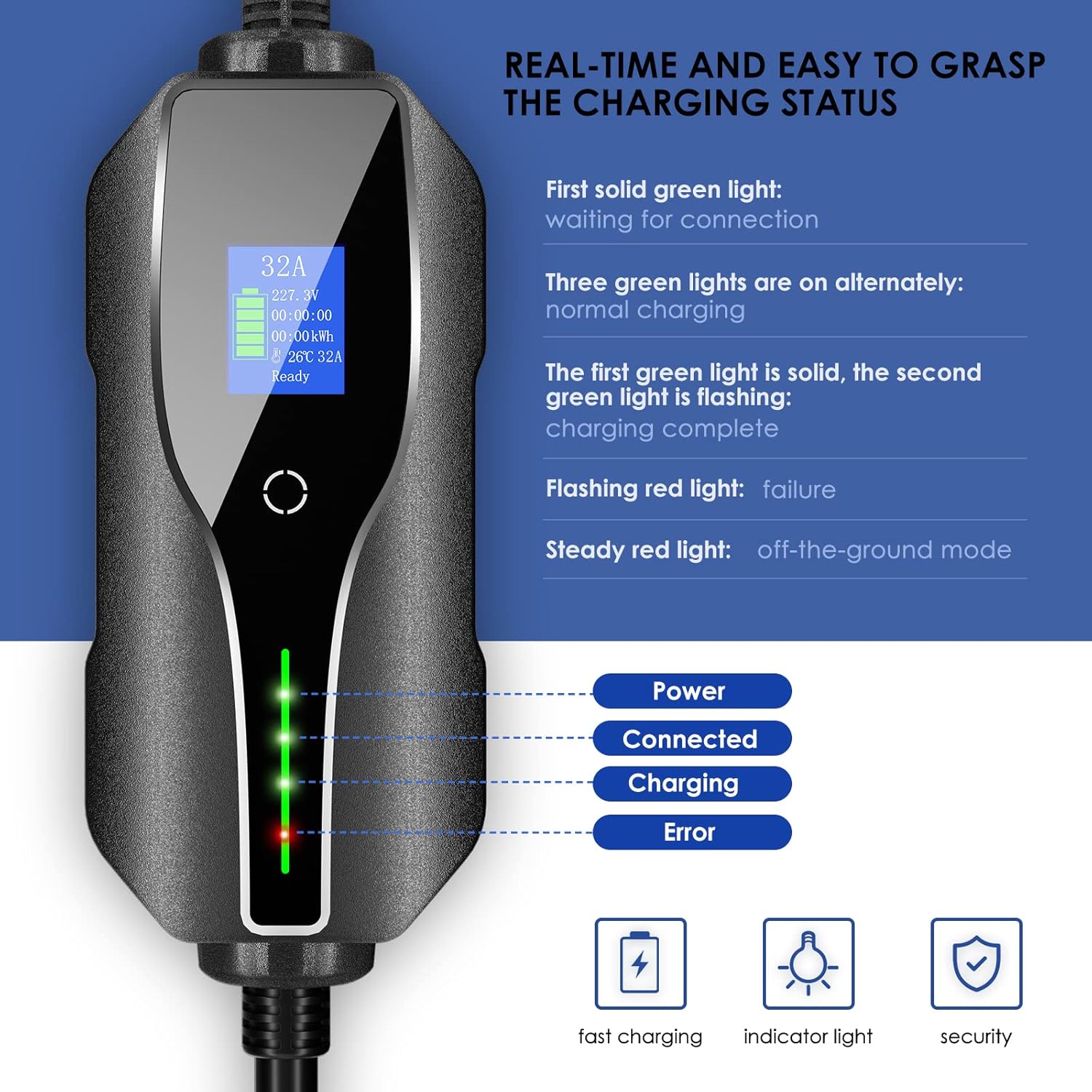
Image: Real-Time Charging Status. This image details the LED indicator lights on the control box and their corresponding charging states, providing clear visual feedback during operation.
6. Maintenance
Proper maintenance ensures the longevity and safe operation of your FNRIDS EV charger.
- Cleaning: Keep the charger clean and free from dust, dirt, and moisture. Use a soft, dry cloth for cleaning. Do not use abrasive cleaners or solvents.
- Storage: When not in use, store the charger in its professional carrying bag in a dry, cool place, away from direct sunlight and extreme temperatures.
- Cable Care: Avoid kinking, twisting, or driving over the charging cable. Always coil the cable loosely when storing.
- Environmental Resistance: The charger is rated IP67 (as per product title) / IP65 (as per feature bullet and image) for water and dust resistance, allowing for use in various weather conditions. However, avoid prolonged exposure to heavy rain or submersion.
- Temperature Range: The charger is designed to operate within a wide temperature range, typically from -30°C to 50°C.

Image: Operation in Bad Weather. This image shows the charger in a snowy environment, indicating its robust design for outdoor use.

Image: IP65 Rating. This icon visually confirms the charger's protection against dust ingress and low-pressure water jets.

Image: Temperature Range. This graphic illustrates the wide operational temperature range, from extreme cold to significant heat, ensuring reliability in diverse climates.

Image: Carrying Bag. This image shows the included professional bag, designed for convenient transport and storage of the charger.
7. Troubleshooting
If you encounter issues with your FNRIDS EV charger, refer to the following common problems and solutions.
| Problem | Indicator/Display | Possible Cause / Solution |
|---|---|---|
| Charger not starting | First solid green light | Charger is waiting for connection. Ensure both CEE plug and Type 2 connector are securely plugged in. Check vehicle's charging settings. |
| Charging stops unexpectedly | Flashing red light | Indicates a failure. Disconnect and reconnect the charger. Check for power fluctuations or vehicle errors. |
| Red light is steady | Steady red light | Indicates 'off-the-ground mode'. This suggests a grounding issue with the power outlet. Consult an electrician to verify the outlet's grounding. Do not use if grounding is faulty. |
| No display/power | Screen off | Check if the CEE plug is fully inserted into a live power socket. Verify the power outlet is functioning. |
| Cannot change current | N/A | Current can only be changed before charging begins. Disconnect from the vehicle, adjust current, then reconnect. |
If the problem persists after attempting these solutions, please contact FNRIDS customer service for further assistance.
8. Specifications
| Feature | Detail |
|---|---|
| Brand | FNRIDS |
| Model | 7.2 kW Type 2 Portable EV Charger |
| Power | 7.2 kW |
| Adjustable Current | 10A / 16A / 20A / 24A / 32A |
| Input Voltage | 250 Volts |
| Connector Type (Vehicle) | IEC 62196-2 (Type 2) |
| Plug Type (Wall) | CEE Plug |
| Cable Length | 5 meters |
| IP Rating | IP67 (as per product title) / IP65 (as per feature bullet and image) |
| Product Dimensions (L x W x H) | 40 x 38 x 12 cm |
| Item Weight | 3.53 Kilograms |
| Certifications | CE, IEC, TÜV |
| Portable | Yes |
9. Warranty and Support
FNRIDS is committed to providing high-quality products and excellent customer service.
- Warranty: This product comes with a one-year warranty from the date of purchase.
- Technical Support: Lifetime technical support is available for all FNRIDS products.
- Contact Us: For any questions, issues, or to request further instructions, please contact FNRIDS customer service. We are dedicated to resolving any product-related concerns efficiently.