Product Overview
The Runleader Digital Bluetooth Hours Tachometer is a versatile instrument designed to monitor engine hours, RPM, and provide maintenance reminders for a wide range of gasoline-powered equipment. It features Bluetooth connectivity for remote control and data management via the "Moresee" mobile application, offering enhanced convenience and data logging capabilities.

Figure 1: Runleader Digital Bluetooth Tachometer and included wiring.
This device is suitable for various applications including lawn mowers, generators, chainsaws, motorcycles, and marine engines. Its robust design ensures water and shock resistance (IP67), making it reliable in diverse operating conditions.
What's in the Box
- Runleader Digital Bluetooth Tachometer Unit
- User Manual (this document)
- 3M Adhesive Velcro
- Cable Ties
- Screw Kit (M6*35 screws x2, M6*16 screw x2, M6 flat washer x4, M6 hex nut x4, M6 spring washers x4)
- Battery (CR2032, pre-installed)
- Cut-out Sticker (for snap-in mounting)
- Power Cable Assembly
- Mini Screwdriver

Figure 2: All components included in the product package.
Specifications
| Feature | Description |
|---|---|
| Model Number | RL-HM027BT |
| Brand | Runleader |
| Material | Polycarbonate (PC) |
| Item Weight | 6.42 Ounces |
| Power Supply | Built-in CR2032 battery (included) or DC 8V to 30V external power |
| Hours Range | 0 to 99999H |
| RPM Range | 0-25000 RPM |
| Water Resistance | IP67 |
| Certifications | CE/ROHS/FCC authorized |
| Connectivity | Bluetooth (via "Moresee" APP) |

Figure 3: Key features and certifications of the Runleader Tachometer.
Installation
The Runleader Tachometer offers multiple installation methods to suit various mounting surfaces and preferences.
Mounting Methods
Choose one of the following methods for physical installation:
- Velcro Installation:
Use the provided 3M adhesive velcro to attach the device to a flat, clean surface. This method allows for easy removal and reattachment.
- Surface Mounting:
Secure the device to a flat surface using screws. A template is provided to mark drilling locations for precise alignment.
- Snap-in Mounting:
For a flush installation, use the cut-out sticker to create an opening in a panel. The device can then be snapped into this opening and secured from behind with screws.

Figure 4: Detailed diagrams for Velcro, Surface, and Snap-in mounting.

Figure 5: Examples of product installation on various equipment.
Wiring Connection
The device requires a single wire connection for engine signal reception and can be powered by its internal battery or an external DC power source.
- Signal Wire: Wrap the signal wire (typically yellow) around the spark plug wire of your engine. The number of wraps may vary depending on engine type for optimal RPM accuracy. Refer to the detailed manual for specific engine firing patterns.
- Power Supply: The device comes with a built-in CR2032 battery. For extended service life or continuous operation, connect the device to an external DC 8V to 30V power supply. This also serves as a standby energy source for the internal battery.

Figure 6: Power supply options and low battery indicator.
Operation
"Moresee" APP Installation and Connection
The "Moresee" APP allows for remote control, data viewing, and advanced settings configuration via Bluetooth.
- Download APP: Search for "Moresee" in your mobile device's app store (iOS or Android) and install it.
- Enable Bluetooth: Ensure Bluetooth is enabled on your mobile device.
- Pair Device: Open the "Moresee" APP, log in, and follow the on-screen prompts to add a new device. The app will search for nearby Runleader devices. Select your device from the list. During the binding process, the device's LCD will display a Bluetooth icon. Press the "S" or "M" button on the device to confirm pairing.
- Start Using: Once successfully paired, the app will display "Start using". Click it to access the device's data and settings.
Video 1: Demonstrates the process of connecting the Runleader Tachometer to the "Moresee" APP via Bluetooth, including unboxing and initial setup.

Figure 7: The "Moresee" APP interface for managing multiple devices.
Monitoring Data and Settings
The "Moresee" APP provides a comprehensive view of your engine's performance data and allows for customization.
- Total/Partial Working Hours (TOT HOUR): Track the cumulative operating time of your engine. You can also set initial hours for new installations or replacements.
- RPM Display: View real-time engine revolutions per minute. The device can warn you if RPM exceeds a set limit and displays the maximum RPM hit.
- Maintenance Reminders (SVC): Set up to 32 groups of maintenance reminders. The app allows you to customize maintenance item names and time intervals for engines or generators.
- Customized Interfaces: Manage different equipment by creating individual customized interfaces within the app, allowing for customized names and usage scenarios (e.g., Outboard, Generator, Lawn Mower, Motorcycle).

Figure 8: App interface showing total hours, service, and RPM data.
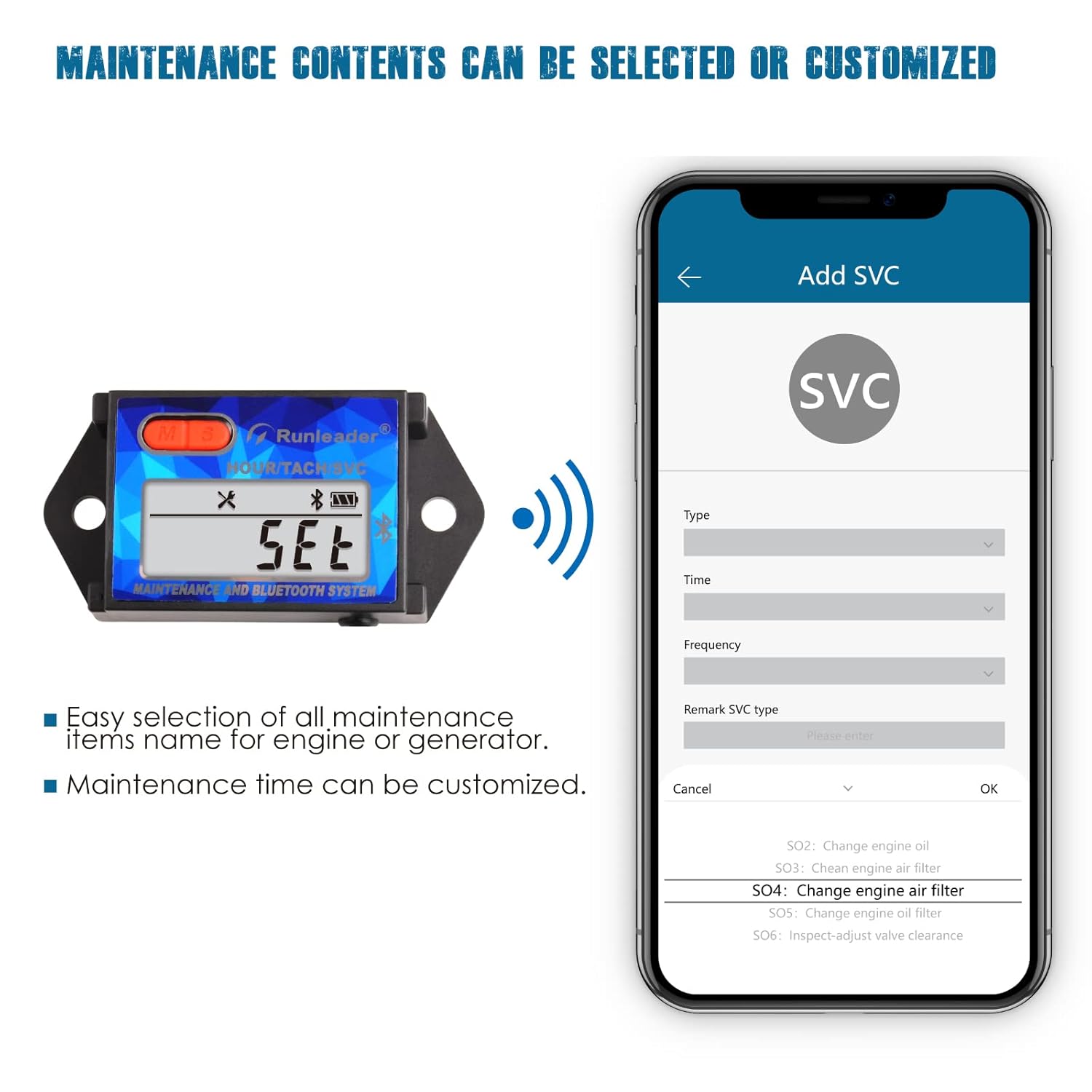
Figure 9: Customizing maintenance contents within the app.

Figure 10: Customizing usage scenarios for different equipment types.
Maintenance
- Maintenance Reminders: Utilize the 32 customizable maintenance groups within the "Moresee" APP to set timely reminders for oil changes, filter replacements, spark plug checks, and other routine services.
- Battery Replacement: The device uses a CR2032 coin cell battery. When the low battery reminder appears (Figure 6), replace the battery by accessing the battery compartment on the back of the unit. Ensure proper polarity.
- Cleaning: The device has an IP67 water resistance rating, meaning it is protected from dust and can withstand immersion in water up to 1 meter for 30 minutes. It can be cleaned with a damp cloth. Avoid using harsh chemicals.

Figure 11: Device construction highlighting the PC transparent board and IP67 waterproof feature.
Troubleshooting
If you encounter issues with your Runleader Digital Bluetooth Tachometer, refer to the following common troubleshooting steps:
- Device Not Turning On:
- Check the internal CR2032 battery. Replace if necessary.
- If using external DC power, ensure the power supply is within the 8V-30V range and connections are secure.
- Bluetooth Connection Issues:
- Ensure Bluetooth is enabled on your mobile device.
- Make sure the "Moresee" APP has Bluetooth permissions enabled in your phone's settings.
- Bring your mobile device closer to the Runleader unit during pairing.
- Restart both the "Moresee" APP and your mobile device.
- If issues persist, try unpairing and re-pairing the device in the app.
- Inaccurate RPM Readings:
- Ensure the signal wire is correctly wrapped around the spark plug wire. Adjust the number of wraps if needed.
- Verify the engine firing pattern setting in the "Moresee" APP is correct for your engine type.
- Data Not Synchronizing with APP:
- Confirm the device is successfully connected via Bluetooth to the app.
- Check your mobile device's internet connection if the app requires it for certain features (though core data sync is local via Bluetooth).
Warranty and Support
Runleader provides reliable technical support and excellent after-sales service for this product.
- Warranty: This product comes with a 2-year warranty from the date of purchase. Please retain your proof of purchase for warranty claims.
- Technical Support: For any technical inquiries or assistance beyond this manual, please contact Runleader customer support. Refer to the product packaging or the official Runleader website for contact information.


