1. Introduction
Thank you for choosing the ALISENED 30-inch Small Computer Desk. This desk is designed to provide a functional and space-saving workstation for various environments, including home offices, dorm rooms, and small apartments. It features an integrated keyboard tray, a monitor stand, and additional storage shelves to help organize your workspace efficiently.
This manual provides detailed instructions for assembly, operation, maintenance, and troubleshooting to ensure you get the most out of your new desk. Please read this manual thoroughly before assembly and retain it for future reference.
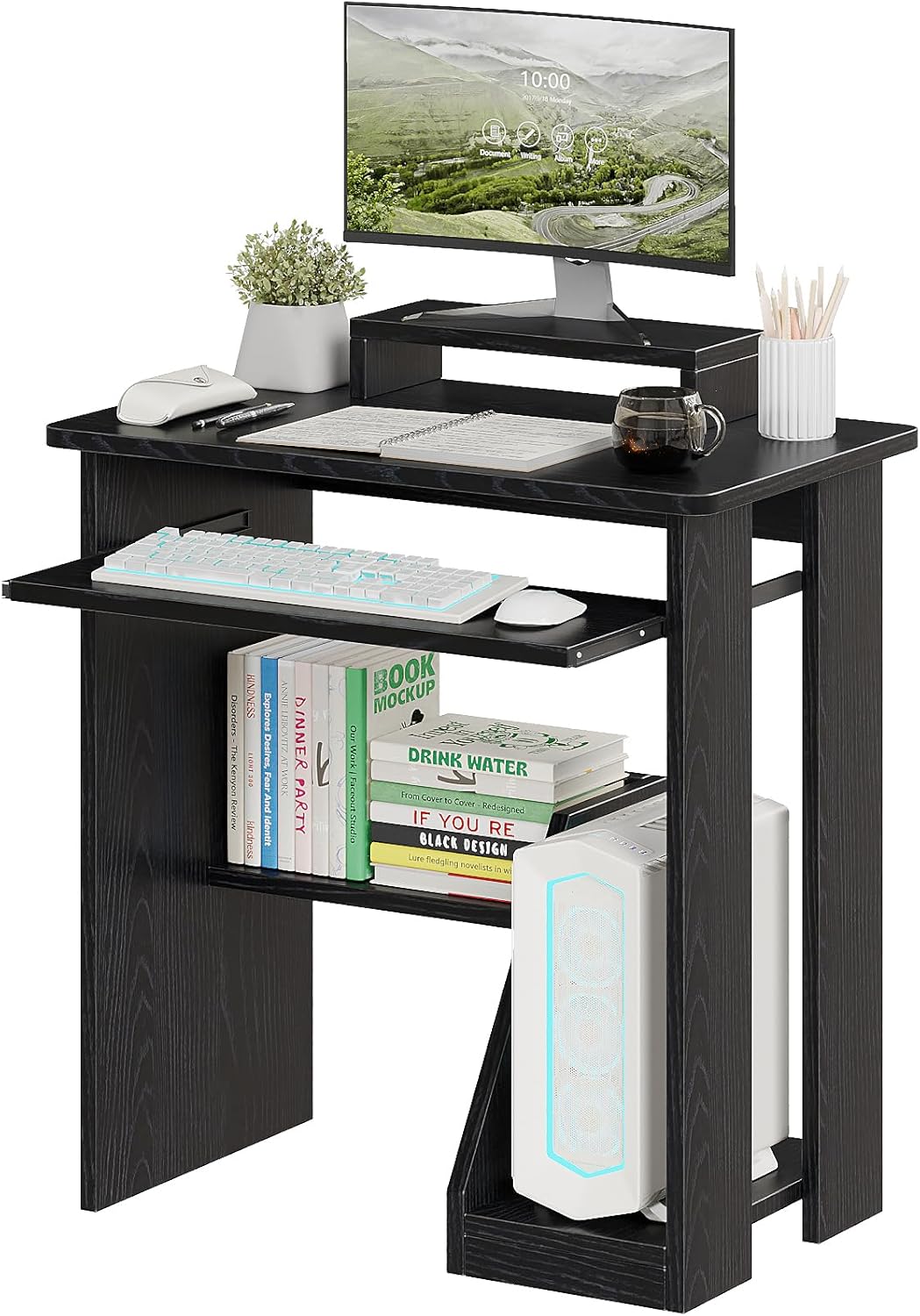
An overview of the ALISENED 30-inch Small Computer Desk, showcasing its compact design and integrated features like the monitor stand and keyboard tray.
2. Important Safety Information
Please observe the following safety guidelines to prevent injury or damage to the product:
- Always assemble the desk on a stable, flat, and clean surface to ensure proper alignment and prevent scratching components.
- Secure the desk to the wall using the provided mounting accessories to prevent tipping. This is especially important in households with children or pets.
- Do not overload the desk or shelves beyond their intended weight capacity.
- Keep small parts and packaging materials away from children to avoid choking hazards.
- Ensure all screws and fasteners are tightened securely before use. Periodically check and re-tighten if necessary.
3. Package Contents
Before beginning assembly, verify that all components listed below are present and undamaged. If any parts are missing or damaged, please contact customer support.
- Desktop Panel
- Keyboard Tray
- Monitor Stand
- Side Panels (Left & Right)
- Storage Shelves
- CPU Holder Panel
- Assembly Hardware (screws, dowels, cam locks, etc.)
- Assembly Tools (screwdriver, hex key)
- Anti-tip Wall Anchors
4. Assembly Instructions
Assembly typically takes approximately 30-60 minutes. All necessary tools are included in the package. Follow these steps carefully:
- Prepare the Area: Clear a spacious, flat, and clean area for assembly. Lay out all components and hardware.
- Attach Side Panels: Connect the side panels to the main desktop panel using the provided hardware. Ensure they are oriented correctly.
- Install Keyboard Tray Rails: Secure the sliding rails for the keyboard tray to the designated slots on the side panels.
- Assemble Storage Shelves: Attach the storage shelves between the side panels according to the pre-drilled holes.
- Integrate CPU Holder: Assemble the CPU holder section and attach it to the lower part of the desk structure.
- Insert Keyboard Tray: Slide the keyboard tray onto its installed rails.
- Place Monitor Stand: The monitor stand is designed to rest securely on the main desktop surface. It is not permanently affixed, allowing for flexible positioning to suit your ergonomic needs.
- Final Tightening & Stability Check: Once all components are assembled, gently tighten all screws. Do not overtighten. Ensure the desk is stable and level.
- Install Anti-tip Anchors: For safety, attach the anti-tip wall anchors to the back of the desk and secure them to a wall stud.

Detailed dimensions of the desk, including height, width, depth, and measurements for the keyboard tray, monitor stand, and storage shelves.
5. Operating Instructions
The ALISENED computer desk is designed for ease of use and ergonomic comfort.
- Keyboard Tray: The integrated keyboard tray slides smoothly in and out. Pull it out when typing and push it back in to save space when not in use. This helps maintain an ergonomic typing position and keeps your desktop clear.

Illustration of the smooth-gliding keyboard tray, designed for ergonomic typing and space-saving storage.
- Monitor Stand: Place your monitor on the elevated stand to raise your screen to eye level. This promotes better posture and reduces strain on your neck and eyes during prolonged use. The stand can be repositioned on the main desktop as needed.

Demonstration of the elevated monitor stand's benefit in promoting proper posture and reducing neck strain by raising the screen to eye level.
- Storage Shelves and CPU Holder: Utilize the lower shelves for storing books, documents, or other office supplies. The dedicated CPU holder provides a secure and accessible spot for your computer tower, keeping it off the floor and out of the way.

View of the integrated storage solutions, including shelves for books and supplies, and a designated space for a computer tower.
6. Maintenance
To keep your ALISENED computer desk in optimal condition:
- Cleaning: Wipe the desk surfaces with a damp cloth. Avoid harsh chemicals or abrasive cleaners, which can damage the finish.
- Regular Checks: Periodically inspect all screws and fasteners to ensure they remain tight. Re-tighten if necessary to maintain stability.
- Avoid Excessive Moisture: Protect the desk from prolonged exposure to moisture or direct sunlight to prevent warping or discoloration.
7. Troubleshooting
If you encounter any issues with your desk, please refer to the following common solutions:
- Desk is Wobbly: Ensure all screws are fully tightened. Check that the desk is on a level surface. If not, use furniture pads or shims to stabilize.
- Keyboard Tray Not Sliding Smoothly: Check the rails for any obstructions or debris. Ensure the rails are installed correctly and lubricate with a silicone spray if needed.
- Monitor Stand Appears Loose: The monitor stand is designed to be movable and not permanently fixed to the desktop. This allows for flexible positioning. Ensure it is placed on a stable part of the main desktop.
- Missing Parts: Double-check the packaging. If parts are genuinely missing, contact ALISENED customer support with your purchase details.
8. Specifications
| Feature | Detail |
|---|---|
| Brand | ALISENED |
| Model Number | 1213 |
| Product Dimensions (D x W x H) | 17.7"D x 30"W x 30"H (45cm D x 75cm W x 75cm H) |
| Color | Black |
| Material | Engineered Wood (Base & Top), Alloy Steel (Furniture Legs) |
| Special Features | Keyboard Tray Included, Monitor Stand, Storage Shelves, CPU Holder |
| Item Weight | 20 Pounds |
| Assembly Required | Yes (All tools included) |
| Product Care Instructions | Damp cloth |
9. Warranty and Support
This ALISENED product comes with a Limited Warranty. Please refer to your purchase documentation or contact ALISENED customer service for specific warranty terms and conditions.
For technical assistance, missing parts, or any other inquiries, please contact ALISENED customer support through the retailer's platform or the official ALISENED website. Please have your model number (1213) and purchase date ready when contacting support.