
1. Introduction
This manual provides detailed instructions for the safe and efficient operation, setup, maintenance, and troubleshooting of your IMRELAX 400W LED Moving Head Light. Please read this manual thoroughly before operating the device to ensure optimal performance and safety.
2. Product Features
- Powerful 400W LED Module – Delivers ultra-bright, high-efficiency output with 50,000-hour lifespan for professional lighting performance.
- 3-in-1 Versatility – Combines beam, spot, and wash effects in one fixture with 15–60° motorized zoom and precise focus.
- Advanced Color Effects – Features CMY color mixing, CTO filter, and 9-color wheel for vibrant, customizable lighting.
- Stunning Visuals – Equipped with 2 gobo wheels (static & rotating), dual prisms (linear + circular), and smooth 0–100% dimming.
- Easy Control & Installation – Supports DMX512, sound, auto, and master-slave modes, with a 180° rotatable touch screen and mounting brackets included.
3. Setup Guide
Before setting up the IMRELAX 400W LED Moving Head Light, ensure you have a stable surface or appropriate rigging for mounting. Always connect the power last after all other connections are secure.
3.1 Unpacking
Carefully remove the fixture from its packaging. Inspect for any signs of damage during transit. Retain all packaging materials for future transport or storage.
3.2 Mounting
The fixture can be floor-mounted or rigged using appropriate clamps and safety cables (not included). Ensure the mounting surface or truss can support the fixture's weight (50.7 pounds). Use the included mounting brackets for secure installation.
3.3 Connections
- Power Connection: Connect the provided power cable to the "Power In" port on the fixture and to a suitable 120V (AC) power outlet.
- DMX Connection: For DMX control, connect a DMX cable from your DMX controller to the "DMX In" port on the fixture. For multiple fixtures, daisy-chain them by connecting the "DMX Out" of the first fixture to the "DMX In" of the next.
4. Operating Instructions
The IMRELAX 400W LED Moving Head Light offers multiple control modes for versatile operation.
4.1 Control Panel and Display
The fixture features a 180° rotatable touch screen display for easy navigation and setting adjustments. Use the Menu, Up, Down, and Enter buttons to navigate through the options.
4.2 Operating Modes
- DMX512 Mode: Allows for precise control over all fixture functions using a DMX controller. Refer to the DMX channel chart (typically provided in a separate DMX manual or appendix) for specific channel assignments.
- Sound-Activated Mode: The fixture reacts to ambient sound, creating dynamic light shows. Adjust sensitivity via the control panel.
- Auto Mode: Pre-programmed light sequences run automatically. Select from various built-in programs.
- Master-Slave Mode: Link multiple fixtures where one acts as the master (controlling unit) and others as slaves (following the master's commands).
4.3 Basic Functions
- Pan/Tilt: Control the horizontal (pan) and vertical (tilt) movement of the head.
- Zoom: Adjust the beam angle from 15° to 60° for wide washes or tight beams.
- Focus: Sharpen or soften the edges of the light beam and gobos.
- Color Mixing (CMY): Create a vast spectrum of colors by mixing Cyan, Magenta, and Yellow.
- CTO Adjustment: Adjust color temperature from cool to warm white.
- Color Wheel: Select from 9 pre-set colors.
- Gobo Wheels: Project various patterns using static and rotating gobos.
- Prisms: Create multi-faceted beam effects using linear and circular prisms.
- Dimming: Smooth 0-100% electronic dimming for intensity control.
5. Media Gallery
5.1 Product Images

Front view of the IMRELAX 400W LED Moving Head Light, showcasing its sleek design and powerful lens.

Rear view of the light fixture, showing the power input/output, DMX connections, and cooling vents.

Close-up of the control panel with the 180° rotatable touch screen and navigation buttons.

Demonstration of the CMY color mixing capabilities, showing various color outputs on a wall.

Examples of different gobo patterns projected by the light fixture, showcasing its visual effects.

Further examples of the light's color output, demonstrating the range of the 9-color wheel.
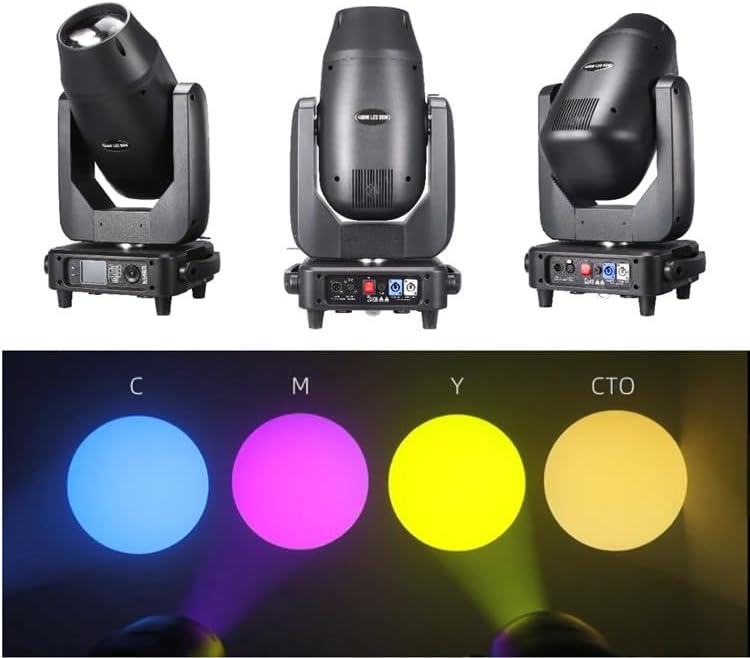
Visual representation of CMY color mixing and CTO adjustment, showing the effect on light output.

Detailed view of various gobo patterns available from the fixture's gobo wheels.
5.2 Official Product Videos
This video demonstrates the various beam, spot, wash, and zoom functions of the IMRELAX 400W LED Moving Head Light, including its CMY color mixing and CTO adjustment capabilities. It showcases the dynamic movement and diverse effects of the fixture in a studio setting.
6. Maintenance
Regular maintenance ensures the longevity and optimal performance of your IMRELAX 400W LED Moving Head Light.
6.1 Cleaning
- Periodically clean the exterior of the fixture with a soft, dry cloth.
- Ensure lenses and optical components are free from dust and debris. Use a lens cleaning solution and a soft, lint-free cloth for optical parts.
- Keep ventilation openings clear to prevent overheating.
6.2 Storage
When not in use, store the fixture in its original packaging or a suitable flight case in a dry, dust-free environment.
7. Troubleshooting
This section addresses common issues you might encounter with your fixture.
| Problem | Possible Cause | Solution |
|---|---|---|
| Fixture does not power on. | No power supply; faulty cable; blown fuse. | Check power connection; test cable; replace fuse (if applicable and safe to do so). |
| No DMX control. | Incorrect DMX address; faulty DMX cable; DMX termination issue. | Verify DMX address settings; check DMX cable connections; ensure DMX terminator is used for long chains. |
| Light output is dim or inconsistent. | Dust on lens; overheating; LED module issue. | Clean lenses; ensure proper ventilation; contact support if problem persists. |
For issues not listed here, please contact IMRELAX customer support.
8. Specifications
| Attribute | Detail |
|---|---|
| Model Number | IM-LED400 |
| Light Source Type | Light Emitting Diode |
| Power Source | Corded Electric |
| Voltage | 120 Volts (AC) |
| Material | Aluminum |
| Finish Type | Powder Coated |
| Item Weight | 50.7 Pounds |
| Product Dimensions | 21"L x 18"W x 23.8"H |
| Color Temperature | 8000 Kelvin |
| Mounting Type | Floor Mount |
| Specification Met | CE, FCC, RoHS |
| Number of Light Sources | 1 |
| Included Components | LED Module |
9. Warranty and Support
IMRELAX is committed to providing high-quality products and excellent customer service.
9.1 Warranty Information
All products purchased from IMRELAX Stage Lighting store are provided with free parts maintenance within 2 years from the date of purchase.
9.2 Product Service
Lifetime product service is available for all IMRELAX products.
9.3 Contact Information
For any inquiries, technical support, or warranty claims, please visit the IMRELAX Store on Amazon or refer to your purchase documentation for direct contact methods.