
1. Introduction
This manual provides comprehensive instructions for the safe and efficient operation of your BetterSub 15x15 Inch Digital Slide Out Heat Press Machine. Please read this manual thoroughly before use to ensure proper setup, operation, and maintenance.
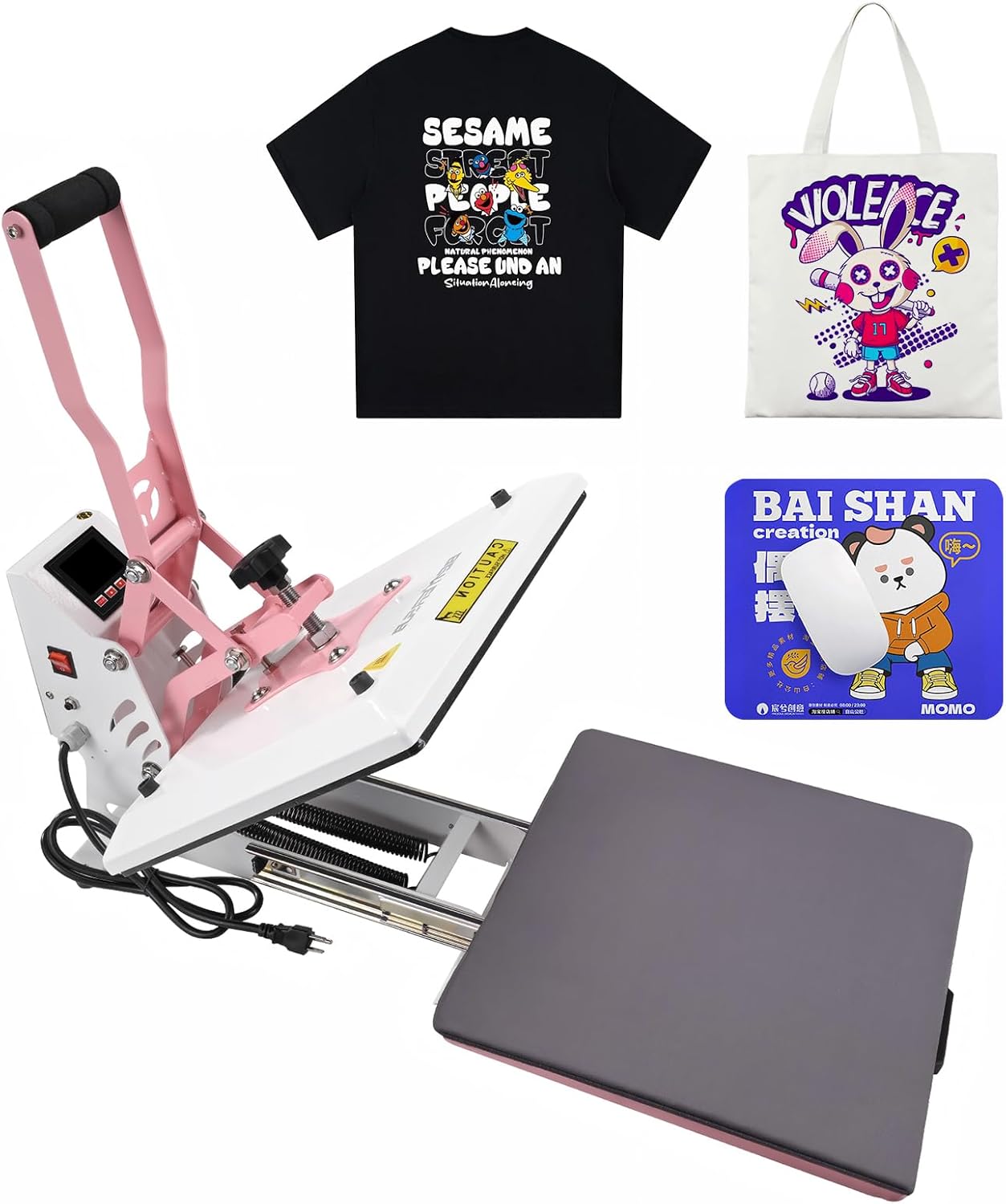
Figure 1: BetterSub 15x15 Inch Digital Slide Out Heat Press Machine.
2. Safety Instructions
Your safety is paramount. Please observe the following precautions:
- Keep out of reach of children: This machine operates at high temperatures and pressures.
- Power Supply: Ensure the power socket used is up to standard (110V) and do not overload the circuit.
- Hot Surfaces: The heat platen and surrounding areas become extremely hot during operation. Avoid direct contact. Use caution when handling materials.
- Initial Heat-up: The first heat-up may take up to 20 minutes to reach 360°F/180°C. Test the machine several times with a waste cloth before production.
- Unattended Operation: Do not leave the machine unattended while it is powered on or heating.
- Emergency Shut-off: In case of malfunction or damage, immediately cut the power and unplug the machine. Contact customer service.
- Fuse Protection: The machine is equipped with solid-state relays for circuit protection, reducing fire risk from overvoltage.
- Cleaning: Always unplug the power cord and allow the machine to cool completely before cleaning.

Figure 2: Safety fuse for circuit protection.
3. Product Overview
The BetterSub 15x15 Inch Digital Slide Out Heat Press Machine is designed for efficient and precise heat transfers. Key features include:
- 15x15 Inch Heat Platen: Large surface area suitable for various items like T-shirts, garments, bags, mouse mats, jigsaw puzzles, and ceramic tiles.
- Digital Control Panel: Provides accurate control over temperature (0-440°F) and time (0-499 seconds).
- Slide Out Drawer: Allows for easy and safe placement of materials, reducing burn risks and ensuring precise transfer alignment.
- Adjustable Pressure Knob: Easily adjust pressure for different material thicknesses.
- Teflon Coated Surface: The heat platen features a non-stick Teflon surface for easy cleaning and durability.
- Uniform Heating: Premium thicker aluminum casting ensures fast and even heat distribution across the platen.
- Double Springs: Enhanced spring mechanism for stronger and more consistent pressure.
- Durable Heat Resistant Silicone Pad: Provides a stable and protective base for pressing.

Figure 3: Key features of the heat press machine.

Figure 4: Advantages of the BetterSub design.
4. Setup
- Unpacking: Carefully remove the heat press from its packaging. Inspect for any damage during transit.
- Placement: Place the machine on a stable, heat-resistant surface capable of supporting its weight (approximately 46 pounds). Ensure adequate ventilation around the machine.
- Power Connection: Connect the power cord to a standard 110V grounded electrical outlet.
- Initial Test: Before first use, power on the machine and allow it to heat up to a moderate temperature (e.g., 300°F). Perform several test presses with a waste cloth to familiarize yourself with the controls and ensure proper function.
Video 1: Overview of the BetterSub Heat Press, demonstrating its compact design and basic features.
5. Operating Instructions
5.1 Setting Temperature and Time
- Power On: Turn on the machine using the power switch located on the side.
- Set Temperature: Press the "SET" button on the digital control panel. The "PV" (Process Value) display will flash. Use the up/down arrows to set the desired temperature (0-440°F). Press "SET" again to confirm.
- Set Time: After setting the temperature, the "SV" (Set Value) display will flash. Use the up/down arrows to set the desired time (0-499 seconds). Press "SET" again to confirm.
- Heating: The machine will begin heating to the set temperature. The "Heating" indicator light will be on. Wait until the set temperature is reached.
5.2 Adjusting Pressure
The pressure can be adjusted using the black knob located on top of the heat platen. Turn clockwise for more pressure, counter-clockwise for less. Adjust based on the thickness of your material and transfer type.
5.3 Transfer Process
- Prepare Material: Place your garment or item onto the slide-out drawer. Smooth out any wrinkles.
- Position Transfer: Carefully position your DTF, sublimation, or HTV transfer onto the material.
- Slide In: Push the drawer back into position under the heat platen.
- Press: Lower the handle firmly until the heat platen makes full contact with the material. The timer will automatically start counting down.
- Release: Once the timer beeps, lift the handle to release the pressure and slide out the drawer.
- Remove Transfer: Carefully remove the transfer paper according to its specific instructions (hot peel or cold peel).

Figure 5: Visual guide for the heat transfer process.
Video 2: Demonstration of the slide-out drawer feature for easy material placement.
6. Maintenance
- Cleaning the Platen: After use, allow the heat platen to cool completely. Wipe the Teflon surface with a soft, damp cloth. Avoid abrasive cleaners or tools that could damage the coating.
- General Cleaning: Keep the machine free from dust and debris. Regularly wipe down the exterior with a dry cloth.
- Storage: Store the heat press in a dry, clean environment when not in use.
- Cable Inspection: Periodically check the power cord and USB cable for any signs of wear or damage. Replace if necessary.
7. Troubleshooting
| Problem | Possible Cause | Solution |
|---|---|---|
| Machine does not power on | No power supply; Power switch off; Blown fuse | Check power cord connection; Turn on power switch; Check and replace fuse if necessary. |
| Uneven heat transfer | Uneven pressure; Incorrect temperature setting; Material not flat | Adjust pressure knob; Verify temperature settings; Ensure material is smooth and flat on the platen. |
| Transfer peeling/fading | Incorrect temperature/time; Insufficient pressure; Incorrect peel method | Adjust temperature/time settings; Increase pressure; Follow specific transfer instructions for hot/cold peel. |
| Error codes (e.g., "E1", "E2") | Sensor malfunction; Overheating | Immediately cut power and unplug. Allow to cool. If problem persists, contact customer service. |
8. Specifications
- Brand: BetterSub
- Model: BYBS- 15x15 Slide Out
- Product Dimensions: 15"L x 15"W x 14.6"H (38cm x 38cm x 37cm)
- Item Weight: 46 pounds (20.8 kg)
- Voltage: 110 Volts
- Wattage: 1000 Watts
- Upper Temperature Rating: 480°F (249°C)
- Temperature Range: 0-440°F (0-226°C)
- Time Range: 0-499 seconds
- Material: Alloy Steel, Aluminum
- Recommended Uses: T-Shirt, Bag, Mouse Pad, Plate, Other flat surfaced items.
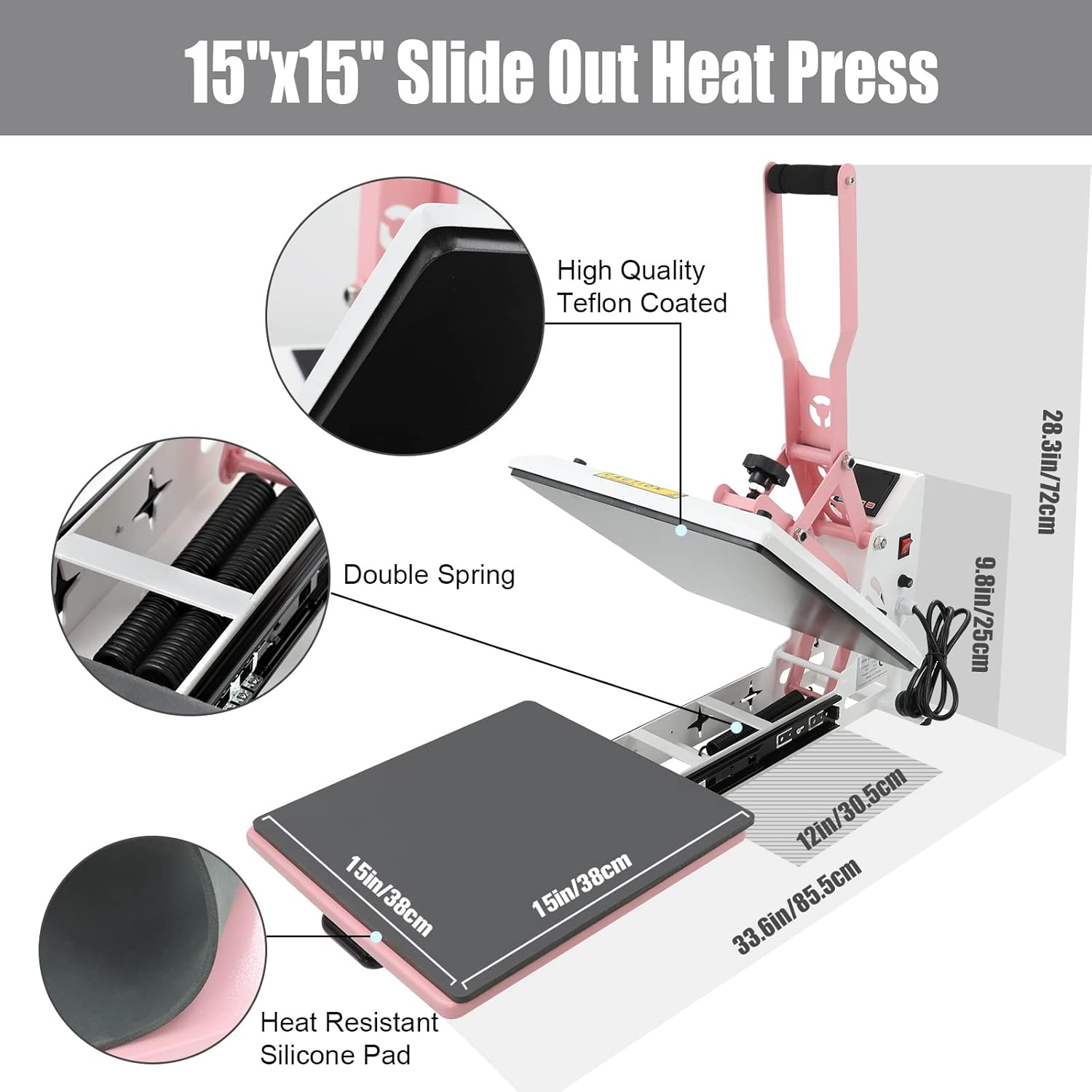
Figure 6: Machine dimensions and key components.
9. Warranty and Support
For warranty information, technical support, or customer service inquiries, please refer to the contact details provided with your product packaging or visit the official BetterSub website. Keep your purchase receipt for warranty claims.
