1. Introduction
This manual provides essential information for setting up, operating, and maintaining your Samsung Galaxy S22 5G. The device features a 6.1-inch Dynamic AMOLED 2X display, a powerful 4nm processor, and an advanced camera system designed for exceptional performance and user experience.

Figure 1: Samsung Galaxy S22 5G, showcasing its sleek design and camera module.
2. What's in the Box
Upon unboxing your Samsung Galaxy S22 5G, verify that all components are present:
- Samsung Galaxy S22 5G Smartphone (Model SM-S901W)
- USB-C to USB-C Cable
- SIM Ejection Pin
- Quick Start Guide
- 25W Super Fast Charge Cube (Adapter)

Figure 2: The Samsung Galaxy S22 5G alongside its included 25W Super Fast Charge Cube.
3. Setup Guide
- Insert SIM Card: Locate the SIM card tray on the side of the device. Use the provided SIM ejection pin to open the tray. Insert your Nano-SIM card into the tray with the gold contacts facing down. Close the tray securely.
- Power On: Press and hold the Power/Side key until the Samsung Galaxy logo appears.
- Initial Setup: Follow the on-screen prompts to select your language, connect to a Wi-Fi network, and sign in to your Google or Samsung account.
- Data Transfer: If you are upgrading from another device, use Samsung Smart Switch to transfer your data, contacts, photos, and apps.
- Security Setup: Configure your preferred security method, such as fingerprint recognition, face recognition, PIN, pattern, or password.
4. Operating Instructions
4.1 Basic Navigation
- Home Screen: Swipe up or down from the home screen to access the Apps screen.
- Notifications Panel: Swipe down from the top of the screen to view notifications and quick settings.
- Recent Apps: Tap the Recent Apps button (three vertical lines) to view and switch between recently used applications.
- Back: Tap the Back button (arrow) to return to the previous screen.
4.2 Display Features
The 6.1-inch Infinity-O FHD+ Dynamic AMOLED 2X Display offers a 120Hz refresh rate for smooth scrolling and vibrant visuals. Vision Booster technology enhances visibility outdoors, ensuring clarity even in bright sunlight.

Figure 3: The vibrant 6.1-inch Dynamic AMOLED 2X display of the Galaxy S22 5G.
4.3 Camera Operation
The Galaxy S22 5G features a versatile triple-camera system:
- Rear Camera: 50MP (main, f/1.8), 10MP (telephoto, f/2.4), 12MP (ultrawide, f/2.2).
- Front Camera: 10MP (f/2.2).
Key features include Nightography for enhanced low-light photography, Super Clear Glass to reduce lens flare, and AI-powered processing for optimal image quality.
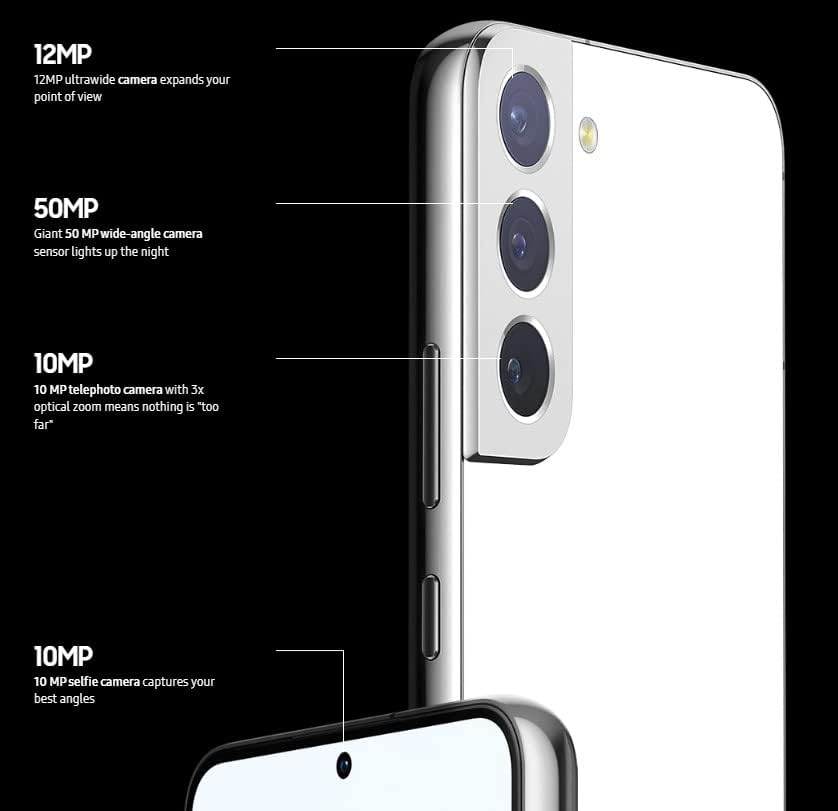
Figure 4: Detailed view of the Galaxy S22 5G's triple camera system and its specifications.
Video 1: Demonstration of the Samsung Galaxy S22 5G camera and its features.
4.4 Performance and Battery
Powered by a 4nm processor (Qualcomm SM8450 Snapdragon 8 Gen 1), the device delivers smooth performance for multitasking, gaming, and 4K video editing. The 3700mAh battery intelligently adapts to usage patterns, providing over 24 hours of power on a single charge. Wireless PowerShare allows you to charge other compatible devices wirelessly.
Video 2: A demonstration of the smooth operation and responsiveness of the Galaxy S22 5G.
5. Connectivity
The Samsung Galaxy S22 5G supports a wide range of network technologies:
- 5G: 1/3/5/7/8/20/28/38/41/66/71/260/261 SA/NSA/Sub6/mmWave
- 4G LTE: 1/2/3/4/5/7/8/12/13/14/18/19/20/25/26/28/29/30/38/39/40/41/46/48/66/71
- 3G: HSDPA 850/900/1700(AWS)/1900/2100, CDMA2000 1xEV-DO
- CDMA: 800/1900
- Wireless: Wi-Fi, Bluetooth, GPS
This device is factory unlocked and compatible with most GSM and CDMA carriers, including T-Mobile, AT&T, MetroPCS, Verizon, and Sprint.
6. Maintenance
- Software Updates: Regularly check for and install software updates to ensure optimal performance and security.
- Cleaning: Use a soft, lint-free cloth to clean the screen and body of the device. Avoid harsh chemicals.
- Battery Care: To prolong battery life, avoid extreme temperatures and do not leave the device fully charged or fully discharged for extended periods.
- Storage Management: Periodically clear unnecessary files and apps to maintain device speed and free up storage.
7. Troubleshooting
| Problem | Possible Solution |
|---|---|
| Device not powering on | Ensure the battery is charged. Connect to the charger for at least 10 minutes. If still unresponsive, perform a force restart by holding the Power/Side key and Volume Down key simultaneously for 7-10 seconds. |
| Apps crashing or freezing | Close and reopen the app. Clear the app's cache and data in Settings > Apps. Ensure the app and device software are up to date. |
| Poor battery life | Adjust screen brightness, disable unnecessary background apps, turn off Wi-Fi/Bluetooth when not in use, and check for power-intensive apps in Battery settings. |
| Network connectivity issues | Toggle Airplane Mode on and off. Restart the device. Check SIM card insertion. Reset network settings in Settings > General management > Reset > Reset network settings. |
8. Specifications
| Feature | Detail |
|---|---|
| Model Name | Samsung Galaxy S22 5G |
| Model Number | SM-S901W |
| Display | 6.1 Inches, 1080 x 2340 pixels, Dynamic AMOLED 2X, 120Hz Refresh Rate |
| Processor | Qualcomm SM8450 Snapdragon 8 Gen 1 (4 nm), Octa-Core, 3 GHz CPU Speed |
| RAM | 8 GB |
| Internal Storage | 128 GB (No SD Card Slot) |
| Rear Camera | 50MP (f/1.8) + 10MP (f/2.4) + 12MP (f/2.2) |
| Front Camera | 10 MP (f/2.2) |
| Battery Capacity | 3700 mAh |
| Operating System | Android 12, One UI 4.1 |
| Connectivity | 5G, 4G LTE, 3G, CDMA, Wi-Fi, Bluetooth, GPS |
| Dimensions | 6 x 4 x 2 inches |
| Weight | 0.145 ounces |
| Audio Jack | No headphone jack |
9. Warranty and Support
This Samsung Galaxy S22 5G is a renewed product. Please refer to the seller's specific warranty and return policy for details. Typically, renewed products come with a limited warranty provided by the seller or a third-party refurbisher.
- Return Policy: 90-day refund/replacement policy (as per product data).
- Manufacturer Support: For general product information and software support, visit the official Samsung support website.
- Seller Support: For issues related to the renewed condition or specific purchase, contact "Edge Cellular" (seller name from buybox_winner.fulfillment.third_party_seller.name).