
EFFYDESK FRAME-VARIATION
EFFYDESK Electric Height Adjustable Standing Desk Frame User Manual
Model: FRAME-VARIATION
1. Introduction
Thank you for choosing the EFFYDESK Electric Height Adjustable Standing Desk Frame. This manual provides detailed instructions for the assembly, operation, maintenance, and troubleshooting of your new ergonomic desk frame. Please read this manual thoroughly before use to ensure proper function and safety.
2. Important Safety Information
To prevent injury or damage, please observe the following safety precautions:
- Always ensure the desk is properly assembled and anchored to the floor.
- Do not exceed the maximum weight limit of 265 lbs (120 kg).
- Be cautious when adjusting the desk height to prevent injury from pinching or crushing. Ensure no objects or body parts are in the path of the moving frame.
- Keep children and pets away from the desk during operation.
- Do not sit or stand on the desk frame.
- Only use the provided power adapter and components.
- Disconnect power before cleaning or performing maintenance.
3. Package Contents
Please verify that all components are present before beginning assembly:
- Desk Legs (2)
- Crossbar/Frame (1)
- Feet (2)
- Control Panel (1)
- Power Adapter (1)
- Power Cable (1)
- Cable Management Tray (1)
- Assembly Hardware (screws, Allen wrenches)
- User Manual (this document)

Image: Main components of the EFFYDESK Electric Height Adjustable Standing Desk Frame, showing the two legs, crossbar, and feet in white finish.
4. Assembly Instructions
The EFFYDESK frame is designed for quick and easy assembly, typically taking less than 5 minutes. Follow these steps:
- Attach Feet to Legs: Securely fasten the two feet to the bottom of each desk leg using the provided screws.
- Connect Legs to Crossbar: Attach the desk legs to the adjustable crossbar. Ensure the crossbar is extended to your desired width (40” to 70”).
- Install Control Panel: Mount the control panel to the underside of the desk frame using the designated screws.
- Install Cable Management Tray: Attach the cable management tray to the underside of the desk frame.
- Connect Cables: Connect the motor cables from the legs to the control panel. Connect the power adapter to the control panel and then to a power outlet.
- Attach Tabletop (Optional): If you have a tabletop, align it with the pre-drilled holes on the frame and secure it with screws.
- Initial Calibration: After connecting power, the desk may need an initial calibration. Press and hold the 'Down' button until the desk reaches its lowest point and slightly retracts, then release. This resets the system.
For detailed visual instructions, refer to the quick-install guide included in your package.
5. Operating Instructions
Your EFFYDESK frame features an intuitive control panel for easy height adjustment and memory presets.
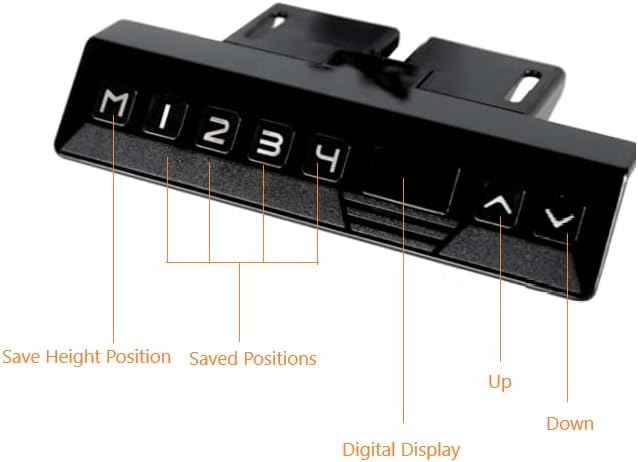
Image: Close-up of the EFFYDESK control panel, showing buttons for Up, Down, Digital Display, Save Height Position (M), and four Saved Positions (1, 2, 3, 4).
5.1. Basic Height Adjustment
- Raise Desk: Press and hold the Up (▲) button to raise the desk to your desired height.
- Lower Desk: Press and hold the Down (▼) button to lower the desk to your desired height.
- The digital display will show the current height in inches or centimeters.
5.2. Setting Memory Presets
You can save up to four preferred height positions for quick adjustments:
- Adjust the desk to your desired height using the Up or Down buttons.
- Press the "M" button. The display will show "S-".
- Within 3 seconds, press the desired preset number (1, 2, 3, or 4). The display will show the number, confirming the position is saved.
5.3. Using Memory Presets
To move the desk to a saved position, simply press the corresponding preset number (1, 2, 3, or 4). The desk will automatically move to that height.
6. Maintenance
Regular maintenance will ensure the longevity and smooth operation of your EFFYDESK frame:
- Cleaning: Wipe the desk frame with a soft, damp cloth. Avoid harsh chemicals or abrasive cleaners.
- Cable Management: Periodically check that all cables are securely connected and not pinched or tangled. Utilize the cable management tray to keep wires tidy.
- Lubrication: The lifting columns are generally maintenance-free. Do not apply lubricants unless specifically instructed by EFFYDESK support.
- Weight Distribution: Distribute weight evenly on the desk surface to prevent strain on the motors.
7. Troubleshooting
If you encounter issues with your desk frame, try the following solutions:
| Problem | Possible Cause | Solution |
|---|---|---|
| Desk does not move. | No power, loose cable, overload, or motor error. | Check power connection. Ensure all motor cables are securely plugged into the control panel. Reduce weight on the desk. Perform a reset (see below). |
| Desk moves unevenly. | Uneven weight distribution or calibration issue. | Ensure weight is evenly distributed. Perform a reset. |
| Digital display shows an error code (e.g., E01, E02). | Specific system error. | Unplug the desk for 10 minutes, then plug it back in. Perform a reset. If the error persists, contact customer support. |
| Desk stops mid-movement. | Overload protection or thermal protection activated. | Reduce weight. Allow the motor to cool down for 20 minutes before attempting to operate again. |
7.1. Reset Procedure
If your desk is not functioning correctly, a reset can often resolve the issue:
- Unplug the power cable from the wall outlet.
- Wait for at least 30 seconds.
- Plug the power cable back into the wall outlet.
- Press and hold the Down (▼) button until the desk reaches its lowest position and slightly retracts, then release. This completes the reset.
8. Product Specifications
| Feature | Detail |
|---|---|
| Brand | EFFYDESK |
| Model Number | FRAME-VARIATION |
| UPC | 628176194387 |
| Product Dimensions (D x W x H) | 85"D x 71"W x 50"H (Frame adjustable width 40" to 70") |
| Color | White |
| Base Material | Alloy Steel |
| Lifting Mechanism | Electric |
| Maximum Weight Recommendation | 265 Pounds (120 kg) |
| Item Weight (Frame) | 78 lbs (35.3 kg) |
| Special Features | Adjustable Height, Ergonomic, Memory Presets |
| Required Assembly | Yes |
9. Warranty Information
EFFYDESK provides an extensive 10-year warranty for your Electric Height Adjustable Standing Desk Frame. This warranty covers defects in materials and workmanship under normal use. Please retain your proof of purchase for warranty claims. For full warranty terms and conditions, please visit the official EFFYDESK website or contact customer support.
10. Customer Support
If you have any questions, require assistance with assembly, or need troubleshooting support, please contact EFFYDESK customer service:
- Website: www.effydesk.ca (Please note: This is a placeholder URL as no specific support URL was provided in the product data. Refer to your product packaging or official brand website for accurate contact information.)
- Email: Refer to brand website
- Phone: Refer to brand website
When contacting support, please have your model number (FRAME-VARIATION) and purchase date available.
Related documentsFRAME-VARIATION


Ask a question about this manual
Ask about setup, troubleshooting, compatibility, parts, safety, or missing instructions. Manuals+ will review the question and use this page’s manual context to help answer it.