
Swissten SW1010
SWISSTEN Elegant Bluetooth Headphones User Manual
Model: SW1010
Product Overview
The SWISSTEN Elegant Bluetooth Headphones are designed for versatile audio playback, offering high-quality sound and multiple connectivity options. These headphones feature Bluetooth wireless connectivity, an integrated FM radio tuner, a microSD card slot for direct music playback, a 3.5mm AUX audio input, and a built-in hands-free microphone. The earcups are pivotable for enhanced comfort during use.

Figure 1: Front view of the SWISSTEN Elegant Bluetooth Headphones, showcasing the sleek black design and earcups.
Package Contents
Upon opening the package, ensure all components are present:
- SWISSTEN Elegant Bluetooth Headphones
- USB Charging Cable
- 3.5mm Audio Cable (AUX)
- User Manual
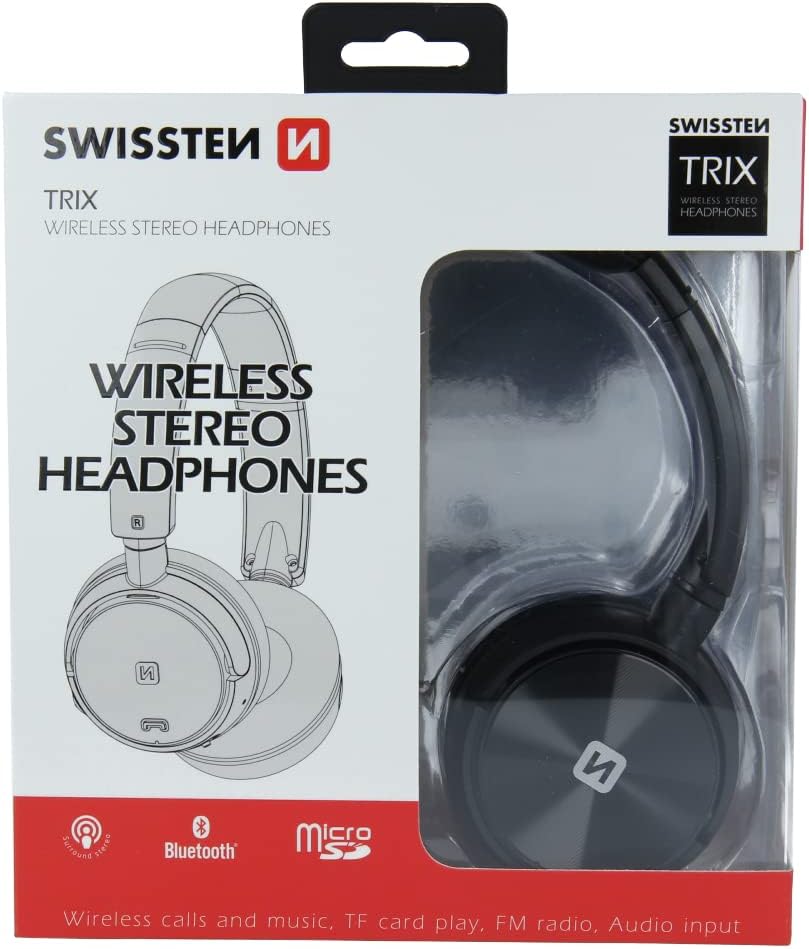
Figure 2: Retail packaging of the SWISSTEN Elegant Bluetooth Headphones, showing the product and key features.
Setup
Charging the Headphones
Before first use, fully charge the headphones. Connect the supplied USB charging cable to the micro USB port on the headphones and the other end to a USB power source (e.g., computer USB port, USB wall adapter). The charging indicator light will illuminate during charging and turn off when fully charged. A full charge takes approximately 2 hours.
Powering On/Off
- To Power On: Press and hold the Power button until the indicator light flashes.
- To Power Off: Press and hold the Power button until the indicator light turns off.

Figure 3: Close-up view of the headphone earcup, highlighting the control buttons, charging port, and 3.5mm audio jack.
Operating Instructions
Bluetooth Pairing
- Ensure the headphones are powered off.
- Press and hold the Power button for approximately 5-7 seconds until the indicator light flashes blue and red alternately, indicating pairing mode.
- On your device (smartphone, tablet, computer), enable Bluetooth and search for available devices.
- Select "SWISSTEN SW1010" (or similar name) from the list of found devices.
- Once paired, the indicator light will flash blue slowly.
The Bluetooth range is approximately 10 meters (33 feet).
Music Playback (Bluetooth/MicroSD/AUX)
- Bluetooth Mode: After successful pairing, play music from your connected device. Use the headphone controls for Play/Pause, Next/Previous Track, and Volume adjustment.
- MicroSD Card Mode: Insert a microSD card (up to 32GB) with MP3, WMA, or WAV audio files into the designated slot. The headphones will automatically switch to microSD mode and begin playback.
- AUX Mode: Connect one end of the 3.5mm audio cable to the headphone's AUX port and the other end to your audio source. The headphones will automatically switch to AUX mode. Note: In AUX mode, controls on the headphones may be limited; control playback from your audio source.
FM Radio Operation
- Power on the headphones.
- Press the Mode button (often labeled 'M' or similar) to switch to FM Radio mode.
- Press the Play/Pause button once to auto-scan and save available FM stations.
- Use the Next/Previous Track buttons to navigate between saved stations.
The FM frequency range is 87.5-108 MHz.
Hands-Free Calling
- Answer Call: Press the Play/Pause button once.
- End Call: Press the Play/Pause button once during a call.
- Reject Call: Press and hold the Play/Pause button for 2 seconds.
- Redial Last Number: Double-press the Play/Pause button.

Figure 4: A person wearing the SWISSTEN Elegant Bluetooth Headphones, demonstrating their comfortable fit.
Maintenance
- Cleaning: Use a soft, dry cloth to clean the headphones. Do not use abrasive cleaners or solvents.
- Storage: Store the headphones in a cool, dry place away from direct sunlight and extreme temperatures.
- Battery Care: To prolong battery life, avoid fully discharging the battery frequently. Charge the headphones regularly, even if not in use for extended periods.
- Water Exposure: These headphones are not waterproof. Avoid exposure to water or excessive moisture.
Troubleshooting
| Problem | Possible Cause | Solution |
|---|---|---|
| Headphones do not power on. | Low battery. | Charge the headphones fully. |
| Cannot pair via Bluetooth. | Headphones not in pairing mode; device Bluetooth off; too far from device. | Ensure headphones are in pairing mode (flashing blue/red). Turn on Bluetooth on your device. Move headphones closer to the device (within 10m). |
| No sound. | Volume too low; incorrect mode selected; AUX cable not fully inserted. | Increase volume on headphones and connected device. Ensure correct mode (Bluetooth, MicroSD, AUX, FM) is selected. Re-insert AUX cable firmly. |
| Poor FM radio reception. | Weak signal; interference. | Move to an area with better signal. Re-scan stations. |
Specifications
| Feature | Detail |
|---|---|
| Model Number | SW1010 |
| Bluetooth Version | V4.2 |
| Supported Bluetooth Profiles | A2DP, AVRCP |
| Supported Audio Formats (MicroSD) | MP3 (8-320 Kbps), WMA (5-320 Kbps), WAV (16-1536 Kbps) |
| FM Radio Frequency Range | 87.5-108 MHz |
| Speaker Diameter | 40 mm |
| Impedance | 32 ohm |
| Sensitivity | 108 +/- 3 dB |
| Frequency Response | 20 – 20,000 Hz |
| Operating Range | 10 m |
| Charging Time | 2 hours |
| Operating Time | 6 – 8 hours |
| Connectivity | Wireless Bluetooth, 3.5mm Jack |
| Special Features | Microphone included, FM Radio, MicroSD slot |
| Form Factor | Over-Ear (Supra-Auriculaire) |
| Material | Faux Leather (Simili cuir) |
Warranty and Support
For warranty information and technical support, please refer to the official SWISSTEN website or contact your retailer. Keep your proof of purchase for warranty claims.
Manufacturer: SWISSTEN
ASIN: B0BC9F9LWM
Ask a question about this manual
Ask about setup, troubleshooting, compatibility, parts, safety, or missing instructions. Manuals+ will review the question and use this page’s manual context to help answer it.