1. Introduction
Thank you for choosing the BEENOCAM D5 3MP 2K Solar Security Camera. This wireless outdoor surveillance camera is designed to provide reliable security monitoring with its solar power capabilities, high-resolution video, and advanced detection features. This manual provides detailed instructions for setting up, operating, and maintaining your camera to ensure optimal performance.
2. Product Features
- 100% Wireless Operation: Powered by an 8000mAh rechargeable lithium battery and a solar panel, ensuring continuous operation without external power cables. Offers up to 5 months of normal operation and 10 months of standby time.
- 2K Super High Resolution: Captures video in 2034 x 1296p, providing clear and detailed images.
- Color Night Vision & WDR: Provides clear color images at night and Wide Dynamic Range (WDR) technology automatically compensates for low light and overexposure for balanced visuals.
- Advanced Motion Detection: Features real-time motion detection with humanoid recognition, minimizing false alarms. Includes white LED light flashing and siren alerts (auto or manual).
- Two-way Audio: Allows for real-time communication with individuals in the camera's field of view.
- Remote Viewing & Playback: Access live video and recorded footage from anywhere via the O-KAM application.
- Weatherproof Design: IP66 rated for outdoor use, capable of withstanding various weather conditions including rain, snow, and dust.
3. Package Contents
Please check the package contents upon receipt. If any items are missing or damaged, contact customer support.
- BEENOCAM D5 Security Camera Unit
- Solar Panel
- Mounting Bracket
- Mounting Screws and Wall Plugs
- USB Charging Cable
- User Manual
4. Setup Guide
4.1 Initial Charging
Before first use, fully charge the camera's internal battery using the provided USB cable. Connect the USB cable to the camera's charging port and a 5V/2A USB power adapter (not included). The charging indicator light will show the charging status.

Figure 4.1: Initial charging and solar panel connection. The camera's 8000mAh battery provides extended operation, supplemented by the solar panel.
4.2 App Installation
Download and install the O-KAM application from your smartphone's app store (iOS App Store or Google Play Store). Register for an account and log in.
4.3 Camera Pairing
- Open the O-KAM app and tap the "Add Device" or "+" icon.
- Follow the on-screen instructions to select your camera model.
- Power on the camera. The camera will enter pairing mode (indicated by a flashing LED).
- Connect your smartphone to a 2.4GHz Wi-Fi network. The camera only supports 2.4GHz Wi-Fi.
- Scan the QR code displayed on your phone screen with the camera lens. Ensure the camera is approximately 15-20 cm (6-8 inches) from the phone screen.
- Once connected, the camera will confirm successful pairing, and you can name your device within the app.
4.4 Mounting the Camera
Choose a suitable location for mounting, ensuring good Wi-Fi signal strength and adequate sunlight exposure for the solar panel. The camera is IP66 weatherproof for outdoor installation.

Figure 4.4: Camera mounted outdoors, demonstrating its IP66 waterproof rating and resilience to rain, snow, sun, temperature changes, and dust.
- Mark the drilling positions using the mounting bracket as a template.
- Drill holes and insert wall plugs if mounting on masonry.
- Secure the mounting bracket to the wall with screws.
- Attach the camera to the mounting bracket and adjust the angle for optimal viewing.
- Connect the solar panel cable to the camera's charging port. Position the solar panel to receive maximum direct sunlight.
5. Operating Instructions
5.1 Live View and Remote Access
Open the O-KAM app and select your camera to view the live feed. You can access the camera remotely from anywhere with an internet connection.

Figure 5.1: Two-way audio in action, allowing communication with individuals near the camera. Multiple users can view the live video simultaneously.
5.2 Motion Detection and Alerts
The camera features advanced motion detection. When motion is detected, you will receive real-time notifications on your smartphone via the O-KAM app.
- Humanoid Detection: Configure settings to detect human shapes, reducing false alarms from animals or swaying branches.
- Activity Zones: Define specific areas within the camera's view where motion detection should be active.
- Sensitivity Adjustment: Adjust the motion detection sensitivity to suit your environment.
- Alarm Actions: Set the camera to trigger a white LED light flash and/or an audible siren upon detection. These can be activated automatically or manually via the app.
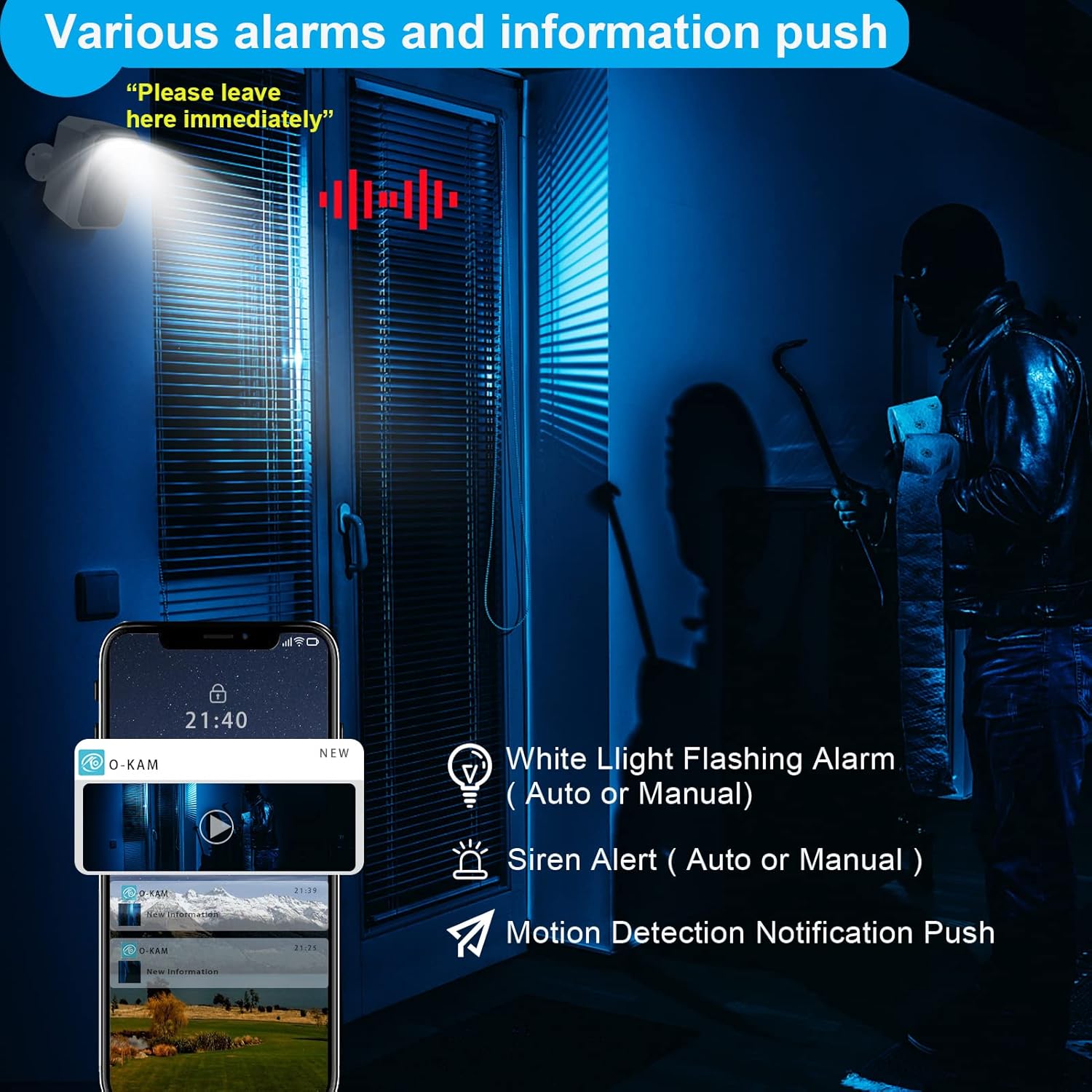
Figure 5.2: Alarm and notification features, including white light, siren, and app alerts for detected motion.

Figure 5.3: Humanoid detection capability, accurately identifying people within a 30ft range and sending notifications.
5.3 Night Vision
The camera supports color night vision, providing clear and detailed images even in low-light conditions. The white LED spotlight assists in illuminating the area for full-color capture.

Figure 5.4: Color night vision in operation, providing clear and vibrant images in dark environments.
5.4 Recording and Playback
Recorded footage can be stored on a local SD card (not included) or via cloud storage (subscription may be required). Access and playback recordings through the O-KAM app.

Figure 5.5: Comparison of 2K camera resolution versus 1080p, highlighting the enhanced detail provided by the BEENOCAM D5.
6. Maintenance
- Cleaning: Regularly clean the camera lens and solar panel with a soft, damp cloth to ensure optimal performance and charging efficiency. Avoid abrasive cleaners.
- Battery Care: While the solar panel maintains the charge, ensure the camera receives adequate sunlight. In prolonged periods of low sunlight, consider manually charging the camera via USB.
- Firmware Updates: Check the O-KAM app periodically for firmware updates. Keeping the firmware updated ensures the camera has the latest features and security enhancements.
- Environmental Conditions: Although weatherproof, extreme weather conditions (e.g., prolonged heavy snow accumulation on the solar panel) may temporarily affect performance. Clear any obstructions from the solar panel.
7. Troubleshooting
| Problem | Possible Cause | Solution |
|---|---|---|
| Camera not connecting to Wi-Fi | Incorrect Wi-Fi password; 5GHz Wi-Fi network; Weak Wi-Fi signal; Camera too far from router. | Ensure correct 2.4GHz Wi-Fi password. Confirm your router is broadcasting a 2.4GHz network. Move camera closer to the router or use a Wi-Fi extender. Reset camera and try pairing again. |
| Poor battery life | Insufficient sunlight for solar panel; Frequent motion detections; Extreme temperatures. | Ensure solar panel is in direct sunlight for several hours daily. Reduce motion detection sensitivity or frequency. Manually charge the camera via USB if needed. |
| False motion alarms | High sensitivity; Non-human movement (animals, trees); Reflections. | Adjust motion detection sensitivity in the O-KAM app. Enable humanoid detection. Define activity zones to exclude irrelevant areas. |
| No image/video | Camera offline; Network issue; Lens obstructed. | Check camera's power and Wi-Fi connection. Restart camera and router. Clean the camera lens. |
| Two-way audio not working | Microphone/speaker muted in app; Network latency. | Ensure microphone and speaker are enabled in the O-KAM app. Check network connection speed. |
8. Product Specifications
| Feature | Detail |
|---|---|
| Brand | BEENOCAM |
| Model Name | D5 |
| Item Model Number | BW4PLUS |
| Video Capture Resolution | 2K (2034 x 1296p) |
| Connectivity Technology | Wireless (Wi-Fi 2.4GHz) |
| Power Source | Solar Powered, Rechargeable Battery (8000mAh) |
| Indoor/Outdoor Use | Indoor, Outdoor (IP66 Weatherproof) |
| Special Features | Motion Sensor, Night Vision (Color), Two-way Audio, Siren, Spotlight, Humanoid Detection, WDR |
| Mounting Type | Wall Mount |
| Item Dimensions (L x W x H) | 8.4 x 17.3 x 12.4 cm |
| Product Weight | 572 g |
| Compatible Devices | Smartphone (Android, iOS via O-KAM app) |
| Battery Cell Type | Polymer |
| Wattage | 4 Watt-hours |
| Frame Rate | 20Hz 20kHz |
9. Warranty and Customer Support
BEENOCAM provides comprehensive support for your D5 security camera:
- Money Back Guarantee: 60 days money back guarantee from the date of purchase.
- Warranty: 2 years warranty covering manufacturing defects.
- Lifetime Support: Free technical support for the lifetime of the product.
- Contact Support: For technical assistance or inquiries, please contact BEENOCAM customer service via phone, email, or WhatsApp. Support is available in English, French, Italian, and Spanish. Our professional customer service staff will respond within 24 hours.
Please refer to the product packaging or the O-KAM app for specific contact details.