
ORIA Bluetooth Receiver 5.0 User Manual
Model: Bluetooth Receiver 5.0
1. Introduction
The ORIA Bluetooth Receiver 5.0 is a versatile audio adapter designed to add Bluetooth functionality to non-Bluetooth devices. It supports both receiving (RX) and transmitting (TX) modes, allowing you to wirelessly stream audio from your smartphone to a car stereo or speaker, or from your TV to Bluetooth headphones. Featuring Bluetooth 5.0 technology and CVC noise reduction, it provides stable connections and clear audio quality for music and hands-free calls.
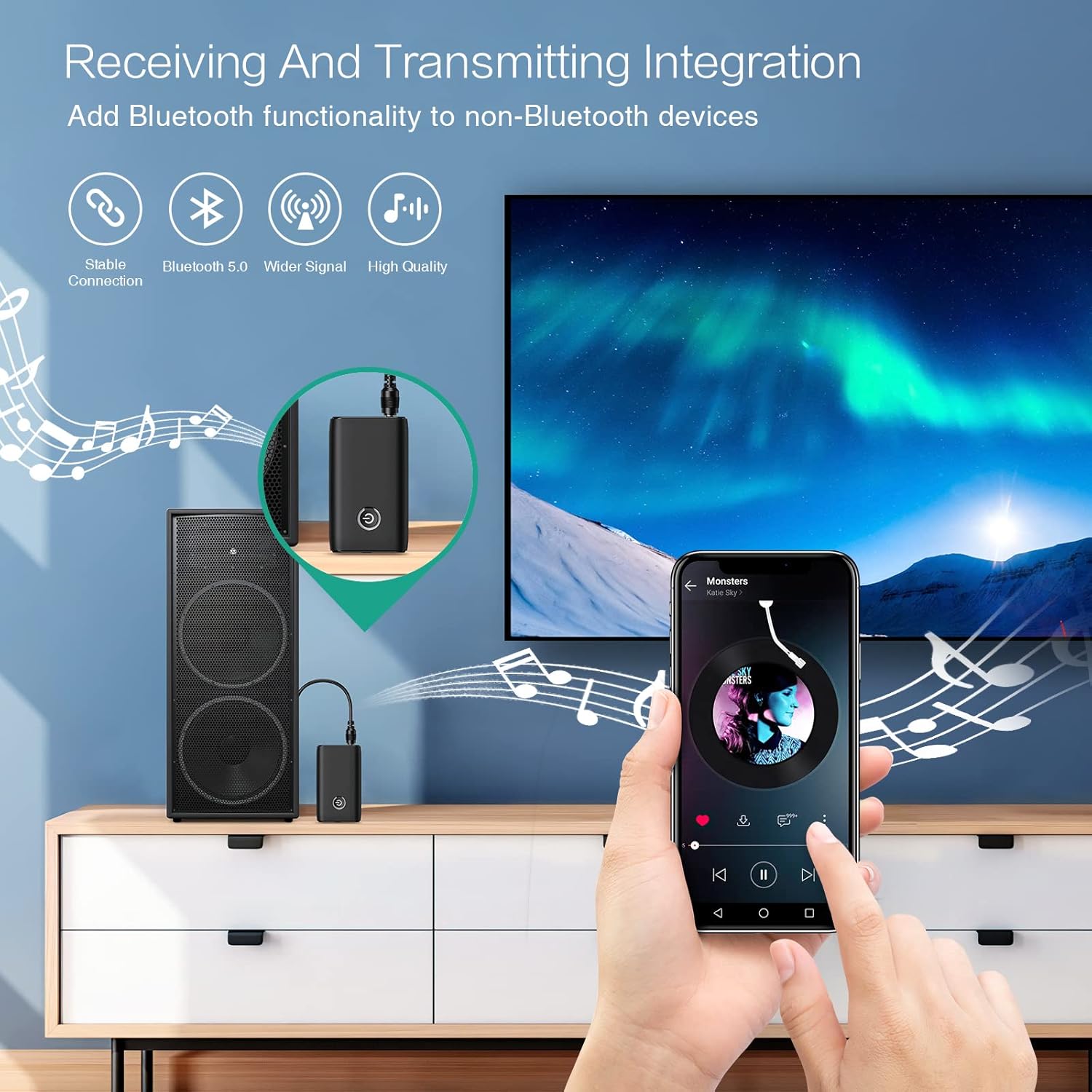
Figure 1.1: The ORIA Bluetooth Receiver 5.0 integrating with various audio systems, showcasing its dual receiving and transmitting functions.
2. Package Contents
Please check the package for the following items:
- ORIA Bluetooth Receiver 5.0 Unit
- 3.5mm Audio Cable
- USB Charging Cable (Type-C)
- User Manual

Figure 2.1: All items included in the ORIA Bluetooth Receiver 5.0 package.
3. Product Overview
Familiarize yourself with the device's components and indicators:

Figure 3.1: Detailed diagram of the ORIA Bluetooth Receiver 5.0, highlighting its ports, buttons, and LED indicator meanings.
- 3.5mm Audio Port: Connects to audio input/output devices.
- Micro USB Charging Port: For charging the device.
- RX/TX Switch: Toggles between Receiver (RX) and Transmitter (TX) modes.
- Multi-function Button: Power on/off, play/pause, answer/end calls.
- Connection Indicator Light:
- Red & Blue flashing: Pairing State
- Red flashing: Low Battery Warning
- Blue solid: Connected
4. Features
- Bluetooth 5.0: Provides a stable wireless connection up to 10 meters for music streaming and audio calls.
- Intelligent Noise Reduction (CVC): Enhances audio clarity by reducing background noise, supporting A2DP, AVRCP, HFP, HSP protocols.
- Dual Mode (TX/RX): Converts non-Bluetooth devices into Bluetooth-enabled devices for both transmitting and receiving audio.
- Long Battery Life: Up to 8 hours of play/talk time, 60 days standby, with a 2-hour full charge time.
- USB Charging: Allows use while charging without interrupting calls or music.
- Easy Operation: Simple one-button control for power, play/pause, and call management.
- Portable Design: Small and lightweight for convenient transport and use anywhere.
5. Setup and Operation
5.1 Charging the Device
Before first use, fully charge the device. Connect the provided USB charging cable to the Micro USB Charging Port on the receiver and the other end to a USB power source (e.g., car charger, wall adapter, computer USB port). The indicator light will show charging status.

Figure 5.1: Battery life and charging duration of the ORIA Bluetooth Receiver 5.0.
5.2 Switching Between Receiver (RX) and Transmitter (TX) Modes
The device features a physical switch to change between RX and TX modes. Important: Always power off the device before switching modes to ensure proper functionality.

Figure 5.2: Instructions for switching between Transmitter (TX) and Receiver (RX) modes.
5.3 Receiver Mode (RX) Setup
Use RX mode to receive audio from a Bluetooth-enabled device (e.g., smartphone, tablet) and play it through a non-Bluetooth audio system (e.g., car stereo, home speaker, wired headphones).
- Switch to RX: Ensure the device is powered off, then slide the switch to the "RX" position.
- Connect to Audio System: Plug one end of the 3.5mm audio cable into the receiver's 3.5mm Audio Port and the other end into the AUX input of your car stereo, home speaker, or wired headphones.
- Power On: Press and hold the Multi-function Button to power on the receiver. The indicator light will flash red and blue, indicating pairing mode.
- Pair with Phone: On your smartphone or other Bluetooth device, enable Bluetooth and search for "ORIA-B6" (or similar name). Select it to pair. Once connected, the indicator light will turn solid blue.
- Play Music: Start playing audio on your paired device. The sound will now be transmitted wirelessly to your connected audio system.

Figure 5.3: Easy setup steps for Receiver (RX) mode, typically used in a car.
5.4 Transmitter Mode (TX) Setup
Use TX mode to transmit audio from a non-Bluetooth device (e.g., TV, PC, MP3 player) to a Bluetooth-enabled audio output (e.g., Bluetooth headphones, Bluetooth speaker).
- Switch to TX: Ensure the device is powered off, then slide the switch to the "TX" position.
- Connect to Audio Source: Plug one end of the 3.5mm audio cable into the receiver's 3.5mm Audio Port and the other end into the audio output (e.g., headphone jack) of your TV, PC, or MP3 player.
- Power On: Press and hold the Multi-function Button to power on the transmitter. The indicator light will flash red and blue, indicating pairing mode.
- Pair with Bluetooth Headphones/Speaker: Put your Bluetooth headphones or speaker into pairing mode. The receiver will automatically search for and connect to nearby Bluetooth audio devices. Once connected, the indicator light will turn solid blue.
- Enjoy Audio: Play audio from your connected source device. The sound will now be transmitted wirelessly to your Bluetooth headphones or speaker.

Figure 5.4: Easy setup steps for Transmitter (TX) mode, typically used with a TV.
5.5 Universal Compatibility
The ORIA Bluetooth Receiver 5.0 is designed for broad compatibility with various devices in both TX and RX modes.
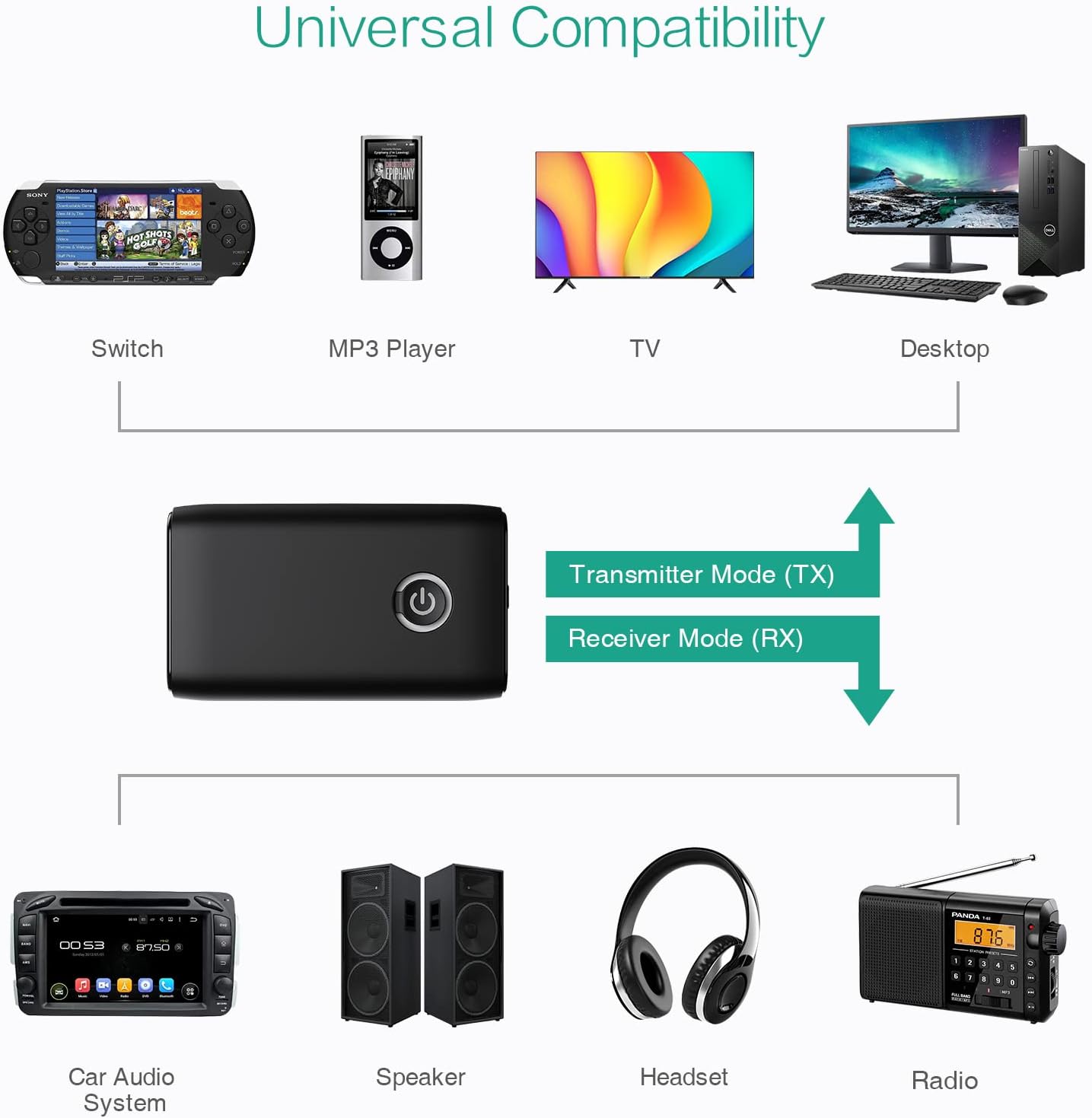
Figure 5.5: Examples of devices compatible with the ORIA Bluetooth Receiver 5.0 in both TX and RX modes.
6. Operating Instructions
6.1 Music Playback Control
- Play/Pause: Short press the Multi-function Button.
- Next Track: (Functionality may vary depending on connected device and mode. Typically controlled via the source device.)
- Previous Track: (Functionality may vary depending on connected device and mode. Typically controlled via the source device.)
- Volume Control: Adjust volume directly on your paired device (smartphone, TV, etc.) or the connected audio system.
6.2 Hands-Free Calling (RX Mode Only)
When in Receiver (RX) mode and paired with a smartphone:
- Answer Call: Short press the Multi-function Button when a call comes in.
- End Call: Short press the Multi-function Button during a call.
- Reject Call: Press and hold the Multi-function Button for 2 seconds when a call comes in.
- Redial Last Number: Double-press the Multi-function Button.
7. Maintenance
- Keep the device dry. Avoid exposure to moisture or liquids.
- Do not attempt to disassemble or modify the device. This will void the warranty.
- Clean the device with a soft, dry cloth. Do not use harsh chemicals or abrasive cleaners.
- Store the device in a cool, dry place when not in use for extended periods.
8. Troubleshooting
If you encounter issues with your ORIA Bluetooth Receiver 5.0, please refer to the following common solutions:
| Problem | Solution |
|---|---|
| Device does not power on. | Ensure the device is fully charged. Connect it to a power source using the USB charging cable. |
| Cannot pair with a Bluetooth device. |
|
| No audio or poor audio quality. |
|
| Device disconnects frequently. |
|
9. Specifications
| Feature | Detail |
|---|---|
| Brand | ORIA |
| Connectivity Technology | Bluetooth, USB |
| Wireless Communication Standard | Bluetooth 5.0 |
| Power Source | Battery Powered, Corded Electric |
| Special Feature | Bluetooth Receiver, Portable |
| Installation Type | Plug In |
| Hardware Interface | Bluetooth, USB |
| Noise Reduction | CVC Technology |
| Battery Life (Play/Talk) | Up to 8 hours |
| Standby Time | 60 days |
| Charging Time | Approximately 2 hours |
10. Warranty and Support
This ORIA Bluetooth Receiver 5.0 comes with a 1-year warranty from the date of purchase.
If you experience any problems with the product's use or function, or if the product is defective or damaged, please contact the seller directly for assistance. They will provide support and solutions to resolve your issue.