
Great Ateam DM1306D
DM1306D Digital Decibel Sound Meter User Manual
Model: DM1306D | Brand: Great Ateam
Introduction
The Great Ateam DM1306D is a versatile digital decibel sound meter designed for real-time monitoring of noise levels, temperature, and humidity. This device features a large LED display for clear readings and is suitable for various environments, including homes and offices. Please read this manual carefully before using the device to ensure proper operation and to maintain its longevity.
Product Overview and Features
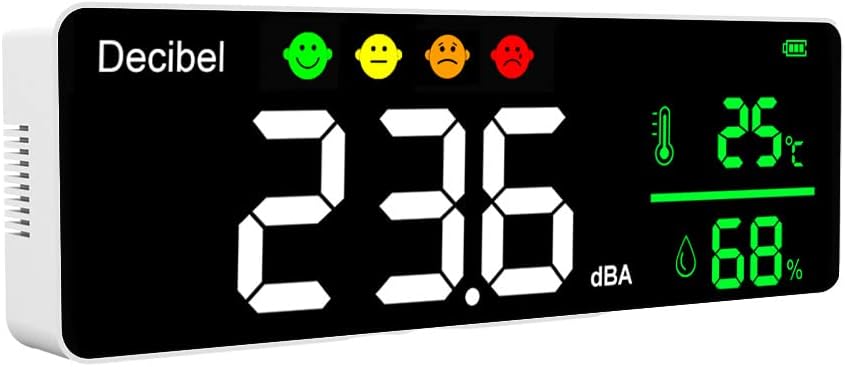
Front view of the DM1306D Digital Decibel Sound Meter, showing the large LED display with noise level, temperature, and humidity readings, along with noise indicator emojis.

Dimensions of the DM1306D meter: 270mm (length), 90mm (height), and 35mm (depth).
- Large Screen LED Display: Provides clear and easy-to-read measurements for decibel levels, temperature, and humidity.
- Adjustable LED Brightness: Customize the display brightness for optimal viewing in various lighting conditions.
- Real-time Monitoring: Continuously monitors and displays environmental data.
- Integrated Sensors: Detects noise levels (30-130dB), temperature (-10.0°C to +50.0°C), and humidity (20%-85%).
- High Capacity Battery: Equipped with a large 2000mAh Lithium battery for extended use.
- Wall-Mountable Design: Can be easily mounted on a wall or placed on a table.
Components and Product List

All components included in the DM1306D package.
The following items are included in your product package:
- DM1306D Device x 1
- Instruction Manual x 1
- Positioning Sticker x 1
- USB Cable x 1
- Screws x 2
- Rubber Stoppers x 2
Setup and Installation Notes

The DM1306D can be placed on a table or hung on a wall, offering flexible installation.

Rear view of the device, highlighting the keyholes for wall mounting.
Wall Mounting:
- Attach the provided positioning sticker to the desired wall location.
- Punch a 6mm hole at the two marked positions on the positioning sticker.
- Drive the screws into the wall, ensuring approximately 4mm of the screw head is exposed.
- Hang the DM1306D meter onto the exposed screw heads.
Power Connection:
- Connect one end of the USB cable to the USB power adapter (not included) and the other end (round connector) to the power input port on the side of the device (input voltage: DC5V).
Operation
Working Method:
Under normal working conditions, no specific settings are required. Simply plug the USB port into the power adapter and the DC round head into the device. The device will continuously display the current noise level, temperature, and humidity in real-time.
Key Operations:

Key operation points on the DM1306D device.
- Power Button: Press to turn the device on or off.
- Brightness Up: Adjust the LED brightness to make it brighter.
- Brightness Down: Adjust the LED brightness to make it darker.
- DC Adapter Input Port: For connecting the USB power cable.
- LED Display: Shows noise, temperature, and humidity readings.
Noise Indicator:
The device features a visual noise indicator with different colors representing decibel ranges:
- 30dB - 65dB: Green indicator (Safe/Normal)
- 65dB - 85dB: Yellow indicator (Moderate)
- 85dB - 130dB: Red indicator (High/Warning)
Automatic Calibration:
For the first use, please turn on the device and keep it powered for more than 24 hours. The device will automatically calibrate during this period. Do not power off or restart the device halfway through the calibration process.
Technical Specifications
| Parameter | Specification |
|---|---|
| Input Voltage | DC5V 1000mA |
| Temperature Measurement Range | -10.0°C ~ +50.0°C |
| Temperature Accuracy | +/-1.0°C (0°C ~ 40°C) |
| Humidity Measurement Range | 20% - 85% Humidity |
| Humidity Accuracy | +/-5% |
| Noise Measuring Range | 30-130dB |
| Noise Accuracy | +/-1.5dB |
| Noise Frequency Range | 50Hz - 8.5kHz |
| Noise Resolution | 0.1dB |
| Power Source | Lithium battery with 2000 mAh capacity; 5V DC power charging |
| Product Dimensions | 270mm x 90mm x 35mm |
| Product Weight | 350g |
| Display Method | LED Screen display |
| Atmospheric Pressure | 86kPa - 106kPa |
| Sampling Time | 1.5 seconds |
| Detection Method for Noise | Condenser microphone |
Maintenance and Precautions
- Air Intake Areas: Avoid covering the air intake areas during use to ensure accurate measurements.
- Cleaning: Avoid using solvents to clean the product as residual fumes may skew air quality readings. Use a soft, dry cloth for cleaning.
- Liquid Exposure: Avoid contact with water or other liquids near the product to prevent electrical damage.
- Modifications: Do not allow unauthorized modification or repair of this product. Any such actions will void the warranty and may cause damage.
- Storage Temperature: Store the device within a temperature range of -10°C to 60°C.
Troubleshooting
This section provides solutions to common issues you might encounter with your DM1306D device. If you experience problems not listed here, please refer to the support information.
- Device not turning on: Ensure the USB cable is securely connected to both the device and a working power adapter (DC5V 1000mA). Check if the power outlet is functional.
- Inaccurate readings:
- Ensure the air intake areas are not covered.
- Allow the device to complete its 24-hour automatic calibration period upon first use.
- Avoid placing the device near strong air currents, heat sources, or direct sunlight, which can affect temperature and humidity readings.
- Ensure no solvents or strong chemicals are present in the environment, as they can interfere with sensor readings.
- Display is dim or too bright: Use the brightness adjustment buttons (as described in the "Key Operations" section) to set the desired display brightness.
Warranty and Support
Specific warranty information for the Great Ateam DM1306D Digital Decibel Sound Meter is typically provided with your purchase documentation. Please refer to the warranty card or contact your retailer for details regarding warranty coverage and terms.
For technical support, troubleshooting assistance beyond this manual, or inquiries about replacement parts, please contact Great Ateam customer service through the contact information provided on their official website or your purchase platform.
Always provide your product model number (DM1306D) and a detailed description of the issue when seeking support.
Ask a question about this manual
Ask about setup, troubleshooting, compatibility, parts, safety, or missing instructions. Manuals+ will review the question and use this page’s manual context to help answer it.