
1. Introduction
The QUIGO H7011 RGB Sunset Projector Lamp is designed to create a vibrant and customizable atmosphere in any indoor space. Featuring 16 color options, flexible angle adjustment, and convenient control via both a remote and a mobile application, this lamp offers versatile lighting for various settings.
This manual provides essential information for the safe and effective use of your QUIGO H7011 lamp. Please read it thoroughly before operation and retain it for future reference.
2. Safety Information
- Indoor Use Only: This product is designed for indoor use. Do not expose to water or high humidity.
- Power Source: Use only a 5V USB power source. Ensure the power adapter (not included) meets safety standards.
- Heat Warning: The lamp head may become warm during extended use. Avoid direct contact with the lens and ensure adequate ventilation. Do not cover the lamp.
- Placement: Place the lamp on a stable, flat surface. The flexible tripod legs allow for secure positioning on various objects.
- Children and Pets: Keep the lamp out of reach of children and pets to prevent accidental damage or injury.
- Cleaning: Disconnect from power before cleaning. Use a soft, dry cloth. Do not use liquid cleaners.
3. Package Contents
Verify that all items are present in your package:
- QUIGO H7011 RGB Sunset Projector Lamp Unit
- Flexible Tripod Stand
- Remote Control (Batteries not included)
- USB Power Cable with In-line Switch
- User Manual

Image: Components of the QUIGO H7011 RGB Sunset Projector Lamp, showing the lamp head, flexible tripod, and USB power cable.
4. Setup
- Attach Tripod: Screw the lamp unit onto the flexible tripod stand. Ensure it is securely fastened.
- Positioning: Place the lamp on a stable surface. The flexible legs of the tripod can be adjusted to wrap around objects or stand firmly. The lamp head features a 360° rotatable joint, allowing you to direct the light projection as desired.
- Power Connection: Connect the USB power cable to the lamp unit. Plug the USB end into a 5V USB power source (e.g., USB wall adapter, power bank, computer USB port).

Image: The QUIGO H7011 lamp highlighting its USB power compatibility with various devices and the 360-degree adjustable head.
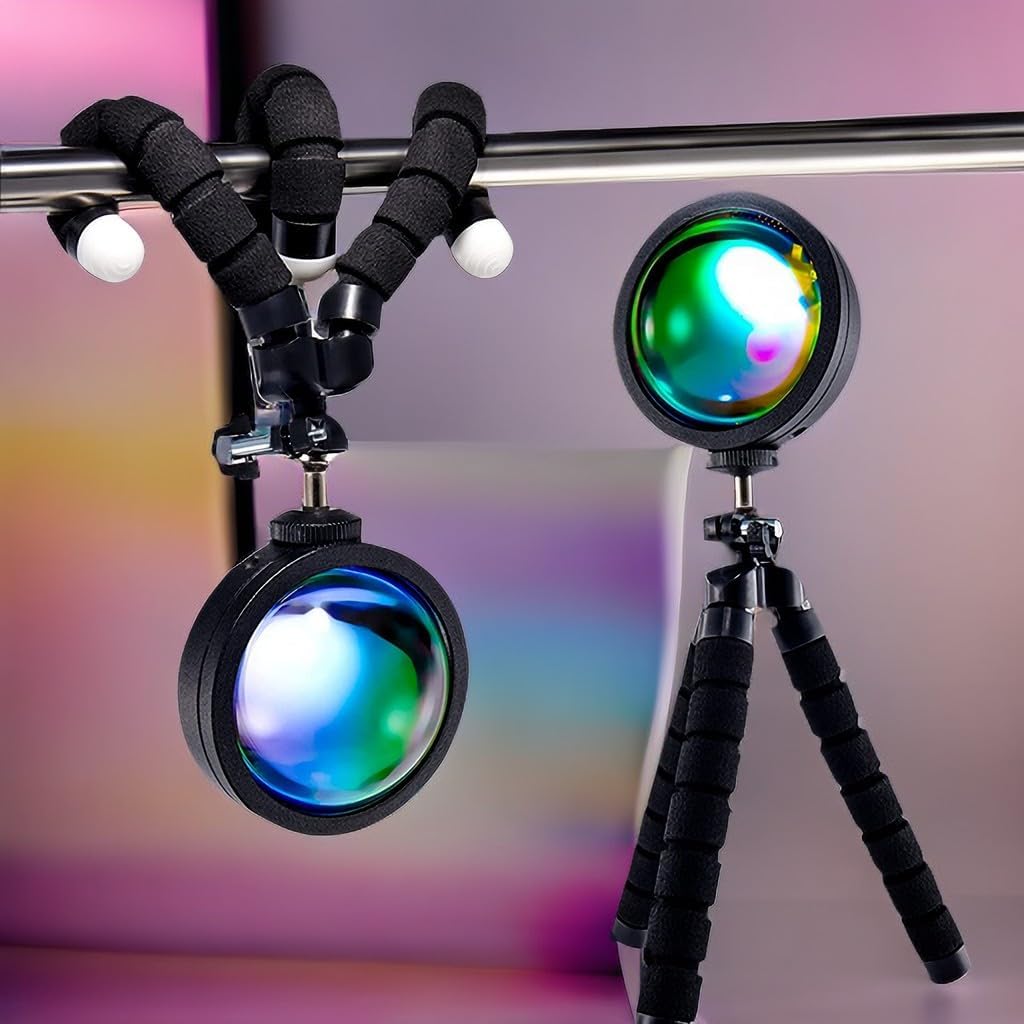
Image: Demonstrates the versatility of the flexible tripod legs, showing the lamp standing on a surface and wrapped around a bar.
5. Operating Instructions
5.1. Using the In-line Switch
The USB power cable includes an in-line switch for basic control:
- Press the power button to turn the lamp ON/OFF.
- Cycle through basic color modes by pressing the mode button.
5.2. Using the Remote Control
Insert 2 AAA batteries (not included) into the remote control. The remote offers comprehensive control:
- Power Button: Turn the lamp ON/OFF.
- Brightness Adjustment: Increase or decrease light intensity.
- Color Selection: Choose from 16 static colors.
- Dynamic Modes: Select from FLASH, STROBE, FADE, and SMOOTH modes for various lighting effects.

Image: Detailed layout of the 24-key remote control, illustrating buttons for power, brightness, 16 color options, and dynamic modes.
5.3. Using the Mobile Application
For advanced control and customization, download the dedicated mobile application (compatible with iOS & Android):
- Download App: Scan the QR code in the product packaging or search for the app name (usually indicated in the manual or packaging) in your device's app store.
- Pairing: Follow the in-app instructions to pair your lamp with your smartphone via Bluetooth.
- App Features: The app allows you to:
- Select colors from a comprehensive color palette.
- Adjust brightness levels.
- Set timers for automatic ON/OFF.
- Access various dynamic lighting modes (e.g., FLASH, STROBE, FADE, SMOOTH, Rhythmic).
- Control multiple QUIGO lamps simultaneously.

Image: Overview of the three control methods: the in-line switch, the infrared remote, and the mobile application interface.
Video: Demonstrates the mobile application control for the QUIGO H7011 sunset lamp, showing color changes and timer settings.
6. Features
- 16 RGB Colors: Offers a wide spectrum of colors to create various moods and aesthetics.
- Flexible Angle Adjustment: The lamp head can rotate 360 degrees, allowing precise projection angles.
- USB Powered: Conveniently powered via any 5V USB port, making it portable and easy to use with power banks, laptops, or wall adapters.
- High-Quality Lens: Features a 2.9-inch optical glass lens for improved light transmission and clarity, ensuring vivid and clear projections.
- Multiple Control Options: Control the lamp using the included remote, the in-line switch on the cable, or a dedicated mobile application.
- Versatile Use: Ideal for creating ambient lighting, photography backdrops, or enhancing room decor in bedrooms, living rooms, and other spaces.

Image: The QUIGO H7011 lamp showcasing its diverse color capabilities and multiple control options.

Image: Visual examples of the QUIGO H7011 lamp enhancing different room environments with its colorful projections.
7. Maintenance
- Cleaning: Ensure the lamp is unplugged before cleaning. Use a soft, dry, lint-free cloth to wipe the lamp unit and lens. Avoid abrasive materials or chemical cleaners.
- Storage: When not in use, store the lamp in a cool, dry place away from direct sunlight and extreme temperatures.
- Cable Care: Do not bend or crimp the USB cable excessively. Avoid placing heavy objects on the cable.
8. Troubleshooting
| Problem | Possible Cause | Solution |
|---|---|---|
| Lamp does not turn on. | No power, loose connection, faulty cable. | Check USB power source. Ensure cable is securely connected. Try a different USB port or adapter. |
| Remote control not working. | Dead batteries, remote out of range, obstruction. | Replace remote batteries. Ensure remote is pointed directly at the lamp. Remove any obstructions between remote and lamp. |
| App control not connecting. | Bluetooth off, app not paired, lamp not powered. | Ensure Bluetooth is enabled on your device. Re-pair the lamp in the app. Confirm the lamp is powered on. |
| Light projection is dim or unclear. | Dirty lens, ambient light too bright, lamp too far from surface. | Clean the lens with a soft cloth. Reduce ambient light. Move the lamp closer to the projection surface. |
9. Specifications
| Feature | Detail |
|---|---|
| Model Number | H7011 |
| Brand | QUIGO |
| Power Source | Corded Electric (USB 5V) |
| Wattage | 10 watts |
| Light Source Type | LED |
| Light Color | Colorful (16 RGB options) |
| Brightness | 500 Lumens (Max) |
| Control Method | App, Remote, In-line Switch |
| Product Dimensions | 7.09"D x 2.76"W x 1.3"H |
| Item Weight | 6.7 ounces (0.42 Pounds) |
| Base Material | Aluminum |
| Shade Material | Glass (2.9" optimal thickness) |
| Mounting Type | Tabletop (with flexible tripod) |
| Indoor/Outdoor Usage | Indoor |
| Assembly Required | Yes |
| Batteries Required (Remote) | Yes (not included) |
10. Warranty and Support
For warranty information and customer support, please refer to the contact details provided on the product packaging or the official QUIGO website. Keep your purchase receipt as proof of purchase.
This product is Verified by Transparency, ensuring each item has a unique code for authenticity verification.


