1. Introduction
The Head Up Display (HUD) projects essential driving data onto your vehicle's windshield, allowing you to view information such as speed, RPM, water temperature, and voltage without diverting your gaze from the road. This enhances driving safety by keeping your focus forward. This device supports both OBD2 and GPS operating modes, offering versatility for various vehicle types and data requirements.
2. Product Overview
2.1 Key Features
- Dual Mode Operation: Supports both OBD2 and GPS modes for comprehensive data display.
- OBD Mode Data: Vehicle speed, water temperature, voltage, fuel consumption, engine speed (RPM), single mileage, total mileage, cumulative travel time, travel direction, satellite count, altitude, system time, intake pressure, oil temperature, air-fuel ratio, turbine pressure, acceleration test, brake test, and data stream reading.
- OBD Mode Alarms: Overspeed, high water temperature, low voltage, engine fault, and clearance code.
- GPS Mode Data: Speed, travel time, satellite time, altitude, satellite count, direction of travel, single mileage, voltage, acceleration test, and brake test.
- GPS Mode Alarms: Overspeed and low voltage.
- Unit Switching: Freely switch between Celsius and Fahrenheit for temperature, and Kilometers per hour (KM/H) and Miles per hour (MPH) for speed.
- Brightness Adjustment: Automatic and manual brightness adjustment modes for optimal visibility in varying light conditions.
- Ambient Lighting: Features ambient decorative lighting.
2.2 Package Contents
Verify that all items listed below are included in your package:
- 1 x HUD Unit (LCD Display)
- 1 x User Manual
- 1 x Anti-Slip Mat
- 1 x OBD Cable
- 1 x USB Cable
- 1 x Wipe Cloth

Figure 1: Contents of the product package, including the HUD unit, cables, and accessories.
3. Setup Instructions
3.1 Device Placement
Place the HUD unit on your dashboard in a position that does not obstruct your view of the road. Use the provided anti-slip mat to secure the device and prevent movement during driving.

Figure 2: The HUD unit ready for dashboard placement.
3.2 Connection
The HUD supports two connection methods depending on the desired operating mode:
- OBD2 Connection: For OBD mode, locate your vehicle's OBD2 port (typically under the dashboard near the steering wheel). Connect the provided OBD cable to the port and then to the HUD unit. This mode is suitable for 12V DC vehicles.
- USB Connection (GPS Mode): For GPS mode, or if your vehicle operates on 24V (e.g., some trucks), use the provided USB cable to power the HUD unit. The USB cable can only be used for GPS mode operation.
Note: If your vehicle is 24V, you must use the USB cable, and the device will operate in GPS mode only. OBD mode requires a 12V connection via the OBD cable.
3.3 Initial Power On
Once connected, the HUD unit should power on automatically with your vehicle's ignition. The display will show a startup sequence before entering the selected operating mode.
4. Operating Modes
The HUD offers two primary operating modes: OBD2 and GPS. You can switch between these modes as needed.
4.1 OBD2 Mode
In OBD2 mode, the HUD retrieves data directly from your vehicle's onboard diagnostic system. This mode provides real-time information about your vehicle's performance and status.
- Displayed Information: Vehicle speed, water temperature, voltage, fuel consumption, engine RPM, single mileage, total mileage, cumulative travel time, travel direction, satellite count, altitude, system time, intake pressure, oil temperature, air-fuel ratio, turbine pressure, acceleration test results, brake test results, and data stream.
- Alarm Functions: The device will alert you to conditions such as overspeed, excessively high water temperature, low voltage, and engine fault codes.

Figure 3: Example of data displayed in OBD2 mode.
4.2 GPS Mode
GPS mode utilizes satellite signals to provide driving data, making it compatible with all vehicle models, including those without an OBD2 port or 24V vehicles. This mode is particularly useful for tracking travel-related metrics.
- Displayed Information: Speed, travel time, satellite time, altitude, satellite count, direction of travel, single mileage, voltage, acceleration test results, and brake test results.
- Alarm Functions: Includes overspeed and low voltage alarms.
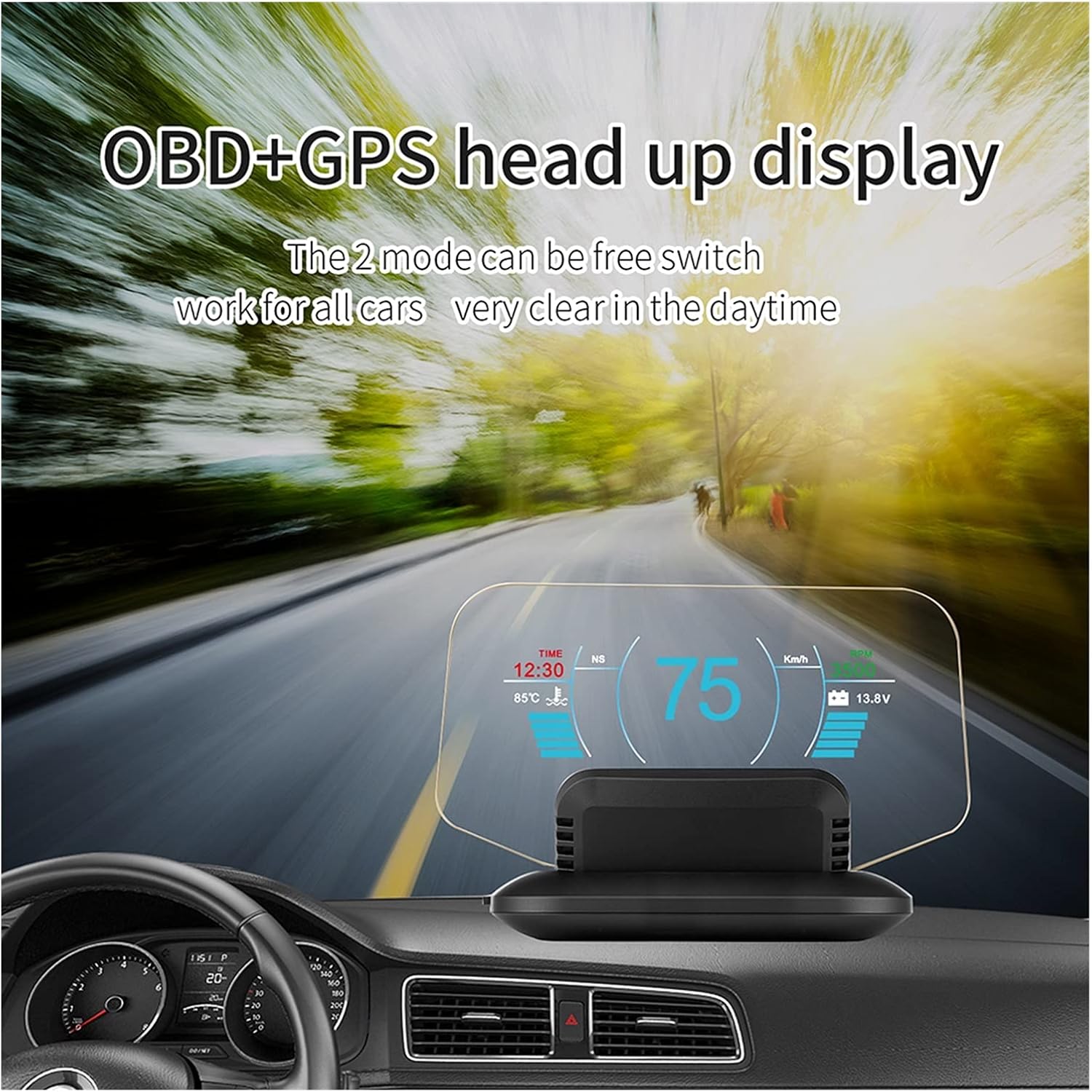
Figure 4: Example of data displayed in GPS mode.
4.3 Switching Between Modes
The device allows for free switching between OBD2 and GPS modes. Refer to the specific instructions in the included printed user manual for the exact button or menu sequence to change modes.
5. Settings and Customization
The HUD unit offers several customizable settings to tailor the display to your preferences.
- Brightness Adjustment: The display can automatically adjust its brightness based on ambient light. You can also manually set the brightness level.
- Unit Switching: Change speed units between KM/H and MPH, and temperature units between Celsius and Fahrenheit.
- Alarm Thresholds: Adjust the trigger points for various alarms, such as overspeed, low voltage, and high water temperature, to suit your driving habits and vehicle specifications.
Detailed instructions for accessing and modifying these settings are provided in the physical user manual.
6. Maintenance
Proper maintenance ensures the longevity and optimal performance of your HUD unit.
6.1 Cleaning
Use the provided wipe cloth or a soft, dry, lint-free cloth to clean the display screen and the unit's exterior. Avoid using abrasive cleaners or solvents, as these can damage the device.
6.2 Storage
When not in use for extended periods, store the HUD unit in a cool, dry place within the specified ambient temperature range of -40°C to +80°C (-40°F to +176°F). Avoid exposure to extreme temperatures or direct sunlight.
7. Troubleshooting
If you encounter issues with your HUD unit, refer to the following common troubleshooting steps:
- No Display/Power: Ensure the OBD or USB cable is securely connected and your vehicle's ignition is on. Check the cable for any visible damage.
- Inaccurate Readings: If in OBD mode, ensure your vehicle is compatible and the connection is stable. If in GPS mode, ensure the device has a clear view of the sky to acquire satellite signals.
- Alarms Triggering Frequently: Review your alarm threshold settings (e.g., overspeed limit, voltage limits) and adjust them as necessary.
- Engine Fault Alarm: If an engine fault alarm appears, it indicates an issue detected by your vehicle's ECU. It is recommended to have your vehicle inspected by a qualified mechanic.
- Display Not Clear: Adjust the brightness settings. Ensure the windshield area where the display is projected is clean.
For persistent issues, consult the detailed troubleshooting section in your physical user manual or contact customer support.
8. Technical Specifications
| Specification | Value |
|---|---|
| Dimensions (L x W x H) | 42mm x 110mm x 77mm |
| Ambient Temperature | -40°C to +80°C (-40°F to +176°F) |
| Atmospheric Pressure | 86-106 KPa |
| Relative Humidity | 10%-95% |
| Ambient Noise | ≤ 60dB(A) |
| Alarm Sound Level | ≥ 30dB(A) |
| Working Voltage | 11V~18V DC (12V DC/200mA) |
| Applicable Models | All models |
| Material | Glass (for display screen) |
| Item Weight | 800 Grams (approx. 1.76 pounds) |
9. Warranty and Support
For specific warranty information, return policies, and technical support, please refer to the documentation provided at the time of purchase or contact the retailer/manufacturer directly. Keep your proof of purchase for warranty claims.