1. Product Overview
The LG CordZero A9 Kompressor A9K-PRO1B stick vacuum cleaner is designed for efficient and convenient cleaning. It features Kompressor technology, which compresses dirt in the dust bin for less frequent emptying and cleaner disposal. Equipped with a dual battery system, each battery provides up to 60 minutes of runtime, allowing for up to 2 hours of continuous cleaning.
The adjustable handle extends from 90 cm to 112 cm, adapting to various cleaning needs. It offers powerful suction, reaching up to 200 Airwatts in Turbo mode for stubborn dust. The one-touch control system makes it easy to power on/off and adjust power levels, including Turbo mode, with a simple thumb press.
This vacuum comes with a comprehensive set of accessories, including a multi-surface motorized brush, mini motorized brush, slim hard floor motorized brush, crevice tool, 2-in-1 tool, an extensible hose, and a multi-angle elbow for car cleaning. The cyclone and filters are removable and washable for easy maintenance.
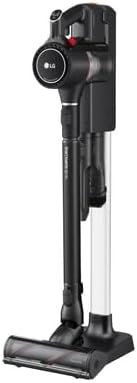
Image: The LG CordZero A9K PRO1B stick vacuum cleaner in its upright position on the charging stand, showcasing its sleek design.
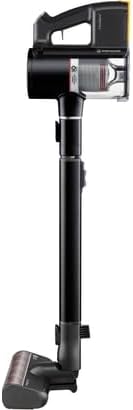
Image: Side profile of the LG CordZero A9K PRO1B, highlighting its slim design and handle.
2. Components and Accessories
Your LG CordZero A9K PRO1B comes with the following components and accessories:
- Main Vacuum Body (Handheld Unit)
- Telescopic Pipe
- Multi-Surface Motorized Brush
- Mini Motorized Brush
- Slim Hard Floor Motorized Brush
- Crevice Tool
- 2-in-1 Combination Tool
- Extensible Hose (for car cleaning)
- Multi-Angle Elbow (for car cleaning)
- Dual Batteries
- Charging Stand (can be wall-mounted, stand-alone, or compact)
- User Manual

Image: The LG CordZero A9K PRO1B vacuum on its stand, with several included accessories neatly stored.

Image: A detailed view of the handheld unit of the LG CordZero A9K PRO1B, showing the ergonomic grip and controls.
3. Setup
- Unpacking: Carefully remove all components from the packaging. Ensure all listed accessories are present.
- Assembly: Attach the telescopic pipe to the main vacuum body. Select your desired cleaning head (e.g., multi-surface motorized brush) and attach it to the end of the telescopic pipe.
- Charging Stand Setup: The charging stand can be set up in three ways: wall-mounted, stand-alone, or compact. Choose the method that best suits your space. Connect the power adapter to the charging stand and plug it into a power outlet.
- Initial Charge: Insert both batteries into the charging slots on the stand or directly into the vacuum if using the stand-alone charging method. Allow the batteries to fully charge before first use. The battery indicator lights will show charging status.
- Adjust Handle Length: Press the handle release button and adjust the telescopic pipe to a comfortable length for your height (90 cm to 112 cm).
4. Operating Instructions
- Power On/Off: Press the power button located on the top of the handheld unit to turn the vacuum on or off.
- Adjusting Suction Power: Use the one-touch control buttons (usually '+' and '-') to cycle through different suction power levels. For stubborn dirt, press the Turbo button to activate maximum suction (up to 200 Airwatts).
- Using Kompressor Feature: The Kompressor lever is located on the dust bin. After accumulating dirt, push the lever to compress the contents, allowing you to store up to 2.4 times more dust before needing to empty.
- Battery Management: The vacuum operates on one battery at a time. When one battery is depleted, replace it with the fully charged second battery to continue cleaning for up to 120 minutes total.
- Attachment Usage: Select the appropriate cleaning attachment for the surface you are cleaning. For example, use the multi-surface brush for carpets and hard floors, or the crevice tool for narrow spaces.

Image: The top of the LG CordZero A9K PRO1B handheld unit, displaying the power button and battery charge indicator lights.
5. Maintenance
Regular maintenance ensures optimal performance and extends the life of your LG CordZero vacuum.
5.1 Emptying the Dust Bin
- Ensure the vacuum is turned off.
- Locate the dust bin release button and detach the dust bin from the main unit.
- Hold the dust bin over a trash can. Open the dust bin cover and empty the contents.
- If you used the Kompressor feature, ensure the compressed dirt is fully released.
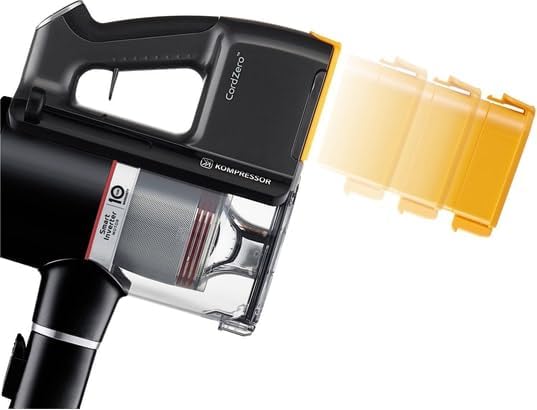
Image: A close-up of the LG CordZero A9K PRO1B's dust bin, highlighting the Kompressor mechanism for compacting debris.
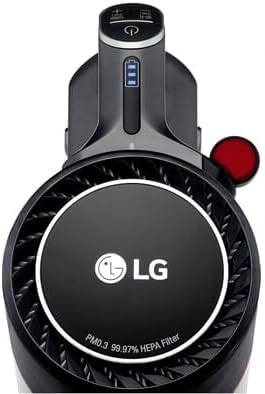
Image: The dust bin being removed from the main body of the LG CordZero A9K PRO1B for emptying.
5.2 Cleaning Filters and Cyclone
The cyclone and filters are washable. It is recommended to clean them regularly, especially if you notice a decrease in suction power.
- Detach the dust bin.
- Remove the pre-filter and the fine dust filter (HEPA filter) from the dust bin assembly.
- Rinse the filters and cyclone assembly under running water until the water runs clear.
- Allow all parts to air dry completely for at least 24 hours before reassembling. Do not use a dryer or direct heat.
- Once dry, reassemble the filters and cyclone into the dust bin, then reattach the dust bin to the vacuum.
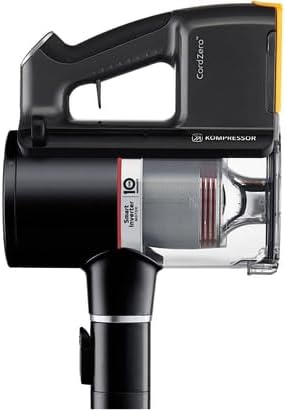
Image: An exploded view demonstrating the removal of the filter and cyclone components for cleaning.
6. Troubleshooting
If you encounter issues with your LG CordZero A9K PRO1B, refer to the following common troubleshooting steps:
- No Power/Not Turning On:
- Ensure batteries are fully charged and properly inserted.
- Check if the power button is pressed firmly.
- Low Suction Power:
- Empty the dust bin.
- Clean the pre-filter and fine dust filter. Ensure they are completely dry before reinserting.
- Check for blockages in the telescopic pipe, cleaning head, or hose.
- Ensure the dust bin is correctly attached and sealed.
- Brush Not Spinning:
- Check the cleaning head for tangled hair or debris that might be obstructing the brush roll.
- Ensure the cleaning head is properly attached to the telescopic pipe.
- Battery Not Charging:
- Verify the charging stand is properly connected to a power outlet.
- Ensure the batteries are correctly seated in the charging slots.
- Check for any damage to the power adapter or charging cable.
For persistent issues, please refer to the official LG support website or contact customer service.
7. Specifications
| Feature | Specification |
|---|---|
| Model Number | A9K-PRO1B |
| Brand | LG |
| Power Consumption | 590 Watts |
| Voltage | 220 Volts |
| Suction Power (Max) | 200 Airwatts (Turbo mode) |
| Dust Bin Capacity (Standard) | 0.44 Liters |
| Dust Bin Capacity (Kompressor) | 1.06 Liters |
| Battery Type | Dual Battery |
| Average Battery Life | Up to 120 minutes (with dual batteries) |
| Noise Level | 76 dB |
| Special Features | HEPA Filter, Bagless, Kompressor Technology |
| Adjustable Handle Length | 90 cm to 112 cm |
| Weight | 11 Kilograms |
| Included Components | Vacuum, User Manual, Various Brushes and Tools |
8. Warranty and Support
For detailed warranty information, please refer to the warranty card included with your product or visit the official LG website. LG provides customer support for product inquiries, technical assistance, and service requests.
You can find more information and support resources by visiting the LG Brand Store or the official LG customer support portal.