
1. Introduction
This manual provides essential information for the safe and efficient operation, installation, and maintenance of your GMAOLIHAIKA Deep Sea DSE8620 Auto Mains (Utility) Failure Generator Controller. The DSE8620 is designed to monitor the utility (mains) supply and automatically start and stop a generator when the mains power fails or returns. It also provides comprehensive monitoring and protection features for both the generator and the engine.
Please read this manual thoroughly before attempting to install, operate, or maintain the controller. Retain this manual for future reference.
2. Product Overview
The DSE8620 controller is a sophisticated module that offers advanced control capabilities for generator sets. Its robust design ensures reliable performance in various applications.
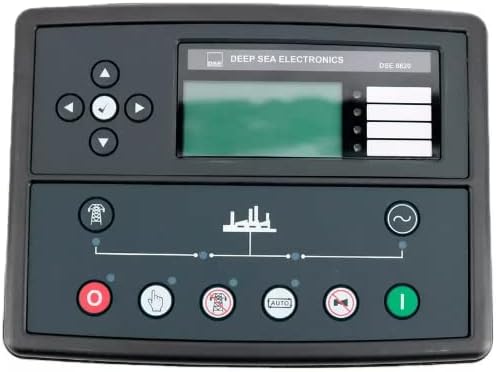
Figure 2.1: Front panel of the DSE8620 controller. This image displays the user interface, including the LCD screen, navigation buttons, and dedicated control buttons for generator operation and mains monitoring.
Key Features:
- Automatic Mains (Utility) Failure detection and generator start/stop.
- Comprehensive generator and engine monitoring.
- User-friendly interface with LCD display and navigation buttons.
- Multiple operational modes for flexible control.
- Advanced protection features to safeguard equipment.
3. Setup and Installation
Installation of the DSE8620 controller should only be performed by qualified personnel. Incorrect installation can lead to equipment damage, personal injury, or system malfunction. Refer to the detailed wiring diagrams and installation guidelines provided with the product packaging for specific instructions.
General Steps:
- Mounting: Securely mount the controller in a suitable enclosure, ensuring adequate ventilation and protection from environmental elements.
- Wiring: Connect all necessary power, sensor, and control wiring according to the provided schematics. Pay close attention to voltage ratings and polarity.
- Configuration: Power on the unit and configure the operational parameters using the front panel interface or dedicated PC software (if applicable). This includes setting up mains failure thresholds, generator start/stop delays, and protection limits.
- Testing: Conduct thorough testing of all functions, including mains failure simulation, generator start/stop sequences, and alarm conditions, before putting the system into full operation.
4. Operating Instructions
The DSE8620 controller features an intuitive front panel for monitoring and control. Familiarize yourself with the buttons and display indicators.
Front Panel Controls:
- LCD Display: Shows system status, measurements, alarms, and menu options.
- Navigation Buttons (Up, Down, Left, Right, Enter/Tick): Used to scroll through menus, adjust settings, and confirm selections on the LCD.
- Stop/Reset Button (Red 'O'): Stops the generator and resets any active alarms.
- Manual Button (Hand icon): Allows manual control of the generator.
- Auto Button (AUTO icon): Puts the controller into automatic mode, where it will manage generator operation based on mains supply status.
- Test Button (Generator icon with 'X'): Initiates a generator test sequence.
- Start Button (Green 'I'): Manually starts the generator (typically used in Manual mode).
Operational Modes:
- STOP/RESET Mode: Generator is off, and alarms are reset.
- MANUAL Mode: Allows direct control of the generator start and stop functions.
- AUTO Mode: The controller automatically monitors the mains supply and starts/stops the generator as required. This is the primary operational mode for unattended operation.
- TEST Mode: Initiates a controlled test of the generator, often without transferring load.
Always ensure the controller is in the appropriate mode for your operational requirements. For automatic operation, select AUTO Mode.
5. Maintenance
Regular maintenance ensures the longevity and reliable performance of your DSE8620 controller and the associated generator system. Always disconnect power before performing any maintenance.
Recommended Maintenance Schedule:
- Monthly:
- Visually inspect the controller for any signs of damage, loose connections, or environmental ingress.
- Perform a generator test run to confirm proper operation.
- Annually:
- Check all wiring connections for tightness and corrosion.
- Verify calibration of sensors (if applicable and accessible).
- Clean the controller's exterior with a soft, dry cloth. Do not use abrasive cleaners or solvents.
Refer to your generator's specific maintenance manual for engine and alternator service requirements.
6. Troubleshooting
This section provides general guidance for common issues. For complex problems, consult a qualified technician or the manufacturer's support.
| Problem | Possible Cause | Solution |
|---|---|---|
| Controller does not power on. | No power supply, blown fuse, loose wiring. | Check power connections, inspect fuses, verify wiring integrity. |
| Generator fails to start in AUTO mode. | Mains supply present, low fuel, low battery, engine fault, controller not in AUTO mode. | Verify mains status, check fuel level, check battery voltage, inspect engine for faults, ensure AUTO mode is selected. |
| Alarm displayed on LCD. | Specific system fault (e.g., low oil pressure, high engine temperature). | Note the alarm message, refer to the controller's alarm list for specific actions, and address the underlying issue. Press STOP/RESET to clear. |
7. Specifications
The following specifications are provided for the GMAOLIHAIKA Deep Sea DSE8620 Auto Mains (Utility) Failure Generator Controller.
| Feature | Detail |
|---|---|
| Model Number | DSE8620 |
| Manufacturer | GMAOLIHAIKA |
| Engine Type Compatibility | 4 Stroke (as per product data, general controller compatibility is broader) |
| Engine Displacement (Reference) | 418 Cubic Centimeters (as per product data, likely for a specific generator pairing) |
| Date First Available | August 25, 2022 |
| ASIN | B0BBVF9344 |
8. Support and Warranty
For technical assistance, detailed wiring diagrams, or advanced troubleshooting, please contact the manufacturer or your authorized distributor. Always provide your model number (DSE8620) when seeking support.
Information regarding product warranty is typically provided with the purchase documentation. Please refer to the warranty card or contact your seller for specific terms and conditions.
Manufacturer: GMAOLIHAIKA