
Ymawetia NNF1C
Ymawetia NNF1C Laptop Battery Replacement User Manual for Dell XPS 13 9365 Series
Model: NNF1C
Introduction
This manual provides essential instructions for the safe and effective use, installation, and maintenance of your Ymawetia NNF1C 46Wh laptop battery replacement. This battery is specifically designed for Dell XPS 13 9365 series laptops.
Please read this manual thoroughly before installing or using the battery to ensure optimal performance and safety.
Important Safety Information
To prevent potential injury or damage, please observe the following safety guidelines:
- Keep the battery pack away from fire.
- Do not expose the battery to water or rain.
- Do not attempt to disassemble the battery.
- Do not short-circuit the battery.
- Keep the battery away from children.
- Dispose of used batteries according to local regulations; do not discard with household waste.
The battery is designed with multiple protections including overcharge, overdischarge, over-temperature, and short-circuit protection to ensure safe operation.

Image: Diagram illustrating the battery's intelligent protection features, including antistatic impact, temperature anomaly, chip monitoring, power protection, short circuit protection, voltage protection, overpower protection, and discharge protection.
Compatibility
This Ymawetia NNF1C battery is compatible with the following Dell laptop models and part numbers:
Compatible Dell Laptop Models:
- Dell XPS 13 9365 Series
- Dell XPS 13 9365 2-in-1 2017
- Dell XPS 13-9365-D1605TS
- Dell XPS 13-9365-D1805TS
- Dell XPS 13-9365-D2805TS
- Dell XPS 13-9365-D3605TS
- Dell XPS 13-9365-D3805TS
- Dell XPS 13-9365-D4605TS
Compatible Part Numbers:
- NNF1C
- P71G
- HMPFH
- 0HMPFH
- NP0V3
- P71G001
- 0NNF1C
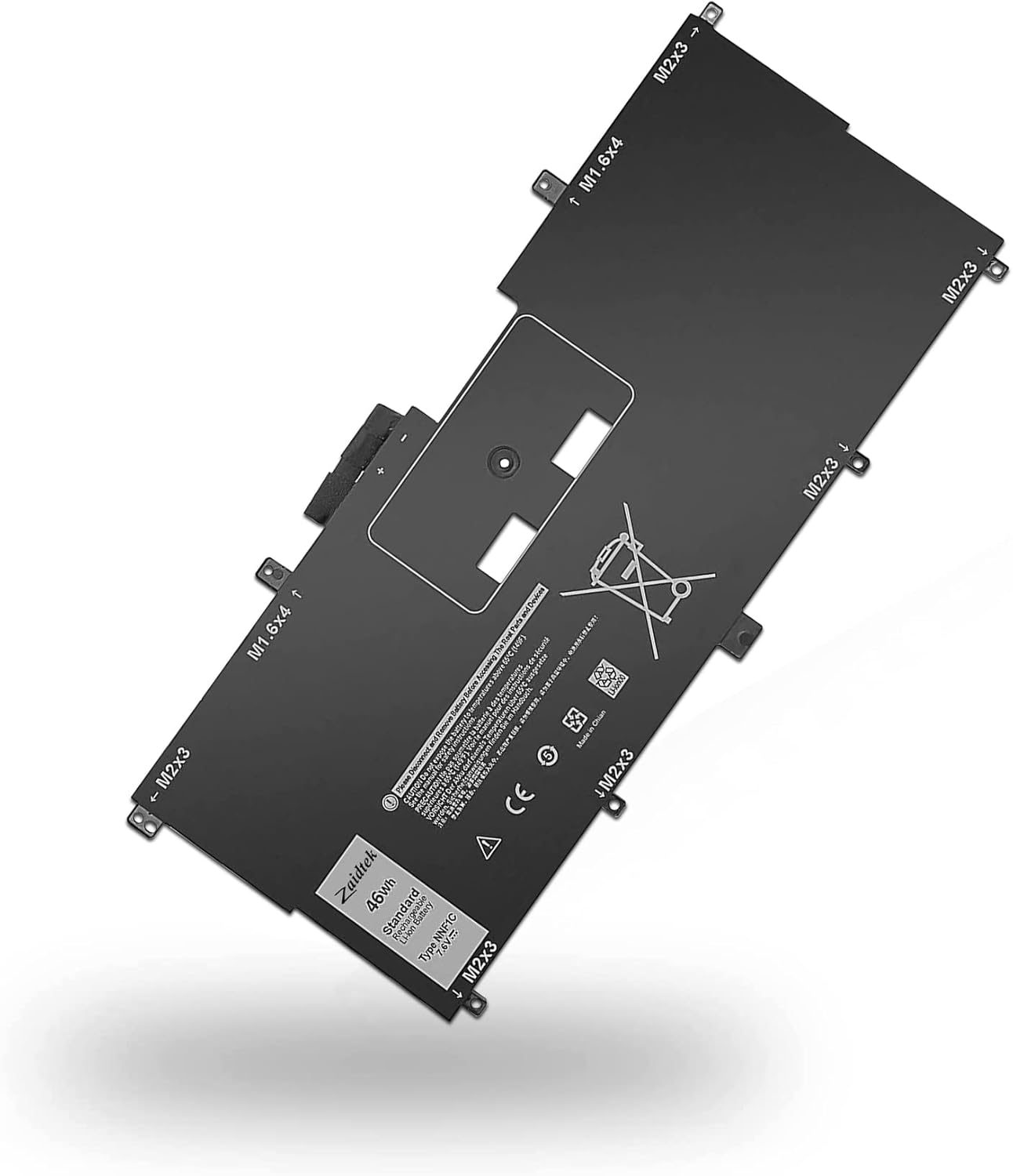
Image: The Ymawetia NNF1C 46Wh laptop battery replacement, showing its form factor and labels.
Setup and First Use
Installation Instructions:
- Power Off: Turn off your laptop completely and disconnect it from the power adapter.
- Access Battery Compartment: Carefully turn the laptop over to access the battery compartment. Refer to your laptop's specific service manual for detailed instructions on opening the chassis and locating the battery.
- Remove Old Battery: Disconnect the old battery and remove it.
- Install New Battery: Place the new Ymawetia NNF1C battery into the compartment and secure it. Connect the battery cable to the laptop's motherboard.
- Secure Chassis: Reassemble your laptop's chassis.
To identify your laptop's model or original battery part number, you can use the following method:

Image: Visual guide demonstrating how to check your original battery's part number and specific laptop model name using Windows system information (msinfo32).
First Use and Calibration:
For optimal performance, the battery must be fully charged before its first use. Follow these steps for initial calibration:
- Fully charge the new battery to 100%.
- Discharge the battery by using your laptop until the battery level reaches approximately 5% (do not let it drain to 0%).
- Recharge the battery to 95%.
- Repeat this charge/discharge cycle 3-4 times to calibrate the battery for accurate power readings.
Operating Guidelines
Your Ymawetia NNF1C battery is designed for reliable performance across various usage scenarios, from work and study to entertainment.

Image: Depiction of multiple usage scenarios for laptops, including work & study, casual movies, and entertainment, highlighting the battery's versatility.
For general use, simply connect your laptop to the power adapter when the battery is low, and disconnect once fully charged. Modern lithium-ion batteries do not require full discharge cycles during regular use.
Video: An official Ymawetia video titled "Work and life need energy" showcasing various individuals using laptops in professional and personal settings, emphasizing the importance of reliable power for daily activities.
Maintenance
General Care:
- Avoid exposing the battery to extreme temperatures (very hot or very cold).
- Keep the battery and laptop clean and free from dust.
- Do not drop or subject the battery to strong impacts.
Long-Term Storage:
If you plan to store the laptop or battery for an extended period without use, follow these recommendations:
- Charge the battery to approximately 40% of its capacity.
- Store the battery in a cool, dry place, ideally around 20 degrees Celsius (68 degrees Fahrenheit).
- To maintain battery health, it is advisable to use the battery at least once a month, allowing it to discharge partially and then recharge.

Image: Detailed views of the battery's construction, highlighting the durable power interface, firm battery clasp, and strong ABS+PC shell for heat and wear resistance.
Troubleshooting
Common Issues and Solutions:
- Battery Not Recognized by Laptop:
If the laptop does not recognize the new battery after installation, try the following:
- Update your laptop's BIOS settings to the latest version.
- Disconnect the new battery, then hold down the laptop's power button for 20 seconds to drain any residual power. Reconnect the new battery and attempt to power on.
- Battery Not Holding Charge / Short Battery Life:
Ensure the battery has undergone the initial calibration cycles as described in the "Setup and First Use" section. If the issue persists, verify that your laptop's power settings are optimized for battery life. Excessive background processes or high screen brightness can significantly reduce battery runtime.
- Battery Overheating:
If the battery or laptop feels excessively hot, immediately power down the laptop and disconnect the charger. Ensure proper ventilation around the laptop and avoid using it on soft surfaces that can block air vents. If overheating continues, discontinue use and contact support.
Specifications
| Feature | Detail |
|---|---|
| Battery Type | Li-ion |
| Cells | 4-cell |
| Voltage | 7.6V |
| Capacity | 46Wh |
| Condition | 100% New |
| Model Number (Battery) | NNF1C |
| Item Weight | 10.5 ounces (approx. 297g) |
| Package Dimensions | 13.83 x 5.63 x 1.34 inches |
| Recharge Cycles | Up to 500 cycles |
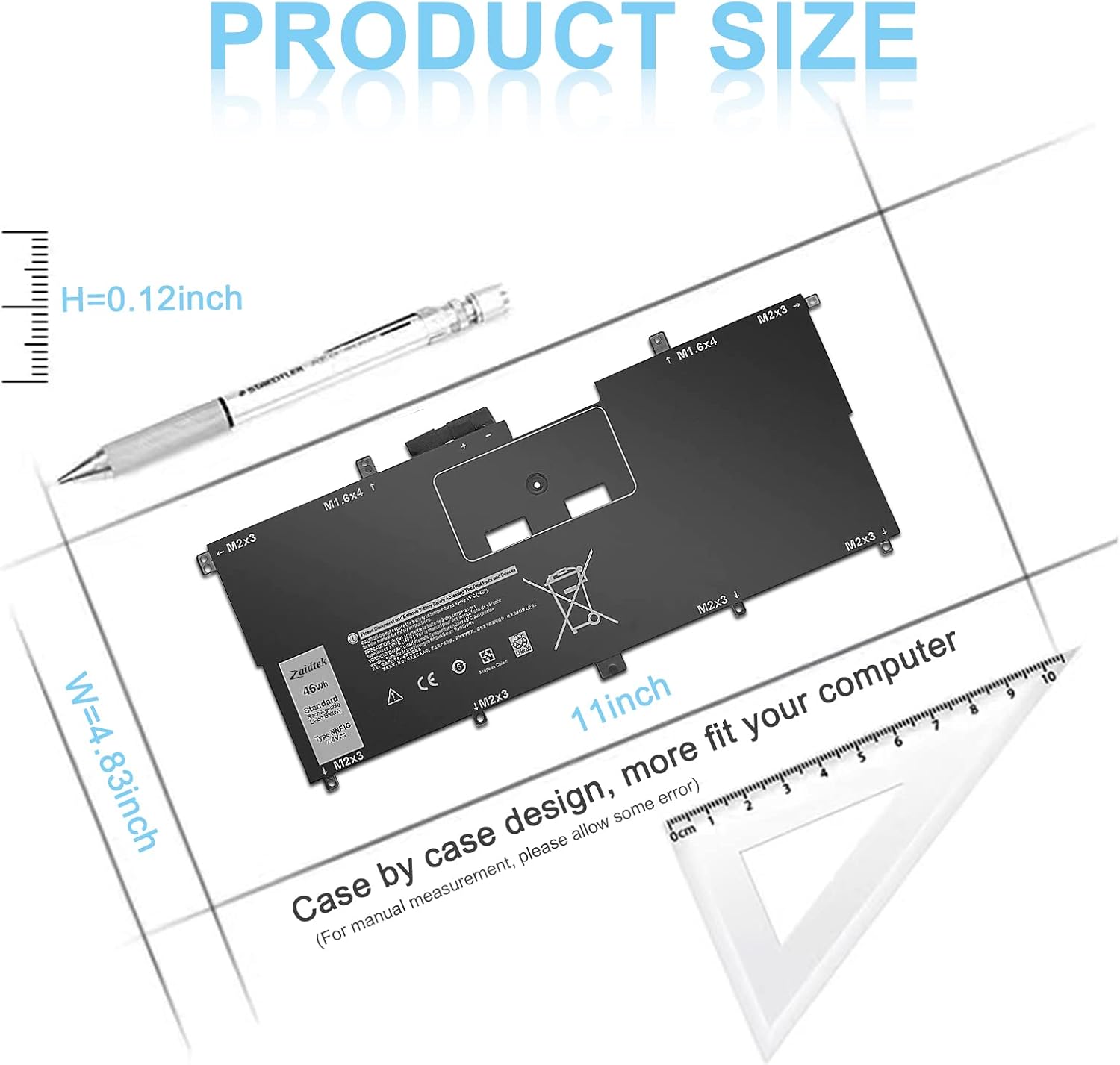
Image: Product size diagram indicating the battery's approximate dimensions: 11 inches in length, 4.83 inches in width, and 0.12 inches in height.
Warranty and Support
Ymawetia is committed to providing high-quality products and customer satisfaction.
- Return Policy: Within 30 days of purchase, we offer a no-questions-asked return policy.
- Product Replacement: For 12 months from the date of purchase, if the product fails due to manufacturing defects, we will replace it with a new one.
For any questions, concerns, or support needs, please contact Ymawetia customer service through your purchase platform.