
1. Introduction
This manual provides detailed instructions for the safe and effective operation, maintenance, and troubleshooting of the VIHELM WT8821 Digital Display Oxygen Detector. This device is designed for industrial applications to accurately measure oxygen concentration in the air. Please read this manual thoroughly before using the product to ensure proper function and safety.

Image 1.1: Front view of the VIHELM WT8821 Oxygen Detector displaying oxygen concentration and temperature.
2. Safety Information
Always observe the following safety precautions to prevent injury or damage to the device:
- Do not operate the device in environments exceeding its specified operating conditions.
- Ensure the device is calibrated regularly according to industry standards.
- Battery Safety: Use only 3x1.5V AAA alkaline batteries. Prohibit charging or disassembling batteries, especially in an explosive environment, as this may cause explosion or leakage.
- Keep the device away from strong electromagnetic fields.
- Do not attempt to repair or modify the device yourself. Refer all servicing to qualified personnel.
3. Product Overview
The VIHELM WT8821 is a compact and robust oxygen detector featuring a digital display and intuitive controls. It is designed for ease of use and reliable performance in various industrial settings.
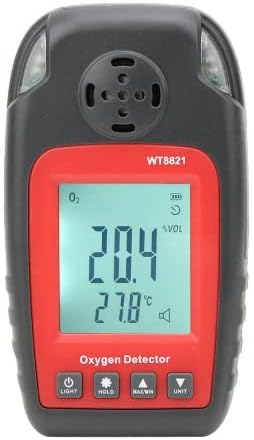
Image 3.1: Front Panel Layout
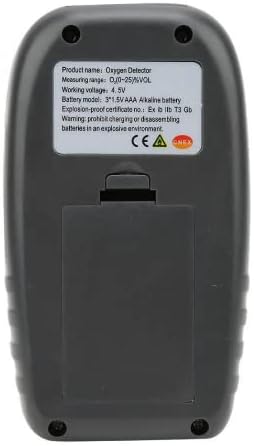
Image 3.2: Rear Panel Layout
3.1 Components
- Digital Display: Shows oxygen concentration (%VOL), temperature (°C), battery status, and alarm indicators.
- Control Buttons:
- LIGHT: Activates backlight.
- HOLD: Freezes the current reading on the display.
- MAX/MIN: Displays maximum or minimum recorded oxygen concentration.
- UNIT: Changes measurement units (if applicable).
- Oxygen Sensor: Located at the top of the device, responsible for detecting oxygen levels.
- Battery Compartment: Located on the rear for AAA batteries.
4. Setup
4.1 Battery Installation
- Locate the battery compartment cover on the back of the device.
- Slide the cover downwards or unclip it to open.
- Insert three (3) 1.5V AAA alkaline batteries, ensuring correct polarity (+/-) as indicated inside the compartment.
- Close the battery compartment cover securely.
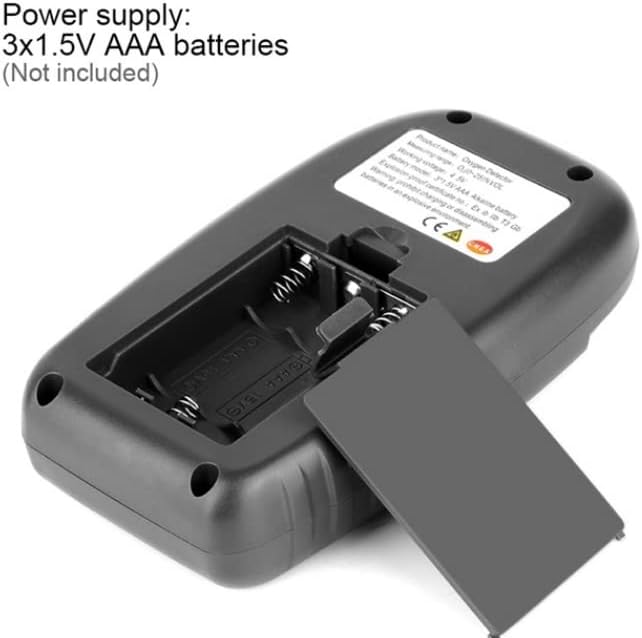
Image 4.1: Battery compartment with batteries not included.
5. Operating Instructions
5.1 Powering On/Off
- To Power On: Press and hold the power button (usually integrated with the 'LIGHT' button or a dedicated power symbol) until the display illuminates.
- To Power Off: Press and hold the power button again until the display turns off.
5.2 Taking Measurements
- Ensure the device is powered on and has completed its self-test (if any).
- Position the oxygen sensor in the environment where oxygen concentration needs to be measured.
- Allow a few seconds for the reading to stabilize on the digital display. The display will show the current oxygen concentration in %VOL and the ambient temperature in °C.
5.3 Button Functions
- LIGHT: Press briefly to activate or deactivate the display backlight for improved visibility in low-light conditions.
- HOLD: Press to freeze the current oxygen and temperature readings on the display. Press again to release and resume live readings.
- MAX/MIN: Press to cycle through the maximum and minimum oxygen concentration values recorded since the device was powered on or reset.
- UNIT: Press to switch between available measurement units, if multiple units are supported (e.g., for temperature).
5.4 Alarm Function
The WT8821 is equipped with an alarm function to alert users to critical oxygen levels. The alarm threshold is factory-set. When oxygen concentration falls outside the safe range, an audible alarm will sound, and a visual indicator (e.g., a speaker icon or flashing display) will appear.
6. Maintenance
6.1 Cleaning
- Wipe the device exterior with a soft, damp cloth. Do not use abrasive cleaners or solvents.
- Ensure the sensor opening is free from dust and debris. Do not insert objects into the sensor opening.
6.2 Battery Replacement
When the low battery indicator appears on the display, replace all three AAA batteries as described in Section 4.1. Always use new alkaline batteries.
6.3 Storage
When not in use for extended periods, remove the batteries to prevent leakage. Store the device in its protective case (if provided) in a cool, dry place, away from direct sunlight and extreme temperatures.
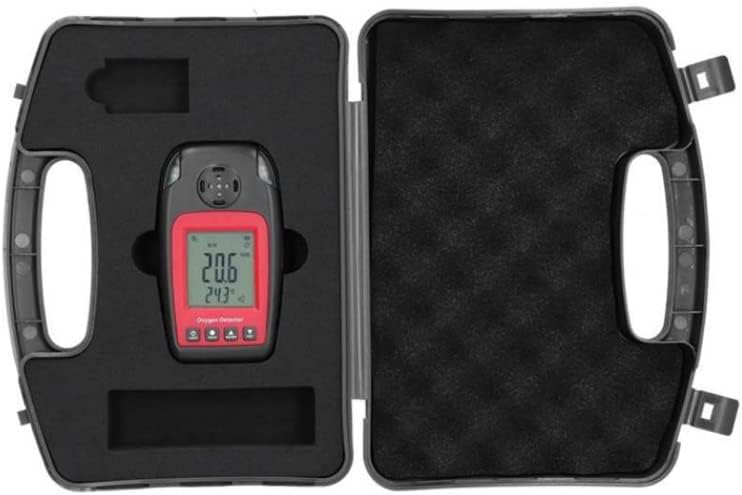
Image 6.1: WT8821 stored in its protective case.
7. Troubleshooting
| Problem | Possible Cause | Solution |
|---|---|---|
| Device does not power on | Dead or incorrectly installed batteries | Replace batteries, ensuring correct polarity. |
| Inaccurate readings | Sensor obstructed or dirty; device needs calibration; extreme environmental conditions | Clean sensor area; contact support for calibration; move to suitable environment. |
| Alarm sounds continuously | Oxygen level outside safe range | Evacuate area if necessary; ventilate the space; verify oxygen levels with another device if possible. |
| Display is dim or flickering | Low battery | Replace batteries. |
8. Specifications
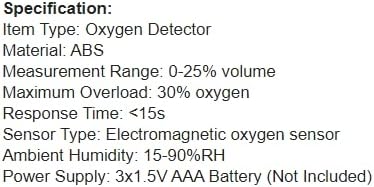
Image 8.1: Product Specifications Overview.
| Feature | Detail |
|---|---|
| Item Type | Oxygen Detector |
| Model | WT8821 |
| Material | ABS |
| Measurement Range | 0-25% volume |
| Maximum Overload | 30% oxygen |
| Response Time | <15s |
| Sensor Type | Electromagnetic oxygen sensor |
| Ambient Humidity | 15-90%RH |
| Power Supply | 3x1.5V AAA Alkaline Battery (Not Included) |
| Working Voltage | 4.5V |
| Explosion-proof Certificate No. | Ex ib IIB T3 Gb |
| Item Weight | 2 pounds (approx. 0.91 kg) |
| Product Dimensions | 9 x 5 x 3 inches (approx. 22.86 x 12.7 x 7.62 cm) |
| UPC | 797442725652 |
9. Warranty and Support
For warranty information, technical support, or service inquiries, please refer to the documentation provided with your purchase or contact your retailer or the manufacturer directly. Keep your purchase receipt as proof of purchase.