
1. Product Overview
The JJA Uniwa V1000 is a mobile phone specifically designed for senior citizens, featuring a large display screen, big buttons, and a loud ringtone for ease of use. It includes essential functions such as calling, messaging, an SOS button for emergencies, FM radio, and Bluetooth connectivity. Its robust design and long-lasting battery ensure reliable communication.
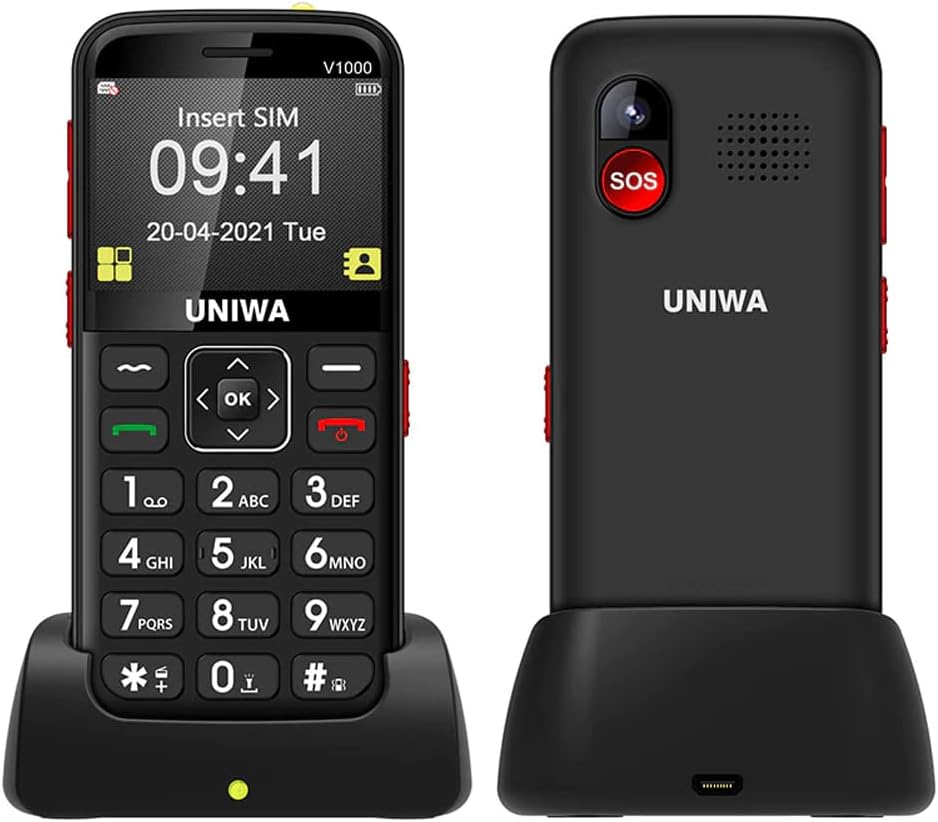
Image: Front and back view of the Uniwa V1000 phone, showcasing its large keypad, display, and the included charging dock.
2. Package Contents
Please check the package contents upon unboxing to ensure all items are present:
- 1 x JJA Uniwa V1000 Mobile Phone
- 1 x Wall Charger
- 1 x User Manual (this document)
- 1 x 1700mAh Battery (pre-installed inside the phone)
- 1 x Charging Dock
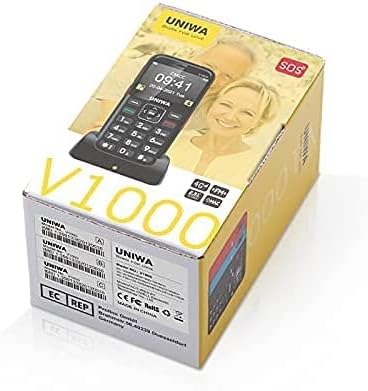
Image: The retail packaging box for the JJA Uniwa V1000, indicating the product model and brand.
3. Safety Information
Read all safety information before using the device to ensure safe and proper operation and to prevent damage to the device or injury to yourself and others.
- Battery Safety: Use only JJA approved batteries, chargers, and accessories. Improper use may lead to fire, explosion, or other hazards.
- Charging: Do not charge the device in wet conditions. Ensure the charger is securely connected.
- Hearing Protection: Avoid prolonged exposure to loud sounds when using headphones or the loudspeaker.
- Driving Safety: Always prioritize driving safety. Do not use the phone while driving if it distracts you.
- Medical Devices: Maintain a safe distance between the phone and medical devices like pacemakers. Consult your physician and the medical device manufacturer for specific guidelines.
- Disposal: Dispose of the phone and battery properly according to local regulations. Do not dispose of them in household waste.
4. Setup
4.1 Inserting SIM Card and Battery
The Uniwa V1000 uses a single SIM card. The 1700mAh battery is typically pre-installed.
- Turn off the phone and disconnect any chargers.
- Carefully remove the back cover of the phone.
- If the battery is not already installed, insert the 1700mAh Lithium Ion battery into its compartment, ensuring the gold contacts align.
- Locate the SIM card slot. Gently slide your 4G SIM card into the slot with the gold contacts facing down and the cut corner oriented correctly.
- Replace the back cover until it clicks securely into place.
4.2 Charging the Phone
Before first use, fully charge the phone's battery.
- Using the Charging Dock: Place the phone into the charging dock, ensuring it sits firmly. Connect the wall charger to the charging dock, then plug the charger into a power outlet. The phone will begin charging.
- Direct Charging: Alternatively, connect the wall charger directly to the phone's charging port, then plug it into a power outlet.
A charging indicator will appear on the screen. The phone is fully charged when the indicator shows a full battery icon.

Image: The Uniwa V1000 phone securely placed in its charging dock, illustrating the stability during charging and highlighting key features like battery capacity and USB connectivity.
5. Operating Instructions
5.1 Power On/Off
- To Power On: Press and hold the Green Call Button until the screen lights up.
- To Power Off: Press and hold the Red End Call Button until the power off options appear, then select "Power off" using the navigation keys and confirm.
5.2 Making and Receiving Calls
- Making a Call:
- Enter the phone number using the large keypad.
- Press the Green Call Button to dial.
- To end the call, press the Red End Call Button.
- Receiving a Call:
- When the phone rings, press the Green Call Button to answer.
- To end the call, press the Red End Call Button.
5.3 Sending and Receiving Messages
- Navigate to the "Messages" menu using the navigation keys.
- Select "Write message" to compose a new SMS.
- Enter the recipient's number and your message.
- Select "Send" to transmit the message.
- Received messages will appear in the "Inbox".
5.4 SOS Function
The SOS button is a critical safety feature for emergencies.
- Setting Up SOS Contacts:
- Go to "Settings" > "SOS Settings".
- Add up to 5 emergency contact numbers. These numbers will be called sequentially when the SOS button is pressed.
- You can also enable an SOS message to be sent to these contacts.
- Using the SOS Button: In an emergency, press and hold the SOS button on the back of the phone for a few seconds. The phone will automatically dial the pre-set emergency contacts one by one until an answer is received, and send the SOS message if enabled.
5.5 FM Radio
- Navigate to the "FM Radio" application from the main menu.
- Use the navigation keys to scan for stations or manually tune to a frequency.
- Headphones may be required to act as an antenna for optimal reception.
5.6 Bluetooth Connectivity
- Go to "Settings" > "Bluetooth".
- Turn Bluetooth "On".
- Select "Search for devices" to find nearby Bluetooth devices (e.g., headsets).
- Select the desired device from the list and follow the on-screen prompts to pair.
5.7 Camera
The Uniwa V1000 features a 0.3 Megapixel rear camera.
- Navigate to the "Camera" application from the main menu.
- Point the camera at your subject.
- Press the "OK" button (center navigation button) to capture a photo.
- Photos are saved to the phone's internal memory.
6. Maintenance
- Cleaning: Use a soft, dry cloth to clean the phone's surface. Avoid using liquid cleaners or aerosols.
- Battery Care:
- Do not expose the battery to extreme temperatures.
- Avoid fully discharging the battery frequently.
- If the phone will not be used for an extended period, charge it to about 50% before storing.
- Storage: Store the phone in a cool, dry place away from direct sunlight and extreme temperatures.
7. Troubleshooting
| Problem | Possible Cause / Solution |
|---|---|
| Phone does not turn on. | Battery is low or depleted. Charge the phone for at least 30 minutes. Ensure battery is correctly inserted. |
| No network signal. | SIM card not inserted correctly or damaged. Reinsert SIM card. You may be in an area with no network coverage. Move to a different location. |
| Battery not charging. | Charger or charging dock may be faulty. Check connections. Ensure power outlet is working. |
| Cannot hear caller / Caller cannot hear me. | Volume too low. Adjust volume during a call. Microphone or speaker may be blocked. Ensure no obstructions. |
| SOS button not working. | SOS contacts not set up. Ensure emergency numbers are configured in SOS settings. |
8. Specifications
| Feature | Detail |
|---|---|
| Brand | JJA |
| Model | Uniwa V1000 |
| RAM Size | 64 MB |
| Digital Storage Capacity | 128 MB |
| Operating System | Mobile |
| Processor Type | Allwinner A20 |
| Standing Screen Display Size | 2.3 Inches |
| Resolution | 320 x 240 Pixels |
| Battery Capacity | 1700 mAh Lithium Ion |
| Battery Average Life (Standby) | 180 Hours |
| Cellular Technology | 4G (Note: Check regional band compatibility) |
| Human Interface Input | Keypad |
| Rear Camera Resolution | 0.3 Megapixels |
| Item Weight | 400 Grams |
9. Warranty and Support
JJA is committed to customer satisfaction. If you encounter any issues or have questions regarding your Uniwa V1000 phone, please do not hesitate to contact our customer support. While specific warranty details are not provided in this manual, we strive to provide the best product and service to ensure a worry-free experience.
For support, please refer to the contact information provided on the product packaging or the retailer's website where you purchased the device.