1. Introduction
Thank you for choosing the Motsfit Smartwatch. This manual provides detailed instructions to help you understand the device's functions, setup, and operation. Please read this manual carefully before using the product to ensure proper usage and to maximize its features.

Image 1.1: Motsfit Smartwatch, showcasing its rectangular display and green strap.
2. Package Contents
Ensure all items are present in the package:
- Motsfit Smartwatch (1)
- Magnetic Charging Cable (1)
- User Manual (1)
3. Product Overview
The Motsfit Smartwatch features a 1.8-inch HD full-touch display, integrated microphone and speaker for calls, and various sensors for health and fitness tracking. It is designed for daily wear and sports activities.
3.1 Key Features
- Bluetooth Call Functionality
- 1.8-inch HD Full-Touch Screen
- Heart Rate, Blood Oxygen, Blood Pressure Monitoring
- Sleep Tracking
- 20+ Sport Modes
- Smart Notifications (SMS, Social Media)
- Music Playback Control
- IP67 Waterproof Rating
- Long Battery Life (7-10 days typical use)
3.2 Physical Components
The watch typically includes a power button, a back button, and a charging port on the rear. The strap is made of comfortable silicone.

Image 3.1: Diagram showing the smartwatch dimensions and key physical features.
4. Setup
4.1 Charging the Smartwatch
Before first use, fully charge the smartwatch. Connect the magnetic charging cable to the charging points on the back of the watch and plug the USB end into a power adapter (not included) or a computer's USB port.
- Charging time: Approximately 2-3 hours.
- Battery indicator will show charging status on the screen.
4.2 App Installation and Pairing
To unlock the full potential of your Motsfit Smartwatch, download and install the 'Da Fit' application on your smartphone.
- Scan the QR code in the manual or search for 'Da Fit' in your phone's app store (Google Play Store for Android, Apple App Store for iOS).
- Install the 'Da Fit' app.
- Ensure Bluetooth is enabled on your smartphone.
- Open the 'Da Fit' app, register or log in, and follow the on-screen instructions to add your device.
- Select your Motsfit Smartwatch from the list of available devices (e.g., 'KR06').
- Confirm the pairing request on both your phone and the smartwatch.
4.3 Enabling Bluetooth Call Function
For the call function, a separate Bluetooth connection is required:
- After pairing the watch with the 'Da Fit' app, go to your smartphone's Bluetooth settings.
- Search for a new device, usually named 'KR06_Audio' or similar.
- Connect to this audio device. This enables the watch's speaker and microphone for calls.

Image 4.1: Visual guide for connecting the smartwatch to a mobile phone via the 'Da Fit' app and Bluetooth.
5. Operating Instructions
5.1 Basic Navigation
- Touch Screen: Swipe left/right, up/down to navigate through menus and features. Tap to select.
- Power Button: Press to wake/sleep the screen. Long press to power on/off.
- Back Button: Press to return to the previous screen or watch face.
5.2 Call Function
Once connected via Bluetooth (both 'KR06' and 'KR06_Audio'), you can make and receive calls directly from your smartwatch.
- Making Calls: Access the dial pad on the watch screen or select a contact from your synced phonebook.
- Receiving Calls: When a call comes in, the watch will display the caller ID. Tap to answer or reject.

Image 5.1: Illustration of the Bluetooth dial call feature, showing the watch displaying an incoming call and a dial pad.
5.3 Health Monitoring
The smartwatch continuously monitors various health metrics.
- Heart Rate: Provides 24-hour heart rate monitoring. View real-time data on the watch or detailed trends in the 'Da Fit' app.
- Blood Oxygen (SpO2): Measure your blood oxygen levels.
- Blood Pressure: Monitor your blood pressure.
- Sleep Tracking: Automatically tracks your sleep patterns, including deep sleep, light sleep, and total sleep duration. Data is available in the app.
- Stress & Breathing Exercises: Guided breathing exercises and stress level monitoring are available.
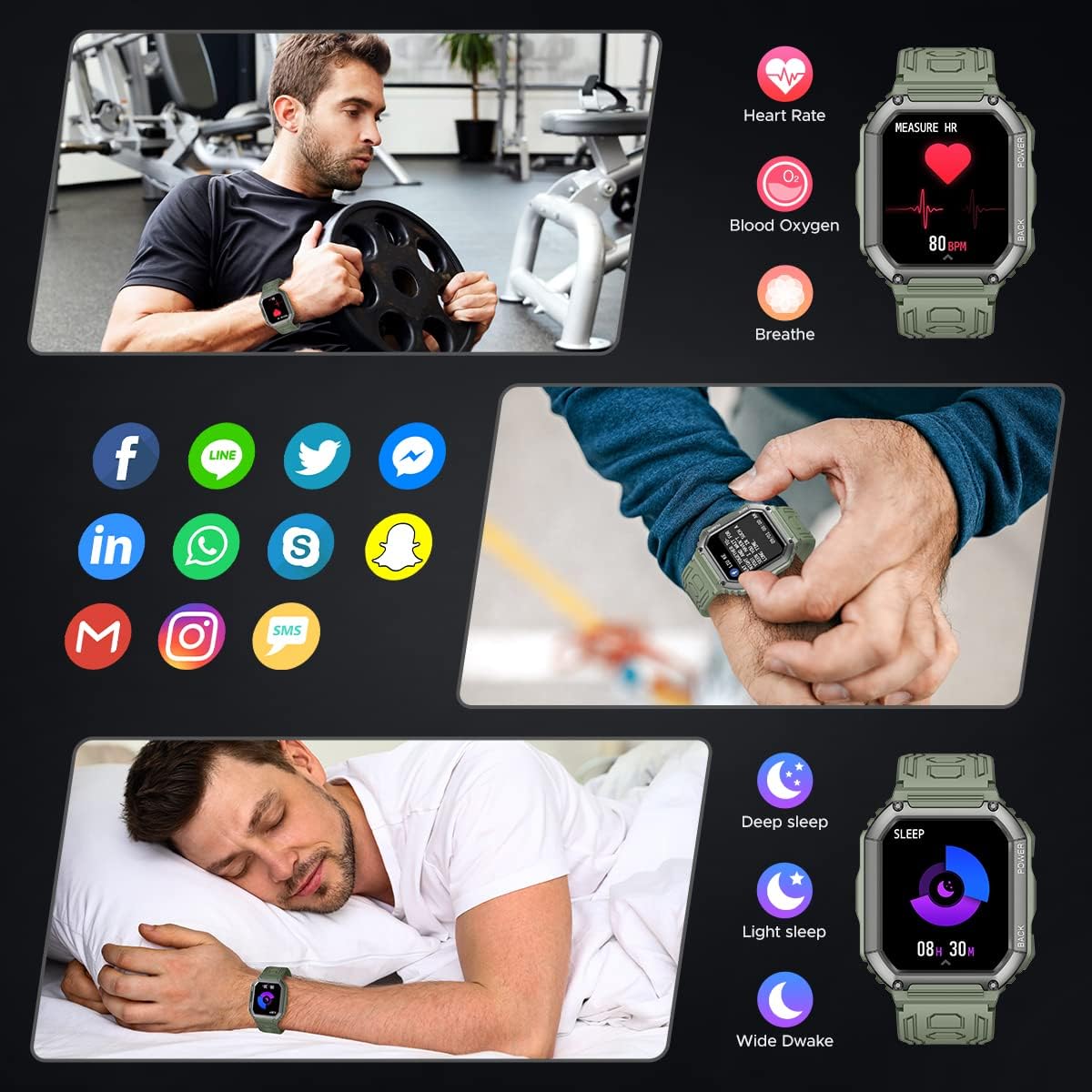
Image 5.2: Display of heart rate, blood oxygen, sleep tracking, and notification icons on the smartwatch.
5.4 Sport Modes
The watch supports over 20 built-in sport modes to track your workouts.
- Accessing Sport Modes: Swipe to the sport mode menu and select your desired activity (e.g., Running, Cycling, Football, Basketball, Tennis, Skiing).
- Tracking: The watch will record steps, calories burned, and distance. GPS tracking (via phone) can be viewed in the 'Da Fit' app.
- Additional Tools: Stopwatch and timer functions are available for workouts.

Image 5.3: Visual representation of different sports activities supported by the smartwatch, including jump rope, basketball, running, cycling, and climbing.
5.5 Smart Notifications & Features
- Message Sync: Receive notifications for SMS, Facebook, WhatsApp, Twitter, Instagram, Skype, and other apps directly on your watch.
- Reminders: Set up vibration reminders for drinking water, sedentary alerts, and alarms through the 'Da Fit' app.
- Weather Sync: Get real-time weather updates on your watch.
- Watch Faces: Choose from over 100 watch faces in the app or customize your own.
5.6 Music Control
Control music playback on your connected smartphone directly from the smartwatch.
- Play, pause, skip tracks, and adjust volume.
- This feature is also available during workouts.

Image 5.4: The smartwatch displaying music controls, with a person enjoying music.
6. Battery & Charging
The Motsfit Smartwatch is equipped with a 320mAh lithium-polymer battery.
- Battery Life: Up to 7-10 days with typical usage.
- Standby Time: Approximately 20 days.
- Charging: Use the provided magnetic charging cable. Ensure the charging pins align correctly with the watch's contacts.

Image 6.1: Overview of key features including 1.8-inch screen, 320mAh battery, and IP67 waterproof rating.
7. Maintenance
- Cleaning: Regularly clean the watch and strap with a soft, dry cloth. If necessary, use a slightly damp cloth and mild soap, then dry thoroughly.
- Water Resistance: The watch is IP67 waterproof, meaning it can withstand splashes and brief immersion. Avoid hot water, steam, or prolonged submersion. Do not press buttons underwater.
- Storage: Store the watch in a cool, dry place when not in use.
- Avoid Chemicals: Do not expose the watch to strong chemicals, detergents, or solvents, as these can damage the materials.
8. Troubleshooting
| Issue | Possible Cause | Solution |
|---|---|---|
| Watch does not power on | Low battery; device frozen | Charge the watch for at least 30 minutes. Long press the power button to force restart. |
| Cannot pair with phone | Bluetooth off; app issue; watch not discoverable | Ensure phone Bluetooth is on. Restart phone and watch. Reinstall 'Da Fit' app. Ensure watch is in pairing mode. |
| Call function not working | 'KR06_Audio' not connected | Go to phone's Bluetooth settings and manually connect to 'KR06_Audio'. |
| Inaccurate health data | Improper fit; sensor obstruction | Ensure the watch is worn snugly on the wrist, not too tight or too loose. Clean the sensor on the back of the watch. Note: This device is not a medical device. |
| Notifications not received | App permissions; notification settings | Check 'Da Fit' app settings for notification permissions. Ensure app is running in the background. Check phone's notification settings for the app. |
9. Specifications
| Feature | Detail |
|---|---|
| Brand | Motsfit |
| Model Number | 7d1c3bac-329a-4491-9032-573222281013 |
| Color | Green |
| Screen Size | 1.8 Inches |
| Connectivity | Bluetooth 5.0 |
| Battery Capacity | 320 mAh Lithium-polymer |
| Battery Life | 7-10 days (typical use) |
| Standby Time | Approx. 20 days |
| Waterproof Rating | IP67 |
| Compatible OS | Android 4.4 and above, iOS 9.0 and above |
| GPS | No built-in GPS (uses phone's GPS for tracking) |
| Special Features | Bluetooth Calls, Heart Rate, SpO2, Blood Pressure, Sleep Monitor, 20+ Sport Modes, Notifications, Music Control, Weather, Alarms, Sedentary/Water Reminders |
10. Warranty and Support
Motsfit products are designed for reliability and performance. For warranty information, please refer to the documentation provided at the time of purchase or contact your retailer.
10.1 Customer Support
If you encounter any issues or have questions not covered in this manual, please contact Motsfit customer support through the retailer's platform or the official Motsfit website (if available). Please have your model number and purchase details ready.