
1. Product Overview
This remote control is a replacement unit designed to operate various NEC AC Room Air Conditioner models. It utilizes infrared (IR) technology for communication with your air conditioner. Please note that as a replacement, some advanced functions of your original remote may not be supported.
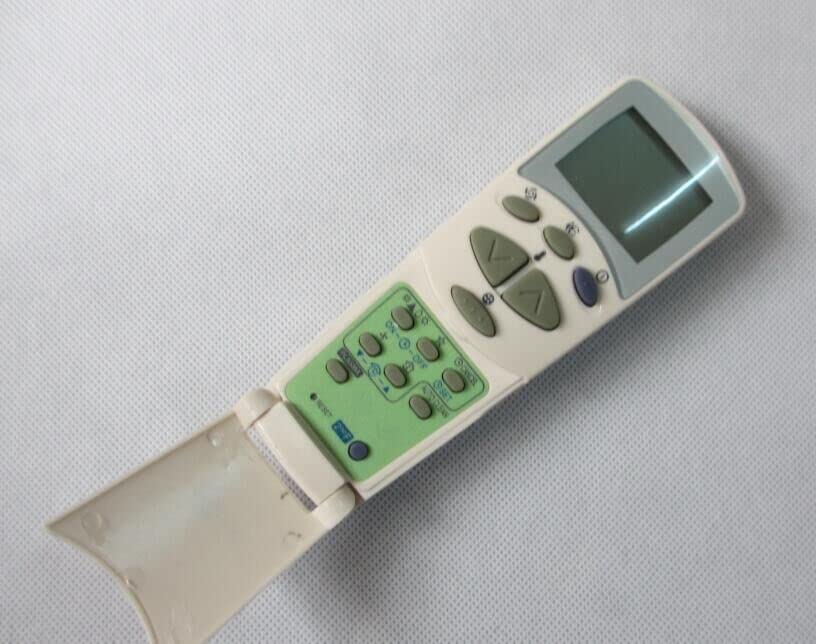
Image 1: Front view of the remote control, showing the display screen and various control buttons.
2. Setup and Battery Installation
The remote control requires two AAA batteries for operation. No complex programming is needed; simply insert the batteries correctly, and the remote will be ready for use.
- Locate the battery compartment on the back of the remote control.
- Slide the battery compartment cover downwards to open it.
- Insert two AAA batteries, ensuring the positive (+) and negative (-) terminals align with the markings inside the compartment.
- Slide the battery compartment cover back into place until it clicks securely.

Image 2: Back view of the remote control with the battery cover removed, illustrating the battery insertion points.
3. Operating Instructions
This remote control provides essential functions for your NEC AC unit. Point the remote directly at the air conditioner's receiver when operating.

Image 3: Angled view of the remote control, providing a clear look at the button layout and LCD screen.
Key Functions:
- Power On/Off: Press the ON/OFF button to turn the air conditioner on or off.
- Mode Selection: Use the MODE button to cycle through available operating modes (e.g., Cool, Heat, Fan, Dry, Auto). This remote supports Cool and Heat functions.
- Temperature Adjustment: Use the TEMP UP (▲) and TEMP DOWN (▼) buttons to increase or decrease the desired temperature. Note: This remote cannot change between Celsius and Fahrenheit.
- Fan Speed: Press the FAN button to adjust the fan speed (e.g., Low, Medium, High, Auto).
- Swing/Louvre: If available on your AC unit, the SWING button may control the vertical or horizontal airflow direction.
- Timer: The TIMER button allows you to set a time for the unit to turn on or off. Refer to your AC unit's manual for specific timer settings.
- Sleep Mode: The SLEEP button may activate a quiet, energy-saving mode.
Important: This replacement remote may not support all advanced features or specific functions present on your original NEC remote control. Functionality is dependent on the compatibility with your specific AC model.
4. Maintenance
- Cleaning: Wipe the remote control with a soft, dry cloth. Do not use liquid cleaners or abrasive materials.
- Battery Replacement: Replace batteries when the remote's range decreases or it stops responding. Always replace both batteries at the same time with new AAA batteries.
- Storage: If the remote will not be used for an extended period, remove the batteries to prevent leakage and damage.
5. Troubleshooting
- Remote not responding:
- Check if the batteries are inserted correctly with the correct polarity.
- Replace old batteries with new AAA batteries.
- Ensure there is a clear line of sight between the remote and the AC unit's infrared receiver. Remove any obstructions.
- Confirm that your AC model is listed as compatible with this remote.
- Limited functionality:
- As a replacement remote, it may not support all functions of your original AC remote. This is normal.
- Refer to your AC unit's original manual for specific functions not covered by this replacement remote.
6. Specifications
| Brand | Generic |
| Model Number | Easytry14002 |
| Connectivity Technology | Infrared (IR) |
| Controller Type | Button Control |
| Color | White |
| Batteries Required | 2 x AAA (not included) |
| Special Features | Supports Cool and Heat functions. Cannot change between Celsius and Fahrenheit. |
| Compatible NEC AC Models | RSH2422, RSH2424, RSH3521, RSH6847, RSH1221, RSH1222, RSH1225, RSH1822, RSH1823, RSH1825, RSH2421, RSC2413, RSC1711, RSH1721, RSC2411 |
7. Warranty and Support
Warranty:
This product is covered by a 90-Day, Hassle-Free Returns policy. Please refer to your purchase documentation for specific terms and conditions.
Customer Support:
For any issues or questions regarding this remote control, please contact the seller directly through the platform where you made your purchase. Provide your order details for faster assistance.