
Hilitand HD-8401
Hilitand HD-8401 Fingerprint Door Lock User Manual
Model: HD-8401
Introduction
Thank you for choosing the Hilitand HD-8401 Fingerprint Door Lock. This smart door knob offers advanced security and convenience with its fast semiconductor fingerprint recognition technology, allowing for 360-degree fingerprint reading within 0.25 seconds. It also includes traditional mechanical key access and an emergency USB power port for reliable operation. This manual will guide you through the installation, setup, and daily use of your new fingerprint door lock.

This image highlights the key features of the Hilitand HD-8401 Fingerprint Door Lock, including its long battery life, advanced semiconductor fingerprint technology, 360-degree quick identification, ease of installation, emergency USB charging capability, and the option for mechanical key unlocking.
Product Components
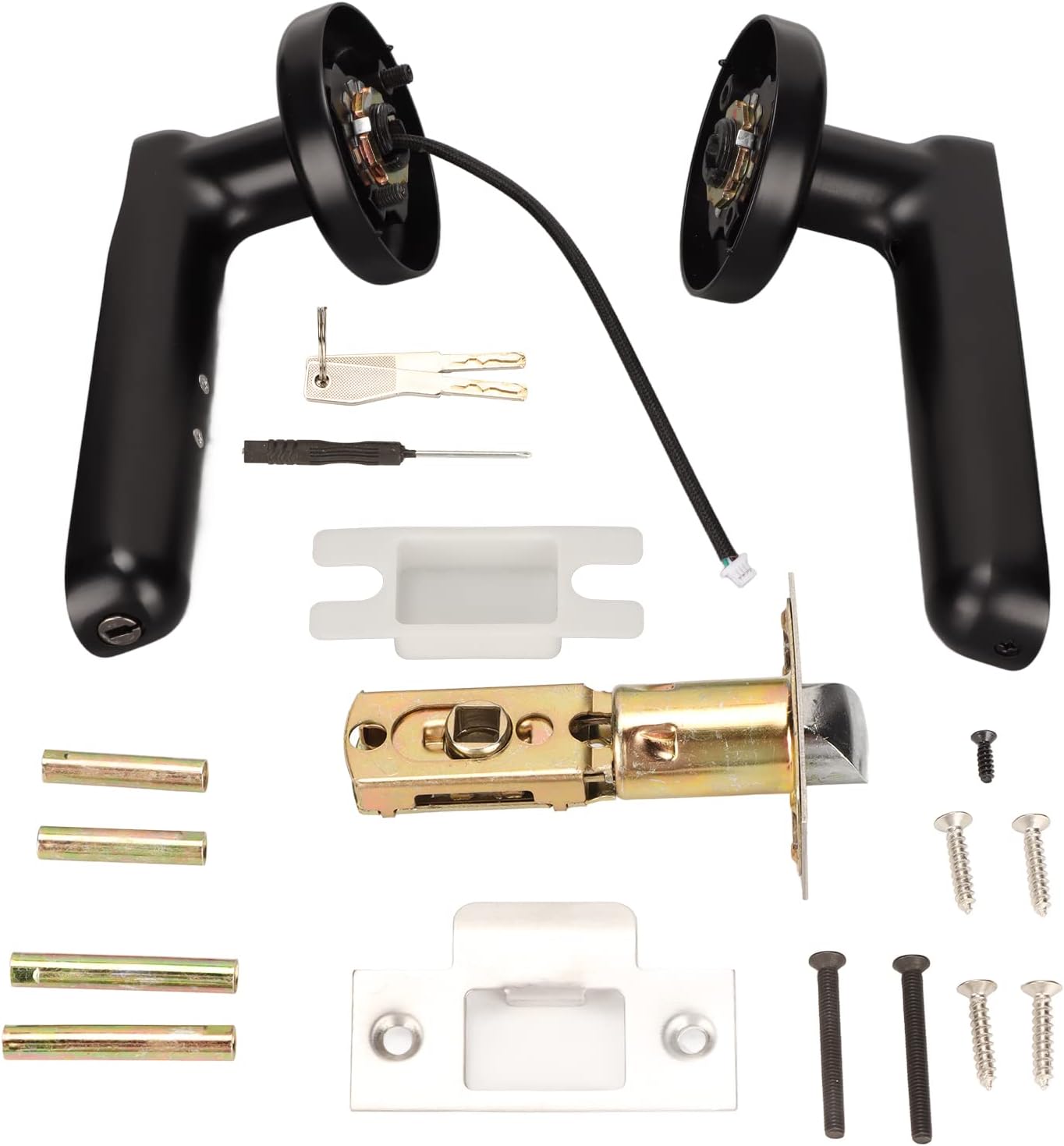
Before installation, please verify that all components are present in the package:

This image displays all the components included in the Hilitand HD-8401 Fingerprint Door Lock package, which typically includes the interior and exterior handles, the latch mechanism, strike plate, various screws for installation, and two mechanical keys for emergency access.
- Front Handle Assembly (with fingerprint sensor)
- Rear Handle Assembly
- Latch Bolt
- Strike Plate
- Mounting Screws
- 2 Mechanical Keys
- Installation Template (if included)

This diagram provides a detailed structural description of the Hilitand HD-8401 Smart Lock, clearly labeling its key parts: the fingerprint head, indicator light, mechanical keyhole, main panel, battery compartment, and screw hole for assembly.
Setup and Installation
Door Preparation
Ensure your door thickness is between 30mm and 65mm. The lock is designed for standard door preparations. If replacing an existing knob, remove the old hardware.
Battery Installation
The lock requires 4 AAA batteries (not included). Follow these steps to install them:
- Unscrew the screw on the battery cover of the rear handle assembly.
- Gently open the top cover and turn it over to reveal the battery compartment.
- Insert 4 AAA batteries, ensuring correct polarity (+/-).
- Close the cover and secure it with the screw.
This image illustrates the three-step process for installing batteries into the Hilitand HD-8401 Fingerprint Door Lock: first, unscrew the battery cover; second, open and flip the cover; and third, insert the batteries into the designated slots.
Lock Installation
Refer to the included installation template for precise drilling if needed. Generally, installation involves:
- Install the latch bolt into the door edge.
- Connect the front and rear handle assemblies through the door, aligning the spindle and wires.
- Secure the assemblies with the provided mounting screws.
- Install the strike plate on the door frame.

This image shows the Hilitand HD-8401 Fingerprint Door Lock successfully installed on a wooden door, emphasizing its straightforward installation process and the illuminated fingerprint sensor indicating readiness for 360-degree fingerprint recognition to unlock.
Operating Instructions
Adding Fingerprints (Administrator)
The first fingerprint registered will be the administrator. This fingerprint is required to add or delete other users.
- Press and hold the fingerprint sensor until the indicator light turns blue.
- Place your finger on the sensor. Lift and repeat several times as prompted by the indicator light (e.g., green flash for successful scan, red for error).
- Once successfully registered, the light will turn green.
Adding User Fingerprints
After setting up the administrator fingerprint, you can add up to 29 additional user fingerprints (total 30).
- Wake the lock by touching the sensor.
- Place the administrator's registered finger on the sensor until the light turns blue.
- Immediately, have the new user place their finger on the sensor. Lift and repeat several times as prompted.
- Once successfully registered, the light will turn green.
Unlocking with Fingerprint
Simply place your registered finger on the fingerprint sensor. The lock will recognize your fingerprint within 0.25 seconds and unlock. The indicator light will turn green upon successful recognition.

This image visually represents the rapid unlocking capability of the Hilitand HD-8401 Fingerprint Door Lock, illustrating that it can store up to 30 unique fingerprints and unlock the door in a mere 0.25 seconds.
Unlocking with Mechanical Key
In case of battery depletion or fingerprint sensor malfunction, you can use the provided mechanical keys.
- Locate the concealed mechanical keyhole on the front handle assembly.
- Insert the key and turn to unlock the door.

This image clearly demonstrates the mechanical key unlock feature of the Hilitand HD-8401 Fingerprint Door Lock, highlighting the discreetly hidden keyhole that can be accessed for manual unlocking.
Emergency USB Power
If the batteries are completely drained, you can temporarily power the lock using a power bank (not included) via the emergency USB port.
- Connect a power bank to the USB port located at the bottom of the front handle.
- Once powered, you can use a registered fingerprint to unlock the door.
Maintenance
To ensure optimal performance and longevity of your Hilitand HD-8401 Fingerprint Door Lock, follow these maintenance guidelines:
- Battery Replacement: Replace all four AAA batteries when the low battery indicator appears or when the lock's response becomes slow. Always use new, high-quality alkaline batteries.
- Cleaning: Wipe the fingerprint sensor and the lock's surface with a soft, dry cloth. Avoid using abrasive cleaners, solvents, or harsh chemicals, as these can damage the finish or electronic components.
- Avoid Moisture: Do not expose the lock to excessive moisture or direct water spray. While designed for indoor use, extreme humidity can affect performance.
- Mechanical Key Check: Periodically test the mechanical key function to ensure it operates smoothly as a backup.
Troubleshooting
If you encounter issues with your Hilitand HD-8401 Fingerprint Door Lock, refer to the following common problems and solutions:
- Lock does not respond / No power:
Solution: Check if the batteries are installed correctly and are not depleted. Replace with new batteries if necessary. Use the emergency USB power port with a power bank to temporarily power the lock. - Fingerprint not recognized:
Solution: Ensure your finger is clean and dry. Try placing your finger in different orientations on the sensor. If the issue persists, re-register your fingerprint. Ensure you are using a registered fingerprint. - Lock does not unlock after successful fingerprint scan:
Solution: Check if the latch bolt is obstructed. Ensure the handle is properly installed and not loose. Try using the mechanical key to confirm the lock mechanism is not jammed. - Indicator light flashes red:
Solution: A red flash usually indicates an error or an unrecognized fingerprint. Try scanning your finger again. If during registration, it means the scan was unsuccessful; try again. - Cannot add new fingerprints:
Solution: Ensure you are using the administrator's fingerprint to initiate the adding process. Check if the maximum number of fingerprints (30) has been reached.
Specifications
| Feature | Specification |
|---|---|
| Brand | Hilitand |
| Model Number | Hilitandg2evcz8yqi874-11 |
| Lock Type | Biometric (Fingerprint) |
| Material | Metal |
| Special Feature | Keyless Entry, Emergency USB Port |
| Power Source | 4 x AAA Batteries (not included) |
| Door Thickness Compatibility | 30-65mm |
| Fingerprint Recognition Speed | 0.25 seconds |
| Fingerprint Capacity | Up to 30 sets |
| Included Components | Lock assembly, 2 Mechanical Keys |
Warranty and Support
For warranty information or technical support, please contact the seller or manufacturer directly. Keep your purchase receipt as proof of purchase. For general inquiries or troubleshooting not covered in this manual, refer to the Hilitand official support channels.