
1. Introduction and Overview
The UREVO URTM012 is an innovative 3-in-1 foldable treadmill designed for versatile home fitness. It seamlessly transitions between walking, running, and working modes, offering a convenient solution for maintaining an active lifestyle even with limited space. Its robust 3 HP motor and shock-absorbing system ensure a comfortable and quiet workout experience.
Video 1.1: Overview of the UREVO URTM012 3-in-1 Running/Walking/Working Treadmill. This video demonstrates the various modes and compact design of the treadmill.
2. Product Features
- 3-in-1 Design: Combines treadmill, walking machine, and working machine functionalities.
- Effortless 2-Second Folding: Quick and easy folding mechanism for convenient storage without needing tools.
- Powerful 3 HP Motor: Supports up to 286 lbs capacity and speeds up to 8.6 mph.
- Spacious Running Surface: Measures 42.5" x 16.5" for comfortable movement.
- Advanced Shock Absorption: Features 8 silicone shock absorbers and 2 extra external shock pads for reduced impact on joints.
- Quiet Operation: Operates at less than 25dB, ideal for home or office use.
- Dual Display: LED display on the handlebar and a display on the remote control for easy monitoring of time, speed, distance, and calories.
- Removable Table: Large, removable table accommodates laptops, books, and other items for working or studying while exercising.
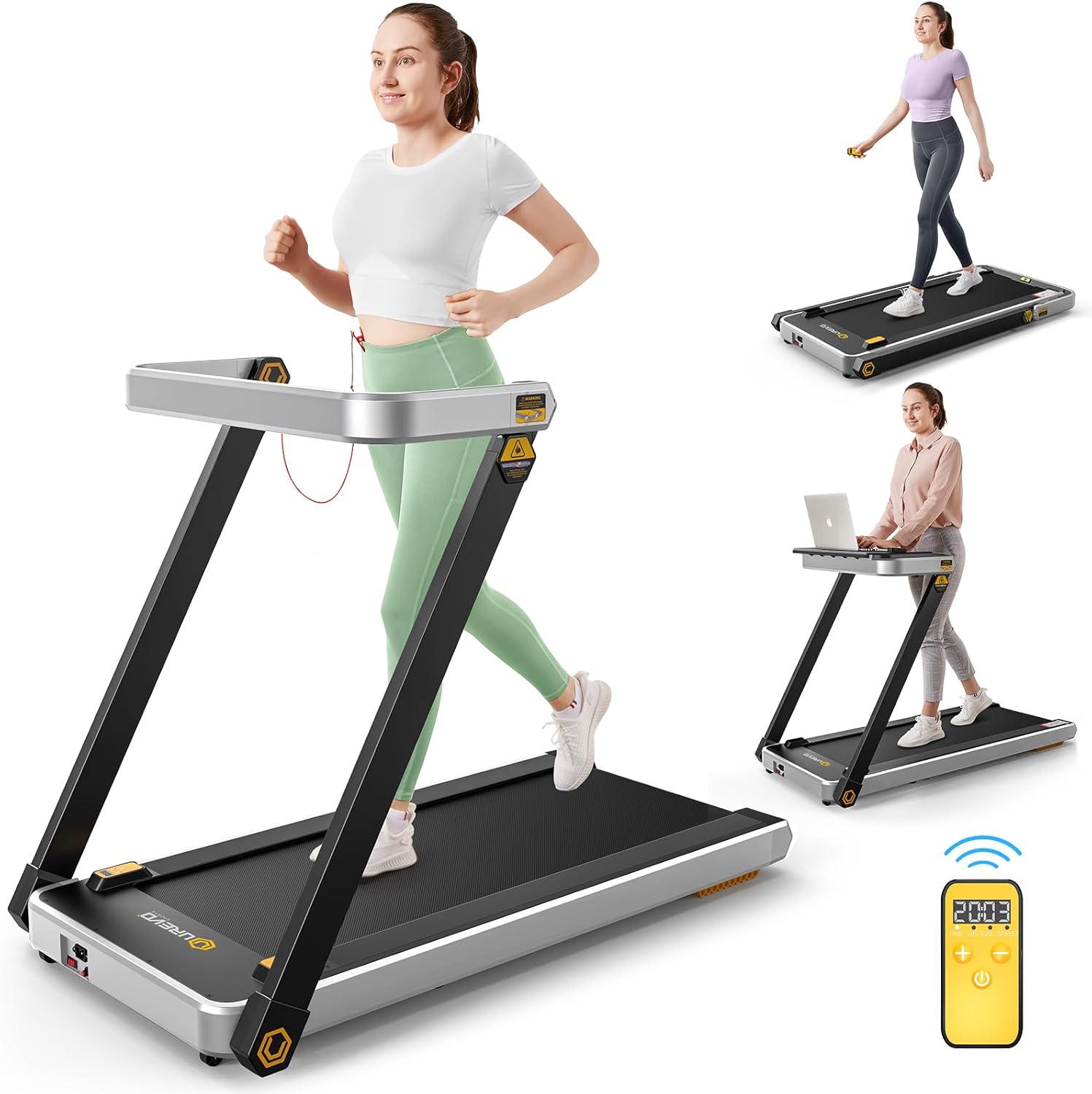
Figure 2.1: The UREVO URTM012 treadmill showcasing its three primary modes of use: running, walking, and working with the integrated desk. The remote control is also visible.

Figure 2.2: Detail of the seamless desk board designed to hold various devices, allowing users to work or study while walking.

Figure 2.3: Visual representation of the treadmill's unique folding design, highlighting its ease of setup and compact storage.

Figure 2.4: An illustration emphasizing the powerful 3 HP commercial treadmill motor, designed for smoother running and longer durability.

Figure 2.5: A detailed view of the treadmill's LED display on the handlebar and the remote control, both showing workout metrics like time, speed, distance, and calories.

Figure 2.6: A top-down view highlighting the generous dimensions of the running belt (42.5" x 16.5"), providing ample space for various body types.

Figure 2.7: An exploded view demonstrating the 8 internal silicone shock absorbers and 2 external shock pads, designed to reduce noise and provide cushioning.
3. Setup & Assembly
The UREVO URTM012 treadmill comes fully assembled and requires no complex installation. Simply unpack, unfold, and connect to power.
3.1 Unfolding the Treadmill
- Carefully remove the treadmill from its packaging.
- Lift the handlebar upwards until it locks securely into place.
- Ensure the side safety features (if applicable) are extended for stability.
3.2 Attaching the Removable Table
To use the treadmill in working mode, attach the removable table:
- Align the hooks on the underside of the table with the designated slots on the handlebar.
- Gently press down until the table is securely fastened.
- Ensure the table is stable before placing any items on it.
3.3 Power Connection and Safety Key
- Connect the power cord to the treadmill and then to a grounded electrical outlet.
- Insert the red safety key into its designated slot on the console.
- Attach the clip of the safety key to your clothing before starting any exercise. The treadmill will not operate without the safety key in place.
3.4 Remote Control Pairing
The remote control comes with pre-installed batteries. To pair it with the treadmill:
- Ensure the treadmill is powered on.
- Press and hold the '3' and '6' buttons on the treadmill's console for several seconds until the screen displays 'P'.
- The remote control should now be paired and ready for use.
Video 3.1: Accessories Introduction & Pair Method. This video provides a detailed guide on the included accessories and how to pair the remote control with the treadmill.
4. Operating Instructions
4.1 General Operation
- Power On: Flip the red power switch located at the base of the treadmill to the 'ON' position. The LED display will light up.
- Start: Press the 'Start/Pause' button on the console or the play button on the remote control. The treadmill will begin with a 3-second countdown before starting at a low speed.
- Adjust Speed: Use the '+' and '-' buttons on the console or remote control to increase or decrease the speed.
- Pause: Press the 'Start/Pause' button on the console or the play button on the remote control to pause your workout.
- Stop: Press the 'Stop' button on the console or remote control to end your workout.
4.2 Walking Mode
For walking, the treadmill can be used with the handlebar in the upright position or folded down. Ensure the removable table is detached if you prefer to walk without it.
4.3 Running Mode
For running, ensure the handlebar is in the upright and locked position. The maximum speed for running is 8.6 mph.
Video 4.1: 3-in-1 Folding Treadmill. This video demonstrates the folding and unfolding of the treadmill, showing how it can be used for both walking and running.
4.4 Working Mode
Attach the removable table as described in Section 3.2. You can then place your laptop or other work materials on the table while walking at a comfortable pace.
4.5 Remote Control Usage
The remote control allows you to conveniently manage your workout without reaching for the console. It displays real-time data including time, distance, calories, and speed. It also features buttons for starting, pausing, stopping, and adjusting speed.
4.6 Safety Features
- Always attach the safety key clip to your clothing before starting the treadmill. If the safety key is pulled out, the treadmill will immediately stop.
- Ensure the treadmill is on a flat, stable surface before use.
- Do not allow children under 13 years old near the machine.
5. Maintenance
5.1 Cleaning
Regularly wipe down the treadmill with a damp cloth. Avoid using abrasive cleaners or solvents.
5.2 Lubrication
The running belt requires periodic lubrication to ensure smooth operation and prolong its lifespan. Use the provided lubricating oil and follow the instructions in the detailed user manual (PDF) for proper application.
5.3 Belt Adjustment
If the running belt becomes misaligned or slips, refer to the detailed user manual (PDF) for instructions on how to adjust its tension and alignment using the provided L-shaped hexagon wrenches.
6. Troubleshooting
- Treadmill not starting: Check if the power cord is securely plugged in, the power switch is ON, and the safety key is correctly inserted.
- Unusual noises: Ensure the treadmill is on a flat surface. Check for any loose parts or if the running belt requires lubrication.
- Running belt slipping: The belt may need tension adjustment. Refer to the maintenance section or the full user manual.
- Remote control not responding: Ensure the remote control is paired correctly (refer to Section 3.4). Check if the batteries need replacement.
For more detailed troubleshooting steps, please consult the comprehensive User Manual (PDF) provided with your product or available online.
7. Specifications
| Feature | Specification |
|---|---|
| Model Name | URTM012 |
| Brand | UREVO |
| Product Dimensions | 50.9"D x 27.2"W x 37.4"H |
| Item Weight | 86 Pounds |
| Material | Alloy Steel |
| Maximum Speed | 8.6 Miles per Hour |
| Maximum Horsepower | 3 Horsepower |
| Maximum Weight Recommendation | 286 Pounds |
| Deck Length | 42.5 Inches |
| Deck Width | 16.5 Inches |
| Folded Size | Approx. 50"L x 27"W x 10"H |
| Display Type | LED |
| Included Components | User Manual, Safety Key, Power Cord, Remote Control |
8. Warranty & Support
The UREVO URTM012 treadmill comes with a 1-year warranty from the date of purchase. This warranty covers manufacturing defects and malfunctions under normal use.
For warranty claims, technical support, or any inquiries regarding your product, please contact UREVO customer service. All inquiries will be answered within 24 hours.
You can also refer to the comprehensive User Manual (PDF) for detailed information and instructions.