
Introduction
This manual provides instructions for the Generic Replacement Remote Control, designed for use with the Tibo Manhattan TV Stand Integrated Soundbar. This remote control is pre-programmed and requires no additional setup beyond battery installation.
Package Contents
- 1 x Replacement Remote Control
- Note: Batteries and instruction manual are not included in the package.
Setup: Battery Installation
The remote control requires two AAA batteries (not included). Follow these steps to install the batteries:
- Locate the battery compartment cover on the back of the remote control.
- Slide the battery compartment cover downwards or press the latch and lift to open it.
- Insert two new AAA batteries, ensuring the positive (+) and negative (-) terminals match the diagrams inside the compartment.
- Replace the battery compartment cover by sliding it back into place until it clicks securely.
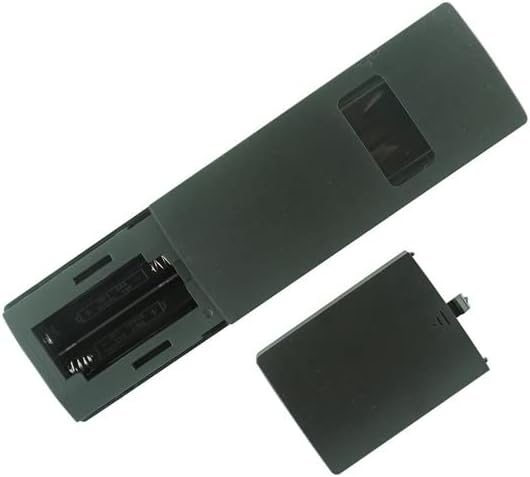
Figure 1: Remote control with battery compartment open, ready for battery insertion.

Figure 2: Front view of the remote control.
Operating Instructions
This remote control is designed for immediate use with the Tibo Manhattan TV Stand Integrated Soundbar once batteries are installed. No programming or pairing is required.
- Power Button: Press to turn the soundbar on or off.
- Volume Up/Down: Adjust the sound level.
- Mute Button: Silence the audio output.
- Source/Input Button: Cycle through available audio input sources.
- Refer to your Tibo Manhattan TV Stand Integrated Soundbar's original manual for specific functions of each button.
Maintenance
- Cleaning: Wipe the remote control with a soft, dry cloth. Do not use liquid cleaners or abrasive materials.
- Battery Replacement: Replace batteries when the remote control's response becomes sluggish or stops working. Always replace both batteries at the same time with new ones.
- Storage: If the remote control will not be used for an extended period, remove the batteries to prevent leakage.
Troubleshooting
- Remote not responding:
- Ensure new batteries are correctly installed with the correct polarity.
- Check if the batteries are depleted and replace them if necessary.
- Ensure there are no obstructions between the remote control and the soundbar's sensor.
- Confirm the remote control is pointed directly at the soundbar's sensor.
- Intermittent operation:
- This may indicate low battery power. Replace the batteries.
Specifications
| Feature | Detail |
|---|---|
| Brand | Generic |
| Compatible Devices | Tibo Manhattan TV Stand Integrated Soundbar |
| Connectivity Technology | Bluetooth (Note: Typically, such remotes use Infrared. If your soundbar requires Bluetooth pairing, refer to its original manual.) |
| Controller Type | Button Control |
| Special Feature | No additional programming required |
| Batteries Required | 2 x AAA (not included) |
Warranty Information
This product is a generic replacement remote control. For specific warranty details, please refer to the retailer or seller from whom the product was purchased. Standard consumer rights apply.
Support
For technical assistance or inquiries regarding this remote control, please contact the seller directly through the platform where the purchase was made. Ensure you have your order details available.