1. Product Overview
This document provides instructions for the SZHKHXD replacement infrared (IR) remote control, designed to operate various Toshiba DVD player models. This remote is a direct replacement and does not require programming. It functions by sending infrared signals to your DVD player.
Note: As a replacement remote, some advanced or specific functions present on the original remote may not be fully supported or may operate differently. Please refer to your DVD player's original manual for detailed functionality of your specific model.

Image 1.1: Angled view of the SZHKHXD replacement remote control. This image displays the overall design and button layout of the remote, including the main control buttons and the flip-down numeric keypad section.
2. Important Safety Information
- Do not mix old and new batteries.
- Do not mix alkaline, standard (carbon-zinc), or rechargeable (nickel-cadmium) batteries.
- Always remove exhausted batteries promptly to prevent leakage and damage.
- Keep batteries out of reach of children.
- Do not expose the remote control to direct sunlight, heat sources, or moisture.
3. Setup
3.1 Battery Installation
The remote control requires two (2) AA batteries (not included). Follow these steps to install them:
- Locate the battery compartment on the back of the remote control.
- Press down on the tab and slide the battery cover downwards to open it.
- Insert two AA batteries, ensuring the positive (+) and negative (-) terminals align correctly with the markings inside the compartment.
- Slide the battery cover back into place until it clicks securely.
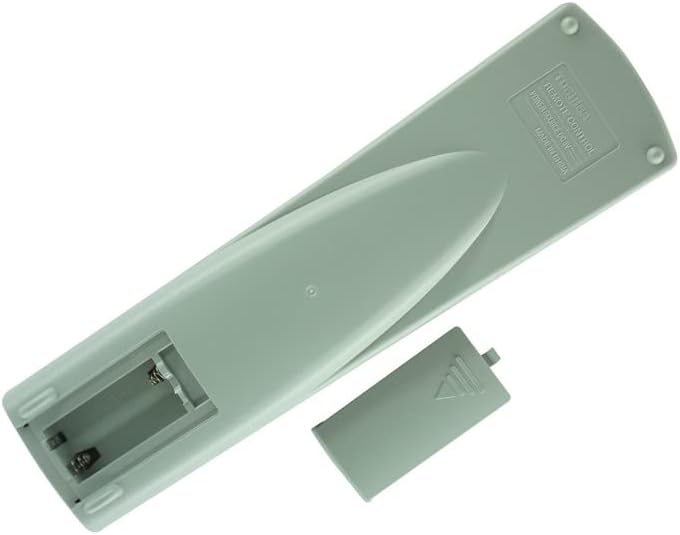
Image 3.1: Rear view of the remote control with the battery compartment open. This image illustrates the correct orientation for inserting two AA batteries.
3.2 Initial Use
Once batteries are installed, the remote control is ready for use. No programming or pairing is required. Point the remote directly at your Toshiba DVD player and press the desired function button.
4. Operating Instructions
The remote control features standard buttons for DVD player operation. Below is a general guide to common functions:

Image 4.1: Front view of the remote control, displaying the layout of all operational buttons.
- Power (I/O): Turns the DVD player on or off.
- Open/Close: Opens or closes the disc tray.
- Play (►): Starts disc playback.
- Pause (▐▐): Pauses playback. Press again to resume.
- Stop (■): Stops disc playback.
- Fast Forward (►►): Advances playback quickly.
- Rewind (◄◄): Rewinds playback quickly.
- Skip (●►► / ◄◄●): Skips to the next or previous chapter/track.
- Navigation Buttons (Up, Down, Left, Right, Enter): Used to navigate menus and make selections.
- Menu: Accesses the disc menu or system menu.
- Top Menu: Returns to the disc's top menu.
- Subtitle: Cycles through available subtitle languages.
- Audio: Cycles through available audio tracks/languages.
- Angle: Changes the camera angle if available on the disc.
- Setup: Accesses the DVD player's setup menu.
- Zoom: Zooms in or out on the picture.
- Numeric Keypad (0-9, +10): Used for direct track/chapter selection or inputting numbers.
5. Maintenance
- Cleaning: Wipe the remote control with a soft, dry cloth. Do not use liquid cleaners or abrasive materials.
- Battery Replacement: Replace batteries when the remote's response becomes sluggish or stops working. Always replace both batteries at the same time.
- Storage: If the remote control will not be used for an extended period, remove the batteries to prevent leakage. Store in a cool, dry place.
6. Troubleshooting
- Remote not responding:
- Ensure batteries are correctly installed and not depleted. Replace if necessary.
- Check for any obstructions between the remote control and the DVD player's IR sensor.
- Ensure you are within the effective range and pointing the remote directly at the DVD player.
- Certain functions do not work:
- This replacement remote is designed to cover primary functions. Some highly specific or advanced features of your original DVD player remote may not be replicated.
- Verify that the function you are trying to use is supported by your specific Toshiba DVD player model.
7. Specifications
- Connectivity Technology: Infrared (IR)
- Power Source: 2 x AA Batteries (not included)
- Compatibility: Toshiba DVD Player Models SD-1008U, SD-2008U, SD-2108U, SE-R002, SD-3108C, SD-310SU, SD-9000U, SD-9100U, SE-R0013, SD-2150U
- Special Feature: IR remote, cannot be programmed.
8. Warranty and Support
This product is a replacement remote control. Specific warranty and support details are typically provided by the seller at the time of purchase. Please refer to your purchase documentation or contact the seller (SZHKHXD) for information regarding warranty coverage or technical support.


