
Yahboom DOGZILLA S1 with Pi 4B-4G
Yahboom Smart AI Robot Dog Instruction Manual
Model: DOGZILLA S1 with Pi 4B-4G
Brand: Yahboom
1. Introduction to the Yahboom Smart AI Robot Dog
The Yahboom Smart AI Robot Dog is an advanced quadruped robot designed for adults interested in AI, robotics, and programming. It utilizes a Raspberry Pi as its main controller and an STM32 as a co-processor, enabling sophisticated bionic movements and artificial intelligence functions.
This robot is equipped with a camera module and developed based on OpenCV, allowing for features such as face recognition, target tracking, QR code, and color recognition. Its 12 movable joints, controlled by 3 bus servos per leg, accurately restore natural animal movements, supporting omnidirectional motion and six-dimensional attitude control.
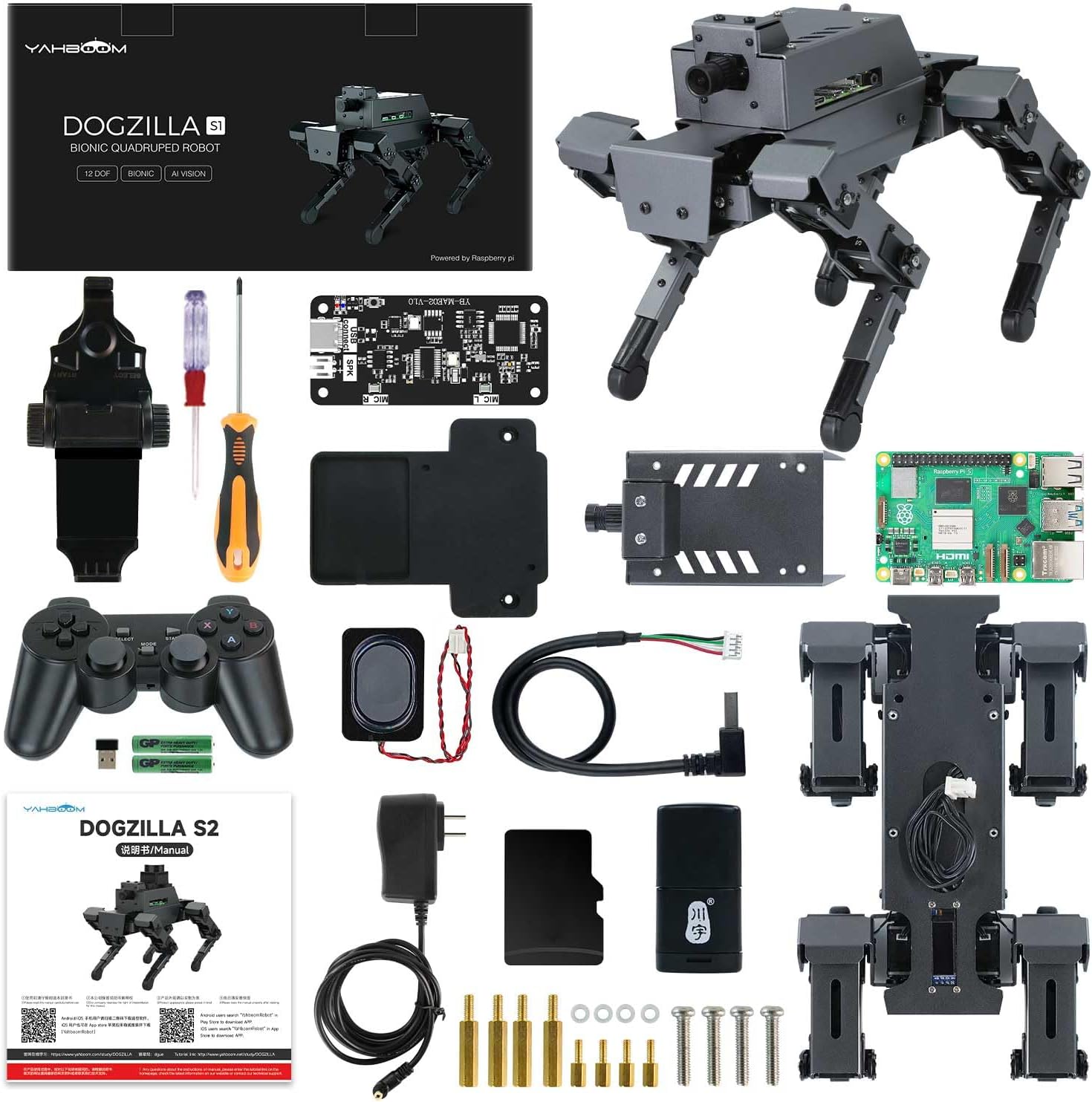
Figure 1.1: The Yahboom Smart AI Robot Dog (S1 with Pi 5-4G) and its various components.
The DOGZILLA robot dog has undergone several upgrades, enhancing its capabilities and performance. Initially released in August 2023, it has seen improvements in voice interaction, SLAM mapping, and a significant upgrade to the Raspberry Pi 5 main control board, boosting AI computing power by 2-3 times.

Figure 1.2: Development timeline highlighting key upgrades to the DOGZILLA robot dog.
2. What's in the Box
The DOGZILLA S1 with Pi 5-4G comes as a pre-assembled electronic kit. Most structural parts are assembled before delivery. Users only need to install the top cover of the Raspberry Pi board box.
Included Components:
- Robot Dog Body
- Raspberry Pi 4B motherboard (optional, included in this model)
- Aluminum alloy cover (including camera)
- AI large model voice module
- Wireless handle + mobile phone holder
- 64G TF card + card reader
- Charger
- Speaker
- Speaker base
- Screwdriver (x2)
- Manual
- Copper column screw pack
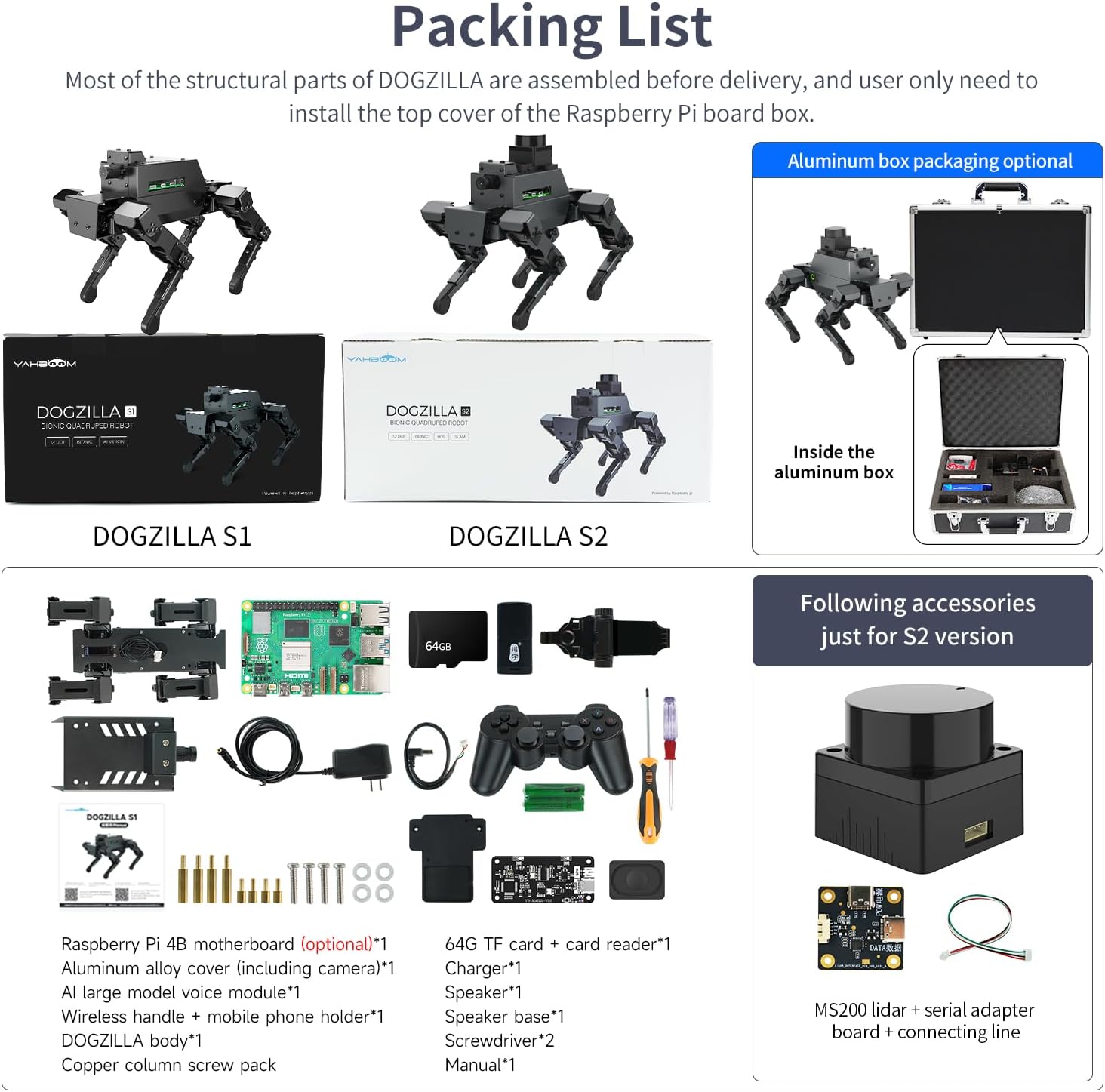
Figure 2.1: Detailed view of the components included in the DOGZILLA S1 kit.
3. Setup
The DOGZILLA robot dog is largely pre-assembled. The primary setup step involves installing the Raspberry Pi into the designated compartment and securing its top cover. Ensure all connections are firm before powering on the device.
Once the Raspberry Pi is installed, the robot is ready for initial operation. The built-in actions can be controlled using the provided wireless remote control or the exclusive mobile application.

Figure 3.1: The packing list image provides a visual guide for component identification during setup.
Initial Power-On:
After assembly, switch on the robot. The system will boot up, and the OLED display will show information once it's ready. This process may take approximately 2 minutes as the robot performs a self-stretch action.
Video 3.1: DOGZILLA S2 product video. This video demonstrates the robot's capabilities and initial setup, including powering on and basic interactions.
4. Operating Instructions
The Yahboom Smart AI Robot Dog offers a wide range of functionalities, from basic movements to advanced AI interactions and programming.
4.1. Bionic Movement and Control
The robot's 12-DOF (Degrees of Freedom) kinematic joints allow for highly realistic and agile movements. Each leg is controlled by 3 bus servos, mimicking the elbow, shoulder, and hip joints of a real animal. This enables various gaits and omnidirectional motion.
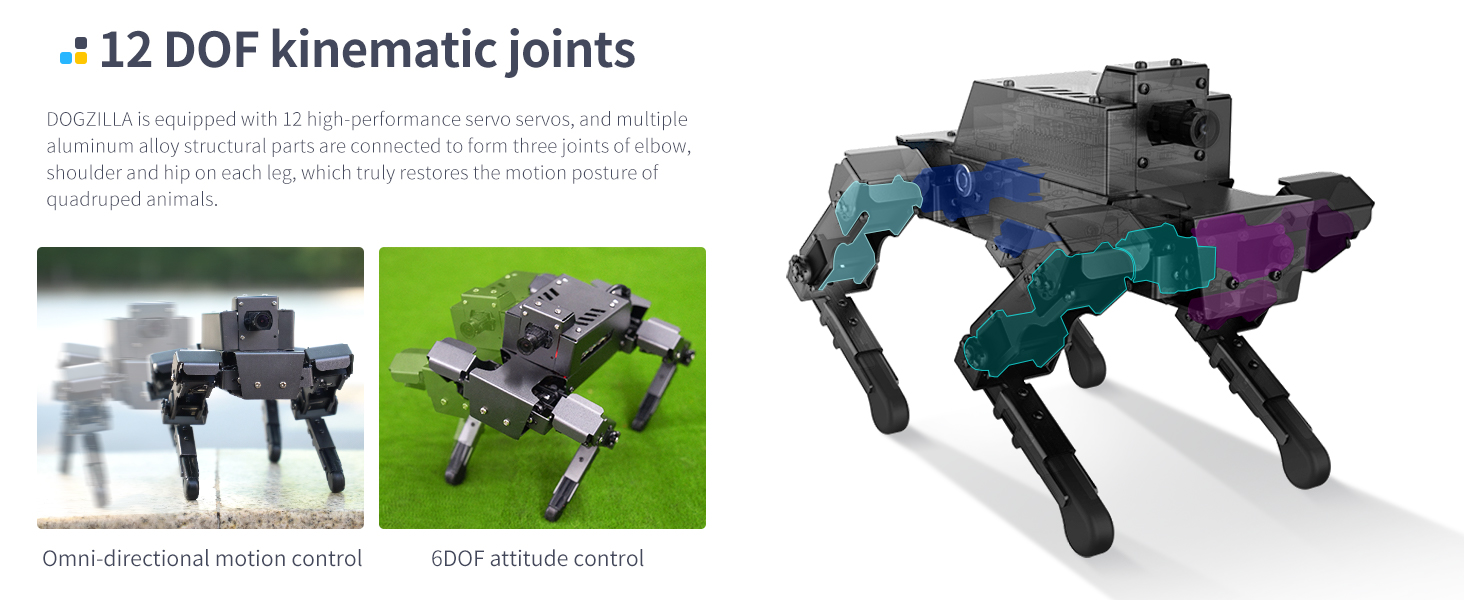
Figure 4.1: Illustration of the 12-DOF kinematic joints and their contribution to omni-directional motion and 6DOF attitude control.
The robot can perform a variety of pre-programmed bionic actions, which are integrated into the control application. Users can also manually adjust joints to create and save custom actions.
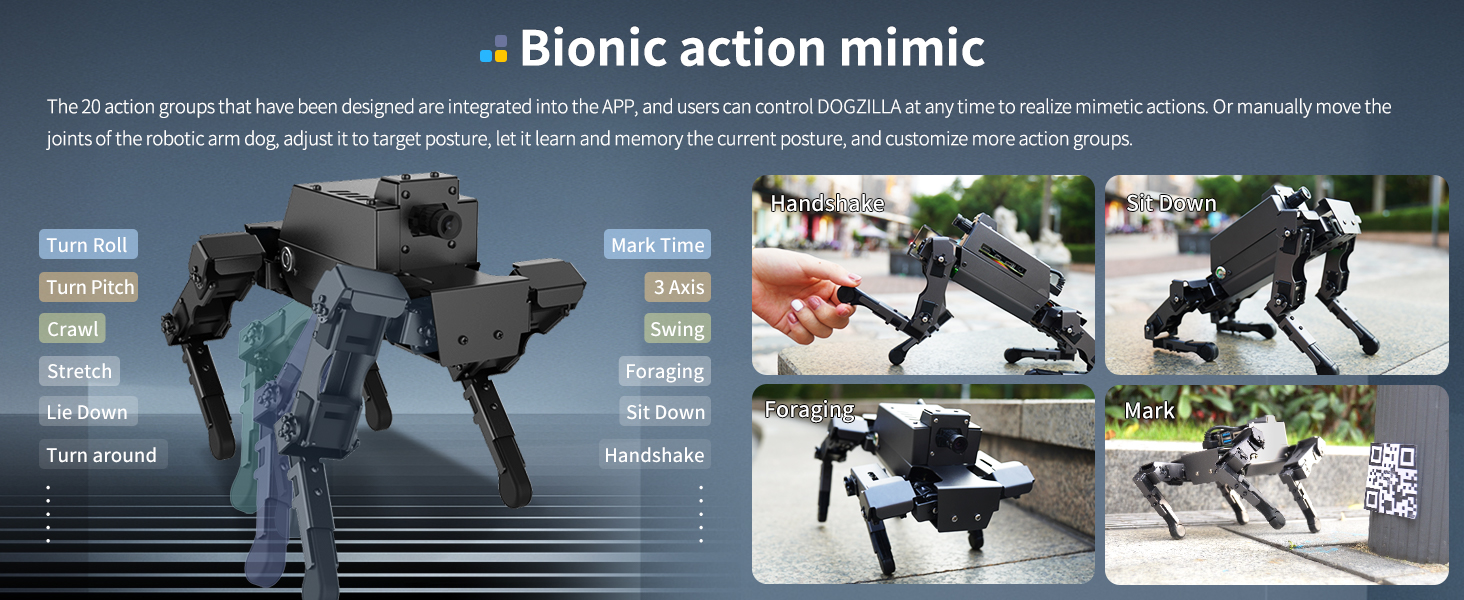
Figure 4.2: Examples of bionic actions the robot can mimic, such as handshake, sit down, and foraging.
4.2. AI Capabilities: Visual Recognition, Voice Interaction, and Large Models
The DOGZILLA robot dog is equipped with a 2MP high-definition wide-angle camera and leverages OpenCV for advanced AI visual recognition functions. These include human body recognition, object recognition, color recognition, face detection, target tracking, QR code identification, and AR vision.

Figure 4.3: Overview of AI visual recognition functions, including Mediapip development, tag recognition, AR vision, tag tracking, QR code recognition, visual tracking, target tracking, obstacle recognition, color recognition, and face detection.
The robot integrates intelligent voice interaction technology, allowing for natural voice dialogue. It supports three main AI large models: Large Language Model (LLM) for text generation and Q&A, Voice Large Model for real-time conversion between voice and text, and Visual Large Model for image generation based on voice commands.

Figure 4.4: Explanation of the three AI large models and their applications in the robot dog.
Embodied intelligence functions include autonomous line tracking, intelligent robot dog responses, and multimodal large model combined with SLAM mapping and navigation (S2 version exclusive). These features allow the robot to understand and respond to complex instructions, navigate environments, and perform tasks based on visual and auditory input.

Figure 4.5: Demonstrations of embodied intelligence functions, including autonomous line tracking and multimodal large model with SLAM mapping navigation.
Video 4.1: DOGZILLAAI Large Model Robot Dog. This video showcases the robot's AI capabilities, including voice commands, object tracking, and environmental understanding.
4.3. Navigation and SLAM Mapping
The robot supports SLAM (Simultaneous Localization and Mapping) mapping and navigation, allowing it to build a map of its environment and navigate autonomously. This includes features like navigation obstacle avoidance, Lidar patrol, Lidar follow, Lidar guard, and Lidar obstacle avoidance.
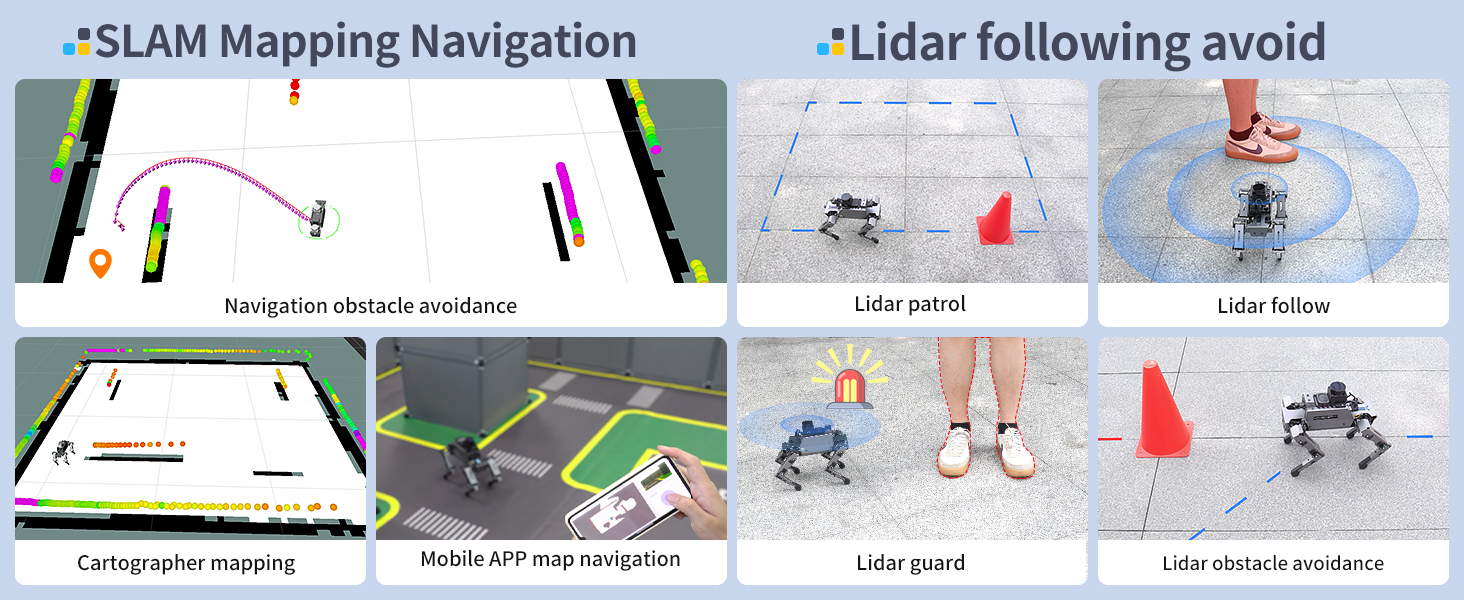
Figure 4.6: Visual representation of SLAM mapping navigation and various Lidar-based functions.
4.4. Control Methods
The DOGZILLA robot dog can be controlled through multiple methods:
- Mobile Phone Control (iOS/Android APP): The exclusive app allows for mapping and navigation, remote control, and FPV (First Person View) control.
- USB Wireless Handle: Use the provided wireless handle with dual joysticks and multiple buttons for direct control.
- Web Remote Control: Access and control the robot through a web browser.
- Keyboard Remote Control: Use a computer keyboard for precise control.

Figure 4.7: Different ways to control the DOGZILLA robot dog.
4.5. Programming and Development (ROS2)
Designed for programming and maker education, the robot supports Python programming and AI application development. It is developed using the ROS2 (Robot Operating System 2) system, specifically ROS2 Humble, which offers robust features for robotics development.
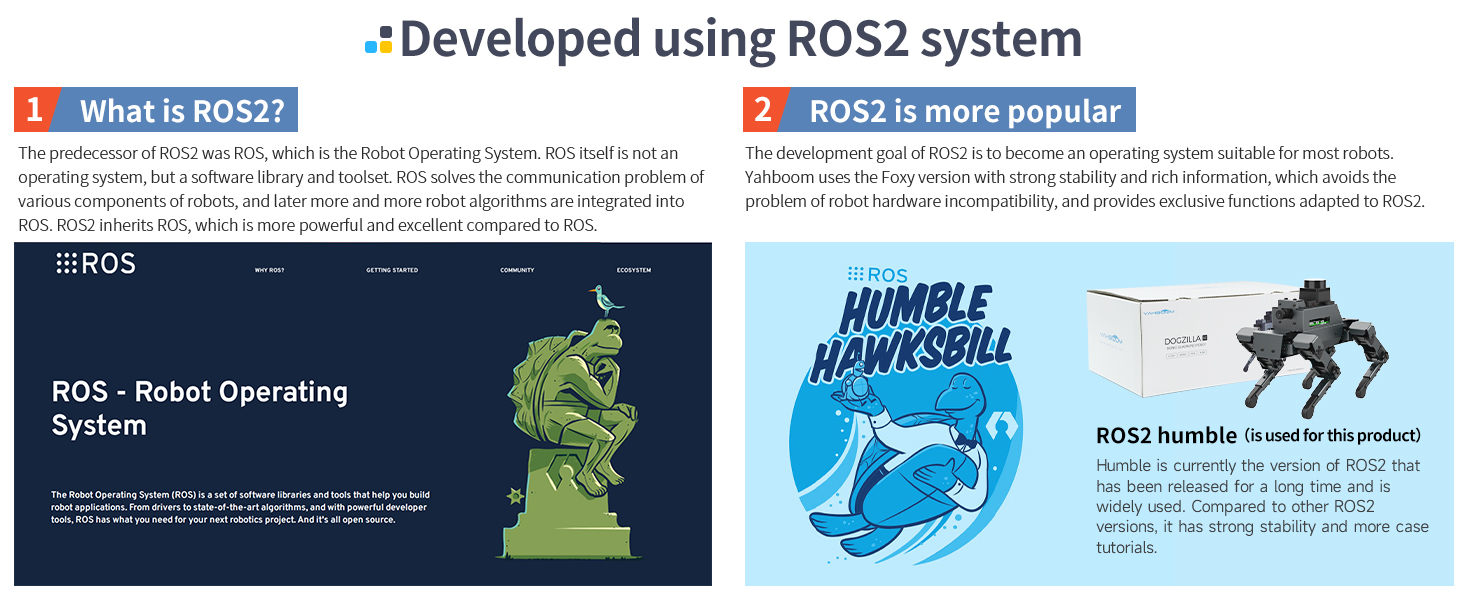
Figure 4.8: Explanation of the ROS2 system and its application in the DOGZILLA robot dog.
Users can utilize RVIZ simulation for algorithm validation and entertainment, exploring unlimited programming possibilities.

Figure 4.9: The robot's integration with ROS2 and inverse kinematics for precise control.
Yahboom provides a systematic teaching curriculum and detailed tutorials to help users learn and develop robot dog control, including courses on hardware assembly, remote control, kinematics analysis, Raspberry Pi system configuration, OpenCV basics, DOGZILLA control, advanced concepts, ROS, and AI LLM.

Figure 4.10: A comprehensive list of courses available for learning and developing with the DOGZILLA robot dog.
5. Maintenance
No specific maintenance instructions are provided in the product information. It is generally recommended to keep the robot clean, avoid exposure to extreme temperatures or moisture, and handle the delicate electronic components with care. For any issues with the serial bus servos or other hardware, refer to the detailed technical support resources provided by Yahboom.
6. Troubleshooting
If you encounter issues with the robot, consider the following:
- Software/Programming Errors: If the program reports an error, review your code and ensure all dependencies are correctly installed. Yahboom provides extensive tutorials and technical support to assist with programming challenges.
- Connectivity Issues: Ensure the Raspberry Pi is correctly installed and all connections are secure. For app control, verify your network connection.
- Functionality Discrepancies: Note that certain advanced features like Lidar and Voice Interaction are exclusive to the S2 model. The S1 model (this product) does not include these features. Refer to the product specifications to confirm supported functionalities for your specific model.
- Physical Damage: Inspect the robot for any visible damage to its joints, wiring, or sensors.
Safety Information:
The DOGZILLA S1 is designed for adults. Please ensure it is used by individuals aged 18 years and up. Keep small components away from children to prevent choking hazards. Operate the robot in a safe environment, away from obstacles and potential fall hazards.
7. Specifications
Below are the detailed specifications for the Yahboom Smart AI Robot Dog (DOGZILLA S1 with Pi 5-4G):
| Feature | Specification |
|---|---|
| Product Name | DOGZILLA AI large model robot dog |
| Model Number | DOGZILLA S1 with Pi 4B-4G |
| Main Control Board | Raspberry Pi 5-4GB |
| Operating System | raspbian-bookworm-arm64 + Docker + ROS2 Humble |
| Programming Language | Python |
| Number of Joints (DOF) | 12DOF joints |
| Camera Image Pixels | 2MP (1080) |
| Camera FOV | 80°-120° (Depends on video resolution) |
| Material | Aluminum alloy body, silicone shank, ABS toe |
| Battery Capacity | 7.4V 3800mAh Battery pack |
| Battery Life (S1) | About 1.5 hours |
| Weight (S1) | About 870g |
| Product Dimensions (Power-on state) | 246.2*144.6*169.5mm |
| Product Dimensions (Power-off state) | 249.5*144.8*99.4mm |
| Manufacturer Recommended Age | 18 years and up |
| Country of Origin | China |
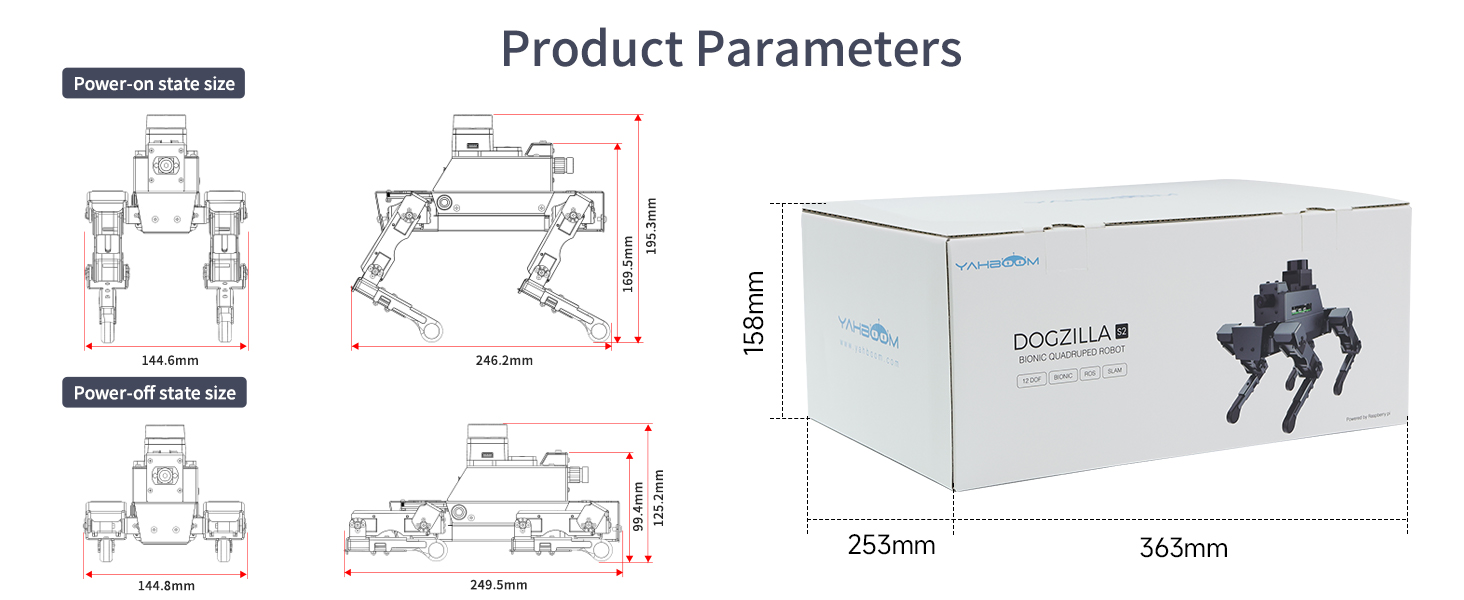
Figure 7.1: Detailed dimensions of the DOGZILLA robot dog in both power-on and power-off states, along with packaging size.
7.1. Professional Intelligent Serial Bus Servo
DOGZILLA's servo joint is composed of a DC hollow cup motor, a reduction gear set, a ball bearing, a 12-bit magnetic encoder, and an integrated control circuit. It adopts a large speed ratio and high efficiency reducer, allowing for 360° controllable movement and joint angle readback.

Figure 7.2: Close-up of the serial bus servo and a table of LIDAR parameters (LIDAR is for S2 version only).
8. Warranty and Support
Yahboom is committed to providing comprehensive technical support for its products. They offer a wealth of tutorials and professional technical assistance to ensure users can effectively learn and develop with the robot dog.
For any technical inquiries or support needs, users can reach out to the Yahboom support team. They aim to provide complete technical support services throughout your learning journey.
While specific warranty details are not provided in the product description, standard return policies apply as per the retailer's terms (e.g., 30-day refund/replacement policy if purchased via Amazon's buybox winner).