
1. Product Overview
The FORLIM Boot and Shoe Dryer (Model SD-002) is designed to efficiently dry various types of footwear and accessories using a combination of heat and forced air. Its adjustable design accommodates different item sizes, promoting thorough drying and helping to eliminate moisture and odors.

Figure 1.1: Main unit of the FORLIM Boot and Shoe Dryer.
2. Key Features
- 360° Hot Air Drying: Ensures comprehensive drying by circulating warm air throughout the item.
- Telescopic and Bendable Dry Ports: Adjustable arms allow for optimal positioning inside various footwear and accessories, reaching the toe area for effective drying.
- Automatic Timer: Features a timer with settings from 30 to 120 minutes, allowing for customized drying cycles and automatic shut-off.
- Constant Temperature Heating: Maintains a consistent temperature between 105°F (40°C) and 140°F (60°C) for safe and efficient drying.
- Quiet Operation: Designed to operate with minimal noise, similar to a quiet fan.
- Foldable Design: Compact and portable for easy storage and travel.

Figure 2.1: Illustration of 360° hot air drying for thorough moisture removal.

Figure 2.2: The telescopic and bendable arms allow for versatile positioning to fit different items.
3. Setup and Assembly
The FORLIM Boot and Shoe Dryer comes pre-assembled for immediate use. Follow these steps to prepare it for operation:
- Unpack: Carefully remove the dryer from its packaging.
- Position the Arms: The drying arms are foldable for compact storage. Gently pull each arm upwards until it locks into an upright position.
- Extend and Bend: For optimal drying, extend the telescopic sections of the arms and bend them as needed to fit the shape and depth of the item being dried. Ensure the vents are positioned to direct airflow effectively.
- Connect Power: Plug the power cord into a standard electrical outlet.
Video 3.1: Demonstration of unpacking and setting up the FORLIM Boot and Shoe Dryer, including adjusting the arms for use.
4. Operating Instructions
Using your FORLIM Boot and Shoe Dryer is straightforward:
- Place Items: Carefully place your boots, shoes, gloves, or other items onto the drying arms. Adjust the arms to ensure the item is fully supported and airflow can reach all areas.
- Set the Timer: Rotate the timer dial to select the desired drying duration (30, 60, 90, or 120 minutes). The dryer will automatically begin operation.
- Monitor Drying: The dryer operates at a constant temperature to prevent damage. Drying times may vary based on the material and wetness of the item.
- Automatic Shut-off: Once the selected time has elapsed, the dryer will automatically turn off.
- Remove Items: Carefully remove the dried items from the arms.
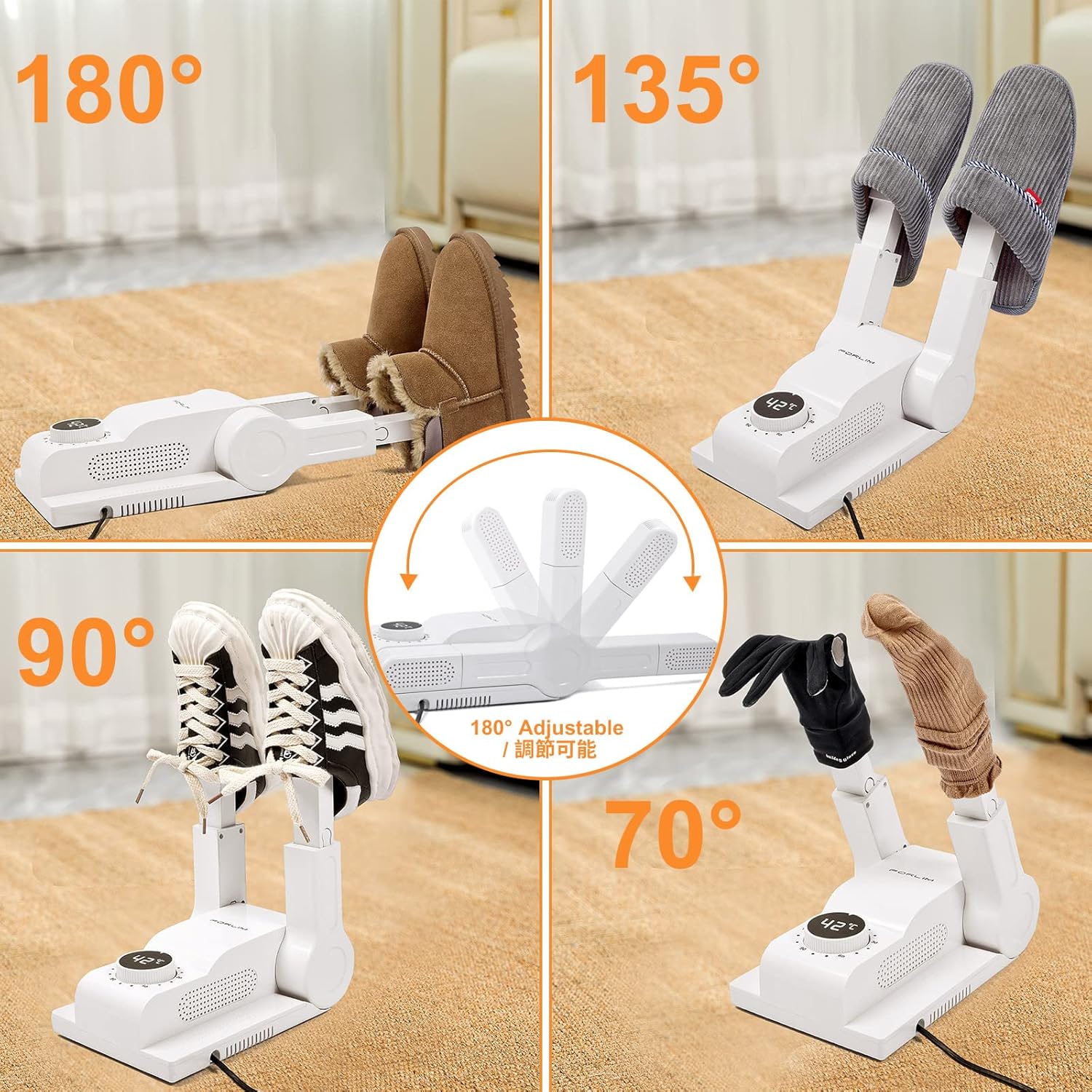
Figure 4.1: The dryer's adjustable arms can accommodate various items like boots, sneakers, slippers, and gloves.

Figure 4.2: Timer settings ranging from 30 to 120 minutes, suitable for different types of items and moisture levels.

Figure 4.3: The dryer maintains a constant temperature for efficient and safe drying.
5. Maintenance
Regular maintenance ensures optimal performance and longevity of your dryer:
- Cleaning: Disconnect the dryer from the power outlet before cleaning. Wipe the exterior with a soft, damp cloth. Do not use abrasive cleaners or immerse the unit in water.
- Storage: When not in use, fold the drying arms down for compact storage. Store the dryer in a cool, dry place away from direct sunlight.

Figure 5.1: The dryer's compact, foldable design makes it ideal for travel and easy storage.
6. Troubleshooting
If you encounter issues with your FORLIM Boot and Shoe Dryer, refer to the following common problems and solutions:
- Dryer does not turn on:
- Ensure the power cord is securely plugged into a working electrical outlet.
- Check if the timer dial is set to a specific duration (not 'OFF').
- Airflow is weak or cold:
- Verify that the vents on the drying arms are not obstructed by the items being dried.
- Ensure the dryer is placed on a flat, stable surface to allow proper air intake.
- Items are not drying completely:
- Increase the drying time using the timer dial.
- Adjust the drying arms to ensure optimal positioning and airflow inside the items.
- For very wet items, an initial longer drying cycle may be required.
7. Specifications
| Feature | Detail |
|---|---|
| Brand | FORLIM |
| Model | SD-002 (Item model number: QQ6629) |
| Product Dimensions | 1 x 1 x 2.54 cm (folded); 1.06 kg |
| Drying Temperature | Approx. 105°F (40°C) - 140°F (60°C) |
| Timer Settings | 30, 60, 90, 120 minutes (Auto-off) |
| Manufacturer | FORLIM |
| Date First Available | Aug. 22 2022 |
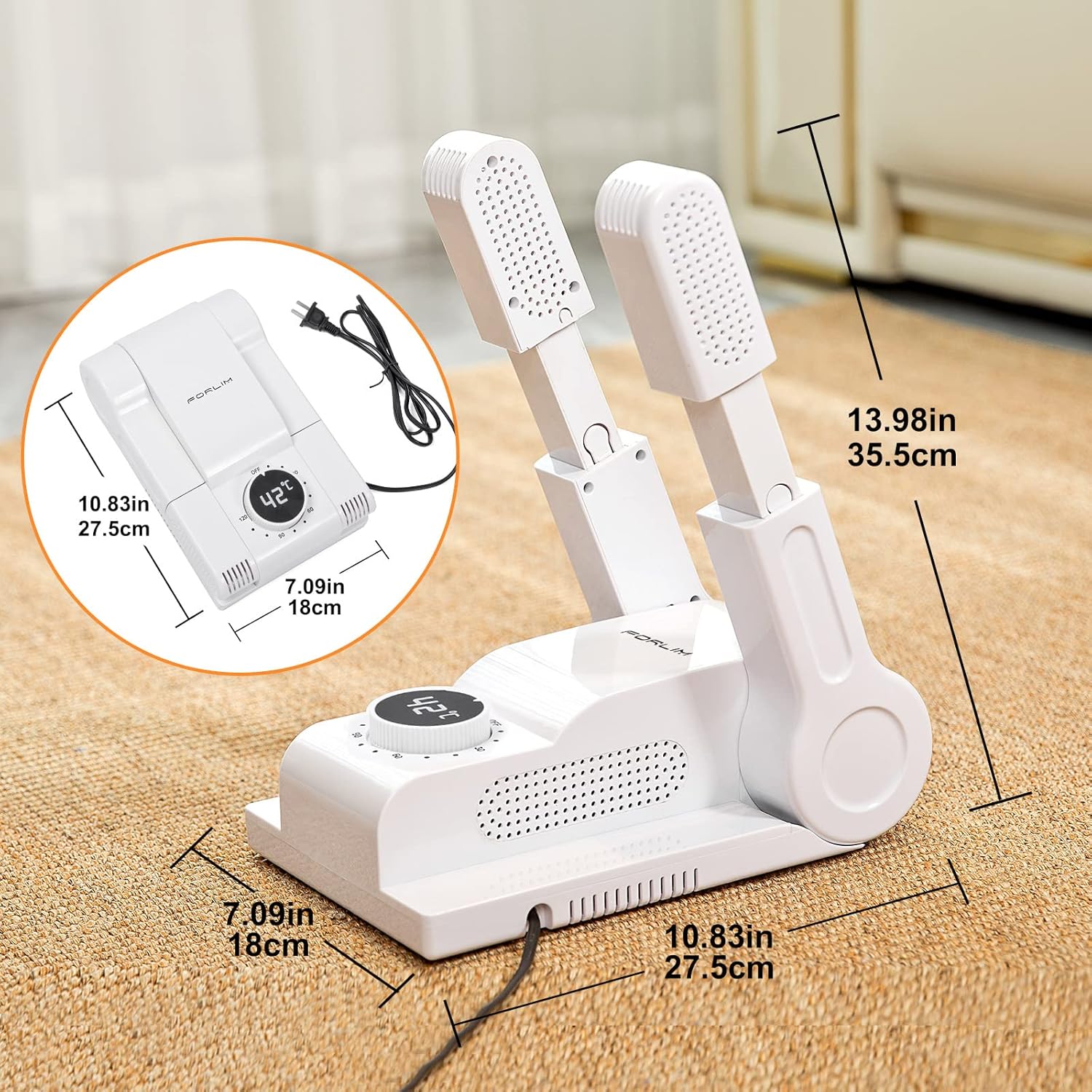
Figure 7.1: Product dimensions for the FORLIM Boot and Shoe Dryer.
8. Safety Information
- Do not immerse the unit in water or other liquids.
- Ensure the power cord is not damaged or frayed.
- Keep out of reach of children and pets.
- Do not block the air intake or exhaust vents during operation.
- Unplug the dryer when not in use or before cleaning.
9. Warranty and Support
FORLIM products are manufactured with quality and customer satisfaction in mind. For any questions, concerns, or warranty inquiries, please refer to the contact information provided with your purchase or visit the official FORLIM store on Amazon.
Amazon Store Link: FORLIM Store


