
1. Introduction
This manual provides comprehensive instructions for the Kiven HWD0143-CD-5W-WJTG Remote Control Landscape Spotlight. Please read this manual carefully before installation and operation to ensure proper use and longevity of your product. Keep this manual for future reference.
2. Safety Information
- Ensure the power supply is disconnected before installation or maintenance.
- This product is designed for outdoor and indoor use with an IP65 waterproof rating for the spotlight unit. The remote control is not waterproof.
- Use only the specified power source (110 Volts).
- Do not attempt to disassemble or modify the product, as this will void the warranty and may cause damage or injury.
- Keep the product away from flammable materials.
- All accessories are UL certified.
3. Package Contents
Verify that all components are present and in good condition:
- 1 x Kiven LED Spotlight (with integrated bulb and plug-in cord)
- 1 x Remote Control (requires 2xAAA batteries, not included)
4. Product Overview
The Kiven Landscape Spotlight is a versatile lighting solution featuring remote control operation, color changing capabilities, and stepless dimming. Its robust aluminum construction and IP65 waterproof rating make it suitable for various indoor and outdoor applications.

Image 1: Kiven Landscape Spotlight with its remote control. The spotlight features a black housing, a ground stake, and a power cord with a standard plug. The remote control is white with various buttons for power, brightness, and color temperature adjustment.
5. Specifications
| Parameter | Detail |
|---|---|
| Brand | Kiven |
| Model Name | HWD0143-CD-5W-WJTG |
| Bulb Type | LED, 5W COB |
| Color Temperature | 2700K (Warm White) - 6500K (Cool White) |
| Dimming | Stepless (0-100%) |
| Waterproof Grade | IP65 (Spotlight unit only) |
| Material | Aluminum |
| Voltage | 110 Volts |
| Product Dimensions | 2.48"L x 2.48"W x 12.4"H (6.3cm x 6.3cm x 31.5cm) |
| Light Source Life | 30,000 hours |
| Remote Battery | 2xAAA (not included) |

Image 2: Diagram showing the dimensions of the Kiven Landscape Spotlight. The total height is 12.4 inches (31.5 cm), and the lampshade diameter is 2.48 inches (6.3 cm).
6. Setup and Installation
The Kiven Landscape Spotlight features a plug-and-play design for easy installation.
- Unpack: Carefully remove all components from the packaging.
- Positioning: Choose a desired location for the spotlight. For outdoor use, ensure the ground is soft enough to insert the stake without excessive force. For indoor use, the stake can be inserted into potted plants or other suitable soft bases.
- Adjust Angle: The spotlight head can be adjusted up to 180 degrees to direct light as needed. Loosen the adjustment screw, set the desired angle, and then tighten the screw to secure it.

Image 3: Close-up of the Kiven Landscape Spotlight's adjustable joint, illustrating a 180-degree range of motion for directing the light.
- Power Connection: Plug the spotlight's cord into a standard 110V power outlet. Ensure the outlet is protected from water if used outdoors.
- Remote Batteries: Insert 2xAAA batteries into the remote control, observing correct polarity.

Image 4: Two Kiven Landscape Spotlights installed in a garden setting, illuminating a landscaped area near a building. This demonstrates a typical outdoor application.

Image 5: A Kiven Landscape Spotlight operating outdoors in the rain, highlighting its IP65 waterproof capability. The light is shining brightly amidst falling raindrops.
7. Operation
The spotlight is controlled using the provided remote control.
7.1 Remote Control Functions
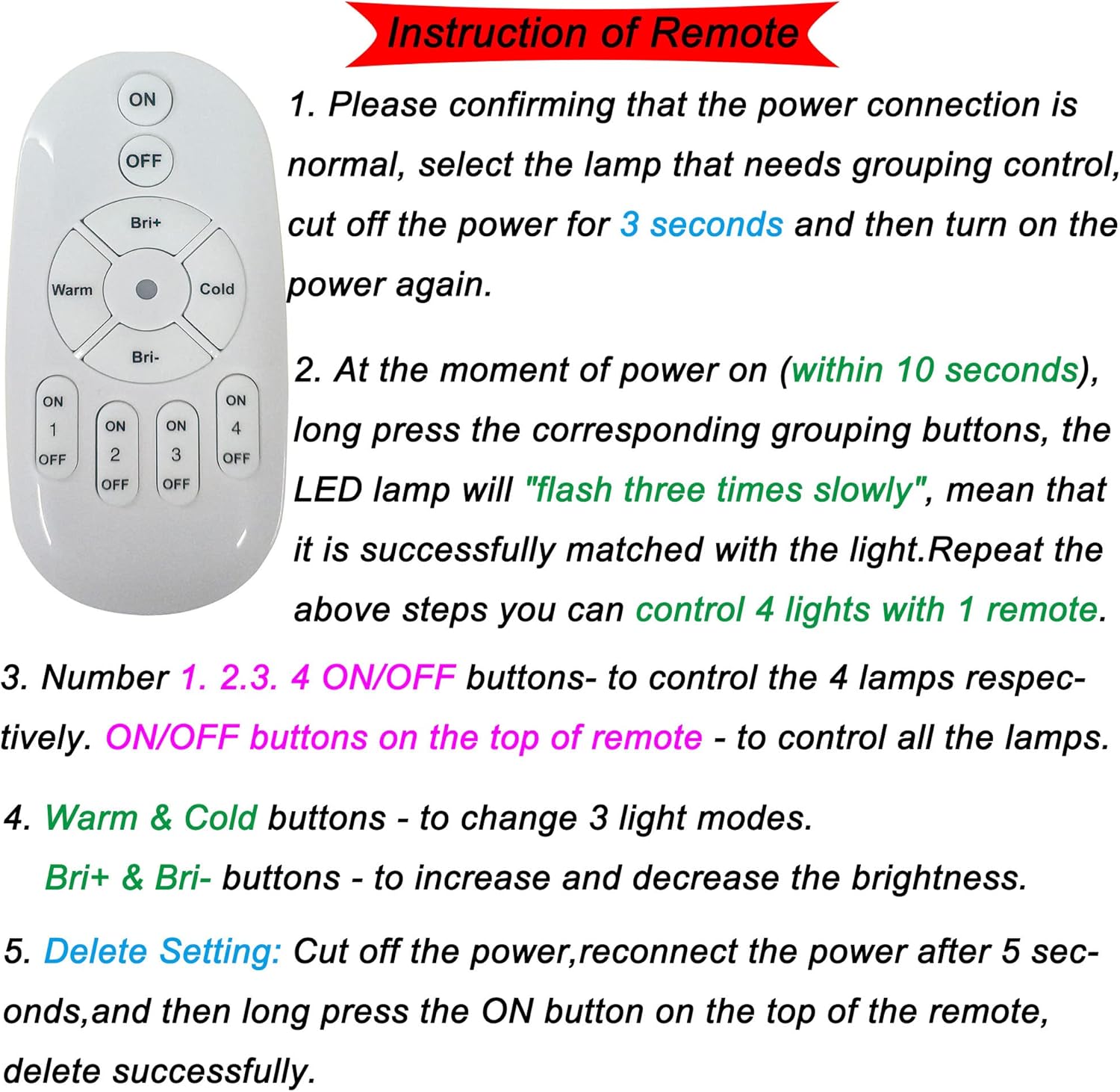
Image 6: A detailed diagram of the remote control for the Kiven Landscape Spotlight, with numbered instructions for its various functions.
- Power ON/OFF: Press the "ON" or "OFF" buttons at the top of the remote to turn the spotlight on or off.
- Brightness Adjustment (Stepless Dimming): Use the "Bri+" button to increase brightness and "Bri-" button to decrease brightness. The brightness can be adjusted steplessly from 0% to 100%.
- Color Temperature Change: Press the "Warm" button for warmer light (2700K) or the "Cold" button for cooler light (6500K). The light color changes gradually between these two extremes.

Image 7: Illustration of the three distinct light modes available: White, Natural Light, and Warm White, demonstrating the color changing capability of the spotlight.
- Grouping Control (for multiple lights):
- Ensure the power connection is normal. Select the lamp for grouping control.
- Cut off the power for 3 seconds, then turn the power on again.
- Within 10 seconds of powering on, long press one of the corresponding grouping buttons (1, 2, 3, 4 ON/OFF). The LED lamp will flash three times slowly, indicating successful pairing.
- Repeat these steps for up to 4 lights to control them with one remote.
- The individual "ON/OFF" buttons (1, 2, 3, 4) control specific grouped lamps. The main "ON/OFF" buttons at the top control all paired lamps.
- Delete Grouping Setting: Cut off the power, reconnect the power after 5 seconds, and then long press the main "ON" button at the top of the remote. This will delete the grouping setting for that specific lamp.
- Timer Function: The spotlight has a smart timer switch with settings for 3, 6, 12, or 24 hours. Once a timer is set, the light will automatically turn off after the selected duration. It has a memory function, so the next time it's turned on, it will default to the last set timer duration.
8. Maintenance
- Cleaning: Disconnect power before cleaning. Wipe the spotlight with a soft, damp cloth. Do not use abrasive cleaners or solvents.
- Inspection: Periodically check the power cord for any signs of damage. Ensure the ground stake is securely in place.
- Remote Control: Replace AAA batteries in the remote control when its range or responsiveness decreases.
9. Troubleshooting
| Problem | Possible Cause | Solution |
|---|---|---|
| Light does not turn on. | No power supply. Remote control batteries are dead. Light is not paired with remote. | Check power outlet and cord connection. Replace remote control batteries. Follow grouping control instructions to pair the light. |
| Remote control not responding. | Remote batteries are dead or inserted incorrectly. Obstruction between remote and light. Remote is too far from the light. | Replace batteries, ensuring correct polarity. Remove any obstructions. Move closer to the spotlight. |
| Light color or brightness cannot be adjusted. | Remote control issue. Light is not responding to commands. | Ensure remote batteries are fresh. Try re-pairing the light with the remote (see Grouping Control). |
| Timer function not working correctly. | Incorrect timer setting. Power interruption. | Re-set the desired timer duration. Ensure stable power supply. |
10. Warranty and Support
For warranty information or technical support, please refer to the purchase documentation or contact Kiven customer service through the retailer where the product was purchased. Keep your proof of purchase for warranty claims.
Manufacturer: Kiven
Model: HWD0143-CD-5W-WJTG
Date First Available: August 20, 2022