
1. Introduction
This manual provides essential information for the safe and efficient operation, maintenance, and troubleshooting of your Dellona Veniibot H10 Robot Vacuum and Mop. The Veniibot H10 is a 6-in-1 cleaning system designed to sweep, vacuum, mop, auto-wash, air-dry, and sterilize your floors. Please read this manual thoroughly before using the product and retain it for future reference.

Figure 1: Dellona Veniibot H10 Robot Vacuum and Mop with its self-cleaning station, highlighting its comprehensive 6-in-1 cleaning capabilities.
2. Safety Information
To reduce the risk of injury or damage, read and follow all safety precautions. This device is for indoor household use only.
- Do not allow children to operate the robot. Supervise children and pets when the robot is operating.
- Ensure the power voltage matches the rating label on the charging station.
- Do not use the robot in wet environments or near water.
- Remove loose cables, small objects, and fragile items from the cleaning path before operation.
- Do not use the robot to pick up large debris, liquids, or burning objects.
- Keep hair, loose clothing, fingers, and all body parts away from openings and moving parts.
- Only use manufacturer-specified attachments and accessories.
- If the power cord is damaged, it must be replaced by the manufacturer or a qualified service agent.
- Do not attempt to repair or modify the robot or charging station yourself.
3. Package Contents
Verify that all components are present and in good condition upon unpacking.
- Dellona Veniibot H10 Robot Vacuum and Mop (1 unit)
- Self-Cleaning Station (1 unit)
- Power Adapter (1 unit)
- Side Brushes (2 units, 1 pre-installed, 1 spare)
- Mop Pads (2 units, 1 pre-installed, 1 spare)
- Dust Bag (1 pre-installed)
- Cleaning Tool (1 unit)
- User Manual (this document)
4. Product Overview
The Dellona Veniibot H10 integrates advanced navigation and cleaning technologies for a comprehensive floor cleaning experience.
4.1 Robot Vacuum and Mop
- Lidar 2.0 Obstacle Detection: Advanced radar and control system for accurate room scanning and route planning, detecting obstacles over 1 inch (2cm).
- Pressure Mopping: Simulates human mopping with 10N pressure and a 40N dynamic scraping mop to remove stubborn stains.
- Powerful Suction: 2000Pa strong suction for effective debris removal.
- Intelligent Floor Recognition: Automatically adjusts cleaning based on floor type (hard floor, carpet).
- Side Brush & Rotating Center Brush: For thorough cleaning along edges and across surfaces.
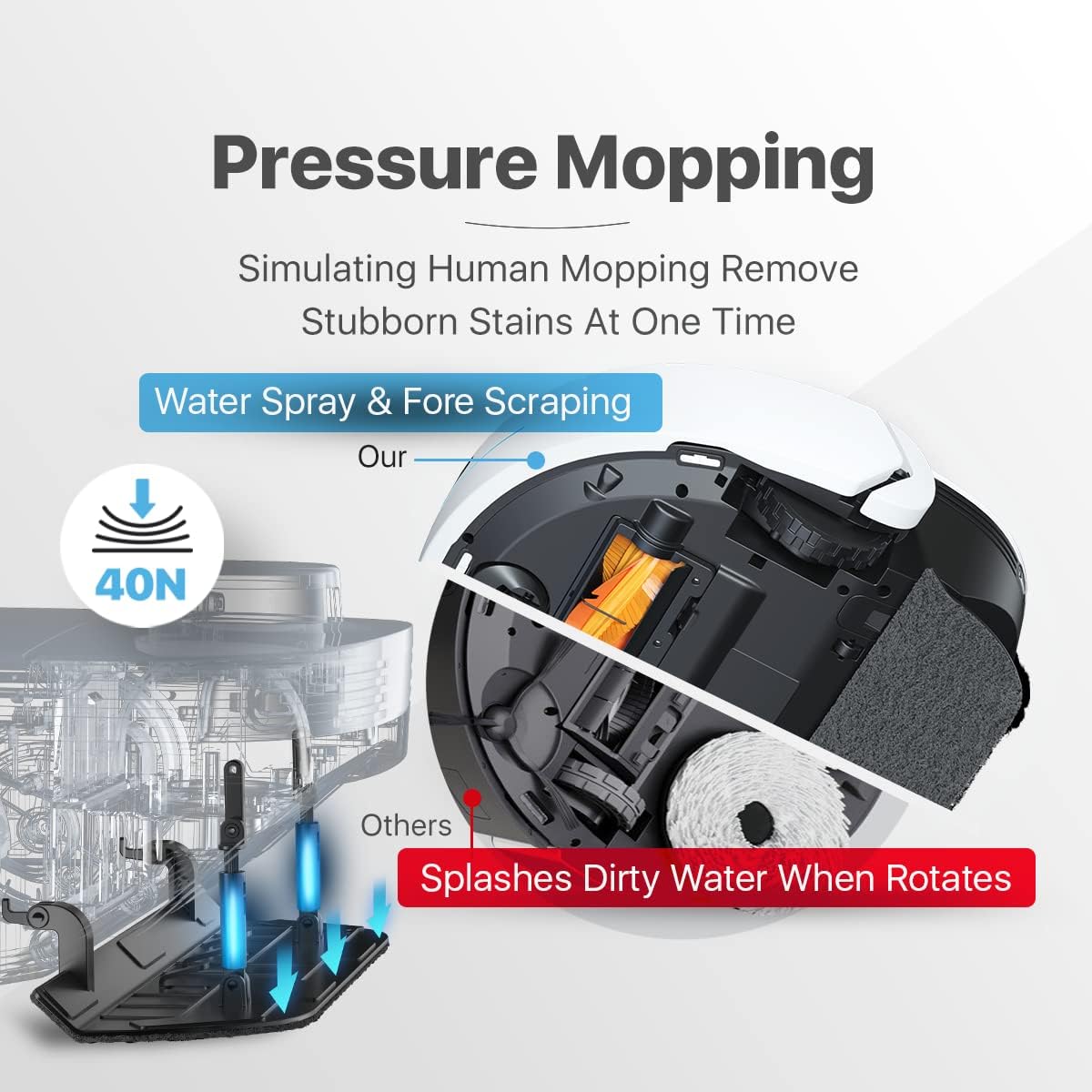
Figure 2: Pressure Mopping System of the Veniibot H10.
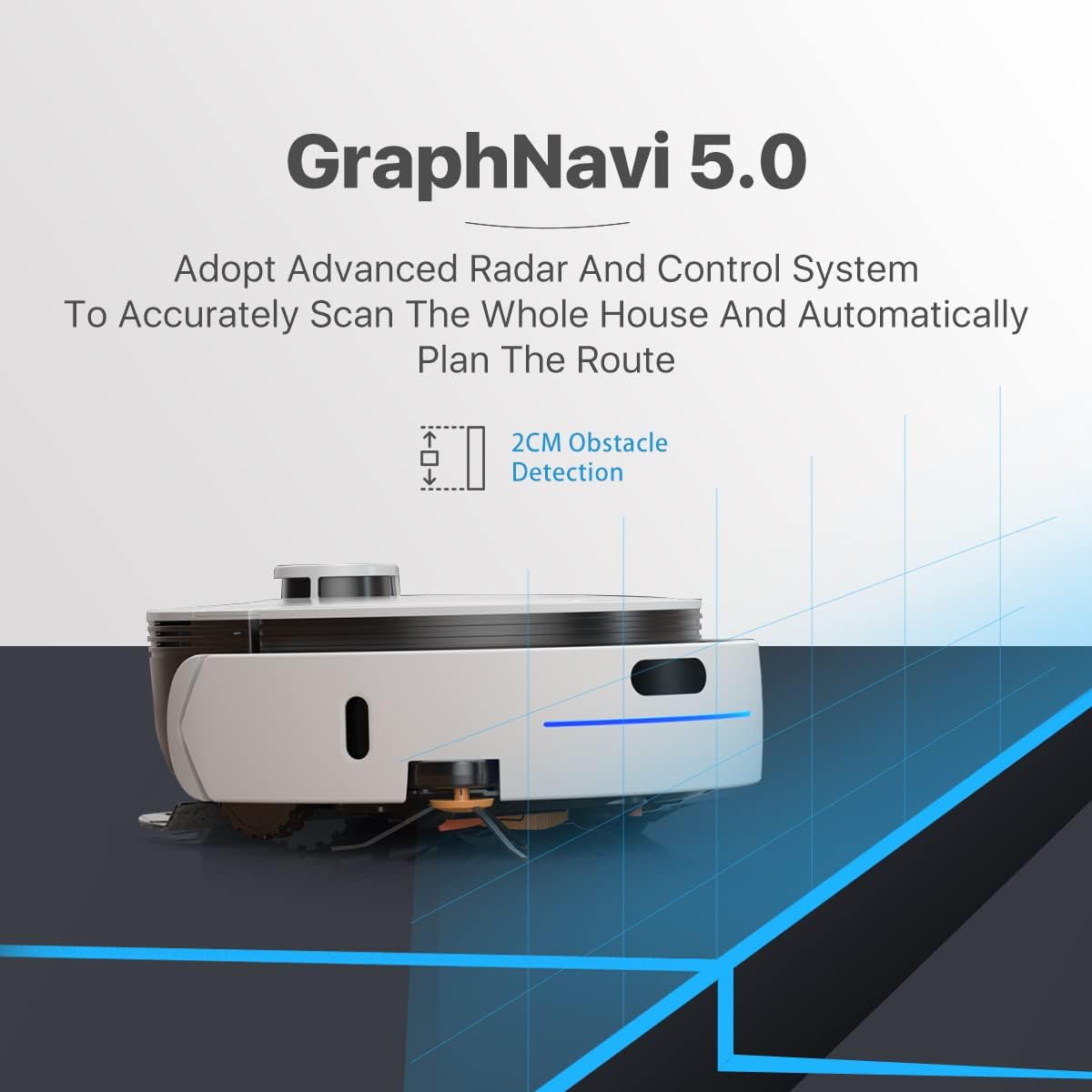
Figure 3: GraphNavi 5.0 Navigation System.

Figure 4: Key Smart Features of the Veniibot H10.
4.2 Self-Cleaning Station
- Auto Wash & Air Dry: Automatically cleans and dries mop pads to prevent odors and mildew.
- Ozone Sterilization: Integrated OzoneMe 2.0 disinfection system for waste water tank purification.
- Self-Refilling: Automatically refills the robot's water tank.
- Large Capacity Tanks: 3-liter clean water tank and 1-liter dust bag for extended cleaning cycles (up to 4,300 sq. ft.).

Figure 5: Self-Cleaning Station Features.
5. Setup
5.1 Unpacking and Placement
- Remove all packaging materials and protective films from the robot and the self-cleaning station.
- Place the self-cleaning station against a wall on a hard, level surface. Ensure there is at least 0.5 meters (1.6 feet) of clear space on both sides and 1.5 meters (5 feet) in front of the station.
- Connect the power adapter to the self-cleaning station and plug it into a wall outlet.
- Ensure the clean water tank is filled with clean water and the dirty water tank is empty.
5.2 Initial Charging
Place the robot onto the charging contacts of the self-cleaning station. The robot will automatically align and begin charging. Allow the robot to fully charge before its first use (approximately 4-6 hours).
5.3 App Connection
For full functionality, download the Dellona Veniibot app on your smartphone.
- Scan the QR code in the quick start guide or search for "Dellona Veniibot" in the App Store (for iOS) or Google Play Store (for Android).
- Install the app and create an account.
- Follow the in-app instructions to connect your robot to your home Wi-Fi network.

Figure 6: Controlling the Veniibot H10 via Smartphone App.
6. Operating Instructions
6.1 Starting a Cleaning Cycle
- Manual Start: Press the power button on the robot once to start a cleaning cycle.
- App Control: Open the Dellona Veniibot app, select your robot, and tap "Start Cleaning." You can choose between full cleaning, spot cleaning, or specific room cleaning.

Figure 7: Veniibot H10 handling various debris types.
6.2 Cleaning Modes and Settings
The app allows customization of cleaning preferences:
- Suction Power: Adjust suction levels (e.g., quiet, standard, strong, max) based on floor type and dirt level.
- Mopping Intensity: Control water flow and mopping pressure.
- Cleaning Schedule: Set recurring cleaning times for specific days or rooms.
- No-Go Zones/Virtual Walls: Define areas the robot should avoid.
- Do Not Disturb Mode: Prevents the robot from cleaning during specified hours.
- Recharge: Sends the robot back to the station to recharge.
- Return to Wash: Sends the robot back to the station for mop washing and drying.
6.3 Pausing and Resuming
Press the power button on the robot or use the app to pause a cleaning cycle. Press again to resume. If paused for an extended period, the robot may return to the charging station.
6.4 Returning to Charging Station
The robot will automatically return to the self-cleaning station when the battery is low or when a cleaning cycle is complete. You can also manually send it back via the app.
7. Maintenance
Regular maintenance ensures optimal performance and extends the lifespan of your Dellona Veniibot H10.
7.1 Self-Cleaning Station Maintenance
- Clean Water Tank: Refill with clean water as needed. The app will notify you when the water level is low.
- Dirty Water Tank: Empty the dirty water tank regularly. The station's ozone sterilization helps purify the waste water, but it still needs to be emptied.
- Dust Bag: The 1-liter dust bag typically holds a week's worth of debris. Replace the dust bag when full.
- Mop Pad Washing Tray: Periodically clean the mop pad washing tray inside the station to prevent residue buildup.
7.2 Robot Vacuum and Mop Maintenance
- Mop Pads: The robot's self-cleaning function washes and dries the mop pads. For deep cleaning, remove and hand wash or machine wash the mop pads as needed.
- Side Brushes: Check side brushes regularly for tangled hair or debris. Remove and clean them using the provided cleaning tool. Replace if worn.
- Main Brush: Remove the main brush cover and main brush. Clean any tangled hair or debris. Use the cleaning tool to cut and remove hair.
- Sensors: Wipe all sensors (Lidar, cliff sensors, wall sensors) with a clean, dry cloth to ensure accurate navigation.
- Charging Contacts: Clean the charging contacts on both the robot and the station with a dry cloth.
- Filter: Clean the HEPA filter regularly by tapping it gently to remove dust. Replace the filter every 3-6 months, depending on usage.
8. Troubleshooting
If you encounter issues with your Dellona Veniibot H10, refer to the following common problems and solutions.
| Problem | Possible Cause | Solution |
|---|---|---|
| Robot does not start or respond. | Low battery; Power switch off; Robot stuck. | Charge the robot; Ensure power switch is ON; Clear any obstructions. |
| Robot cannot find charging station. | Station obstructed; Charging contacts dirty; Station not powered. | Ensure clear space around station; Clean charging contacts; Verify station is plugged in. |
| Poor cleaning performance. | Dust bin full; Brushes tangled; Filter clogged; Mop pads dirty. | Empty dust bin; Clean main/side brushes; Clean/replace filter; Ensure mop pads are clean. |
| Robot gets stuck frequently. | Obstacles in path; Sensors dirty. | Remove loose items; Clean all sensors. Consider setting no-go zones in the app. |
| App connection issues. | Incorrect Wi-Fi password; Robot too far from router; App not updated. | Verify Wi-Fi credentials; Move robot closer to router; Update app to latest version. |
| Mop pads not drying properly. | Drying vent blocked; Excessive humidity. | Ensure drying vent on station is clear; Operate in a well-ventilated area. |
9. Specifications
| Feature | Detail |
|---|---|
| Brand | DELLONA |
| Model Name | H10 |
| Model Number | DRV-H10-03 |
| Product Dimensions | 45.72 x 53.34 x 63.5 cm |
| Item Weight | 15.08 kg |
| Power Source | Battery Powered |
| Battery Type | Lithium Ion |
| Battery Capacity | 5200mAh |
| Battery Average Life | 3 years |
| Special Features | Obstacle Avoidance, Self-Cleaning, Self-Refilling, Air Drying, Ozone Sterilization |
| Controller Type | App Control |
| Filter Type | HEPA |
| Surface Recommendation | Hard Floor, Carpet, Wood, Stone, Marble, Tile |
| Compatible Devices | Amazon Echo |
| Cleaning Area | Up to 4,300 sq. ft. |
| Dust Bag Capacity | 1 Liter |
| Clean Water Tank Capacity | 3 Liter |
10. Warranty and Support
For warranty information and technical support, please refer to the warranty card included in your product packaging or visit the official DELLONA website. If you encounter issues not covered in this manual, please contact DELLONA customer service for assistance.