
1. Product Overview
The AstroAI Digital Multimeter is a versatile and accurate tool designed for various electrical measurements. It features 6000 counts auto-ranging for precise readings across multiple parameters.
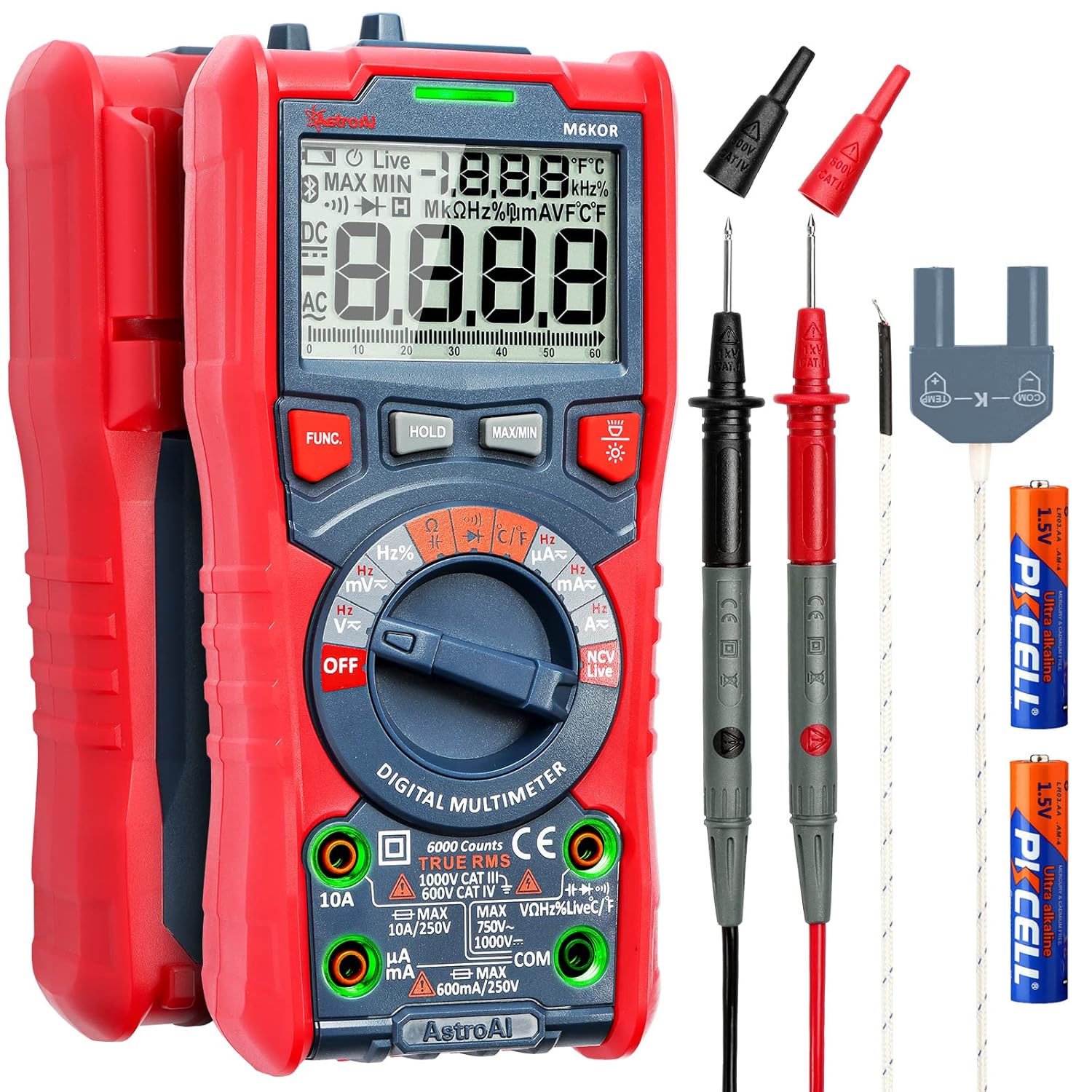
Figure 1: AstroAI Digital Multimeter with included accessories.
2. Setup
2.1 Unpacking and Included Items
Carefully unpack your AstroAI Digital Multimeter. Ensure all components are present:
- AstroAI Digital Multimeter (6000 Counts)
- Test Leads (Red and Black)
- Temperature Probe
- 2 x AA Batteries (pre-installed)
- User Manual (this document)
2.2 Battery Installation
The multimeter comes with 2 AA batteries pre-installed. If replacement is needed:
- Locate the battery compartment on the back of the multimeter.
- Open the compartment cover.
- Insert 2 AA batteries, ensuring correct polarity (+/-).
- Close the battery compartment cover securely.
The use of AA batteries makes replacement more convenient compared to 9V batteries.

Figure 2: Main unit and accessories for initial setup.
3. Operating Instructions
3.1 General Operation
The AstroAI Digital Multimeter features auto-ranging for most measurements, simplifying operation. Simply select the desired function using the rotary dial.

Figure 3: Icons representing various measurement functions.
3.2 LED Intelligent Jack
This multimeter is equipped with an LED Intelligent Jack feature. When you switch the rotary dial to a specific function, the corresponding input jacks will illuminate, indicating where to insert the test leads for that measurement. This enhances safety and ease of use.

Figure 4: The LED Intelligent Jack feature guides lead placement.
3.3 Large LCD Screen with Display Modes
The large LCD backlight display ensures clear readings even in dimly lit environments. It offers three display modes:
- Normal Mode: For use in bright environments.
- Backlight Mode: Improves readability in dimly lit or bright environments.
- Alert Mode: The backlight turns orange and the screen changes to red when detecting live wires or measuring high voltage (above 80V) or high current (over 1A), providing a visual safety alert.

Figure 5: Different display modes for various lighting and safety conditions.
3.4 Measurement Functions
The multimeter can accurately measure the following parameters:
- AC/DC Voltage (V): For measuring electrical potential difference.
- AC/DC Current (A, mA, µA): For measuring electrical current flow.
- Resistance (Ω): For measuring electrical resistance.
- Continuity: For checking if a circuit is complete (audible beep).
- Capacitance (F): For measuring electrical capacitance.
- Frequency (Hz) & Duty Cycle (%): For measuring signal frequency and duty cycle.
- Diodes: For testing diode functionality.
- Temperature (°C/°F): Measures temperature using the included probe.

Figure 6: Examples of dual readings for AC Voltage, AC Current, Frequency, and Temperature.

Figure 7: Using the temperature probe for accurate readings.
3.5 Non-Contact Voltage (NCV) Testing
The NCV function allows you to detect AC voltage without direct contact with the test leads, enhancing safety. It provides both audible and visual alarms when live wires are detected.

Figure 8: NCV testing in action, showing high and low voltage detection.
3.6 Additional Smart Functions
- Low Battery Prompt: Alerts you when batteries need replacement.
- Data Retention (HOLD): Freezes the current reading on the display.
- Max/Min Data: Records maximum and minimum readings during a measurement session.
- Auto Power-Off: Conserves battery life by automatically turning off after a period of inactivity.
- Flashlight: A built-in flashlight on the back assists in dimly lit work areas.
4. Safety Information
The AstroAI Digital Multimeter is designed with safety as a priority. Please adhere to the following guidelines:
- The multimeter has passed overvoltage category III 600V and CE safety standards.
- Features Anti-Burn protection with a double ceramic fuse and thermistor protection circuit.
- Overload protection is present on all ranges.
- The silicone protective case effectively prevents the machine from damage due to drops.
- Always ensure test leads are correctly inserted into the appropriate jacks as indicated by the LED Intelligent Jack feature.
5. Maintenance
5.1 General Care
Keep the multimeter clean and dry. The silicone protective case helps prevent damage from impacts.
5.2 Battery Replacement
Refer to section 2.2 for battery replacement instructions. The multimeter uses 2 AA batteries.
5.3 Fuse Replacement
The multimeter is equipped with double ceramic fuses for protection. If a fuse blows due to exceeding current limits, it can be replaced. Refer to the detailed user manual (PDF) for specific instructions on accessing and replacing fuses.
6. Troubleshooting
- Slow Auto-Ranging: If the auto-ranging function appears slow, especially when checking multiple wires or resistances, allow a few seconds for the meter to stabilize its reading. This is typical behavior for some auto-ranging multimeters.
- Test Lead Issues: Inspect test leads regularly for cracks in insulation or damage at the strain relief. Replace leads if they show signs of wear to ensure accurate and safe measurements.
- Display Not Working: If the digital screen fails to show digits but backlighting works, ensure batteries are properly seated and charged. If the issue persists, contact customer support.
- Temperature Measurement Inaccuracy: Ensure the temperature probe is correctly connected and making good contact with the surface being measured.
7. Specifications
- Model: 6000 Counts TRMS
- Product Dimensions: 7.95 x 5.04 x 2.44 inches
- Item Weight: 1 Pound (16 ounces)
- Power Source: Battery Powered (2 AA batteries included)
- Color: Red
- Safety Standards: Overvoltage Category III 600V, CE certified

Figure 9: Physical dimensions and robust design of the multimeter.
8. Official Product Videos
8.1 NCV 6000 TRMS Multimeter Overview
This video provides a concise overview of the AstroAI Digital Multimeter, highlighting its Non-Contact Voltage (NCV) feature and 6000 TRMS counts. It demonstrates key functionalities and the overall design of the device.
9. Warranty and Support
For detailed warranty information, troubleshooting steps, or customer support, please refer to the official User Manual (PDF) available online or contact AstroAI Direct customer service.
User Manual (PDF): Download Here
Customer reviews frequently praise AstroAI's responsive and helpful customer support.