
imuto Portable Power Station T600-G User Manual
Model: T600-G
1. Introduction
Thank you for choosing the imuto Portable Power Station T600-G. This device is a versatile power solution designed to provide reliable electricity for various applications, including outdoor activities, emergency backup, and mobile power needs. With a 622Wh capacity and 600W AC output, it can power a wide range of electronic devices and small appliances. Please read this manual thoroughly before operating the power station to ensure safe and optimal performance.
Package Contents:
- imuto Portable Power Station T600-G
- AC Charging Cable
- User Manual
2. Safety Instructions
To prevent injury, property damage, or damage to the power station, observe the following safety precautions:
- Do not disassemble, repair, or modify the unit.
- Keep the unit away from fire, heat sources, and direct sunlight.
- Do not store or use the unit in bathrooms or areas exposed to water or high humidity.
- Do not use or charge the unit in areas with high temperatures.
- Use only the provided or approved charging cables and adapters.
- Ensure proper ventilation during use and charging. Do not block ventilation openings.
- Do not drop, strike, or subject the unit to strong impacts.
- Keep out of reach of children and pets.
- Do not insert foreign objects into the ports or openings.
- If the unit emits smoke, odors, or unusual noises, stop use immediately and contact customer support.
- Dispose of the unit according to local regulations. Do not dispose of it in household waste.
3. Product Overview
The imuto T600-G features multiple output ports to power various devices and an intuitive LCD display for monitoring status.

This image displays the front panel of the imuto Portable Power Station, highlighting its various input and output options. From left to right, it features a DC input (12-24V 120W max), a DC 12V/10A output, a Carport 12V/10A output, two AC 110V/600W outlets, three USB 5V/2.4A ports, and one USB-C 100W port. The central LCD screen provides real-time power status.
3.1. Ports and Controls
- DC Input (12-24V, 120W Max): For charging the power station via AC adapter, car charger, or solar panel.
- DC 12V/10A Output: For powering 12V DC devices.
- Carport 12V/10A Output: For powering 12V car appliances.
- AC Outlets (2x 110V/600W): For powering standard household appliances.
- USB-A Ports (3x 5V/2.4A): For charging smartphones, tablets, and other USB-powered devices.
- USB-C Port (100W PD): For fast charging compatible USB-C devices and for recharging the power station.
- LCD Display: Shows battery level, input/output wattage, and status indicators.
- Power Button: To turn the unit on/off and activate/deactivate outputs.
- LED Light: Integrated light for illumination.
3.2. LCD Display
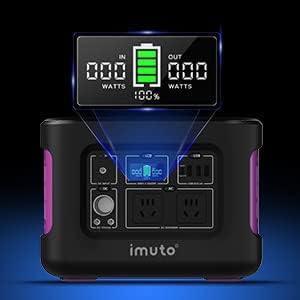
A close-up view of the imuto Portable Power Station's LCD display. It shows 'IN' and 'OUT' wattage readings, along with the battery charge level indicated by a battery icon and percentage (e.g., 100%). This display provides essential information about the power station's operational status.
The LCD display provides real-time information about the power station's operation:
- Battery Level Indicator: Shows the current charge level of the battery.
- Input Wattage (IN): Displays the power being drawn into the unit during charging.
- Output Wattage (OUT): Displays the total power being consumed by connected devices.
- Status Icons: May include indicators for AC output, DC output, USB output, and warning symbols.
4. Setup
4.1. Unpacking
Carefully remove the power station and all accessories from the packaging. Inspect the unit for any signs of damage. If any components are missing or damaged, contact customer support immediately.
4.2. Initial Charge
Before first use, it is recommended to fully charge the imuto Portable Power Station. This ensures the battery is calibrated and ready for optimal performance. Connect the AC charging cable to the DC input port and plug it into a wall outlet until the LCD display shows 100% battery.
5. Operating Instructions
5.1. Powering On/Off
- To Power On: Press and hold the main Power Button for approximately 3 seconds until the LCD screen illuminates.
- To Power Off: Press and hold the main Power Button for approximately 3 seconds until the LCD screen turns off.
5.2. Using AC Outlets
- Ensure the power station is turned on.
- Press the AC Power Button (usually located near the AC outlets) to activate the AC output. An AC icon will appear on the LCD.
- Plug your AC appliance into one of the 110V AC outlets.
- Ensure the appliance's power consumption does not exceed 600W.
- When finished, press the AC Power Button again to turn off the AC output and conserve battery.
5.3. Using DC Outlets (12V Carport & DC 12V/10A)
- Ensure the power station is turned on.
- Press the DC Power Button (usually located near the DC outlets) to activate the DC output. A DC icon will appear on the LCD.
- Plug your 12V DC device into the Carport or DC 12V/10A output.
- Ensure the device's power consumption does not exceed 120W (12V/10A).
- When finished, press the DC Power Button again to turn off the DC output.
5.4. Using USB Ports (USB-A & USB-C)
- Ensure the power station is turned on.
- The USB ports are typically active once the unit is powered on. Check the LCD for a USB icon.
- Connect your USB-powered device to the appropriate USB-A or USB-C port.
- The USB-C port supports Power Delivery (PD) for faster charging of compatible devices.
- Disconnect devices when fully charged to conserve battery.
5.5. Operating the LED Light
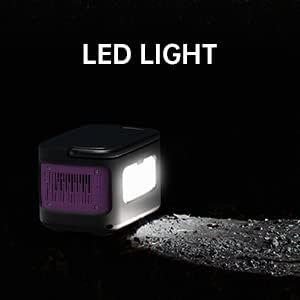
This image shows the imuto Portable Power Station with its integrated LED light activated, illuminating a dark area. This feature provides convenient lighting for outdoor activities or emergency situations.
The imuto T600-G includes an integrated LED light for illumination:
- To Turn On/Off: Press the dedicated LED Light Button (refer to the product diagram for location).
- Brightness Modes: Some models may have multiple brightness settings or an SOS mode. Press the button repeatedly to cycle through modes.
6. Recharging the Power Station
The imuto T600-G can be recharged using multiple methods:

This image demonstrates the recharging capabilities of the imuto Portable Power Station. It highlights the dual input charging feature, showing the unit being recharged simultaneously via its DC input (up to 120W Max) and USB-C PD input (up to 100W Max), allowing for a combined maximum input of 220W for faster charging.
6.1. AC Wall Charging
- Connect the provided AC charging cable to the DC Input port on the power station.
- Plug the other end of the AC charging cable into a standard wall outlet (100-240V).
- The LCD display will show 'IN' wattage and the battery icon will animate, indicating charging.
- Charging is complete when the battery icon is full and shows 100%.
6.2. Solar Panel Charging
- Position your solar panel (not included) in direct sunlight.
- Connect the solar panel to the DC Input port on the power station using a compatible cable (ensure voltage and current are within the power station's specifications: 12-24V, 120W Max).
- The LCD display will show 'IN' wattage and the battery icon will animate.
- Optimal charging performance depends on sunlight intensity and solar panel efficiency.
6.3. Car Charging
- Connect a compatible car charger (not included) to the DC Input port on the power station.
- Plug the other end into your vehicle's 12V cigarette lighter socket.
- The LCD display will show 'IN' wattage and the battery icon will animate.
- Charging speed may vary depending on the vehicle's electrical system.
6.4. Dual Input Charging (DC + USB-C PD)
For faster recharging, the imuto T600-G supports simultaneous charging via its DC input and USB-C PD input, allowing for a combined input of up to 220W (120W DC + 100W USB-C PD).
- Connect the AC charging cable (or solar panel/car charger) to the DC Input port.
- Simultaneously connect a USB-C PD charger (not included) to the USB-C port.
- The LCD will show the combined input wattage, significantly reducing charging time.
7. Maintenance
7.1. Storage
- Store the power station in a cool, dry place, away from direct sunlight and extreme temperatures.
- For long-term storage, charge the unit to approximately 50-80% every 3-6 months to prolong battery life.
- Avoid storing in environments with high humidity or corrosive gases.
7.2. Cleaning
- Disconnect all cables before cleaning.
- Use a soft, dry cloth to wipe the exterior of the unit.
- Do not use abrasive cleaners, solvents, or immerse the unit in water.
- Keep the ventilation openings free of dust and debris.
7.3. Battery Care
- Avoid fully discharging the battery frequently, as this can reduce its lifespan.
- Do not expose the battery to temperatures above 40°C (104°F) or below -10°C (14°F) for extended periods.
- If the unit will not be used for a long time, charge it to 50-80% and store it.
8. Troubleshooting
If you encounter issues with your imuto Portable Power Station, refer to the following common problems and solutions:
- Unit will not turn on:
- Ensure the battery is not completely depleted. Try charging the unit.
- Press and hold the Power Button for the required duration (approx. 3 seconds).
- No output from AC/DC/USB ports:
- Ensure the specific output (AC, DC) is activated by pressing its respective button.
- Check if the total power consumption of connected devices exceeds the maximum output (600W for AC, 120W for DC).
- Verify that cables are securely connected.
- The unit may have entered protection mode due to overload or overheating. Disconnect devices, turn off the unit, and let it cool down before restarting.
- Unit is not charging:
- Ensure the charging cable is securely connected to both the power station and the power source.
- Verify the power source (wall outlet, solar panel, car charger) is functional.
- Check if the input wattage is displayed on the LCD.
- Ensure the input voltage and current from the charging source are within the specified range (12-24V for DC input).
- LCD display is not working:
- Try turning the unit off and on again.
- If the issue persists, contact customer support.
9. Specifications
| Feature | Specification |
|---|---|
| Model | T600-G |
| Battery Capacity | 622Wh (172800mAh) |
| AC Output | 2x 110V, 600W (Pure Sine Wave) |
| DC Output | 1x 12V/10A, 1x Carport 12V/10A |
| USB-A Output | 3x 5V/2.4A |
| USB-C Output/Input | 1x 100W Power Delivery (PD) |
| DC Input | 12-24V, 120W Max |
| Max Combined Input | 220W (DC 120W + USB-C PD 100W) |
| Power Source | Battery Powered, Solar Powered |
| Special Feature | Durable, Electric, Portable, LED Light |
| Included Components | Charging Cable |
| First Available Date | September 19, 2022 |
10. Warranty and Support
imuto products are designed and manufactured to the highest quality standards. This product is covered by a limited warranty from the date of purchase. For detailed warranty information, please refer to the warranty card included with your product or visit the official imuto website.
If you have any questions, require technical assistance, or experience any issues with your imuto Portable Power Station T600-G, please contact imuto customer support. Provide your model number and purchase details for faster service.
Contact Information: Please refer to the official imuto website or your product packaging for the most up-to-date customer support contact details.