1. Introduction
Thank you for choosing the Profey NV4000 Upgraded 4K Digital Infrared Night Vision Binoculars. This device is designed to provide clear visibility in low-light conditions and complete darkness, offering advanced features for various outdoor activities such as hunting, wildlife observation, and camping. This manual provides detailed instructions for setup, operation, maintenance, and troubleshooting to ensure optimal performance and longevity of your device.
The binoculars feature a 3-inch TFT screen, 4K Ultra HD video recording, 36-megapixel image capture, 7-level adjustable infrared illumination, 5x digital zoom, 2x optical zoom, and a 4000mAh rechargeable lithium battery. It supports up to a 128GB TF card for extensive storage of your captured media.
2. Package Contents
Please verify that all items are present in your package:
- 1 x Profey Night Vision Binoculars
- 1 x Neck Strap
- 1 x 32GB TF Card
- 1 x Data Cable
- 1 x Charging Cable
- 1 x User Manual
3. Product Overview
The Profey Night Vision Binoculars are equipped with a robust design and intuitive controls for ease of use. The device features a large viewing screen, an infrared illuminator, and various control buttons for navigation and function selection.
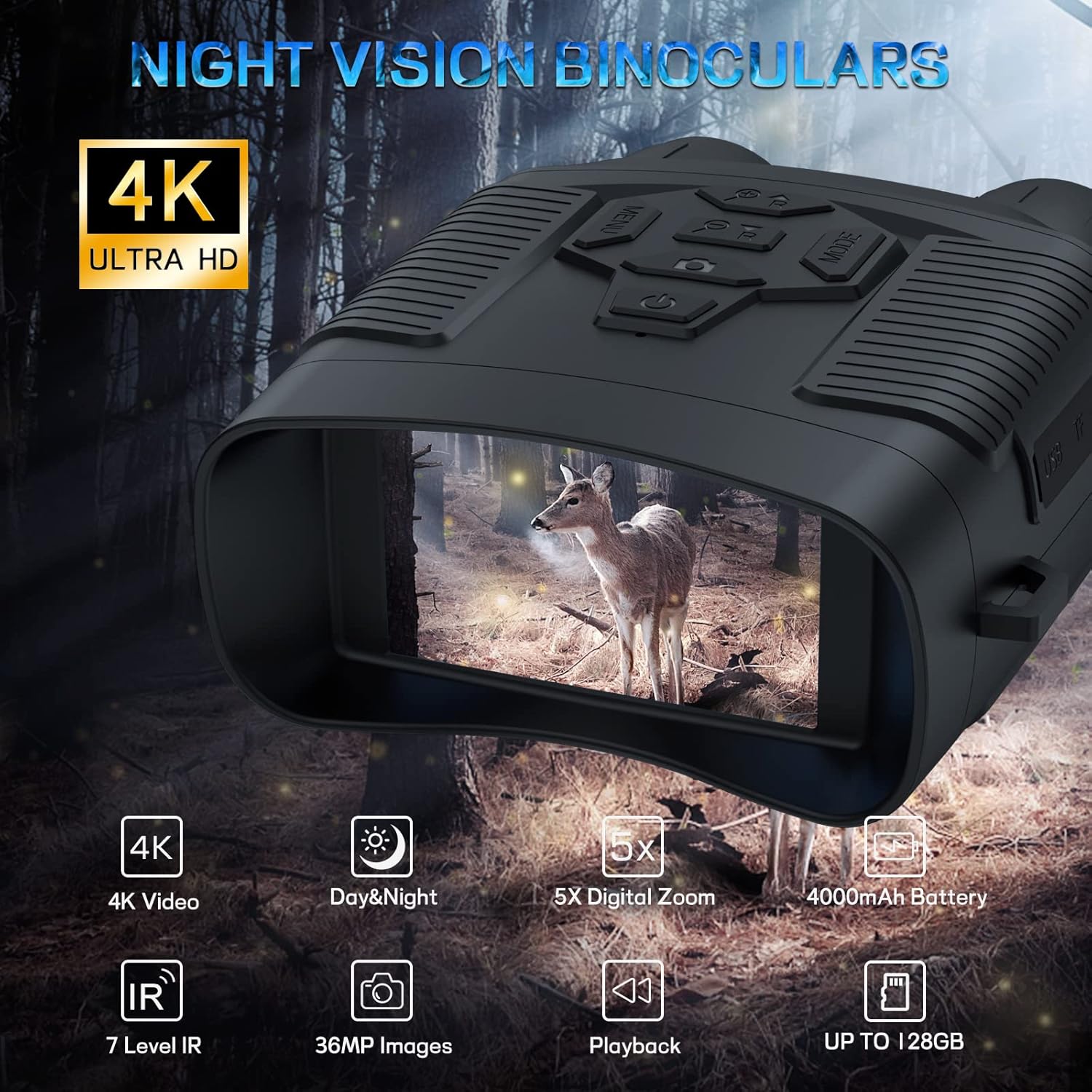
Figure 3.1: Front view of the Profey Night Vision Binoculars, highlighting the screen and control panel.
Key components include:
- 3-inch TFT Screen: For real-time viewing and playback of captured media.
- Control Buttons: Including Power, Menu, Mode, IR Up/Down, and Zoom functions.
- Infrared Illuminator: Provides invisible light for clear vision in complete darkness.
- Objective Lens: 25mm fully multi-coated lens for optimal light gathering.
- Rubber Armor: Shock-absorbing rubber casing for enhanced grip and durability.

Figure 3.2: Illustration of day and night use capabilities, demonstrating 36MP image quality and 4K video resolution.
4. Setup
4.1 Charging the Battery
The device is equipped with a built-in 4000mAh rechargeable lithium battery. Before initial use, fully charge the battery.
- Connect the provided charging cable to the charging port on the binoculars.
- Connect the other end of the charging cable to a USB power source (e.g., wall adapter, power bank, car charger).
- The charging indicator light will illuminate during charging and turn off or change color when fully charged.

Figure 4.1: The binoculars being charged via a USB cable, indicating the rechargeable lithium battery.
4.2 Inserting the Memory Card
A 32GB TF card is included for storing photos and videos. The device supports TF cards up to 128GB.
- Locate the TF card slot on the side of the binoculars.
- Gently insert the TF card into the slot with the gold contacts facing down until it clicks into place.
- To remove, push the card inward until it springs out.
5. Operating Instructions
5.1 Power On/Off
- To Power On: Press and hold the Power button until the screen illuminates.
- To Power Off: Press and hold the Power button until the screen turns off.
5.2 Mode Selection
The binoculars offer three primary modes: Photo, Video, and Playback.
- Press the Mode button to cycle through the available modes. The current mode will be displayed on the screen.
5.3 Adjusting Infrared (IR) Illumination
The 850nm infrared illuminator has 7 adjustable levels to optimize visibility in varying degrees of darkness.
- In Photo or Video mode, press the IR Up (+) button to increase the IR level.
- Press the IR Down (-) button to decrease the IR level.
- Adjust the IR level according to the ambient light conditions and the distance to your target for the clearest image. Higher IR levels consume more battery power.

Figure 5.1: Visual representation of the 7 adjustable IR levels and their effect on image clarity in darkness.
5.4 Zoom Function
The device features 2x optical zoom and 5x digital zoom.
- Use the Zoom In and Zoom Out buttons to adjust the magnification.
5.5 Capturing Photos and Videos
- Select either Photo or Video mode using the Mode button.
- Frame your subject on the screen.
- Press the Shutter/Record button to take a photo or start/stop video recording.

Figure 5.2: A visual comparison demonstrating the superior clarity of 4K UHD resolution compared to 1080P.
5.6 Playback
- Switch to Playback mode using the Mode button.
- Use the navigation buttons (often the IR Up/Down or Zoom buttons) to scroll through your captured photos and videos.
- Press the OK or Shutter button to view a selected item.
5.7 Data Transfer
To transfer files to a computer:
- Connect the binoculars to your computer using the provided data cable.
- The device should appear as a removable disk or mass storage device on your computer.
- Navigate to the device's storage to access and transfer your photos and videos.
6. Maintenance
6.1 Cleaning
- Lenses: Use a soft, lint-free cloth specifically designed for optical lenses. Do not use abrasive materials or harsh chemicals.
- Body: Wipe the rubber armor and body with a soft, damp cloth. Avoid getting water into electronic components.
6.2 Storage
- Store the binoculars in a cool, dry place, away from direct sunlight and extreme temperatures.
- If storing for extended periods, ensure the battery is partially charged (around 50%) and recharge it every few months to maintain battery health.
6.3 Battery Care
- Avoid fully discharging the battery frequently.
- Use only the provided charging cable or a compatible USB charger.
7. Troubleshooting
| Problem | Possible Cause | Solution |
|---|---|---|
| Device does not power on | Low or depleted battery | Charge the battery fully using the provided charging cable. |
| Poor image quality in darkness | IR level too low; out of focus | Increase the IR illumination level. Adjust the focus manually if available. |
| Cannot save photos/videos | Memory card full, incorrectly inserted, or corrupted | Check memory card insertion. Delete unnecessary files or replace the card. Format the card if necessary (this will erase all data). |
| Screen is blank or frozen | Software glitch | Perform a soft reset by holding the Power button until the device turns off, then restart. If issue persists, contact support. |
| Cannot set date/time in menu | Incorrect menu navigation or button response | Refer to the menu navigation section of the manual. Ensure buttons are pressed firmly. If unresponsive, contact customer support. |
8. Specifications
| Feature | Specification |
|---|---|
| Model Name | NV4000 Upgraded Night Vision Binoculars |
| Video Resolution | 4K Ultra HD |
| Image Resolution | 36 Megapixels |
| Display Screen | 3-inch TFT |
| Infrared Illuminator | 850nm, 7 Levels Adjustable |
| Digital Zoom | 5x |
| Optical Zoom | 2x |
| Objective Diameter | 25mm |
| Maximum Magnification | 8x |
| Battery Type | 4000mAh Rechargeable Lithium Battery |
| Storage | Supports TF card up to 128GB (32GB included) |
| Material | Rubber |
| Mounting Type | Tripod Mount |
| Dimensions | 18.49 x 14.2 x 7.39 cm |
| Weight | 458 grams |
9. Warranty and Support
Profey provides a 1-year warranty for this product. If you encounter any quality issues with your device, please do not hesitate to contact our customer service team. We are committed to providing support and will assist with replacements or refunds as applicable.
For technical assistance or warranty claims, please refer to the contact information provided with your purchase or visit the official Profey support website.