1. Introduction
This manual provides essential instructions for the safe and efficient operation of your Panasonic NNSG448S Compact 900W High Power Microwave Oven. Please read all instructions carefully before using the appliance and retain this manual for future reference. Proper use and maintenance will ensure optimal performance and extend the lifespan of your microwave oven.
2. Important Safety Instructions
When using electrical appliances, basic safety precautions should be followed, including the following:
- Read all instructions before using the appliance.
- Do not attempt to operate this oven with the door open as this can result in harmful exposure to microwave energy.
- Do not place any object between the oven front face and the door or allow soil or cleaner residue to accumulate on sealing surfaces.
- Do not operate the oven if it is damaged. It is particularly important that the oven door closes properly and that there is no damage to the: (1) door (bent), (2) hinges and latches (broken or loosened), (3) door seals and sealing surfaces.
- The oven should not be adjusted or repaired by anyone except properly qualified service personnel.
- Do not heat liquids or other foods in sealed containers since they are liable to explode.
- Only use utensils that are suitable for use in microwave ovens.
- When heating food in plastic or paper containers, keep an eye on the oven due to the possibility of ignition.
- If smoke is observed, switch off or unplug the appliance and keep the door closed in order to stifle any flames.
- Do not overcook food.
- Do not use corrosive chemicals or vapors in this appliance.
- This appliance is designed for heating food. It is not designed for industrial or laboratory use.
3. Package Contents
Verify that all components are present and in good condition:
- Panasonic NNSG448S Compact 900W High Power Microwave Oven
- Glass Turntable Tray (270 mm / 10.6 inches)
- Roller Ring
- Instruction Manual
4. Product Overview
The Panasonic NNSG448S is a compact 900W microwave oven featuring a black stainless steel design and a black glass door. It is equipped with a clear white LED display and an intuitive control panel for various cooking functions.
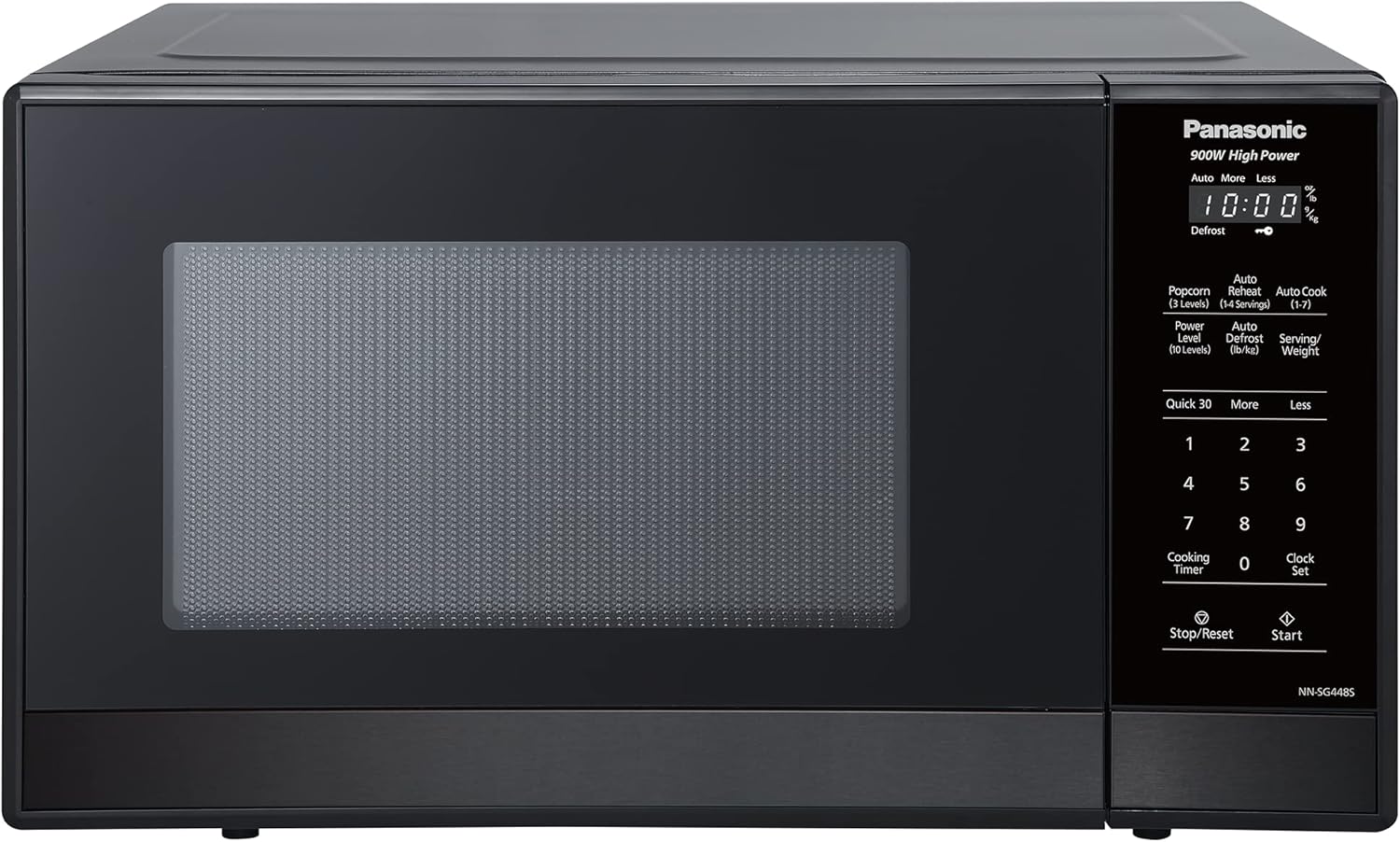
Figure 4.1: Front view of the Panasonic NNSG448S microwave oven, showcasing its sleek black stainless steel finish and glass door.

Figure 4.2: Close-up of the control panel with a white LED display, showing various function buttons and numerical keypad.

Figure 4.3: Interior view of the microwave oven, showing the removable glass turntable tray and roller ring.
5. Setup
5.1 Placement
- Place the microwave oven on a flat, stable surface capable of supporting its weight.
- Ensure adequate ventilation by leaving at least 10 cm (4 inches) of space at the rear, 20 cm (8 inches) at the top, and 5 cm (2 inches) on both sides. Do not block any ventilation openings.
- Keep the oven away from heat sources and strong magnetic fields.
5.2 Turntable Installation
- Place the roller ring in the center of the oven cavity floor.
- Carefully place the glass turntable tray on top of the roller ring, ensuring it sits securely in the center hub.
5.3 Power Connection
Plug the power cord into a grounded electrical outlet. Ensure the voltage matches the specifications of the appliance.
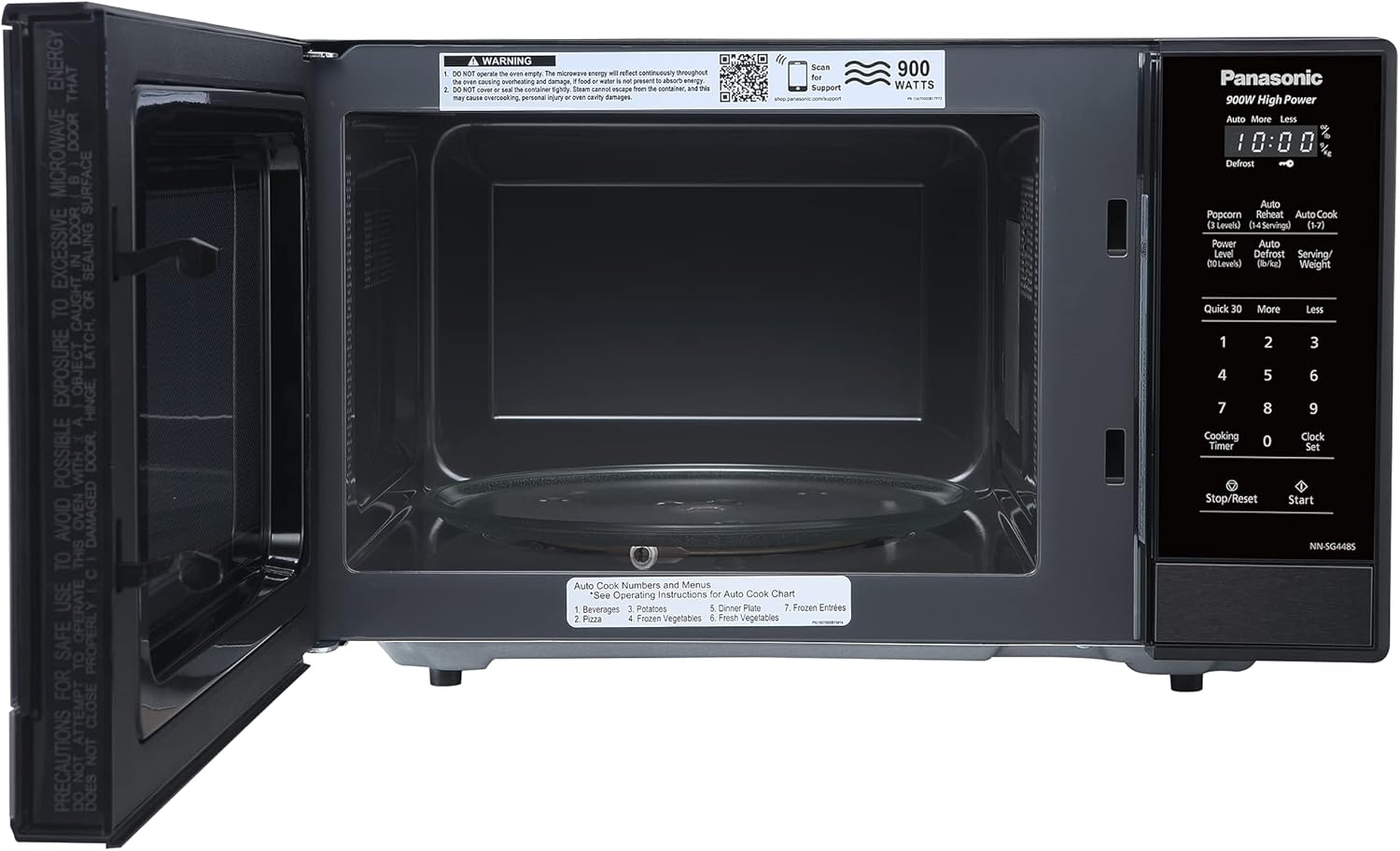
Figure 5.1: Dimensions of the microwave oven: 48.5 cm (width) x 37.5 cm (depth) x 29.3 cm (height).
6. Operating Instructions
6.1 Setting the Clock
- Press the Clock Set button once.
- Use the number pad to enter the current time (e.g., 12:30).
- Press the Clock Set button again to confirm.
6.2 Basic Cooking (Time Cook)
- Place food in a microwave-safe container on the turntable.
- Enter the desired cooking time using the number pad (e.g., 1 for 1 minute, 100 for 1 minute 00 seconds).
- To adjust power level (optional): Press Power Level repeatedly to select desired power (e.g., P10 for 100%, P5 for 50%). Default is P10 (100%).
- Press Start to begin cooking.
6.3 Quick 30
The Quick 30 button allows you to cook at 100% power for 30-second intervals with each press. Simply press Quick 30 repeatedly for the desired cooking time, then press Start (or it will start automatically after a few seconds).
6.4 Auto Cook Programs
The microwave features 7 pre-set auto cook programs for convenient one-touch meal options. Refer to the oven's internal label or the image below for specific program numbers and their corresponding food types.

Figure 6.1: The 7 Auto Cook Programs include: 1. Beverage, 2. Pizza, 3. Potato, 4. Frozen Vegetables, 5. Dinner Plate, 6. Fresh Vegetables, 7. Frozen Entrée.
- Press the Auto Cook button.
- Select the desired program number using the number pad (1-7).
- Enter the serving size or weight if prompted.
- Press Start.
6.5 Auto Defrost
The Auto Defrost function provides simple and convenient one-touch thawing for various foods.

Figure 6.2: Frozen berries, a common item for the Auto Defrost function.
- Press the Auto Defrost button.
- Enter the weight of the food in pounds (lb) or kilograms (kg) using the number pad.
- Press Start. The oven will automatically calculate the defrosting time and power level.
6.6 Stop/Reset
Press the Stop/Reset button to:
- Temporarily pause cooking. Press Start to resume.
- Cancel a program or clear an incorrect entry before cooking starts.
- Stop cooking and clear all settings (press twice).
7. Maintenance and Cleaning
Regular cleaning and maintenance will help ensure the longevity and safe operation of your microwave oven.
7.1 Exterior Cleaning
Wipe the exterior surface with a soft, damp cloth. Avoid using abrasive cleaners or solvents that could damage the finish.
7.2 Interior Cleaning
Clean the interior cavity with a mild detergent and a soft cloth. For stubborn food splatters, place a bowl of water with lemon slices inside and microwave for a few minutes to loosen residue, then wipe clean. Ensure the oven is unplugged before cleaning.
7.3 Turntable and Roller Ring
The glass turntable tray and roller ring can be removed and washed in warm, soapy water or in a dishwasher. Ensure they are completely dry before placing them back in the oven.
8. Troubleshooting
If you encounter issues with your microwave oven, refer to the following common problems and solutions:
| Problem | Possible Cause | Solution |
|---|---|---|
| Oven does not start | Power cord not plugged in; Door not closed properly; Fuse blown or circuit breaker tripped. | Ensure power cord is securely plugged in; Close door firmly; Check household fuse or reset circuit breaker. |
| Food not heating | Incorrect cooking time/power level set; Door not closed properly. | Verify cooking settings; Ensure door is fully closed. |
| Turntable not rotating | Turntable or roller ring not correctly placed; Obstruction under turntable. | Re-position turntable and roller ring; Remove any obstructions. |
| Unusual noise during operation | Turntable or roller ring not correctly placed; Food container touching oven walls. | Check turntable and roller ring placement; Use smaller or different shaped container. |
If the problem persists after attempting these solutions, please contact customer support.
9. Specifications
Technical details for the Panasonic NNSG448S Microwave Oven:
- Model Number: NNSG448S
- Brand: Panasonic
- Wattage: 900 watts
- Capacity: 1.3 Cuft (approx. 3 Kilograms)
- Product Dimensions (Exterior): 48.5 cm (Width) x 37.5 cm (Depth) x 29.3 cm (Height)
- Oven Dimensions (Interior): 31.4 cm (Width) x 34.7 cm (Depth) x 22.1 cm (Height)
- Material: Stainless Steel
- Color: Stainless Steel (Black finish)
- Installation Type: Countertop
- Special Features: Auto Cook, Defrost, Programmable, Timer
- Included Components: Microwave Oven, Glass Turntable Tray
10. Warranty and Support
For warranty information, technical support, or service inquiries, please visit the official Panasonic support website or contact their customer service department.
Panasonic Support Website: http://shop.panasonic.com/support