
EACHSHOT EA702466
ZGCINE R30 Pro Charging Case Instruction Manual
Model: EA702466
Brand: EACHSHOT
1. Product Overview
The ZGCINE R30 Pro is a specialized charging case designed for the Rode Wireless Go series wireless microphones (compatible with Wireless GO and Wireless GO II models). It offers a compact and organized solution for storing and charging your microphone units, ensuring they are always ready for use. The case features built-in battery protection mechanisms and supports reverse charging for other devices, enhancing its utility in various professional and personal settings.
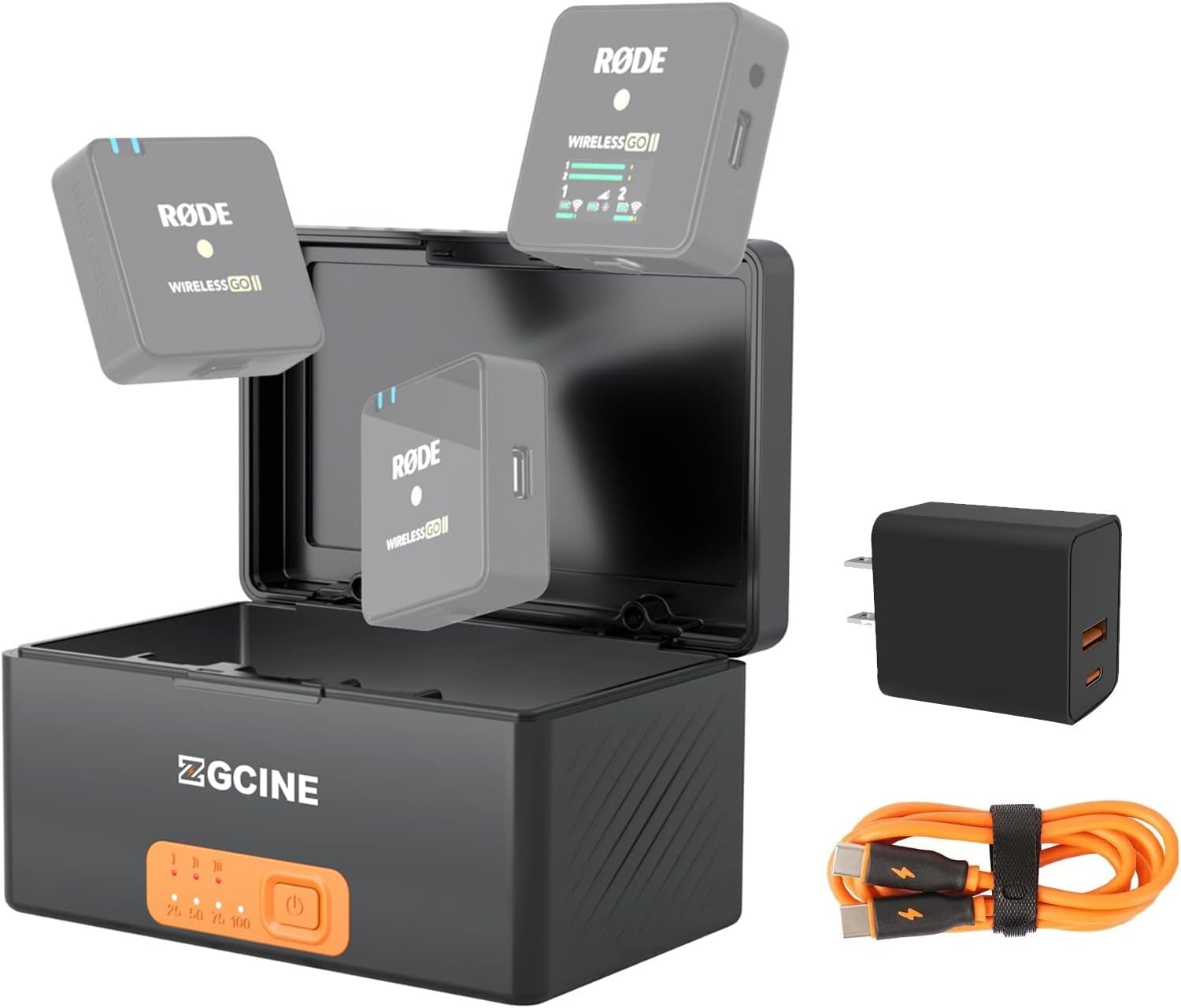
Figure 1: ZGCINE R30 Pro Charging Case with included PD20W adapter and USB-C cable, alongside Rode Wireless Go units (not included).
2. Package Contents
- 1 x ZGCINE R30 Pro Charging Case
- 1 x PD20W Adapter
- 1 x USB-C Charging Cable
- Instruction Manual (this document)
3. Key Features
- Integrated Charging: Features 3 charging slots for simultaneous charging of up to 3 Rode Wireless Go TX and RX units.
- Fast Charging: Units can be fully charged in approximately 2 hours.
- High Capacity Battery: Built-in 3400mAh battery provides multiple full charges for your Rode Wireless Go units.
- Reverse Charging (Power Bank Function): Equipped with a USB-A port for emergency power supply to other devices (supports USB-C output 5V-2.4A, 9V-1.3A, 12V-1A).
- Accessory Storage: Dedicated slot for storing small accessories like wind muffs, cables, or lavalier microphones.
- Safety Features: Constructed from fire-retardant material with over-current, over-voltage, and over-temperature protection to prevent battery overcharge.
- Compact and Portable: Designed for easy transport, making it ideal for on-the-go content creators.

Figure 2: The ZGCINE R30 Pro's reverse charging capability, allowing it to function as a power bank for other devices.
4. Setup
- Initial Charging of the Case:
Before first use, fully charge the ZGCINE R30 Pro charging case. Connect the provided USB-C charging cable to the USB-C input port on the back of the case and plug the other end into the PD20W adapter. Connect the adapter to a power outlet. The LED indicator lights on the front of the case will illuminate to show the charging progress. All four white LEDs indicate a full charge.

Figure 3: Charging the ZGCINE R30 Pro case using the USB-C PD input.
- Understanding Indicator Lights:
The four white LED lights on the front indicate the internal battery level of the R30 Pro case (25%, 50%, 75%, 100%). When charging Rode Wireless Go units, red lights above each slot will indicate active charging, turning off when the unit is fully charged.
5. Operating Instructions
- Charging Rode Wireless Go Units:
Open the magnetic lid of the R30 Pro case. Carefully insert your Rode Wireless Go transmitter (TX) and receiver (RX) units into their respective slots. The slots are designed to fit the units securely. Ensure the units click into place to establish a proper connection for charging. The red indicator lights above each slot will turn on, signifying that charging has begun. Once fully charged, the red lights will turn off.

Figure 4: Rode Wireless Go units correctly placed in the charging slots of the R30 Pro case.
- Activating/Deactivating Charging:
Press the orange power button on the front of the case once to activate charging. The white LED indicators will show the case's battery level. To turn off the charging function and the case's power, press and hold the orange power button for approximately 2 seconds.
- Using Reverse Charging (Power Bank):
To use the R30 Pro as a power bank, connect your external device (e.g., smartphone, action camera) to the USB-A output port on the side of the case using an appropriate USB cable. The case will begin charging your device. This feature is useful for emergency power needs when a wall outlet is not available.
- Accessory Storage:
The case includes a dedicated storage slot for small accessories. Utilize this space to keep your wind muffs, short cables, or lavalier microphones organized and secure alongside your Rode Wireless Go units.

Figure 5: The accessory storage compartment within the R30 Pro case.
6. Maintenance
- Keep the charging case clean and free from dust and debris. Use a soft, dry cloth for cleaning.
- Avoid exposing the case to extreme temperatures, humidity, or direct sunlight.
- Do not attempt to disassemble or modify the case, as this will void the warranty and may cause damage.
- Store the case in a cool, dry place when not in use.
7. Troubleshooting
| Problem | Possible Cause | Solution |
|---|---|---|
| Rode Wireless Go units not charging. | Case battery is low or off; units not properly seated. | Ensure the case is charged and powered on. Re-seat the Rode units firmly into their slots. |
| Case not charging when plugged in. | Faulty cable/adapter; power outlet issue. | Check the USB-C cable and PD20W adapter. Try a different power outlet. |
| Reverse charging not working. | Case battery is too low; incorrect cable; device incompatibility. | Ensure the case has sufficient charge (above 25%). Use a compatible USB-A cable for your device. |
8. Specifications
| Feature | Detail |
|---|---|
| Model | EA702466 |
| Brand | EACHSHOT |
| Manufacturer | ZGCINE |
| Battery Capacity | 3.7V 3400mAh |
| USB-C PD Input | 5V-2.4A, 9V-1.3A, 12V-1A |
| USB-C PD Output | 5V-2.4A, 9V-1.3A, 12V-1A |
| Item Weight | 14.1 ounces |
| Material | Acrylonitrile Butadiene Styrene |
| Compatible Devices | Rode Microphones Wireless GO 2 & Rode Microphones Wireless GO, Cellular Phones (via reverse charging) |
9. Warranty and Support
For any questions, concerns, or support inquiries regarding your ZGCINE R30 Pro charging case, please contact the seller directly through your Amazon Order Page. Click on "problem with this order" for assistance. The seller aims to reply within 24 hours during working days.
Please retain your proof of purchase for warranty claims.
Ask a question about this manual
Ask about setup, troubleshooting, compatibility, parts, safety, or missing instructions. Manuals+ will review the question and use this page’s manual context to help answer it.