
1. Introduction
This user manual provides comprehensive instructions for the installation, operation, and maintenance of your WEPARTICULAR 5.1 Inch 1Din 5188 Car MP5 Player. This device features a 5.1-inch IPS touch screen, voice control, RDS AM/FM radio, 4 USB ports, and bidirectional interconnection for Android and iOS devices. Please read this manual thoroughly before using the product to ensure proper functionality and safety.

Figure 1: Front view of the WEPARTICULAR 5.1 Inch Car MP5 Player, showing the screen, control knob, and USB ports.
2. Product Features
- 5.1-inch IPS Touch Screen: High-definition capacitive screen with wide viewing angles for clear visuals.
- Voice Control: Intelligent AI voice assistant for hands-free operation.
- Bluetooth 5.0: For hands-free calling and wireless music streaming with a built-in clear microphone.
- FM/AM Multi-channel Radio: High-quality digital stereo radio with automatic and semi-automatic station search.
- Android/iOS Bidirectional Interconnection (Mirror Link): Supports screen mirroring for smartphones (iOS 13.3 and Android 10.1 or later).
- Multiple USB Interfaces: Front and rear 4-USB ports, including 2.1A fast charging.
- AUX Audio Input: Supports external audio device connection.
- Rear View Camera Support: Compatible with rear view cameras for parking assistance.
- Steering Wheel Control: Supports voice steering wheel control.
- Multi-voltage Support: Operates on 12-24V, suitable for cars and trucks.
- 1080P HD Video Playback: Full decoding chip for high-definition video and image playback.
- 7-Color Button Lighting: Customizable button illumination.
- Remote Control Included: For convenient operation.

Figure 2: Overview of key features including IPS touch screen, 5.1-inch screen, Full HD, DVR, RDS, Smart Voice, Steering wheel remote control, FM AM Multi-channel radio, Rear AUX, 4USB, Mirror link, SD card/U disk, Bluetooth 4.2, Handsfree, BT playback, Clock, Reversing video, Power-off memory, DSP12, Bass output, 2.2A USB fast charge, One key mute, Colorful lights, AUX input, and remote control.

Figure 3: Illustration demonstrating the superior viewing angles of the IPS screen compared to a general screen, showing clear visibility from various perspectives (left, right, up, down).
3. Setup and Installation
The WEPARTICULAR 5188 Car MP5 Player is designed for 1Din installation. Due to the complexity of car electrical systems, professional installation is highly recommended to ensure correct wiring and prevent damage to the unit or vehicle.
3.1. Product Dimensions
Before installation, verify that the dimensions of the unit fit your vehicle's dashboard opening.
- Product Size: 188mm (Width) x 116mm (Depth) x 58mm (Height)

Figure 4: Detailed product dimensions: 188mm width, 116mm depth, and 58mm height, with a 5.1-inch screen indicated.
3.2. Package Contents
Ensure all components are present before beginning installation:
- WEPARTICULAR 5.1 Inch Car MP5 Player
- Power Wiring Harnesses
- Remote Control
- Steering Wheel Remote Control
- User Manual (this document)

Figure 5: Contents of the product package, including the car MP5 player unit, two wiring harnesses, a standard remote control, and a steering wheel remote control.
3.3. Wiring and Connections
Refer to the wiring diagram provided with the unit for specific connections. Key connections include:
- Power: Connect to vehicle's 12-24V power supply.
- Speakers: Connect to vehicle's speaker system.
- USB Ports: Utilize the front and rear USB ports for media playback and charging.
- AUX Input: Connect external audio devices.
- Rear View Camera Input: For connecting a compatible rear view camera.
- Steering Wheel Control Input: For integrating with vehicle's steering wheel controls.
4. Operating Instructions
4.1. Basic Operation
- Power On/Off: Press the power button (usually the volume knob) to turn the unit on or off.
- Volume Control: Rotate the knob or use the touch screen controls to adjust volume.
- Mode Selection: Use the mode button or touch screen icons to switch between Radio, Bluetooth, USB, AUX, and Mirror Link modes.
- Mute: Press the mute button for instant audio silencing.
4.2. Radio Operation (FM/AM/RDS)
The unit supports high-quality digital stereo FM/AM radio with RDS (Radio Data System) functionality.
- Station Search: Use the search buttons on the screen or remote to automatically or semi-automatically scan for stations.
- Manual Tuning: Fine-tune frequencies manually.
- Preset Stations: Save your favorite stations to preset memory slots for quick access.
- RDS Functions: Display station information (e.g., station name, program type) where available.

Figure 6: The FM radio interface displaying current frequency (102.5 KHz), signal strength, and options for LOC (Local/Distant), PTY (Program Type), AF (Alternative Frequencies), and TA (Traffic Announcement).
4.3. Bluetooth Connectivity
Connect your smartphone via Bluetooth for hands-free calling and audio streaming.
- Pairing: Enable Bluetooth on your phone and search for "WEPARTICULAR 5188" (or similar name). Select to pair.
- Hands-free Calling: Answer, make, and end calls directly from the unit's screen or via voice control.
- Bluetooth Music: Stream audio from your phone to the car stereo.
4.4. Mirror Link (Android/iOS Bidirectional Interconnection)
Mirror Link allows you to display your smartphone's screen on the car stereo and control it from the unit's touch screen.
- Connection: Connect your smartphone to the unit via a USB cable.
- Activation: Follow on-screen prompts to enable Mirror Link. Ensure your phone's developer options (for Android) or trust settings (for iOS) are correctly configured.
- Functionality: Access navigation, music, and other apps directly from the car stereo's display.

Figure 7: The MirrorLink feature showing a smartphone screen mirrored onto the car MP5 player's display, demonstrating two-way interconnection for both iOS and Android devices.
4.5. Voice Control
The intelligent AI voice control system allows for hands-free operation of various functions.
- Activation: Press the dedicated voice control button on the unit or steering wheel.
- Commands: Speak commands clearly, such as "Call [contact name]", "Open [app name]", "Play [song/artist]".
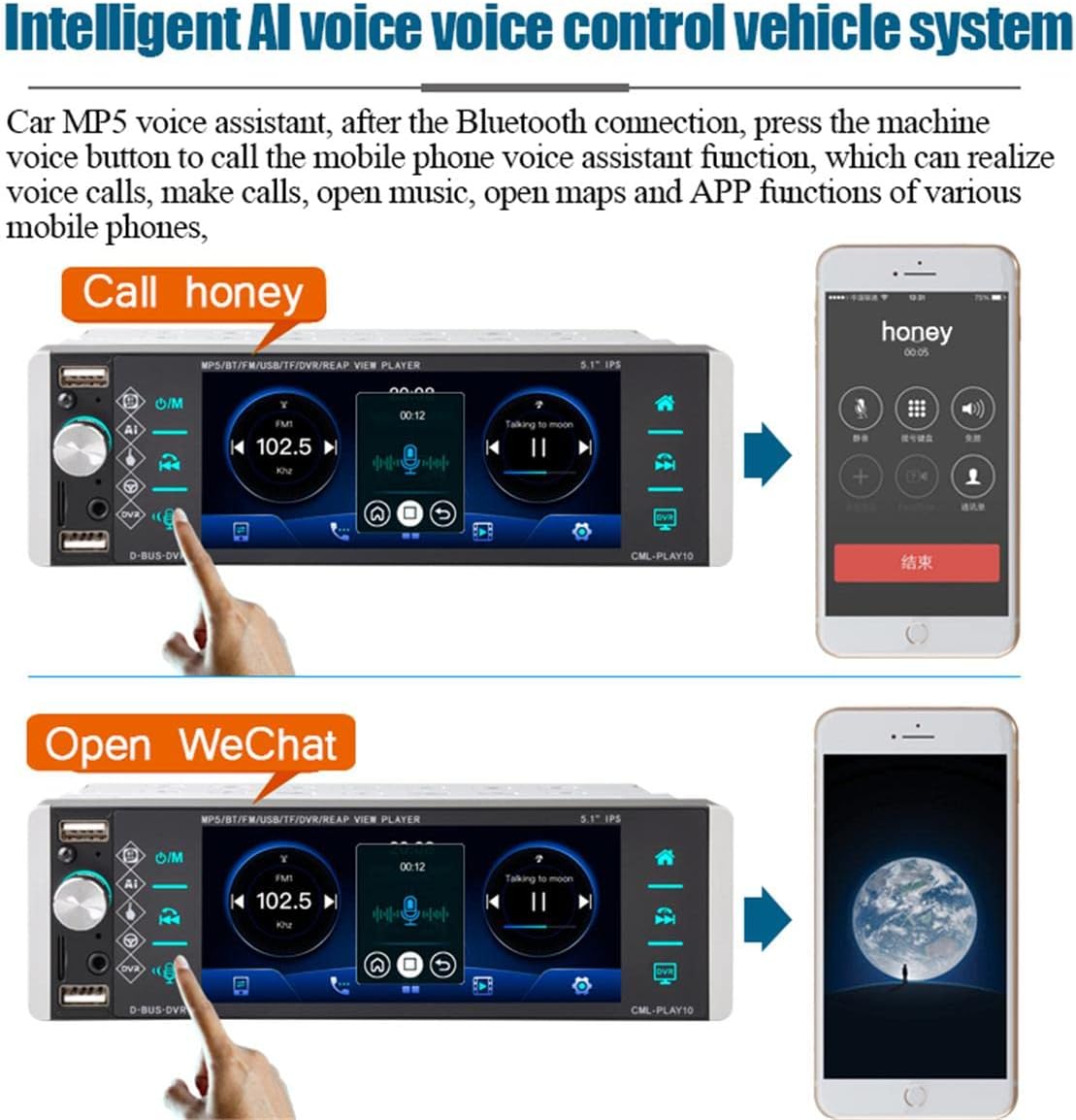
Figure 8: Demonstrations of the intelligent AI voice control system, showing commands like "Call honey" and "Open WeChat" being processed by the car MP5 player.
4.6. Media Playback (USB/SD Card)
The unit supports playback of various audio and video formats from USB drives and SD cards.
- Insert Media: Insert a USB drive into one of the USB ports or an SD card into the designated slot.
- File Browsing: Use the touch screen to navigate through folders and select media files.
- Supported Formats: The unit features a full decoding chip compatible with mainstream video formats (e.g., H.264, H.265/HEVC) and audio formats.
- Breakpoint Memory: The unit remembers the last playback position.

Figure 9: The car MP5 player displaying a 1080P HD video, demonstrating its full decoding chip capability for high-definition media playback.
5. Maintenance
To ensure the longevity and optimal performance of your MP5 player, follow these maintenance guidelines:
- Cleaning: Use a soft, dry cloth to clean the screen and exterior. For stubborn smudges on the screen, use a screen-specific cleaning solution applied to the cloth, not directly to the screen.
- Avoid Liquids: Do not expose the unit to water or other liquids.
- Temperature: Avoid extreme temperatures. Do not leave the unit in direct sunlight for extended periods, especially in hot weather.
- Ventilation: Ensure the unit's ventilation openings are not blocked to prevent overheating.
- Power Off: Turn off the unit before cleaning or performing any maintenance.
6. Troubleshooting
If you encounter issues with your MP5 player, refer to the following common problems and solutions:
| Problem | Possible Cause | Solution |
|---|---|---|
| No power | Loose power connection; Blown fuse; Vehicle battery issue. | Check power wiring; Inspect and replace fuse if necessary; Check vehicle battery. |
| No sound | Volume too low; Mute function active; Loose speaker connections; Incorrect audio source. | Increase volume; Deactivate mute; Check speaker wiring; Select correct audio source. |
| Bluetooth not connecting | Bluetooth not enabled on phone/unit; Incorrect pairing procedure; Interference. | Ensure Bluetooth is on; Re-attempt pairing; Move closer to unit; Restart both devices. |
| Mirror Link not working | Incorrect USB cable; Phone settings not configured (e.g., developer options); Incompatible phone OS version. | Use original or high-quality USB cable; Enable USB debugging/developer options on Android; Ensure iOS trust settings are accepted; Check OS compatibility (iOS 13.3+, Android 10.1+). |
| Poor radio reception | Antenna not connected or damaged; Weak signal area; Interference. | Check antenna connection; Try tuning to a stronger station; Move to an area with better signal. |
If the problem persists after attempting these solutions, please contact customer support.
7. Specifications
| Feature | Specification |
|---|---|
| Product Name | 5188 Single Spindle MP5 Player |
| Screen Size | 5.1 inches |
| Screen Type | IPS Capacitive Touch Screen |
| Material | Hardware Plastic |
| Button Lighting | 7 colored lights |
| Bluetooth Version | 4.2 |
| Radio | FM/AM Multi-channel Radio, RDS |
| Interconnection | Android/iOS Bidirectional Interconnection (Mirror Link) |
| USB Interface | Front and Rear 4-USB (2.1A output) |
| AUX Interface | Front and Rear AUX input |
| System | Wince |
| Voice Control | Supported (Smart Voice, Steering Wheel Control) |
| Rear View Support | Yes |
| Power Output | 50 Watts (5E+1 Watts) |
| Operating Voltage | 12-24V |
| Product Dimensions (L*W*H) | 188mm * 116mm * 58mm |
8. Warranty and Support
WEPARTICULAR products are manufactured to high-quality standards. For information regarding warranty coverage, technical support, or service inquiries, please refer to the warranty card included with your product or visit the official WEPARTICULAR website. Please retain your proof of purchase for warranty claims.