
Introduction
Thank you for choosing the BrizLabs 48-Key Remote Control. This remote is designed to operate specific BrizLabs color-changing fairy lights, offering a wide range of colors and lighting modes for various occasions. Please read this manual carefully before use to ensure proper operation and longevity of your device.
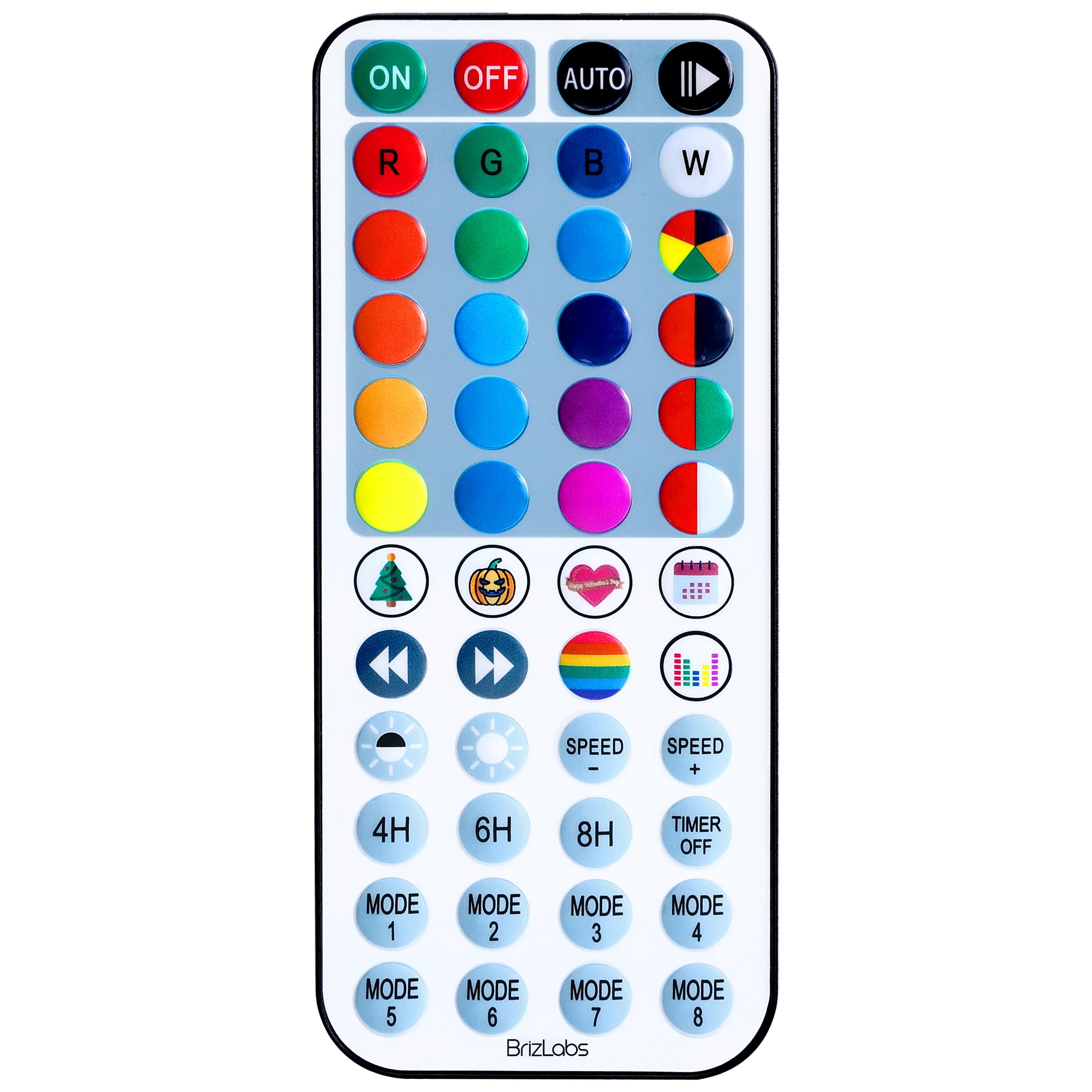
Image: The BrizLabs 48-Key Remote Control, featuring a rectangular shape with numerous buttons for color selection, mode changes, and power control.
Setup
1. Battery Installation
- Locate the battery compartment on the back of the remote control.
- Slide open the battery cover.
- Insert two AA batteries, ensuring the correct polarity (+ and -) as indicated inside the compartment.
- Close the battery cover securely.
2. Compatibility and Initial Use
This remote control is specifically designed for use with certain BrizLabs color-changing fairy lights. It is compatible with the following ASINs:
Ensure your fairy lights are powered on. Point the remote control directly at the receiver on your fairy light string. The remote operates via infrared (IR) technology, requiring a clear line of sight between the remote and the light receiver.
Operating Instructions
The 48-key remote control provides comprehensive control over your compatible BrizLabs fairy lights. Familiarize yourself with the button layout for optimal use.
Key Functions:
- Power Button: Turns the fairy lights On or Off.
- Brightness Control: Adjusts the light intensity (usually marked with sun icons or +/-).
- Color Selection Buttons: Direct access to various static colors (e.g., Red, Green, Blue, White, Yellow, Purple, etc.).
- DIY Buttons: Allows for custom color creation and saving (refer to your fairy light manual for specific DIY instructions).
- Mode Buttons: Cycles through different dynamic lighting effects such as Flash, Strobe, Fade, Smooth, Jump, etc.
- Speed Control: Adjusts the speed of dynamic lighting modes.
- Timer Functions: Activates preset timers (e.g., 6 hours on, 18 hours off).
Ensure the remote is pointed directly at the fairy light receiver within the maximum operating range of 10 meters for reliable control.
Maintenance
Battery Replacement:
When the remote control's range decreases or it becomes unresponsive, it is likely time to replace the batteries. Follow the battery installation steps in the "Setup" section.
Cleaning:
Wipe the remote control with a soft, dry cloth. Do not use liquid cleaners or abrasive materials, as these can damage the surface or internal components.
Storage:
If the remote control will not be used for an extended period, remove the batteries to prevent leakage and potential damage to the device.
Troubleshooting
- Remote not responding:
- Ensure the batteries are correctly installed and not depleted. Replace if necessary.
- Check for a clear line of sight between the remote's IR emitter and the fairy light receiver. Obstructions can block the signal.
- Ensure you are within the maximum operating range of 10 meters.
- Verify that the fairy lights are powered on.
- Remote not controlling lights (even with new batteries):
- Critical: Confirm that your fairy lights are one of the compatible models (ASINs: B07ZSWCY61, B09Y1MVYVG, B08KS4LXFD). This remote is not universally compatible with all BrizLabs lights or other brands.
- If your lights are not listed, this remote will not function with them.
Specifications
| Brand | BrizLabs |
| Model Name | Remote Control |
| Button Quantity | 48 |
| Connectivity Technology | Infrared |
| Maximum Range | 10 Meters |
| Battery Type | AA (2 required) |
| Compatible Devices | BrizLabs Color Changing Fairy Lights (ASINs: B07ZSWCY61, B09Y1MVYVG, B08KS4LXFD) |
Warranty and Support
Warranty Information:
BrizLabs products are manufactured to high-quality standards. For specific warranty details regarding your remote control, please refer to the product packaging or contact BrizLabs customer service directly. Keep your purchase receipt as proof of purchase.
Customer Support:
If you encounter any issues or have questions not covered in this manual, please contact BrizLabs customer support. You can typically find contact information on the official BrizLabs website or through your purchase platform (e.g., Amazon seller page).
Visit the BrizLabs Store: BrizLabs Amazon Store