
1. Introduction
This manual provides essential instructions for the safe and effective use of your MTYTOT 12.6V 1A AC/DC Power Supply Adapter. Please read this manual thoroughly before using the product and retain it for future reference.
2. Safety Information
Important Safety Precautions:
- Before connecting, verify that the DC socket type, power consumption, and polarity of your device match the adapter's specifications. Incorrect usage may cause damage to the device or adapter.
- The adapter features multiple protection functions (over-current, over-voltage, overcharge, short circuit). If the LED indicator flashes red, immediately unplug the adapter. Check for short circuits or if the connected device's power requirements exceed the adapter's rated power.
- This product is not waterproof. Do not use it outdoors or in wet environments.
3. Package Contents
Verify that all items are present in the package:
- 1 x MTYTOT 12.6V 1A AC/DC Power Supply Adapter
- 8 x Interchangeable DC Tips
4. Product Overview
The MTYTOT 12.6V 1A AC/DC Power Supply Adapter is designed to provide stable power to various electronic devices. It includes 8 interchangeable DC tips for broad compatibility.

Image 4.1: The MTYTOT 12.6V 1A AC/DC Power Supply Adapter with its included 8 interchangeable DC tips.
4.1. Interchangeable DC Tips
The adapter comes with 8 commonly used DC tips to ensure compatibility with a wide range of devices. These tips include:
- 5.5x2.1mm
- 4.0x1.7mm
- 3.5x1.35mm
- 3.0x1.1mm
- 2.5x0.7mm
- Micro-USB
- Type-C
- Terminal Connector

Image 4.2: A detailed view of the 8 interchangeable DC plugs, showing their various sizes and types.
4.2. Output Port and Polarity
The main DC plug has an outer diameter of 5.5mm and an inner diameter of 2.5mm, compatible with 5.5x2.1mm ports. The polarity is center positive (+).
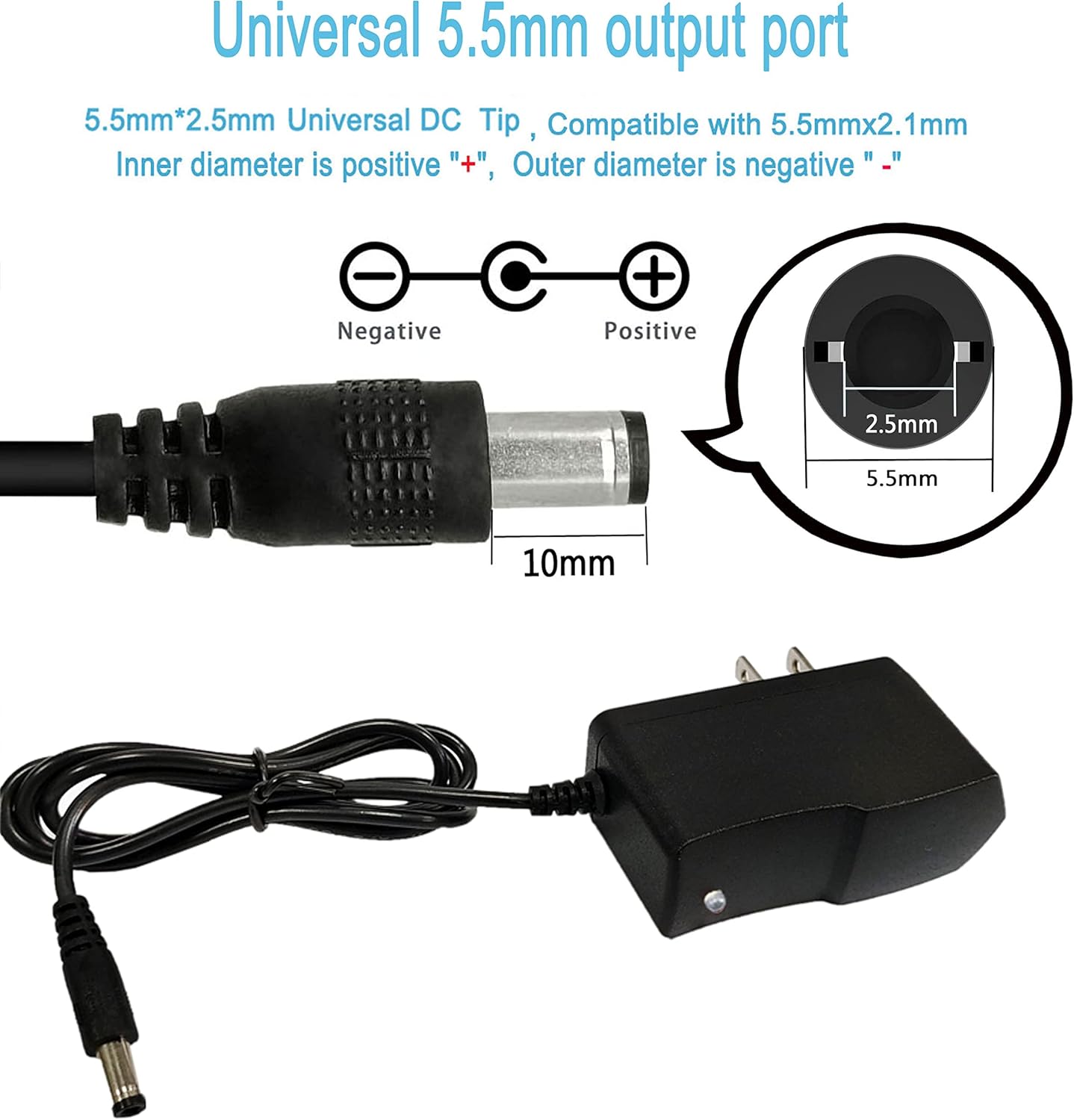
Image 4.3: Diagram illustrating the 5.5mm output port dimensions and the center positive (+) polarity.
4.3. Product Features
The adapter is constructed with durable materials and designed for reliability:
- Solid PC & ABS Shell: Made of flame-retardant and high-temperature resistant ABS & PC synthetic materials for durability.
- Safe & Strong Plug: Features a one-piece cast hardware plug for enhanced safety and strength.
- Reinforced Stress Point: Designed to withstand wear and bending, preventing copper wire breakage.
- Safe & Reliable Power Cord: Made with high-quality oxygen-free copper for better conductivity and a superior PVC cable jacket to prevent leakage.

Image 4.4: Visual representation of the adapter's construction features, including its robust shell, plug, and reinforced cable.
5. Setup
- Identify Device Requirements: Before connecting, confirm the voltage (12.6V), current (up to 1A), DC plug size, and polarity (center positive) required by your electronic device.
- Select Correct DC Tip: Choose one of the 8 interchangeable DC tips that matches your device's input port. Ensure a snug fit.
- Connect Tip to Adapter: Firmly attach the selected DC tip to the adapter's output cable.
- Connect to Device: Insert the connected DC tip into your device's power input port.
- Plug into Power Outlet: Plug the AC adapter into a standard AC 100-240V, 50/60Hz wall outlet.
6. Operating Instructions
Once properly connected, the adapter will begin supplying power to your device. The LED indicator on the adapter provides status information:
- Red LED: Indicates that the adapter is actively charging or supplying power.
- Green LED: Indicates that the battery power of the connected device has reached 90-95% (if applicable for charging devices).
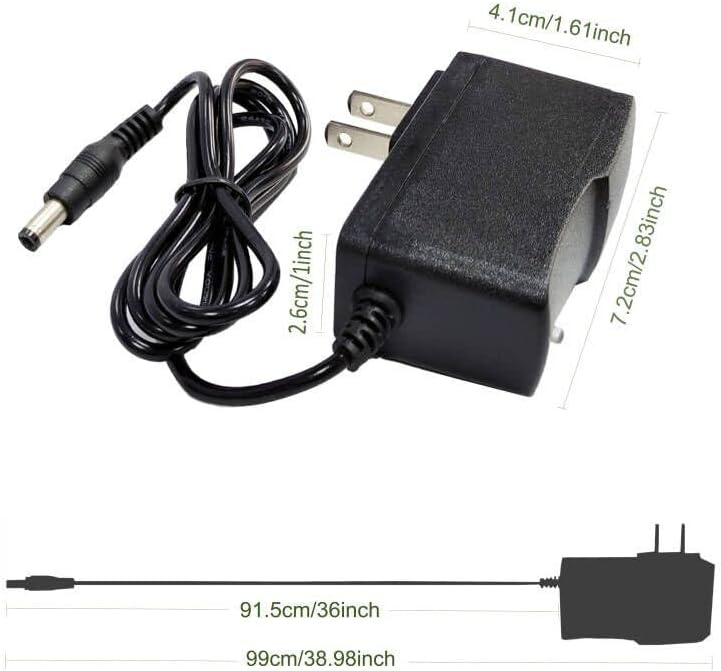
Image 6.1: The LED indicator displays red during charging and green when the charge level is near completion.
6.1. Applications
This adapter is suitable for various 12.6V devices, including but not limited to:
- Massage guns
- Aircraft models
- Ball launchers
- Electric cars
- Headlights
- Flashlights
- Electronic toys

Image 6.2: The adapter can be used with a variety of devices, including electric cars, aircraft models, and automatic ball throwers.
7. Maintenance
- Keep the adapter clean and dry. Avoid exposure to moisture or extreme temperatures.
- Do not attempt to open or repair the adapter. Refer to qualified personnel for service.
- Store the adapter and tips in a safe place when not in use to prevent damage.
8. Troubleshooting
If you encounter issues with your power adapter, refer to the following:
- Adapter not providing power:
- Ensure the adapter is securely plugged into a working wall outlet.
- Verify that the correct DC tip is firmly connected to both the adapter and your device.
- Confirm that your device's power requirements (voltage, current, polarity) match the adapter's specifications.
- LED indicator flashing red:
- This indicates a protection mode has been activated. Immediately unplug the adapter from both the wall and your device.
- Check for any short circuits in your device or cable connections.
- Ensure the electrical power drawn by your device does not exceed the adapter's rated power (12.6V 1A).
- After resolving the issue, reconnect the adapter. If the problem persists, discontinue use.
- Device not charging/powering efficiently:
- Ensure the adapter is not overloaded. It is recommended to use less than 80% of the full load (i.e., less than 1A for a 1A adapter).
- Check for any damage to the adapter cable or tips.
9. Specifications
| Feature | Specification |
|---|---|
| Brand | MTYTOT |
| Model Number | MT-12.601 |
| Input Voltage | AC 100-240V, 50/60Hz |
| Output Voltage | DC 12.6V |
| Output Current | 1A (1000mA) max |
| Wattage | 12.6 Watts |
| DC Plug Size (Main) | Outer 5.5mm, Inner 2.5mm (compatible with 5.5x2.1mm) |
| Polarity | Center Positive (+) |
| Included DC Tips | 8 Pcs (5.5x2.1mm, 4.0x1.7mm, 3.5x1.35mm, 3.0x1.1mm, 2.5x0.7mm, Micro-USB, Type-C, Terminal Connector) |
| Protection Functions | Over-current, Over-voltage, Overcharge, Short circuit |
| Item Weight | 5 ounces |

Image 9.1: Physical dimensions of the power adapter.
10. Warranty and Support
MTYTOT provides a 12-month warranty for this product. Additionally, lifetime technical support is available to assist you with any issues or questions you may have during use.
If you encounter any problems or have inquiries about the product, please contact us through the Amazon platform or via email. Our support team is committed to providing excellent after-sales assistance and will resolve your concerns as soon as possible.