
1. Product Overview
The WADEO Seedling Heat Mat with Thermostat is designed to provide optimal warmth for plant germination and growth. It features precise temperature control, durable waterproof construction, and is suitable for various plant propagation needs.

Image: WADEO Seedling Heat Mat with its thermostat controller.
2. Safety Precautions
- Electrical Safety: The plug is the main disconnect device and should remain readily accessible and operational. Ensure the power cord is well-grounded. Do not plug the power cord during installation or removal.
- Water Immersion: Do not immerse the heat mat in water.
- Surface Use: Do not use on rough, abrasive, or sharp surfaces. Place on a smooth, dry, stable surface.
- Human Use: Do not use to warm people.
- Weight Limit: The heat mat should not support more than 15 kg.
- Environmental Conditions: When ambient temperature is below 0°C (32°F), the thermostat enters self-protection mode and displays an error code.
3. Setup Instructions
-
Place the Heat Mat: Lay the seedling heat mat on a flat, dry surface.

Image: A hand unrolls the WADEO seedling heat mat onto a flat, dry surface.
-
Position Seedling Tray: Place your seedling tray directly on top of the heated mat.

Image: A black seedling tray filled with soil is placed directly on the WADEO heat mat.
-
Connect Power: Plug the power cord into a properly grounded AC outlet.

Image: The power cord of the heat mat is being plugged into a multi-socket power strip.
-
Insert Temperature Probe: Insert the temperature probe into the soil of your seedling tray. Ensure it is firmly in the soil for accurate readings.

Image: A hand inserts the metal temperature probe into the soil of a seedling pot.
4. Operating Instructions
4.1 Thermostat Control
The WADEO Seedling Heat Mat comes with a thermostatic controller and probes for accurate temperature readings. The digital display supports both Fahrenheit and Celsius units.
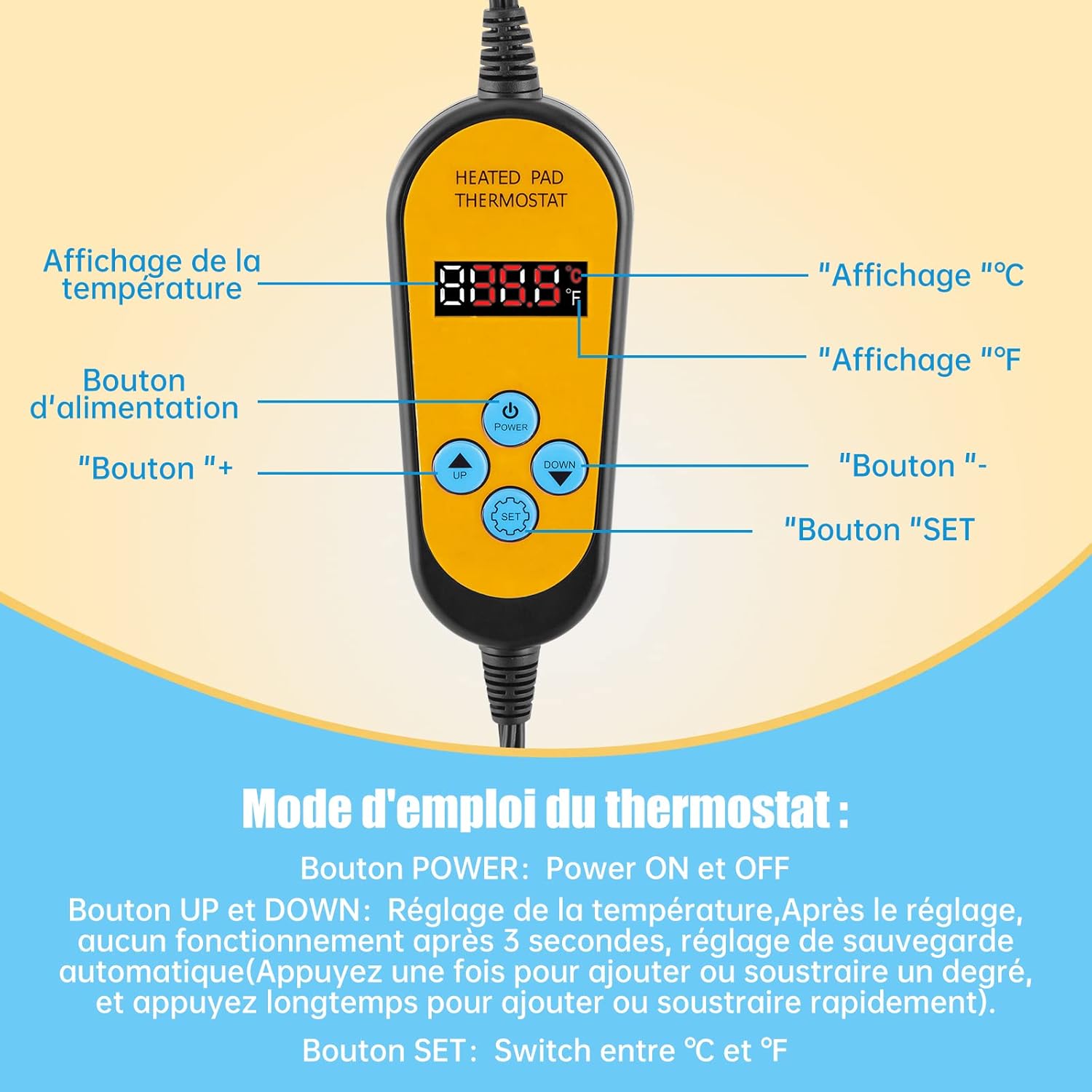
Image: Close-up of the WADEO thermostat controller showing the display and control buttons.
- POWER Button: Press to turn the unit ON or OFF.
- UP and DOWN Buttons: Use these buttons to adjust the desired temperature. A single press changes the temperature by one degree. Press and hold for rapid adjustment. After setting, the device will save the setting automatically after 3 seconds of no operation.
- SET Button: Press to switch between Celsius (°C) and Fahrenheit (°F) display units.
For optimal germination results, it is recommended to maintain the temperature between 5°C (41°F) and 45°C (113°F).
4.2 Enhancing Germination
The heat mat warms the root zone to 10-20°F (5-11°C) above ambient temperature, which significantly improves seed health and germination speed. Adjust the growth temperature according to the specific needs of your plants and environmental conditions. This mat is ideal for starting seedlings and propagating cuttings.
Image: Diagram illustrating how the heat mat warms the root zone, promoting plant growth.
4.3 Multifunctional Use
Beyond seedling warming and plant germination, this heat mat can also serve as an ideal heat source for terrarium animals, reptiles, and indoor greenhouses. Note: Ensure the probe is inserted into the soil. The controller's temperature reading may be affected if the temperature probe is loose or placed directly on the soil surface.

Image: The heat mat providing warmth for both plant seedlings and a small terrarium with a turtle.
4.4 Thermostat Operation Video
Video: Demonstration of how to operate the WADEO heat mat thermostat, including setting temperature and switching units.
5. Specifications
| Product Dimensions (L x W x H) | 52 x 25 x 0.2 cm (20.5 x 9.8 x 0.08 inches) |
| Weight | 500 grams (1.1 lbs) |
| Model Number | HG0281EU |
| Power Type | AC Power |
| Power Cord Length | 98 inches (249 cm) |
| Probe Cable Length | 79 inches (200 cm) |
| Temperature Range | 5°C (41°F) to 45°C (113°F) |
| Material | Waterproof and wear-resistant PVC |
| Waterproof Rating | IP67 |
| Country of Origin | China |
Image: Technical diagram showing the dimensions of the heat mat and cable lengths.
6. Maintenance
- Cleaning: The waterproof PVC surface is easy to clean. Wipe with a damp cloth. Do not use abrasive cleaners.
- Storage: When not in use, ensure the mat is clean and dry. It can be rolled up for compact storage.
- Inspection: Regularly inspect the power cord and mat for any signs of damage. Discontinue use if any damage is observed.
7. Troubleshooting
No specific troubleshooting steps are provided for this product. If you encounter issues, please ensure all connections are secure and the thermostat settings are correct. If the problem persists, contact customer support.
8. Warranty and Support
No specific warranty information is provided. For product support or warranty inquiries, please refer to the seller's contact information or the platform where the product was purchased.


