
GODOX TT350C
Godox TT350C Flash for Canon Camera User Manual
Model: TT350C
1. Introduction
The Godox TT350C is a compact and versatile Mini Thinklite TTL camera flash designed for Canon cameras. It features 2.4G wireless transmission, TTL auto flash, manual flash, and high-speed sync capabilities up to 1/8000s. This manual provides detailed instructions for the proper use, setup, and maintenance of your TT350C flash.

Image: Godox TT350C Flash for Canon Cameras, highlighting its compact design and compatibility.
2. Safety Information
- Do not disassemble or modify the flash unit. High voltage components are present.
- Keep the unit dry. Do not handle with wet hands or immerse in water.
- Avoid direct eye exposure to the flash, especially at close range, as it can cause visual impairment.
- Use only recommended batteries (Ni-MH or LR6 alkaline). Do not mix old and new batteries or different types.
- Do not operate the flash in the presence of flammable gases, chemicals, or other materials.
- If the flash overheats, allow it to cool down before further use.
3. Product Overview
The Godox TT350C is designed for ease of use and portability. Below is a diagram identifying its key components and controls.

Image: Labeled diagram of the Godox TT350C flash unit, showing its various buttons, ports, and display.
- Zoom Selection Button
- Mode Selection Button
- Custom Function Setting Button (long press for 2 seconds)
- Test Button/Flash Ready Indicator
- LCD Panel
- High-Speed Sync Button
- S1/S2 Optic Slave Triggering Selection Button (in non-wireless mode)
- Group/Channel Button (reusable button, in wireless mode)
- Power Switch
- Lock Ring
- Wireless Selection Button (reusable button, long press for 2 seconds)
- Hotshoe
- Set Button
- Select Dial
- Battery Compartment
- Optic Control Sensor
- Focus Assist Beam
- Flash Head
- Catchlight Panel
- Built-in Wide Panel
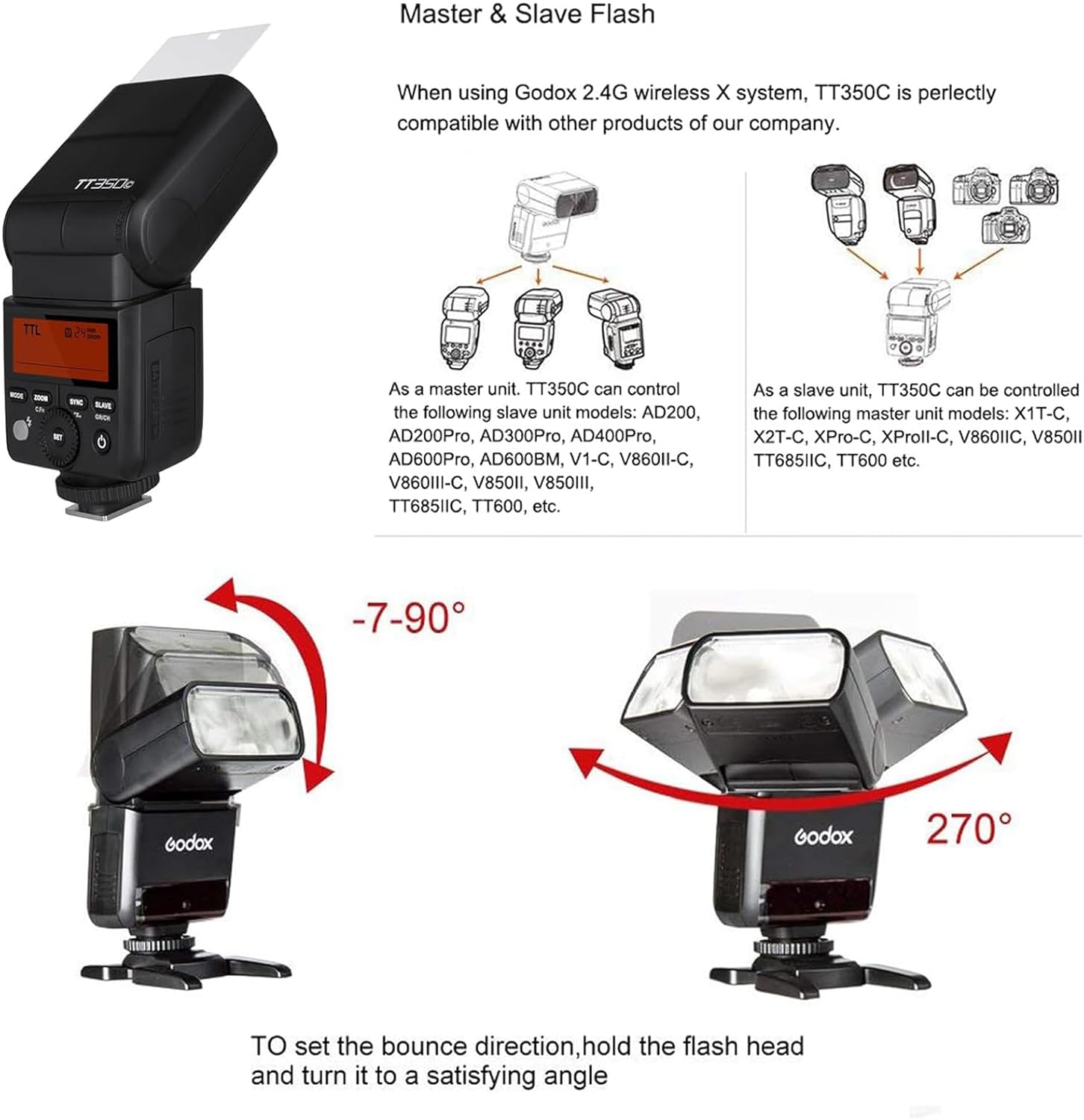
Image: Comparison showing the compact size of the Godox TT350C relative to other flash units, emphasizing its portability.
4. Setup
4.1 Battery Installation
The TT350C flash uses two AA batteries (Ni-MH batteries are recommended for optimal performance). To install batteries:
- Open the battery compartment cover located on the side of the flash unit.
- Insert two AA batteries according to the polarity indicators (+/-) inside the compartment.
- Close the battery compartment cover securely.

Image: Close-up of the Godox TT350C's battery compartment with batteries inserted, illustrating proper battery placement.
4.2 Mounting the Flash to Your Camera
To attach the TT350C to your camera's hotshoe:
- Slide the flash's hotshoe into your camera's hotshoe mount until it clicks into place.
- Rotate the lock ring clockwise to secure the flash firmly to the camera.
- To remove, rotate the lock ring counter-clockwise and slide the flash off.
5. Operating Instructions
5.1 Power On/Off
Press the power switch button (9) to turn the flash on or off. The LCD panel (5) will illuminate upon power-on.
5.2 Flash Modes
Press the MODE button (2) to cycle through the available flash modes: TTL, Manual (M), and Multi (S1/S2).
- TTL Auto Flash Mode: The flash automatically adjusts its output for correct exposure.
- Manual Flash Mode (M): Allows you to manually set the flash output from 1/1 to 1/128 power. Use the Select Dial (14) to adjust the power level.
- Multi Flash Mode: Fires a series of rapid flashes to capture multiple images of a moving subject in a single photograph.
- S1/S2 Optic Slave Mode: In non-wireless mode, the flash can be triggered by another flash. S1 mode triggers on the first flash, S2 ignores the pre-flash.
5.3 High-Speed Sync (HSS)
Press the HSS button (6) to enable High-Speed Sync, allowing the flash to synchronize with shutter speeds up to 1/8000s. This is useful for freezing fast motion or using wide apertures in bright conditions.
5.4 Zoom Function
Press the ZOOM button (1) to adjust the flash coverage. The TT350C supports auto zoom (24-105mm) to match the lens focal length, or manual zoom adjustment.
5.5 Wireless Flash Function (2.4G Wireless X System)
The TT350C can function as a master or slave unit within the Godox 2.4G Wireless X System, offering flexible lighting setups.
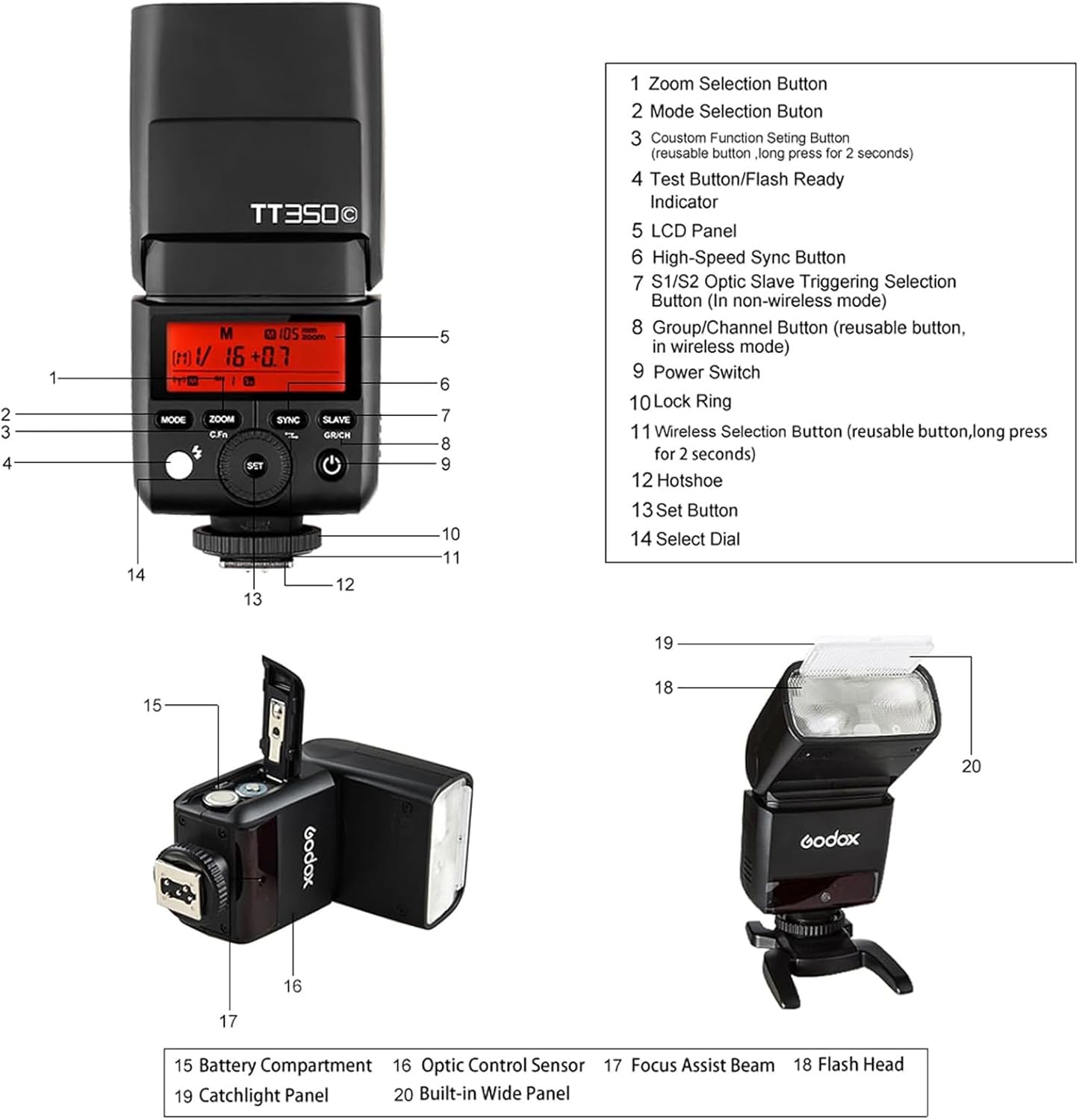
Image: Diagram illustrating the Godox TT350C's master and slave capabilities within the Godox 2.4G Wireless X System, showing compatibility with various Godox flash units.
- As a Master Unit: The TT350C can control slave flash models such as AD200, AD200Pro, AD300Pro, AD400Pro, AD600Pro, V1-C, V860II-C, V860III-C, V850II, V850III, TT685IIC, TT600.
- As a Slave Unit: The TT350C can be controlled by master flash models like X1T-C, XProII-C, XPro-C, V860II-C, V850II, TT685II-C, TT600.
- To activate wireless mode, long press the Wireless Selection Button (11). Use the Group/Channel Button (8) and Select Dial (14) to set groups and channels.
5.6 Flash Head Rotation and Tilt
The flash head can be tilted and rotated to bounce light off ceilings or walls, providing softer and more natural illumination.
- Tilt: The flash head can tilt from -7° to 90° vertically.
- Rotation: The flash head can rotate up to 270° horizontally.
Image: Illustration of the Godox TT350C flash head's tilt and swivel capabilities, demonstrating its flexibility for bounce flash.
6. Maintenance
- Clean the flash unit regularly with a soft, dry cloth. Do not use solvents or abrasive cleaners.
- Remove batteries if the flash will not be used for an extended period to prevent leakage.
- Store the flash in a cool, dry place, away from direct sunlight and extreme temperatures.
- Protect the hotshoe and flash tube from dust and damage.
7. Troubleshooting
| Problem | Possible Cause | Solution |
|---|---|---|
| Flash does not fire. | Low battery, incorrect mode, flash not securely mounted, camera settings. | Check battery level, ensure flash is in correct mode (TTL/M), re-mount flash, check camera flash settings. |
| Flash output is too dark/bright. | Incorrect exposure compensation, manual power setting, subject distance. | Adjust FEC (Flash Exposure Compensation) in TTL mode, adjust manual power, ensure subject is within flash range. |
| Flash overheats. | Frequent full-power flashes. | Allow the flash to cool down. Reduce flash power or frequency of flashes. |
| Wireless triggering fails. | Incorrect group/channel, interference, distance. | Verify master and slave units are on the same group and channel. Reduce distance, check for obstructions. |
8. Specifications
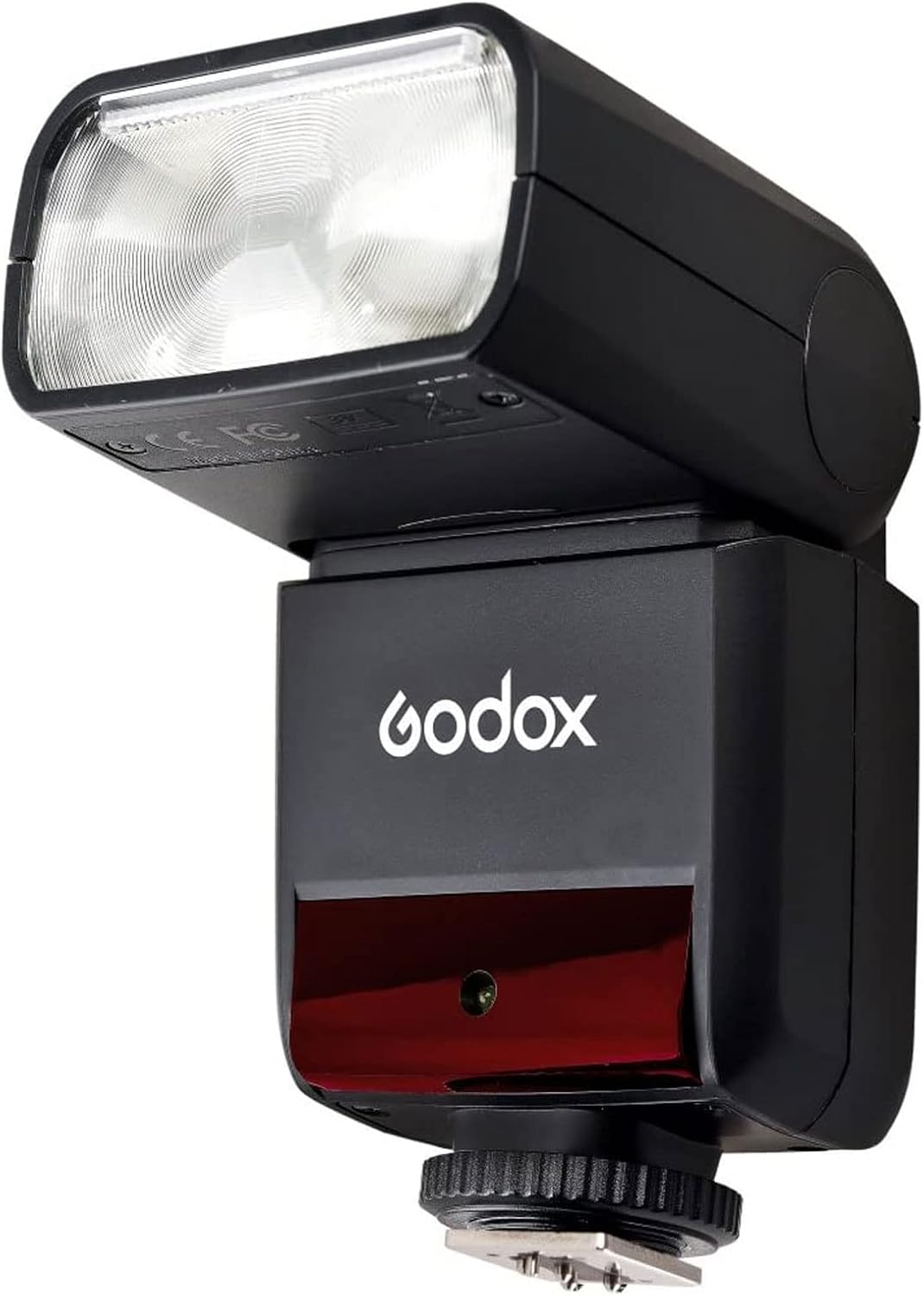
Image: Detailed specifications table for the Godox TT350C flash, including dimensions, power, and flash performance.
| Feature | Detail |
|---|---|
| Model | TT350C |
| Compatible Cameras | Canon Cameras |
| Guide No. (1/1 output@105mm) | 36 (m ISO 100) |
| Flash Coverage | 24 to 105 mm (Auto/Manual Zoom) |
| Flash Duration | 1/350 to 1/20000 seconds |
| Exposure Control System | TTL autoflash and Manual flash |
| Flash Exposure Compensation (FEC) | Manual FEC can be combined |
| Sync Mode | High-speed sync (up to 1/8000 seconds), 1st-curtain sync, 2nd-curtain sync |
| Multi Flash | Provided (up to 90 times, 99 Hz) |
| Wireless Flash Function | Master, Slave, Off |
| Transmission Range (approx.) | ≤100m |
| Channels | 16 (1-16) |
| Auto Focus Assist Beam Effective Range | Center: 0.6-4m; Periphery: 0.6-2.5m |
| Power Supply | AA batteries (Ni-MH recommended or 2*LR6 alkaline batteries) |
| Recycle Time | Approx. 0.1-2.2 seconds (Eneloop Ni-MH batteries of Panasonic) |
| Full Power Flashes | Approx. 210 (2500mA Ni-MH batteries) |
| Power Off Automatically | After approx. 60 seconds of idle operation (60 minutes when configured as a slave) |
| Dimensions (WxHxD) | 140x62x38mm |
| Weight without battery | 200g |
9. Warranty and Support
Godox products are covered by a limited warranty. Please refer to the warranty card included with your product for specific terms and conditions. For technical support, service, or inquiries, please contact Godox customer service or visit the official Godox website.
- Official Godox Website: www.godox.com
- Customer Service: Refer to your product packaging or the official website for regional contact information.
Related Documents - TT350C
 |
Godox TT350S Thinklite TTL Camera Flash for Sony User Manual Comprehensive user manual for the Godox TT350S Thinklite TTL Camera Flash, covering features, operation, modes, wireless shooting, troubleshooting, and technical specifications for Sony cameras. |
 |
Godox TT685II-N Thinklite TTL Camera Flash Instruction Manual This document is the instruction manual for the Godox TT685II-N Thinklite TTL Camera Flash, providing detailed information on its features, operation, settings, troubleshooting, and maintenance for Nikon cameras. |
 |
Godox TT350S Thinklite TTL Camera Flash for Sony - User Manual Comprehensive user manual for the Godox TT350S Thinklite TTL Camera Flash for Sony cameras. Learn about its features, operation, modes (TTL, Manual, Multi), wireless functions, troubleshooting, and technical specifications. |
 |
Godox TT350C Thinklite TTL Camera Flash Instruction Manual This manual provides detailed instructions for the Godox TT350C Thinklite TTL Camera Flash, covering its features, operation, safety precautions, and troubleshooting for Canon cameras. Learn about TTL autoflash, wireless shooting, manual flash, and more. |
 |
Godox TT685II-N Thinklite TTL Camera Flash Instruction Manual Comprehensive user manual for the Godox TT685II-N Thinklite TTL Camera Flash, covering features, operation, wireless settings, troubleshooting, and technical specifications for Nikon cameras. |
 |
Godox TT600 Thinklite Camera Flash User Manual Comprehensive user manual for the Godox TT600 Thinklite Camera Flash, covering features, operation, safety warnings, technical specifications, and maintenance. Learn how to use manual mode, stroboscopic flash, S1/S2 slave modes, Hi-Speed Sync, and custom functions for professional photography. |
Ask a question about this manual
Ask about setup, troubleshooting, compatibility, parts, safety, or missing instructions. Manuals+ will review the question and use this page’s manual context to help answer it.