
1. Product Overview
The vivo Y16 is a feature-rich smartphone designed for daily use, offering a balance of performance, battery life, and camera capabilities. It comes equipped with a large HD+ display, a long-lasting battery, and ample storage for your applications and media.

Figure 1.1: Front and back view of the vivo Y16 smartphone, showcasing its design and camera module.

Figure 1.2: Overview of key features including 6.51-inch screen, 128GB storage, extended RAM, 5000mAh battery, ultra-slim body, Multi-Turbo 5.5, and side-mounted fingerprint unlock.
2. Getting Started
2.1 Unboxing
Upon opening the package, ensure all components are present:
- vivo Y16 Smartphone
- Power Adapter
- USB Cable
- SIM Ejector Tool
- Quick Start Guide
- Warranty Card
2.2 SIM Card and Storage Installation
The vivo Y16 supports dual Nano SIM cards and memory expansion up to 1TB via a microSD card. Locate the SIM tray on the side of the device.
- Insert the SIM ejector tool into the small hole on the SIM tray to open it.
- Carefully pull out the SIM tray.
- Place your Nano SIM cards and/or microSD card into the designated slots on the tray, ensuring correct orientation.
- Gently push the tray back into the phone until it clicks into place.

Figure 2.1: Illustration of the 4GB RAM + 128GB ROM configuration, highlighting support for memory expansion up to 1TB.
2.3 Initial Power On and Setup
To power on your device for the first time:
- Press and hold the Power button until the vivo logo appears.
- Follow the on-screen prompts to select your language, region, and connect to a Wi-Fi network.
- Sign in with your Google account or create a new one to access Google services and the Play Store.
- Set up your preferred screen lock method, including the side-mounted fingerprint sensor for quick and secure access.
3. Basic Operations
3.1 Display and Navigation
The vivo Y16 features a 6.51-inch HD+ display with a 2.5D design. The display automatically adjusts brightness based on ambient light and includes a blue light filter to reduce eye strain.
- Touch Gestures: Swipe, tap, pinch-to-zoom for navigation and interaction.
- Brightness Adjustment: Adjust manually from the quick settings panel or enable adaptive brightness.
- Eye Protection Mode: Activate this mode in display settings to filter blue light.
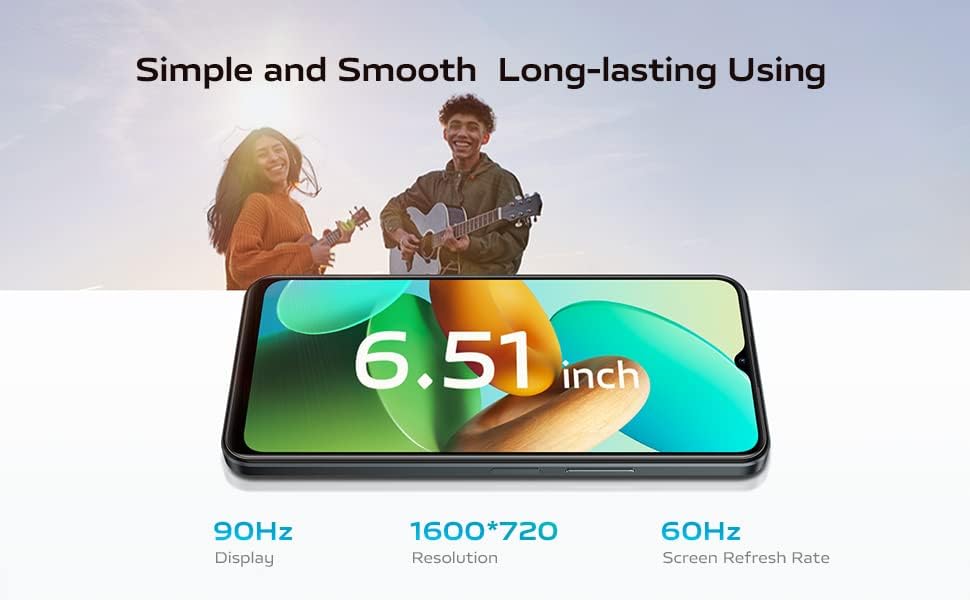
Figure 3.1: The 6.51-inch display with details on 1600*720 resolution and 60Hz screen refresh rate.
3.2 Battery Management
Equipped with a 5000 mAh (typical) battery, the Y16 provides extended usage. It supports 10W charging.
- Charging: Use the provided power adapter and USB cable to charge the device.
- Battery Optimization: The device offers battery optimization features to extend usage time.
- Expected Usage: A full charge can provide approximately 7 hours of gameplay, 22 hours of music playback, or 18 hours of video streaming.

Figure 3.2: Visual representation of the 5000mAh battery capacity and its estimated usage times for gaming, music, and video streaming.
3.3 Camera Features
The Y16 features a 13MP main camera, a 2MP secondary camera, and a 5MP front camera. It includes AI algorithms for enhanced photography.
- AI Face Beauty: Automatically adjusts skin tone, face shape, and features for natural-looking portraits.
- Aura Screen Light: Provides soft illumination for selfies in low-light conditions.
- Filters: New filters are available for various photo themes like portraits, landscapes, and food.

Figure 3.3: Details on the 13MP and 2MP rear cameras, highlighting the AI algorithm for photography.
3.4 Performance and Storage
The device comes with 4GB of RAM and 128GB of internal storage. It supports 1GB of extended RAM via software and memory expansion up to 1TB with a microSD card.
- Smooth Operation: The combination of RAM and storage ensures smooth operation of apps, programs, and games.
- Storage Expansion: Utilize a microSD card for additional space for videos, photos, music, and movies.

Figure 3.4: The MediaTek Helio P35 Octa-Core Processor, ensuring speed, performance, and capacity.
3.5 Security Features
The vivo Y16 includes a side-mounted fingerprint sensor for convenient and secure unlocking.
- Fingerprint Unlock: Register your fingerprints in the security settings for quick access.
- Face Unlock: Configure face recognition for an alternative unlocking method.
4. Care and Maintenance
Proper care ensures the longevity and optimal performance of your vivo Y16 smartphone.
- Cleaning: Use a soft, lint-free cloth to clean the screen and body. Avoid harsh chemicals or abrasive materials.
- Battery Health: Avoid extreme temperatures. Do not leave the phone fully charged or fully discharged for extended periods.
- Software Updates: Regularly check for and install system updates to ensure your device has the latest features, security patches, and performance improvements.
- Protection: Consider using a screen protector and a protective case to guard against scratches and accidental drops.
5. Troubleshooting Common Issues
This section addresses common issues you might encounter with your vivo Y16.
5.1 Notifications Not Arriving
- Check App Settings: Go to Settings > Apps > [App Name] > Notifications and ensure notifications are enabled.
- Battery Optimization: Some battery optimization settings might restrict background app activity. Check Settings > Battery > Battery optimization and ensure the app is not optimized if you want constant notifications.
- Do Not Disturb Mode: Ensure Do Not Disturb mode is not active.
- Network Connection: Verify you have a stable internet connection (Wi-Fi or mobile data).
5.2 Device Freezing or Unresponsive
- Force Restart: Press and hold the Power button for about 10-15 seconds until the device restarts.
- Close Background Apps: Too many apps running in the background can slow down the device. Close unnecessary apps from the recent apps screen.
- Clear Cache: Clear cache for problematic apps or the system cache from recovery mode (refer to online resources for specific steps for vivo Y16).
5.3 Battery Draining Quickly
- Identify Culprit Apps: Go to Settings > Battery > Battery usage to see which apps are consuming the most power.
- Reduce Screen Brightness: Lower screen brightness or enable adaptive brightness.
- Disable Unused Features: Turn off Wi-Fi, Bluetooth, GPS, and mobile data when not in use.
- Background App Refresh: Limit background data usage for apps.
5.4 Poor Camera Quality
- Clean Lens: Ensure the camera lens is clean and free of smudges.
- Good Lighting: Take photos in well-lit environments.
- Stabilize: Hold the phone steady or use a tripod.
- Reset Camera Settings: In the camera app settings, try resetting to default.
6. Technical Specifications
| Feature | Specification |
|---|---|
| Brand | VIVO |
| Model | Y16 |
| Operating System | Android 12.0 |
| Display Size | 6.51 Inches |
| Memory Storage Capacity | 128 GB |
| RAM | 4 GB (with 1GB extended RAM) |
| Battery Composition | Lithium-ion (5000 mAh) |
| Rear Camera Resolution | 13 MP |
| Cellular Technology | 4G |
| Connectivity Technologies | Bluetooth, USB, Wi-Fi |
| Connector Type | 3.5 mm Jack |
| SIM Card Support | Dual Nano SIM |
7. Warranty and Customer Support
Your vivo Y16 smartphone comes with a 2-year warranty.
- Warranty Coverage: The warranty covers manufacturing defects and malfunctions under normal use for a period of two years from the date of purchase. Please retain your proof of purchase.
- Technical Support: You have unlimited access to technical support from vivo's expert team. For assistance, please refer to the contact information provided in your Quick Start Guide or visit the official vivo support website for your region.
- Service Centers: In case of hardware issues, locate an authorized vivo service center for repair or replacement services.
For the most up-to-date support information, please visit the official vivo website or contact their customer service directly.