
MiOYOOW GY20996-3
MiOYOOW DIY Bluetooth-Compatible Speaker Kit with FM Radio
Model: GY20996-3
Introduction
This manual provides detailed instructions for assembling, operating, and maintaining your MiOYOOW DIY Bluetooth-Compatible Speaker Kit. This kit is designed for educational purposes and personal enjoyment, allowing users to build a functional mini sound amplifier with Bluetooth connectivity and FM radio capabilities. Please read all instructions carefully before beginning assembly.
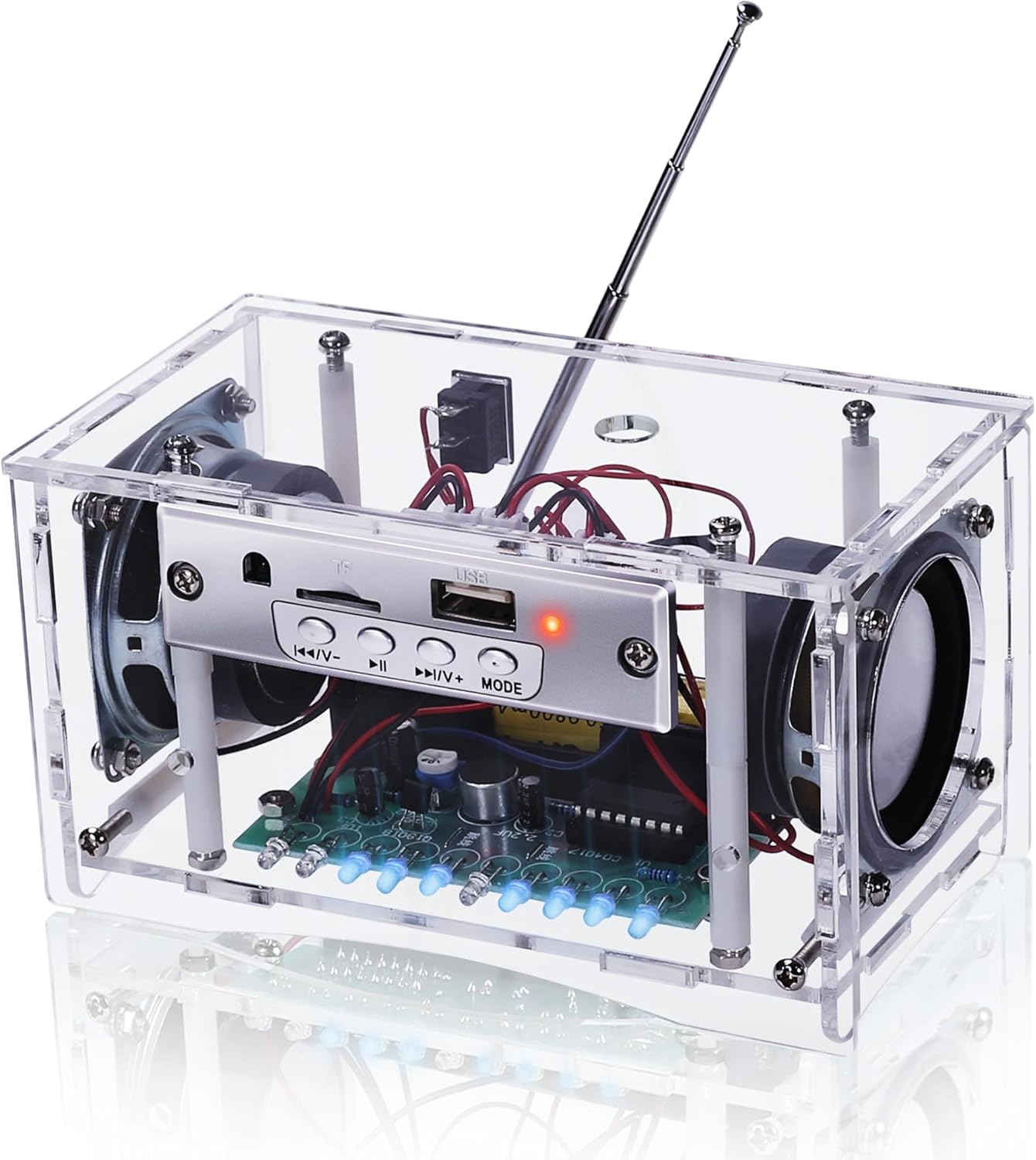
Image: The fully assembled MiOYOOW DIY Bluetooth-Compatible Speaker Kit, showcasing its transparent acrylic casing, internal components, and speakers.
Components in Package
Before starting assembly, verify that all components listed below are present in your package. Refer to the component listing table and image for identification.
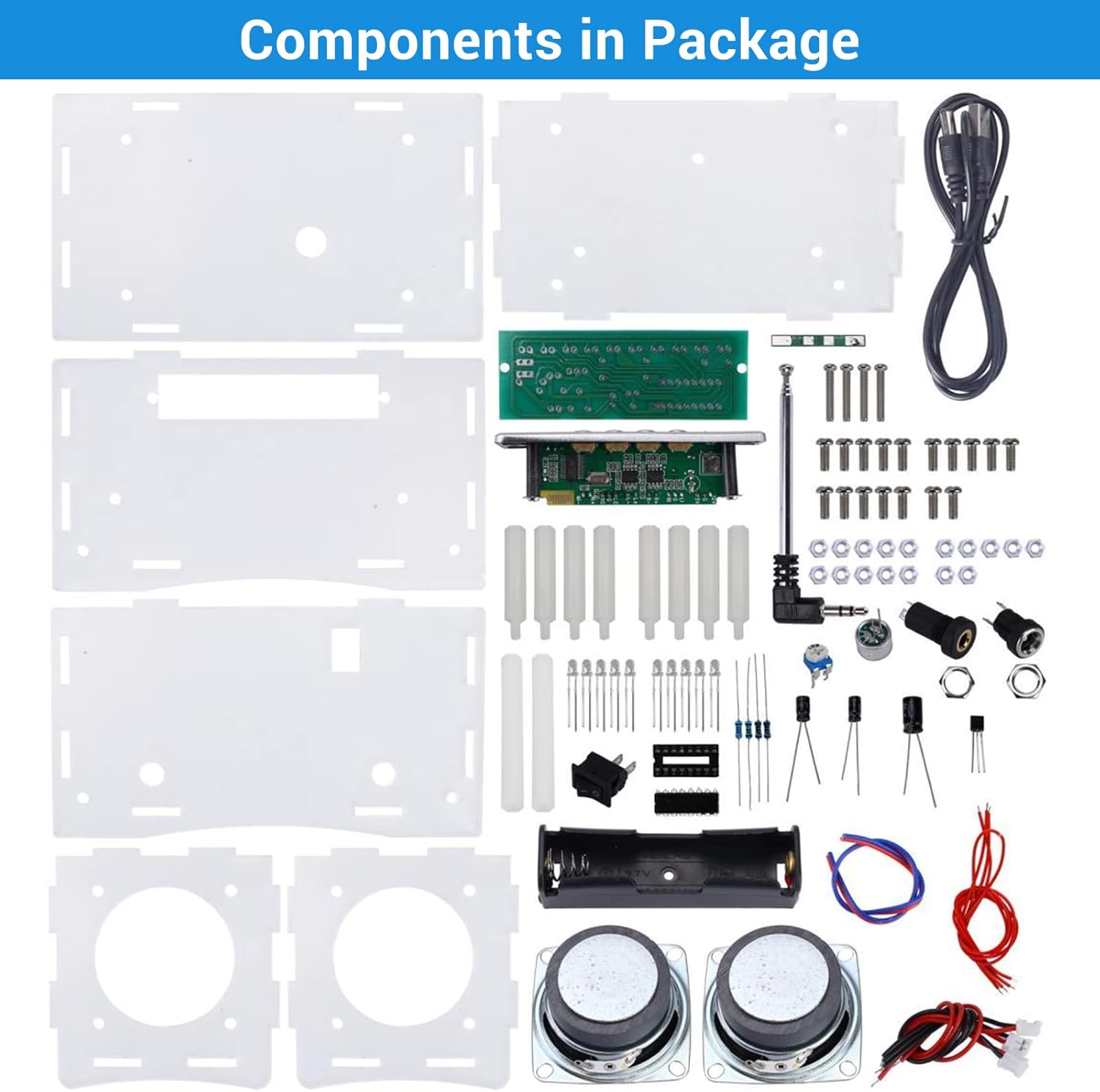
Image: An overhead view displaying all individual components included in the MiOYOOW DIY Bluetooth-Compatible Speaker Kit, neatly laid out for identification.
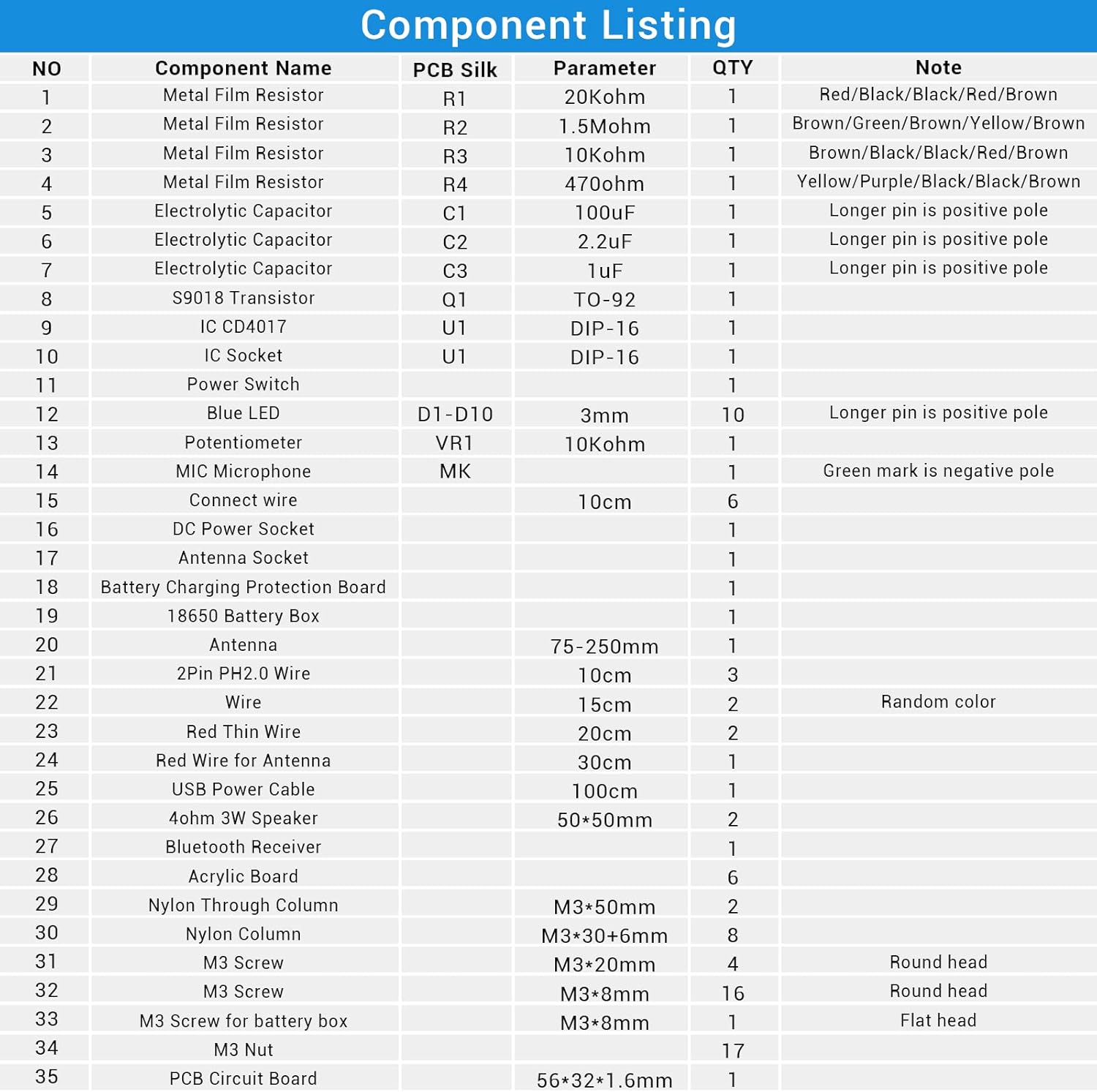
Image: A detailed table listing all electronic and structural components of the kit, including their names, PCB silk screen labels, parameters, quantities, and notes for assembly.
Key Components:
- Acrylic Boards (6 pieces) for the enclosure
- Main Circuit Board (PCB) with pre-soldered components
- Bluetooth/FM Radio Module
- Two 3W 4ohm Speakers
- Rechargeable Battery Box (requires 18650 battery, not included)
- Various electronic components: resistors, capacitors, transistors, LEDs, ICs
- Hardware: screws, nuts, nylon columns
- Wires and cables: USB power cable, speaker wires, antenna wire
- Detachable FM Antenna
- Potentiometer and Microphone (if applicable)
Assembly Instructions
This kit requires soldering. Ensure you have the necessary tools (soldering iron, solder, wire cutters, screwdriver) and follow safety precautions. Refer to the "Component Listing" image for part identification.
- Prepare Components: Unpack all components and identify them using the provided component listing table.
- Solder Smaller Components: Begin by soldering the smaller electronic components (resistors, capacitors, transistors, LEDs, IC sockets) onto the main PCB according to the silk screen markings. Pay attention to polarity for LEDs and electrolytic capacitors (longer pin is positive).
- Install ICs: Once the IC sockets are soldered, carefully insert the ICs into their respective sockets, ensuring correct orientation (notch/dot alignment).
- Connect Wires: Solder the necessary wires to the PCB, including speaker wires, power input wires, and antenna wire. Refer to the PCB markings for correct connection points.
- Assemble Acrylic Casing:
- Attach the main PCB and Bluetooth/FM module to the designated acrylic board using screws and nylon columns.
- Mount the speakers onto the front and back acrylic panels.
- Install the power switch, potentiometer, and other external connectors (TF card socket, USB socket, DC power socket) into their respective cutouts on the acrylic panels.
- Carefully assemble the acrylic panels to form the speaker enclosure, securing them with screws and nuts. Ensure all wires are routed correctly and do not get pinched.
- Install Battery Box: Secure the 18650 battery box inside the enclosure and connect its wires to the PCB. Note that the 18650 battery is not included and must be purchased separately.
- Attach FM Antenna: Connect the detachable FM antenna to its socket on the assembled unit.
- Final Check: Before powering on, double-check all soldering joints for cold joints or bridges, and ensure all components are correctly oriented and securely fastened.
Operating Instructions
Your MiOYOOW DIY Speaker Kit supports multiple input modes including Bluetooth, FM Radio, TF Card, and USB Flash Disk. Familiarize yourself with the control panel:
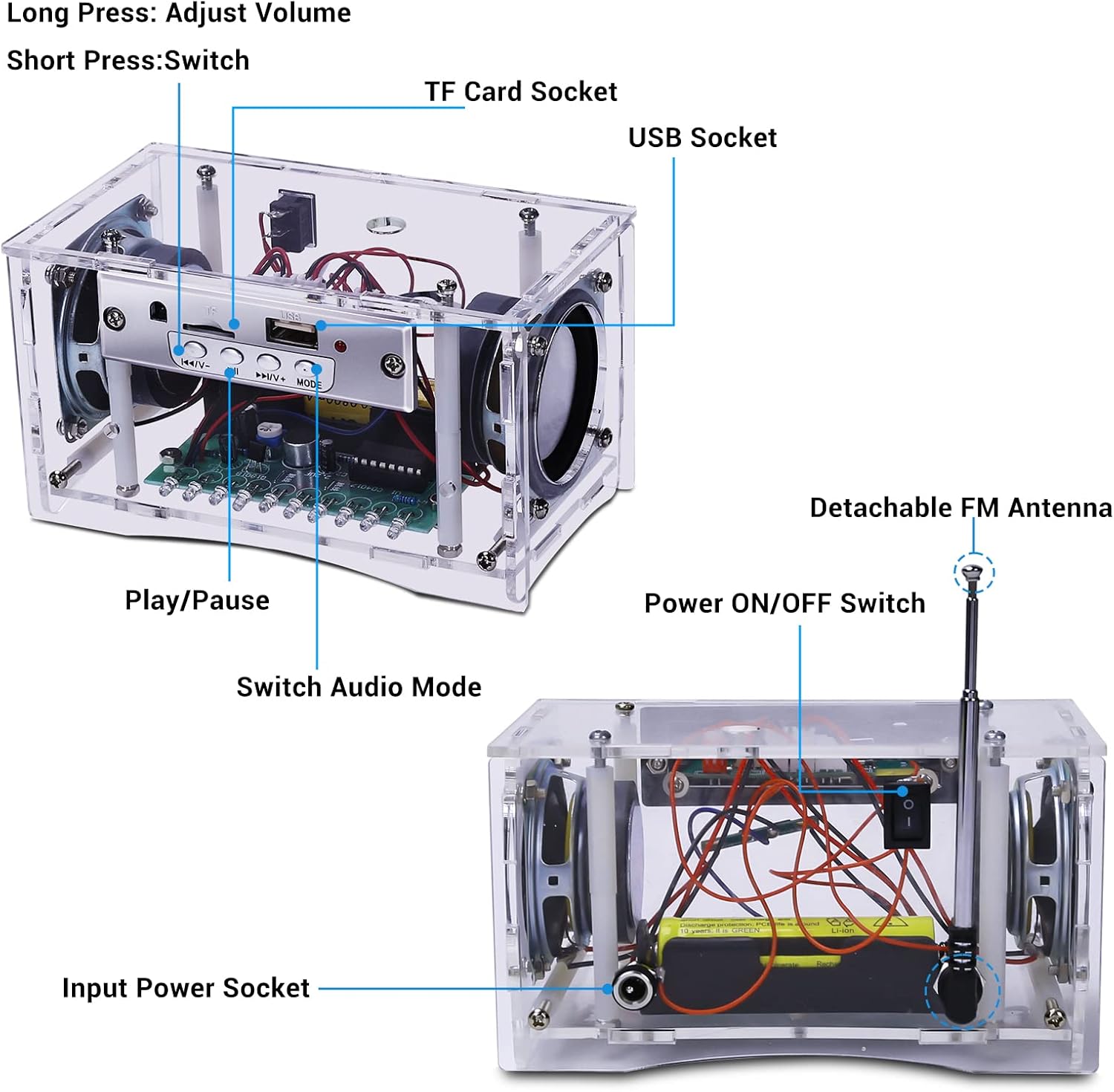
Image: A detailed view of the speaker's control panel, highlighting the TF Card Socket, USB Socket, Play/Pause button, audio mode switch, volume/track control buttons, detachable FM antenna, power ON/OFF switch, and input power socket.


Images: Close-up views of the USB socket, TF card socket, and DC power input socket, illustrating their locations on the speaker's control panel.
Powering On/Off
Locate the Power ON/OFF Switch on the unit. Slide the switch to the "ON" position to power on the speaker. Slide it to "OFF" to power off.
Mode Selection
Press the "MODE" button (or "Switch Audio Mode" button) on the control panel to cycle through available input modes: Bluetooth, FM Radio, TF Card, and USB Flash Disk.
Bluetooth Mode
- Switch the speaker to Bluetooth mode. The LED indicator will typically flash, indicating it's ready for pairing.
- On your mobile device (smartphone, tablet, computer), enable Bluetooth and search for available devices.
- Select "MiOYOOW Speaker" (or similar name) from the list of devices to pair.
- Once paired, the LED indicator will become solid, and you can play audio from your device through the speaker.

Image: An illustration demonstrating the speaker's Bluetooth 5.0 connectivity with a 15-meter transmission distance, and its FM radio capability (87-108MHz) in a home setting.
FM Radio Mode
- Switch the speaker to FM Radio mode.
- Extend the detachable FM antenna for better reception.
- Use the "Previous/Volume Down" (K/V-) and "Next/Volume Up" (>/V+) buttons to scan for radio stations or fine-tune the frequency. A short press typically changes tracks/stations, while a long press adjusts volume.
TF Card / USB Flash Disk Mode
- Insert a TF (microSD) card or a USB flash disk containing audio files into the respective socket.
- Switch the speaker to TF Card or USB mode. The speaker will automatically detect and begin playing audio files.
- Use the "Previous/Volume Down" (K/V-) and "Next/Volume Up" (>/V+) buttons to navigate between tracks. Long press to adjust volume.
- Press the "Play/Pause" button to pause or resume playback.

Image: An illustration showing the speaker's versatility with multiple input modes, including USB Flash Disk, Bluetooth (BT), FM Radio, and TF Card, with a person soldering in the background.
Volume Control
Long press the "Previous/Volume Down" (K/V-) button to decrease volume. Long press the "Next/Volume Up" (>/V+) button to increase volume.
Power and Charging
The speaker kit is designed to be powered by a 18650 rechargeable battery (not included) or via a 5V USB power source.

Image: A visual guide illustrating how the speaker can be powered by an internal 18650 battery for portable use (camping, picnic, fishing) and externally via a 5V USB power source (adapter, power bank, laptop).
- Battery Power: Insert a charged 18650 battery into the battery box. Ensure correct polarity.
- USB Power: Connect the provided USB power cable to the DC power input socket on the speaker and to a 5V USB power adapter, power bank, or computer USB port.
- Charging: If a rechargeable 18650 battery is installed and the unit is connected to a 5V USB power source, the battery charging circuit will recharge the battery.
Maintenance
- Cleaning: Use a soft, dry cloth to clean the acrylic casing. Avoid abrasive cleaners or solvents that may damage the acrylic.
- Component Check: Periodically inspect soldered joints for any signs of corrosion or loosening, especially if the unit is frequently moved or subjected to vibrations.
- Battery Care: If using a rechargeable 18650 battery, follow the battery manufacturer's guidelines for charging and storage to prolong battery life. Remove the battery if the speaker will not be used for an extended period.
- Storage: Store the speaker in a cool, dry place away from direct sunlight and extreme temperatures.
Troubleshooting
| Problem | Possible Cause | Solution |
|---|---|---|
| No power/Unit does not turn on |
|
|
| No sound/Low volume |
|
|
| Bluetooth pairing issues |
|
|
| Poor FM radio reception |
|
|
Specifications
| Feature | Detail |
|---|---|
| Model Number | GY20996-3 |
| Brand | MiOYOOW |
| Material | Acrylic |
| Power Source | Battery Powered (18650, not included) / 5V USB |
| Voltage | 5 Volts |
| Connectivity Technology | Bluetooth 5.0 |
| Bluetooth Transmission Distance | Up to 15 meters |
| Tuner Technology | FM |
| Radio Bands Supported | FM (87-108MHz) |
| Speakers | Two 3W 4ohm Speakers |
| Input Modes | Bluetooth, FM Radio, TF Card, USB Flash Disk |
| Item Weight | 15.5 ounces (approx. 440g) |
| Product Dimensions (L x W x H) | 8.07 x 5.38 x 5.59 inches (approx. 20.5 x 13.67 x 14.2 cm) |

Image: A diagram illustrating the approximate dimensions of the assembled speaker kit: 10.6cm (4.13in) length, 6.6cm (2.60in) width, and 6.0cm (2.36in) height.
Additional Resources and Support
For further assistance or detailed diagrams, you may refer to the official user manual PDF:

Image: A visual cue indicating the availability of a downloadable user manual in PDF format.
For product support or inquiries, please visit the MiOYOOW Store on Amazon.