
1. Product Overview
The EKAT Car Rear View Camera is designed to enhance safety by providing a clear, wide-angle view of the area behind your vehicle. It helps eliminate blind spots and assists in avoiding obstacles during reversing maneuvers. This camera is suitable for various vehicles, including SUVs, RVs, trucks, and trailers.
Key Features:
- HD Image Quality: Provides a clear and detailed view.
- 12 LED Night Vision: Equipped with 12 super bright LEDs for enhanced visibility in low-light conditions, automatically activating when reverse gear is engaged.
- Waterproof Design: IP66 rated, ensuring reliable operation in various weather conditions and during car washes.
- 170° Wide Viewing Angle: Offers an expansive field of view for comprehensive rear coverage.

Image 1.1: Front view of the EKAT Car Rear View Camera, highlighting its integrated LED lights and wide-angle lens.
Package Contents:
The following items are included in your EKAT Car Rear View Camera package:
- 1 x EKAT Rear View Camera
- 1 x 6-meter (20ft) Video Cable
- 1 x 1.3-meter (4.3ft) Power Cable
- 2 x Mounting Screws
- 1 x User Manual (this document)

Image 1.2: Illustration of all components included in the EKAT Car Rear View Camera package: camera, video cable, power cable, mounting screws, and user manual.
2. Specifications
| Feature | Specification |
|---|---|
| Image Sensor | 1/4" Color CMOS Sensor |
| Minimum Illumination | <0.5 Lux |
| AGC (Automatic Gain Control) | Auto |
| BLC (Backlight Compensation) | Auto |
| White Balance | Auto |
| Video Color | Colorful |
| Waterproof Class | IP66 |
| Effective Pixels | 580x540 |
| Resolution | 420 TV lines |
| Operation Temperature | -20°C to +80°C (RH95% Max) |
| Working Power (DCV) | 12V |
| Lens Type | Wide Angle |
| Real Angle of View | 170 Degrees |
| Connector Type | RCA |
| Installation Type | Screw In, Surface Mount |
| Item Weight | 4.8 ounces |
| Package Dimensions | 5.63 x 4.53 x 1.34 inches |
3. Setup and Installation
Proper installation is crucial for optimal performance. Please follow these steps carefully. The camera requires a DC 12V working voltage.
3.1. Mounting the Camera
Choose a suitable location on the rear of your vehicle for mounting the camera. Ensure the camera has a clear, unobstructed view. Use the provided screws to securely attach the camera to the chosen surface. The camera's bracket allows for angle adjustment.
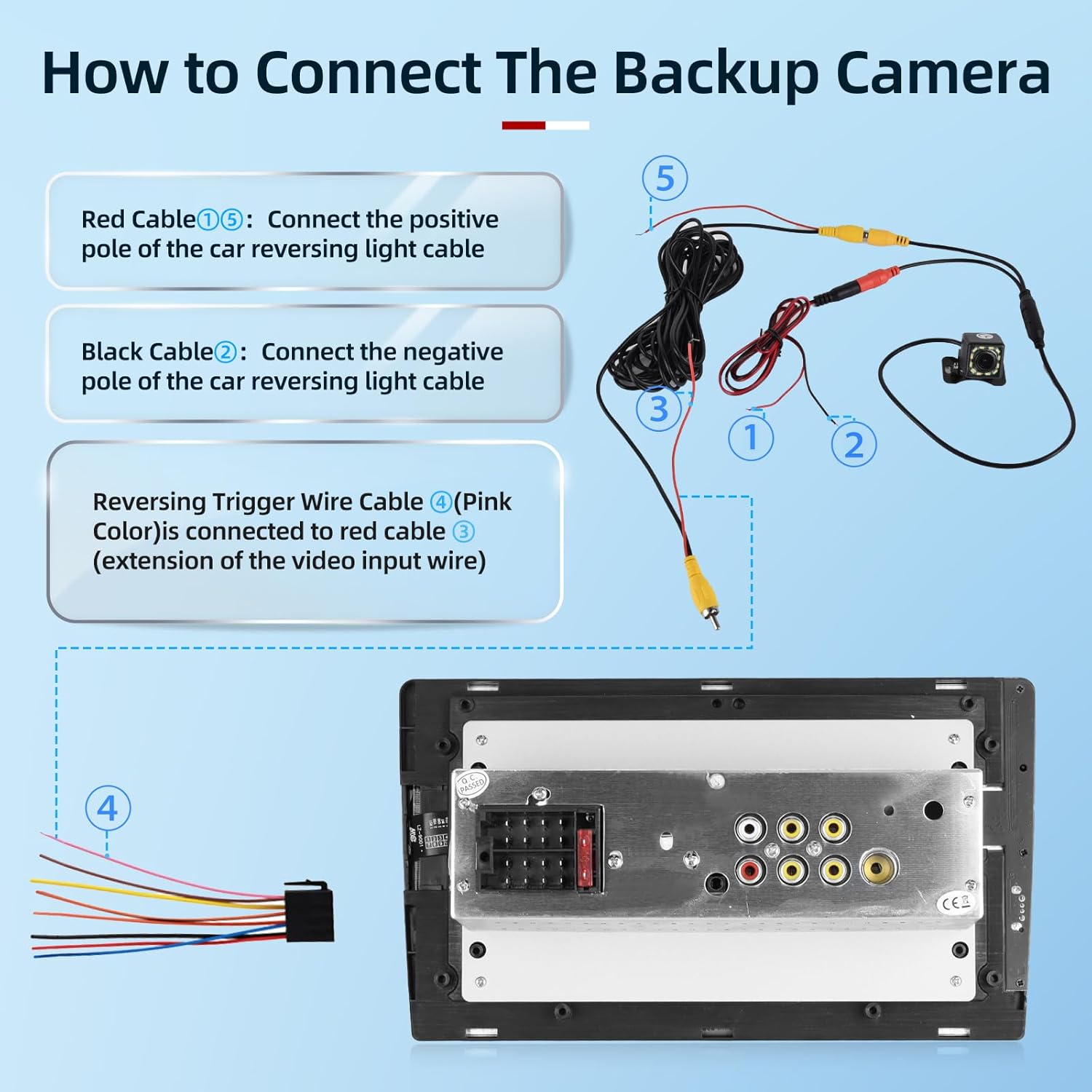
Image 3.1: General wiring diagram for the backup camera, illustrating the connection points for power and video signals.
3.2. Wiring Connections
- Red Cable (Power Positive): Connect the red cable (labeled ⑤ in diagrams) to the positive pole of your car's reversing light cable. This ensures the camera powers on automatically when reverse gear is engaged.
- Black Cable (Power Negative/Ground): Connect the black cable (labeled ② in diagrams) to the negative pole of your car's reversing light cable or a suitable vehicle ground point.
- Video Cable (RCA): Connect the yellow RCA video cable (labeled ③ in diagrams) from the camera to the video input of your display monitor or head unit.
- Reversing Trigger Wire (Pink/Red): If your display unit has a reversing trigger input (often labeled "BACK" or "REVERSE IN"), connect the pink or red reversing trigger wire (labeled ④ in diagrams, typically an extension of the video input wire) to the corresponding trigger wire from your car's reversing light circuit. This signals the display unit to switch to the camera view when reversing.
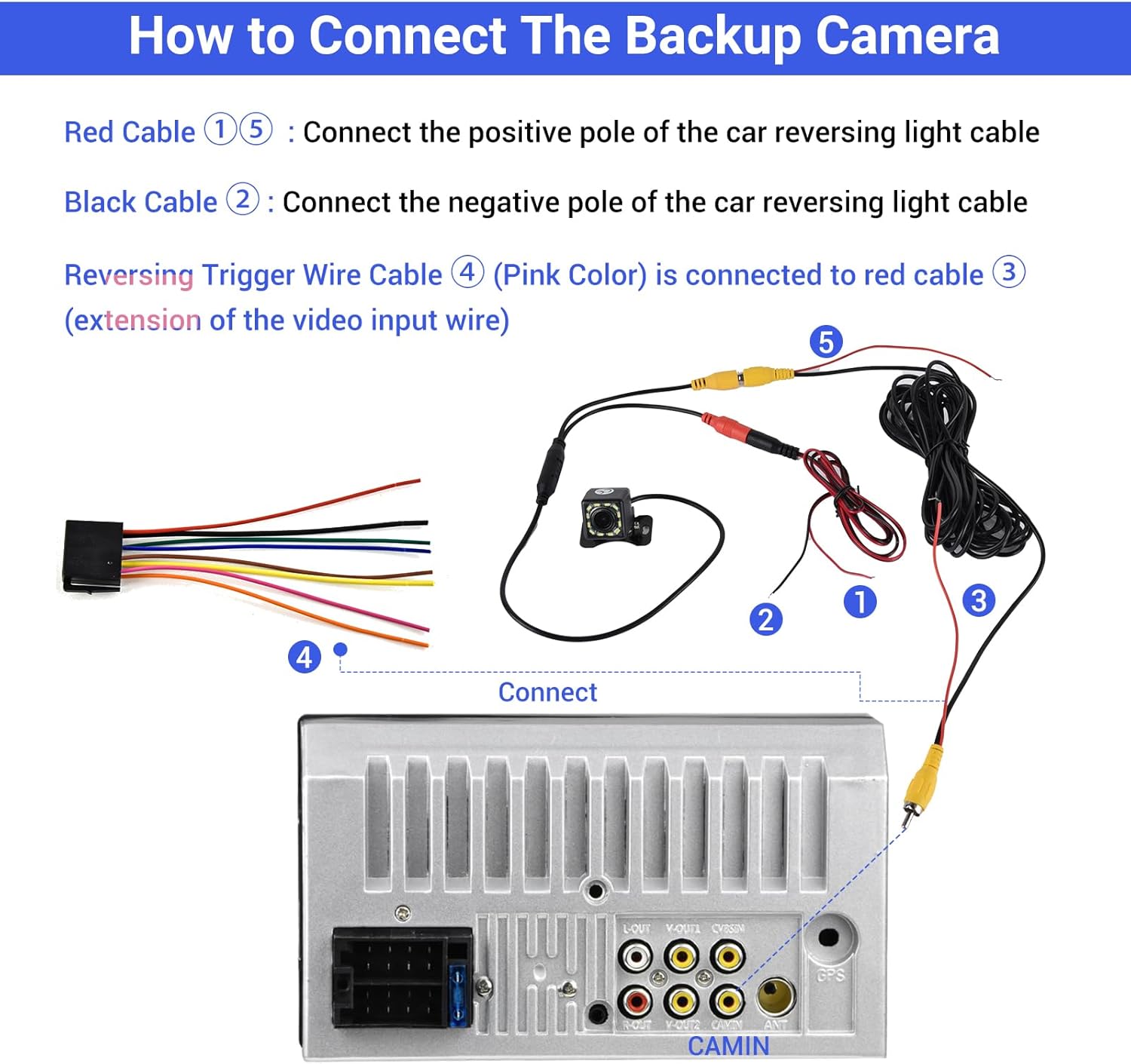
Image 3.2: Detailed connection diagram showing the camera's power and video cables connecting to the car's reversing light and a typical car stereo unit.

Image 3.3: Advanced wiring diagram for connecting the camera to an Android head unit, indicating specific connections for A6 (BACK wire), J (positive pole of backup lamp), and L/K (grounding).
Important: Ensure all connections are secure and properly insulated to prevent short circuits or damage. If the wiring harness is too short, extensions may be required (not included).
4. Operating Instructions
Once correctly installed, the EKAT Car Rear View Camera operates automatically.
- Automatic Activation: When you shift your vehicle into reverse gear, the camera will automatically power on and transmit its video feed to your connected display monitor.
- Night Vision: The integrated 12 LED lights will automatically illuminate in low-light conditions, providing a clear image even at night.
- Wide Angle View: The 170° wide-angle lens provides an extensive view, helping you to see obstacles and surroundings that might otherwise be out of sight.

Image 4.1: Visual comparison demonstrating the camera's clear view during the day and its effective night vision capabilities with LED illumination.

Image 4.2: Overhead diagram showing the expansive 170-degree viewing angle provided by the camera, covering a broad area behind the vehicle.

Image 4.3: Close-up view of the camera's 12 built-in super bright LED lights, designed to provide better guidance and illumination in dark conditions.
5. Maintenance
To ensure the longevity and optimal performance of your EKAT Car Rear View Camera, follow these simple maintenance guidelines:
- Cleaning: Regularly clean the camera lens with a soft, damp cloth to remove dirt, dust, or water spots. Avoid abrasive cleaners that could scratch the lens.
- Waterproof Design: The camera is IP66 waterproof, meaning it is protected against dust and powerful water jets. It can withstand rain and car washes, but avoid directing high-pressure water jets directly at the lens for extended periods.
- Cable Inspection: Periodically check the wiring connections for any signs of wear, damage, or loose connections. Ensure all cables are securely routed and protected from moving parts or sharp edges.
- Environmental Protection: While designed for outdoor use, extreme temperatures or prolonged exposure to harsh chemicals can affect performance.

Image 5.1: Visual representation of the camera's waterproof feature, showing it functioning effectively in water splashes and during car washing.
6. Troubleshooting
If you encounter issues with your EKAT Car Rear View Camera, please refer to the following common problems and solutions:
- No Image on Display:
- Check all power connections to ensure the camera is receiving 12V DC power.
- Verify the video RCA cable is securely connected to both the camera and the display unit's video input.
- Ensure the display unit is switched to the correct video input channel or that the reversing trigger wire is properly connected and functioning.
- Inspect cables for any damage or breaks.
- Flickering or Distorted Image:
- Check for loose connections in both power and video cables.
- Ensure proper grounding for the camera's power supply.
- Test the camera with a different display unit if possible, to rule out display issues.
- Poor Night Vision:
- Ensure the camera lens is clean and free from dirt or obstructions.
- Verify that the 12 LED lights are illuminating when in low-light conditions.
- Image Appears Upside Down or Mirrored:
- Some display units or head units have settings to flip or mirror the image. Consult your display unit's manual. The EKAT camera typically provides a standard rear view image.
If you experience persistent issues or require further assistance, please contact customer support.
7. Warranty and Support
For any questions, technical support, or warranty inquiries regarding your EKAT Car Rear View Camera, please contact the seller directly through the Amazon messaging system. Please provide your order number and a detailed description of the issue to facilitate a quicker resolution.
The manufacturer, EKAT, is committed to providing quality products and customer satisfaction.