
1. Introduction
This manual provides detailed instructions for the proper use and maintenance of your CAMMHD D1 Body Camera. Please read this manual thoroughly before operating the device to ensure correct functionality and to prevent damage.
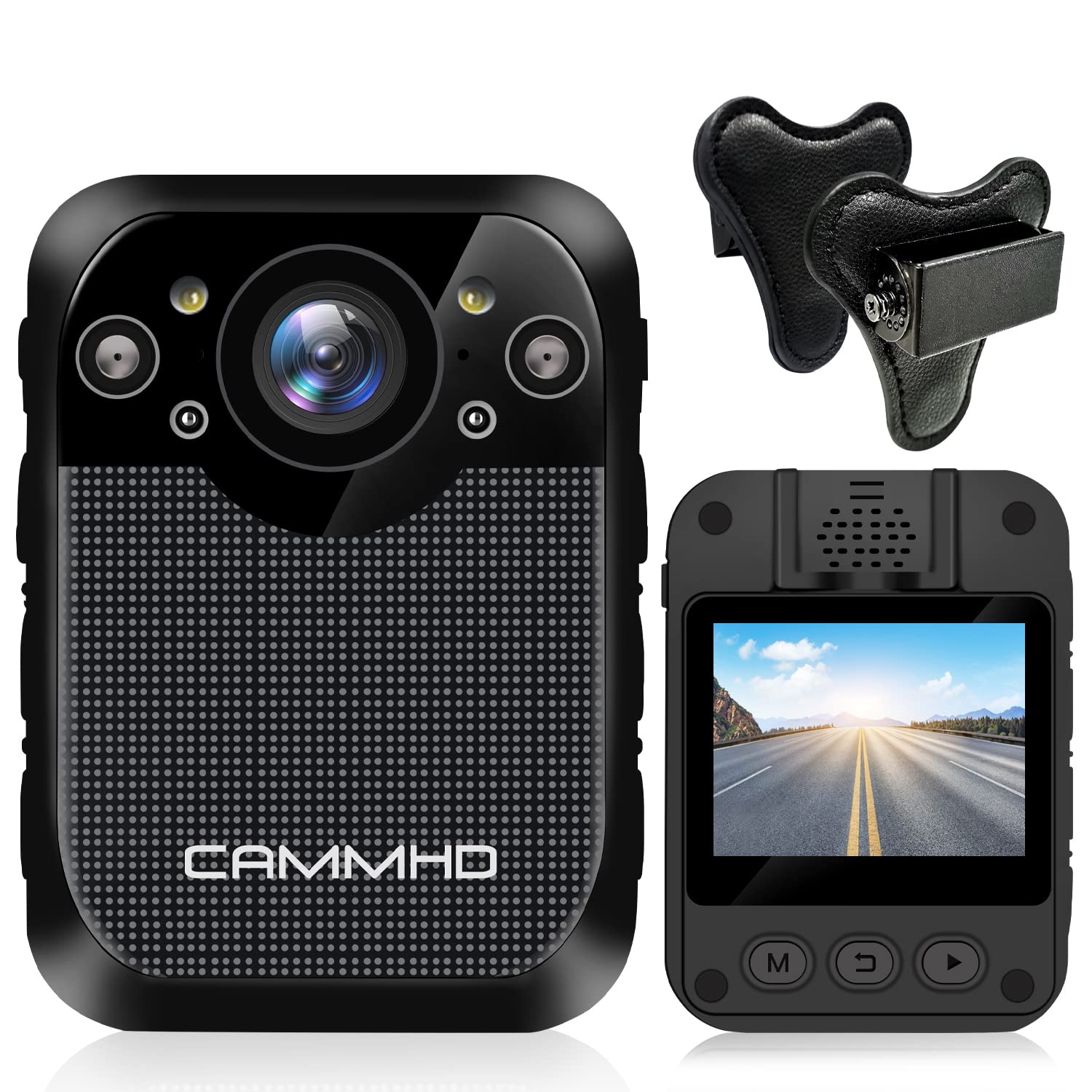
Image: Front view of the CAMMHD D1 Body Camera.
2. Package Contents
Verify that all items listed below are included in your package. If any items are missing or damaged, please contact customer support.
- CAMMHD D1 Body Camera
- Magnet Mount
- USB Charger
- USB Cable
- 360° Rotating Shoulder Clip
- User Manual

Image: All components included in the CAMMHD D1 Body Camera package.
3. Product Overview
Familiarize yourself with the camera's buttons and ports.

Image: Labeled diagram of the CAMMHD D1 Body Camera's external features and controls.
- Alarm Button
- Red and Blue Flash
- Video Button
- Night Vision Indicator
- LED Light
- USB Interface
- Photo Button
- Audio Button
- Power On/Off Button
4. Setup
4.1 Charging the Battery
Before first use, fully charge the camera's built-in 3000mAh lithium battery. Connect the camera to the USB charger using the provided USB cable. A full charge typically takes approximately 3 hours. The camera can record for up to 8 hours (at 1080p resolution) on a full charge.

Image: Visual representation of the camera's 3000mAh battery, 8-hour recording capability, and 3-hour charging time.
4.2 Mounting the Camera
The CAMMHD D1 Body Camera comes with a magnet mount and a 360° rotating shoulder clip for secure attachment.
Using the Magnet Mount:
The magnet mount allows for flexible positioning and angle adjustment.
Image: The adjustable 45-degree angle clips for the body camera mount.
Attaching with the Shoulder Clip:
Follow these steps to attach the camera using the shoulder clip:
- Separate the two parts of the clip.
- Insert the body camera into the 'outside' clip.
- Place the 'inside' clip under your clothing.
- Adjust the screw to set the desired recording angle.

Image: Step-by-step instructions for attaching the body camera with the shoulder clip.
5. Operating Instructions
5.1 Power On/Off
- Power On: Press and hold the Power On/Off button (9) until the screen illuminates.
- Power Off: Press and hold the Power On/Off button (9) until the device shuts down.
5.2 Video Recording
The camera supports 1296P HD video resolution with a 160° wide-angle lens.
- Start Recording: Press the Video button (3) once to begin video recording. A red indicator light will typically flash.
- Stop Recording: Press the Video button (3) again to stop recording.

Image: The camera's display indicating 1296P Full HD video recording capability.
5.3 Photo Capture
- Take Photo: Press the Photo button (7) once to capture a still image.
5.4 Audio Recording
- Start Audio Recording: Press the Audio button (8) once to begin audio-only recording.
- Stop Audio Recording: Press the Audio button (8) again to stop audio recording.
5.5 Night Vision
The camera features automatic infrared night vision with 4 infrared lamps, capable of capturing clear footage up to 10 meters (32 feet) in low-light conditions.
- Automatic Activation: Night vision activates automatically in low light.
- Manual Activation: You can also press the Night Vision button (4) to manually toggle infrared night vision.

Image: Demonstration of the camera's automatic infrared night vision capability.
5.6 Loop Recording
The camera includes 32GB of internal memory. When the memory capacity is reached, the camera automatically overwrites the oldest files to continue recording.

Image: Explanation of loop recording and the camera's 32GB internal storage.
5.7 Playback and File Transfer
- On-Device Playback: Use the camera's 2-inch display and navigation buttons to review recorded videos and photos.
- Computer Playback/Transfer: Connect the camera to a computer using the USB cable. The camera will appear as a removable disk, allowing you to transfer files.
6. Maintenance
- Cleaning: Use a soft, dry cloth to clean the camera body. For the lens, use a specialized lens cleaning cloth. Do not use harsh chemicals or abrasive materials.
- Storage: Store the camera in a cool, dry place away from direct sunlight and extreme temperatures.
- Battery Care: To prolong battery life, avoid fully discharging the battery frequently. Charge the camera regularly, even if not in use for extended periods.
7. Troubleshooting
| Problem | Possible Cause | Solution |
|---|---|---|
| Camera does not power on. | Low battery or faulty battery. | Charge the camera for at least 3 hours. If the issue persists, contact support. |
| Cannot record video/photo. | Memory full or recording error. | Ensure loop recording is enabled or transfer files to free up space. Restart the camera. |
| Poor video quality at night. | Night vision not active or insufficient ambient light for IR. | Ensure night vision is enabled (auto or manual). Ensure no obstructions block the IR lamps. |
| Camera is unresponsive. | Software glitch. | Press and hold the Power On/Off button for 10-15 seconds to force a restart. |
8. Specifications
| Feature | Detail |
|---|---|
| Model | D1 |
| Video Capture Resolution | 1296p, 1080p, 720p |
| Photo Pixel | 34 Million Pixels |
| Wide Angle Lens | 160° |
| Battery Capacity | 3000mAh Lithium Battery |
| Recording Time | Up to 8 hours (1080p) |
| Charging Time | Approx. 3 hours |
| Internal Memory | 32GB (Built-in) |
| Night Vision Range | Up to 10m (32ft) |
| Screen Size | 2 Inches |
| Water Resistance Level | Waterproof |
| Special Features | Motion Detection, Night Vision, Portable |
| Connectivity Technology | Wireless |
| Image Stabilization | Dynamic |
| Focus Type | Manual Focus |
9. Warranty and Support
For warranty information or technical support, please refer to the contact details provided with your purchase documentation or visit the official CAMMHD website. Please retain your proof of purchase for warranty claims.


